TrustZone Deployment
REVISION HISTORY
| Revision No. | Description |
Date |
|---|---|---|
| 1.0 | 05/22/2023 |
1. SGS TRUSTZONE COMPILATION AND DEPLOYMENT
1.1. Burning OTP_TZ to start up TrustZone
Whether to enable TrustZone is determined by the TZ bit in OTP. OTP_TZ is 0 by default, and burning OTP_TZ to 1 can enable the TrustZone function of the chip.
A uboot command is provided to burn OTP_TZ. After this command is set, it will take effect at next startup.
WRITE COMMAND:
otpctrl -w 0x40 0x0 0xffffffff
Sgs# otpctrl -w 0x40 0x0 0xffffffff
[OTP OPTEE] operation = 1, command = 40000000, data = ffffffff
READ COMMAND:
otpctrl -r 0x40
Sgs# otpctrl -r 0x40
[OTP OPTEE] operation = 2, command = 40000000, data = 0
Results:
0x000:: 0xff 0xff 0xff 0xff
1.2. Compiling System Image with TrustZone Function
Compilation:
-
cd ${Alkaid}/project/
-
export ARCH=arm
-
export CROSS_COMPILE=arm-linux-gnueabihf-
-
export PATH=/tools/toolchain/gcc-11.1.0-20210608-sigmastar-glibc-x86_64_arm-linux-gnueabihf/bin:$PATH
-
make ipc_iford.spinand.glibc-11.1.0-squashfs.ssc029a.512.bga12_ddr4_optee_defconfig
-
make image -j32
Generated File:
- cd ${Alkaid}/project/image/output/images
After burning the system image, you can see the message on driver initialization and handshake with OP-TEE when booting Linux system:
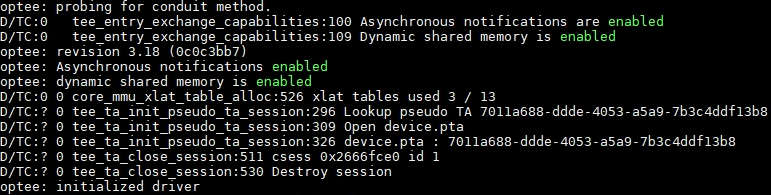
Figure 1: Boot Log
1.3. Compiling and Running OP-TEE Client and OP-TEE Example
1.3.1 OP-TEE Client
The optee_client consists of two main parts:
-
User-space library: libteec.so.1 (TEE client APIs used to provide GlobalPlatform)
-
User-space daemon: tee-supplicant (daemon used to provide OP-TEE service)
Compilation:
-
cd optee_client/
-
vim config.mk modification: Modify CFG_TEE_FS_PARENT_PATH, CFG_TEE_CLIENT_LOAD_PATH and CFG_TEE_PLUGIN_LOAD_PATH to match the path specified by the user.
CFG_TEE_FS_PARENT_PATH: The file system path of TEE in Linux, the default value is /customer/tee/fs.
CFG_TEE_CLIENT_LOAD_PATH: The path of the load library in Linux, the default value is /customer/tee/lib. This path must contain an optee_armtz directory, and TA will be placed in the optee_armtz directory.
CFG_TEE_PLUGIN_LOAD_PATH: The path to place the tee-supplicant user plugin in Linux, the default value is /customer/tee/lib/tee-supplicant/plugins.
-
export ARCH=arm
-
export CROSS_COMPILE=arm-linux-gnueabihf-
-
export PATH=/tools/toolchain/gcc-11.1.0-20210608-sigmastar-glibc-x86_64_arm-linux-gnueabihf/bin:$PATH
-
make
Generated File:
-
out/libteec/libteec.so.1 (which needs to be placed in the path of LD_LIBRARY_PATH on the development board)
-
out/tee-supplicant/tee-supplicant (which needs to be placed in the arbitrary path of the development board, such as /customer/tee)
1.3.2 OP-TEE Example
The optee_example contains a number of CA+TA examples such as hello_world, acipher, aes, rsa, resure_storage and self_hash to help developers provide reference routines. Set forth below is an example of compiling and running hello_world TA and CA.
Compiling Hello World CA:
-
cd optee_examples
-
cd hello_world/host
-
make TEEC_EXPORT=
<optee_client>/out/export/usr --no-builtin-variables<optee_client>is the path of optee_client source code. Compiling optee_example will require the optee_client source code.
Compiling Hello World TA:
-
cd optee_examples
-
cd hello_world/ta
-
make PLATFORM=iford TA_DEV_KIT_DIR=
<optee_os>/out/iford/export-ta_arm32<optee_os >is teh path of optee_os source code. Compiling optee_example will require the optee_os source code.
Generated File:
-
CA: hello_world/host/optee_examples_hello_world
-
TA: hollo_world/ta/8aaaf200-2450-11e4-abe2-0002a5d5c51b.ta (which needs to be placed in the $(CFG_TEE_CLIENT_LOAD_PATH)/optee_armtz directory on the development board)
8aaaf200-2450-11e4-abe2-0002a5d5c51b is the UUID used by hello_world. The TA file name cannot be changed arbitrarily, otherwise it will cause the tee-supplicant to be unable to load TA to TEE when the CA is running.
To execute tee_supplicant as a background task:
-
cd /customer/tee
-
export LD_LIBRARY_PATH=/customer/tee/lib:$LD_LIBRARY_PATH (provided that CFG_TEE_CLIENT_LOAD_PATH specifies the Linux path to store libteec.so.1 as /customer/tee/lib)
-
./tee-supplicant &
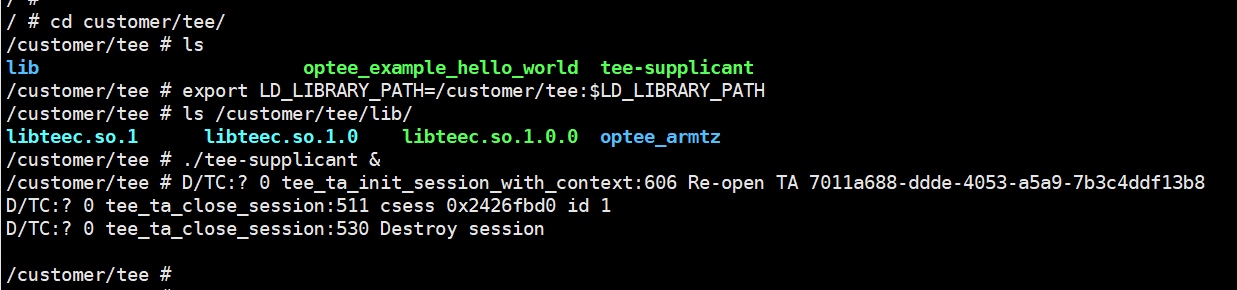
Figure 2: Executing tee_supplicant
The result of Hello World execution is as follows:
- ./optee_example_hello_world
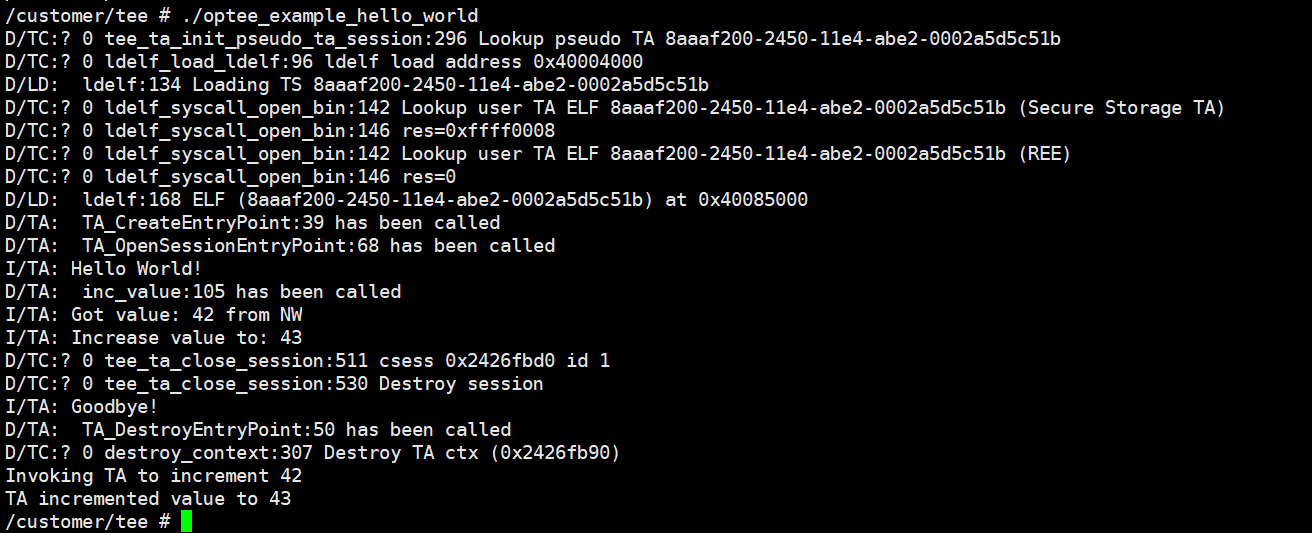
Figure 3: Executing CA
Linux obtains the TA image (8aaaf200-2450-11e4-abe2-0002a5d5c51b.ta) from the file system through tee_supplicant, passes it to op-tee and then runs TA in op-tee.
The effect achieved by the hello_world example: CA sends a hello command to TA, TA receives the integer plus 1 and sends it back to CA.
2. Development Guide
2.1. UUID
CA will use UUID to identify a trusted application (TA).
A reliable 128-bit UUID can be obtained by visiting the https://www.uuidgenerator.net/version4 website.
2.2. Sample Program in optee_examples
A complete function call (such as data encryption and decryption, secure memory access, etc.) is generally executed by the CA, and the TA implements specific functions and returns data to the CA. The CA-side interfaces specified in GP (global platform) mainly include five interfaces, as follows:
-
TEEC_InitializeContext(): initializes TEE context, completes open tee driver and establishes the context with TEE.
-
TEEC_OpenSession(): establishes a session window between CA and TA.
-
TEEC_InvokeCommand(): sends an execution request to TA to perform specific operations.
-
TEEC_CloseSession(): closes a session window between CA and TA.
-
TEEC_FinalizeContext(): clears the created context.
A complete CA call process involves a call to perform initContext, Opensession, InvokeCommand, close session, and FinalizeContext operations.
For more details on the TEEC API interfaces, please refer to the official document "TEE_Client_API_Specification.pdf" available from https://globalplatform.org/specs-library/tee-client-api-specification/.
For the five TEE client APIs called by the CA, there is also a corresponding TA interface at the TA side. The TA is composed of the corresponding TA interface.
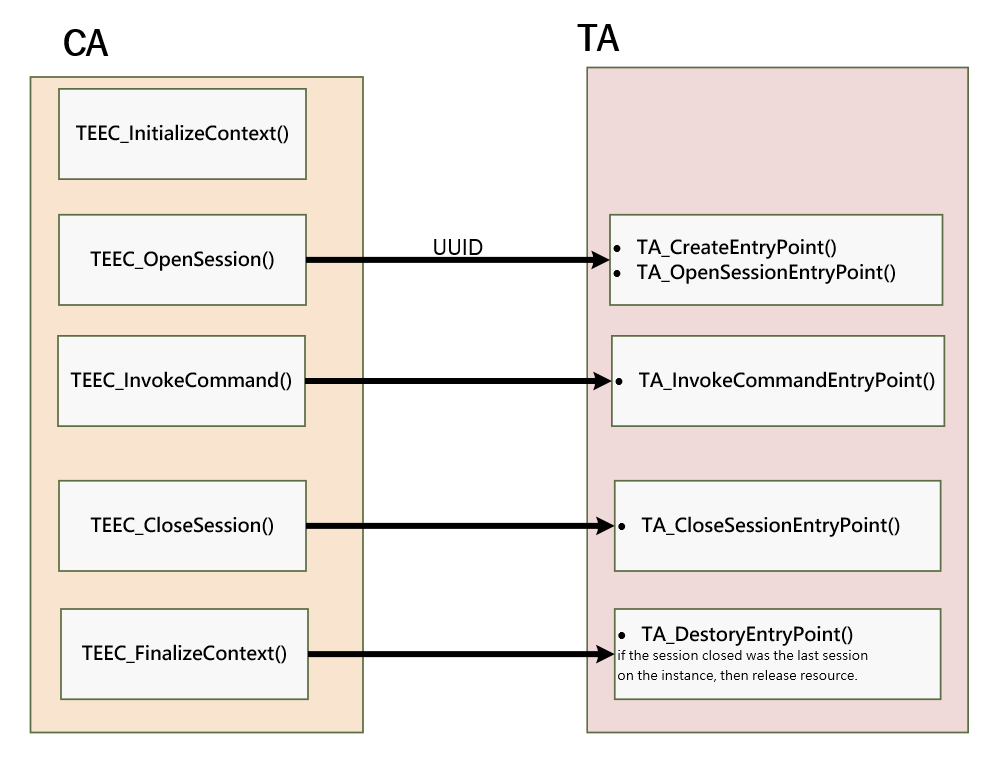
Figure 4: Corresponding Call Relationship between TEEC API and TA Interface
For more details on the TA interface and GlobalPlatform TEE internal API, please refer to the official document "GPT_TEE_Internal_Core_API_Specification_PublicReview.pdf" available from https://globalplatform.org/specs-library/tee-client-api-specification/.
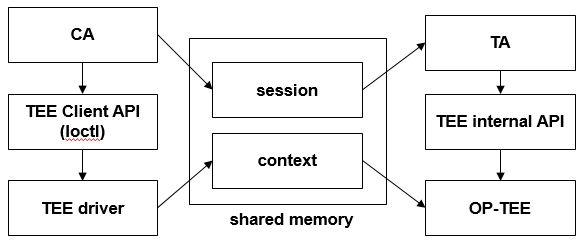
Figure 5: CA/TA Concept
The optee_examples provides OP-TEE sample programs covering CA and TA. For example, in the Hello World example, CA brings in a value of 42, TA executes the function of TA_HELLO_WORLD_CMD_INC_VALUE, adds 1 to the value, and then returns the execution result to CA.
Through the optee_examples, you can learn how to construct the CA and TA.
2.3. Compiling optee_os
The project source code package provided by SGS contains the optee os binary image. If you need to develop the optee_os by yourselves, the compilation process is as follows:
Compilation:
-
cd optee_os/
-
export ARCH=arm
-
export CROSS_COMPILE=arm-linux-gnueabihf-
-
export PATH=/tools/toolchain/gcc-11.1.0-20210608-sigmastar-glibc-x86_64_arm-linux-gnueabihf/bin:$PATH
-
make PLATFORM=iford clean
-
make PLATFORM=iford -j8
Generated File:
-
cp optee_os/out/iford/core/tee.bin ${alkaid}/project/board/iford/boot/optee/tee.bin
-
recompile alkaid
The key directory of optee_os is described as follows:

Figure 6: Directory Structure of optee-os
For more details on optee_os development, please visit https://optee.readthedocs.io/en/latest/building/gits/optee_os.html.
2.4. Compiling Boot and Kernel
The boot and kernel source code packages provided by SGS include defconfig that enables OP-TEE configuration by default.
When compiling the boot and kernel, developers should open the OP-TEE related config option in order to run the TEE system and TrustZone function normally.
2.4.1 Configuring Boot Menuconfig
Device Drivers > Trusted Execution Environment Support:

Figure 7: Config UBoot OPTEE 1
Device Drivers > TEE Drivers > OP-TEE:
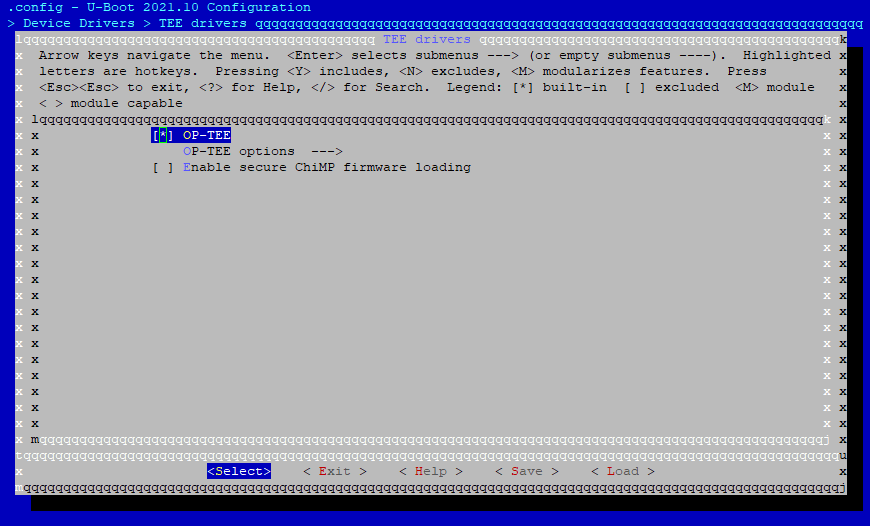
Figure 8: Config UBoot OPTEE 2
2.4.2 Configuring Kernel Menugconfig
Device Drivers > Trusted Execution Environment Support:
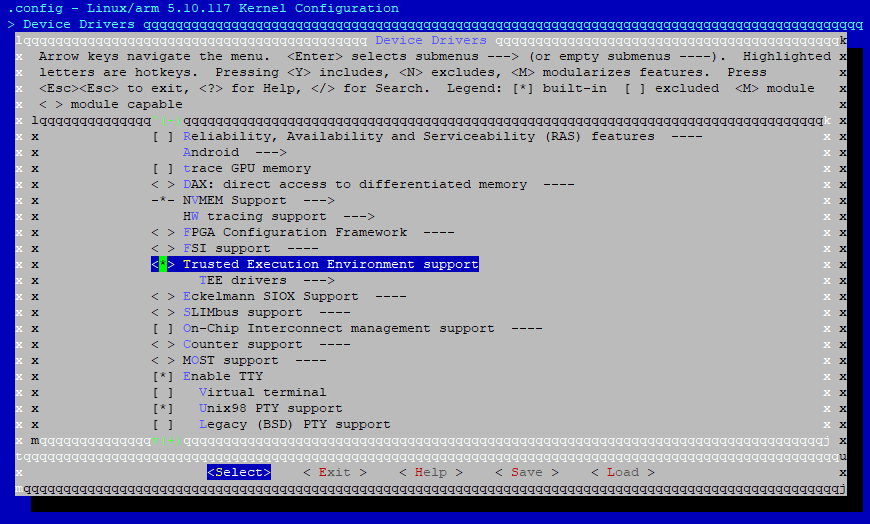
Figure 9: Config Kernel OPTEE 1
Device Drivers > TEE Drivers > OP-TEE:
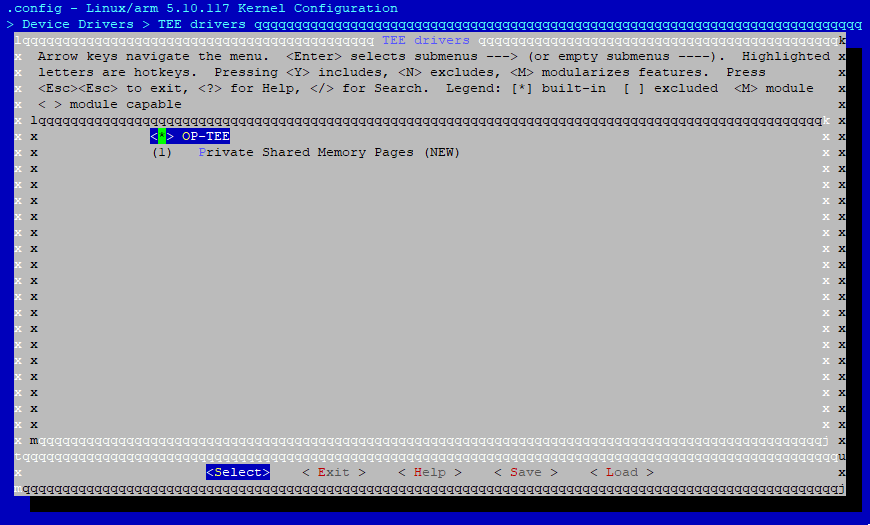
Figure 10: Config Kernel OPTEE 2