Memory Layout
1. DualOS
1.1 LH mode
This section mainly introduces the memory layout of the LH mode image loading stage and execution stage. This part involves the knowledge of the boot flow in the image loading stage. You need to understand the LH mode boot flow first, which can be referred to Boot Flow.
1.1.1 Memory layout composition
The memory layout of DualOS can be divided into several main areas:
- Linux: The space required to run Linux is managed by Linux. This area needs to include the complete ramdisk area.
- Linux ramdisk: This area needs to be completely contained within the Linux area.
- MMA: The buffer required to run the image pipeline. This area is managed by the mma_heap module.
- RTOS: The space required to run RTOS. This area is managed by RTOS.
- RTOS Timestamp: This area needs to be completely contained in the RTOS area.
Take ipc-rtos_iford.nor.uclibc-9.1.0-ramdisk.ssz029c.128.qfn128_ddr3_demo_aov_defconfig as an example:
Figure 1-1: Memory layout diagram of image loading phase and execution phase

1.1.2 Introduction to each stage
Image loading phase:
| Name | Brief Description | Load Address | Adjustment Methods during Compile Phase |
|---|---|---|---|
| Linux image | Linux image | 0x20008000 | Fixed at 0x20008000 |
| IPL CUST share memory | IPL/IPL CUST shared memory, this area needs to be completely included in the Linux area | 0x20800000-0x216fff00 | IPL defconfig (shared with IPL, modification is not allowed): CONFIG_SHMEM_DRAM_BASE views 'load addr' CONFIG_SHMEM_DRAM_LIMIT views 'size' |
| Linux Ramdisk | Linux initial ramdisk package | 0x217fffc0-0x21829a92 | Fixed value of INITRAMFSLOADADDR in image/script.mk |
| IPL CUST-ROM | IPL CUST code, read-only variables, non-zero global variables, this area needs to be completely included in the Linux area | 0x21f00000-0x21f06cd0 | IPL defconfig (modification is not recommended): CONFIG_IPL_CUST_ROM_BASE controls 'load addr' CONFIG_IPL_CUST_ROM_LIMIT controls 'size' |
| IPL CUST-RAM | IPL CUST initializes global variables and stack to 0. This area needs to be completely included in the Linux area | 0x21f20000-0x21f30c40 | IPL defconfig (modification is not recommended): CONFIG_IPL_CUST_RAM_BASE controls 'load addr' |
| IPL CUST DRAM heap | IPL CUST malloc() memory pool, this area needs to be completely included in the Linux area | 0x21f40000-0x22000000 | IPL defconfig (not recommended to modify): CONFIG_SHMEM_DRAM_BASE controls 'load addr' CONFIG_SHMEM_DRAM_LIMIT controls 'size' |
| u-boot image | u-boot image, the main function is to load other images | 0x23dfffc0-0x23e31052 | uboot defconfig: CONFIG_SYS_TEXT_BASE controls 'load addr' |
| RTOS image | RTOS image | 0x27007fc0-0x27152632 | Alkaid defconfig: RTOS addr = 0x20000000 + CONFIG_DRAM_SIZE - CONFIG_RTOS_MEM_SIZE + 0x8000 |
Note:
MMA memory will be allocated after RTOS starts, so each area cannot overlap with the MMA area during the loading phase.
Execution phase:
Without recompiling the image, you can dynamically adjust Linux/Linux ramdisk/MMA/RTOS related parameters through uboot env. After saving with saveenv, it will take effect at the next boot.
For pure Linux, the effective value is bootargs_linux_only; for dualOS, the effective values are bootargs and bootargs_rtos.
| Name | Description | Start Address | Size | How to adjust during compilation | How to adjust during runtime |
|---|---|---|---|---|---|
| Linux | Space required to run linux | Fixed at 0x20000000 | Adjustable | Alkaid defconfig: CONFIG_LX_MEM_SIZE controls 'size' |
bootargs substring LX_MEM controls 'size' |
| Linux Ramdisk | This area needs to be completely included in the Linux area | Fixed at 0x21800000 | Not adjustable (determined by the compilation result) | Fixed value image/script.mk's INITRAMFSLOADADDR | bootargs substring initrd controls 'start addr' |
| MMA | Buffer required to run image pipeline | Adjustable | Adjustable | addr = linux Start addr + CONFIG_LX_MEM_SIZE size = CONFIG_DRAM_SIZE - CONFIG_LX_MEM_SIZE - CONFIG_RTOS_MEM_SIZE |
Substring of bootargs/bootargs_rtos mma_base controls 'start addr' mma_size controls 'size' |
| RTOS | Space required to run RTOS | Adjustable | Adjustable | Alkaid defconfig: CONFIG_RTOS_MEM_SIZE controls 'size' addr = MMA addr + MMA size RTOS defconfig: CONFIG_RTOS_MEM_START_VA/CONFIG_RTOS_MEM_START_PA controls 'start addr' CONFIG_RTOS_MEMORY_SIZE controls 'size' |
Substring of bootargs_rtos rtos_size controls 'size' rtos_base controls 'start addr' |
| RTOS Timestamp | This area needs to be completely contained in the RTOS area | Adjustable | Adjustable | Alkaid defconfig: CONFIG_RTOS_TIMESTAMP_MEM_SIZE controls 'size' addr = RTOS ramdisk addr - CONFIG_RTOS_TIMESTAMP_MEM_SIZE - 0x1000 |
Substring of bootargs_rtos rtosts_addr controls 'start addr' rtosts_size controls 'size' |
Note:
Linux addr and memory size need to be aligned 1MB
RTOS addr and memory size need to be aligned 1MB
rtos ramdisk and rtos timestamp need to be aligned 4K
128M DRAM IPL CUST is limited to 32M, and the size of LX_MEM cannot be less than 32M
If sys_memmap.c is not source code, modifying RTOS defconfig will not take effect
Note:
There is no load rtos ramdisk action in LH mode, CONFIG_RTOS_RAMDISK_MEM_SIZE in Alkaid defconfig is invalid, and the substrings rtosrd_addr and rtosrd_size of bootargs_rtos are invalid fields.
1.1.3 Memory layout adjustment
Adjust the size of each runtime module in alkaid defconfig


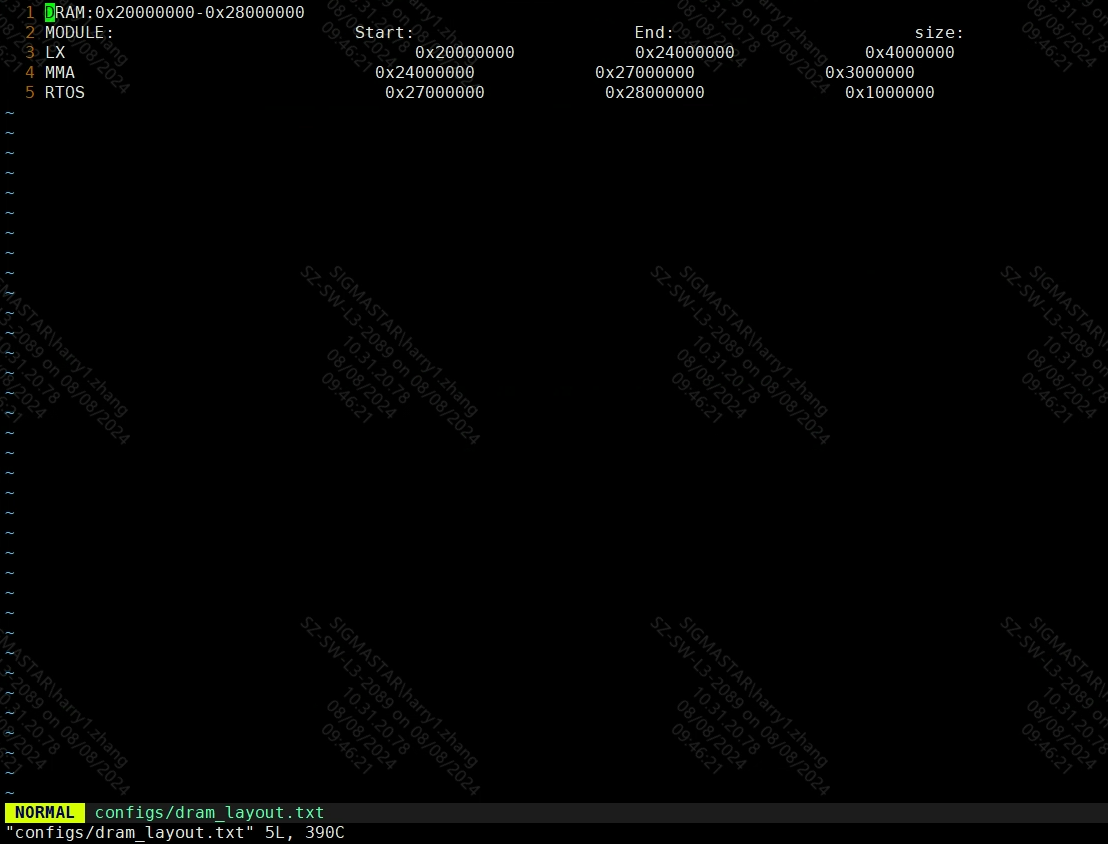
dram_layout.txt will be generated in the project\configs directory
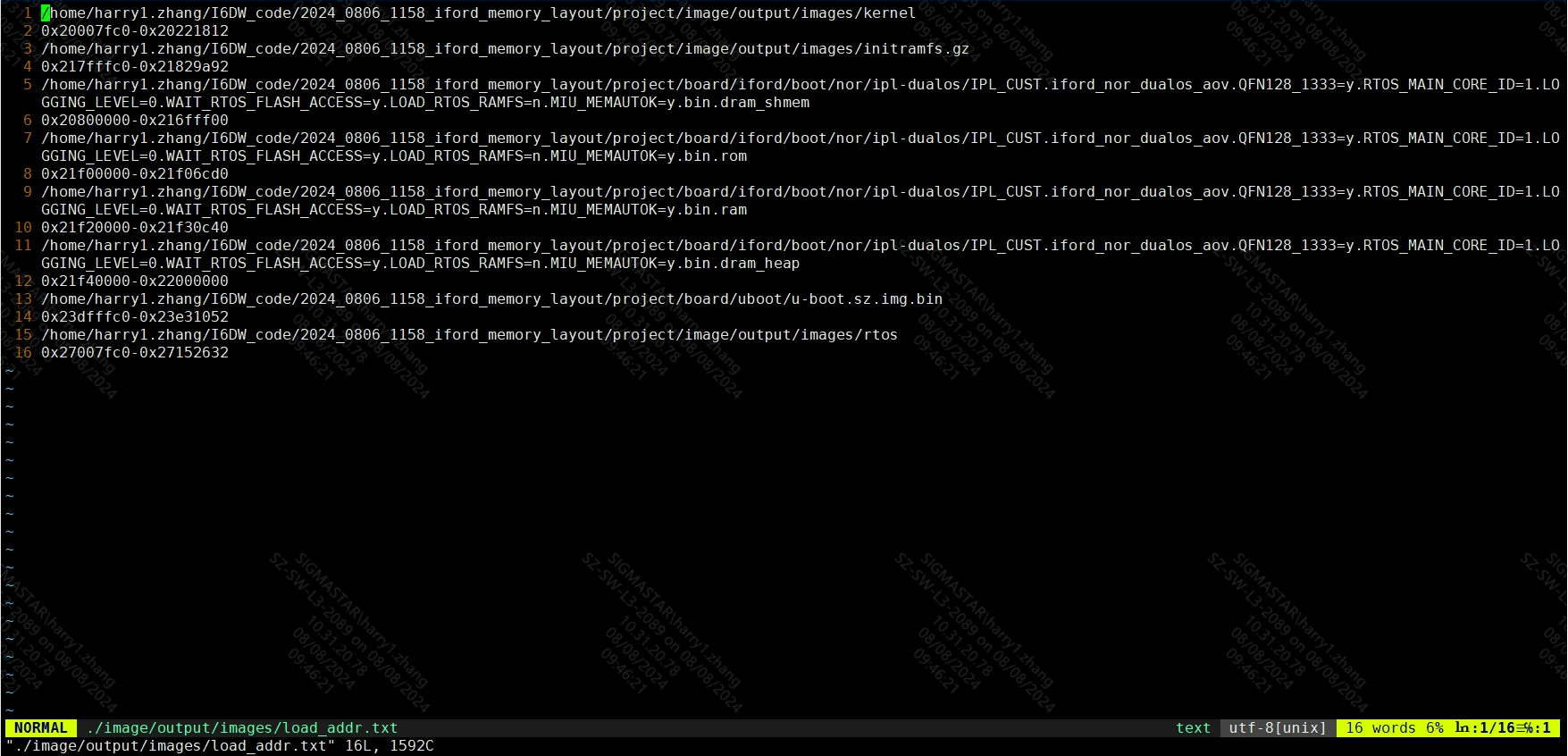
After make image, it will check whether the load addr of each runtime module overlaps. Generate load_addr.txt in the project\image\output\images directory
Layout must comply with the following principles
- Must not exceed physical DRAM size.
- Areas cannot overlap during loading.
- During the runtime, the linux/rtos ramdisk area must be completely within the linux/rtos area. If the packaged content is too large and the linux/rtos area is not large enough, the ramdisk parsing may fail. The rule of thumb is that the ramdisk should not exceed ⅓ of the linux/rtos area.
- During execution, the rtos timestamp area must be completely within the rtos area.
1.1.4 Debug
How to debug abnormal startup after adjusting layout
If the original layout can boot normally, but the boot is abnormal after the layout is adjusted, the following debug SOP can be adopted:
-
Sort out the current planning scope of IPL_Cust/u-Boot/Linux/Ramdisk/MMA/RTOS to ensure compliance with the above principles.
-
Confirm at which stage the boot failure occurred, for example:
- IPL_Cust can be started but RTOS fails to start → Check RTOS locale settings.
- Can boot RTOS but Linux fails to boot → Check Linux and Ramdisk locale settings.
- Can boot Linux but fails to parse ramdisk → Check whether the ramdisk area and size are reasonable.
How to view memory at runtime
-
The blue part in Figure 1-1 is allocated to Linux and managed by Linux. The usage can be checked with Linux general commands, such as:
cat /proc/meminfo cat /proc/vmallocinfo -
The yellow part in Figure 1-1 is allocated to MMA and managed by sys; check the usage:
cat /proc/mi_modules/mi_sys/mi_sys0 cat /proc/mi_modules/mi_sys_mma/mma_heap_name0 -
The green part in Figure 1-1 is mainly allocated to RTOS and managed by RTOS itself.
RTOS mainly uses heap and pool to manage memory. The viewing method is as follows:
First, switch the uart log output mode from buffer mode to direct mode to prevent printing too much memory information, which may cause messages to be dropped. Enter the command:
echo cli log_mode_sw > /proc/dualos/rtosThen check the corresponding memoryinfo and enter the command:
echo cli memstat ? > /proc/dualos/rtosThe displayed result is shown in Figure 1-2:
Figure 1-2 memstat chart

To print relevant information as needed, for example, to print memory usage information, enter the command:
echo cli memstat --usage > /proc/dualos/rtosThe displayed results are shown in Figure 1-3:
Figure 1-3 memstat --usage graph

Taking QFN128 DDR3 128M as an example, the total RTOS partition is 16M = Total Heap size + Code segment size (can be confirmed by the uncompressed rtos bin file size)