MI AQSERVER API
REVISION HISTORY
| Revision No. | Description |
Date |
|---|---|---|
| 1.0 | 10/24/2024 |
1. Overview
1.1. Module Description
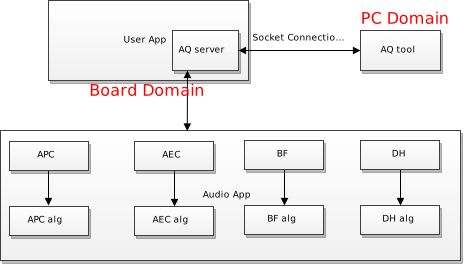
AQ SERVER (Audio Quality tuning Server) is an audio quality tuning service used to complete data communication between the tuning tool (AudioTuning Tool) and the development board, including online reading and setting of Audio module parameters, and obtaining Audio module input and output data.
PS: By default, it is for internal use. If necessary, you can contact FAE to obtain the toolkit
1.2. Basic Structure
-
APC
APC (Audio Process Chain) is an algorithm combination that includes noise reduction, equalizer, and automatic gain control.
-
AGC
AGC (Automatic Gain Control) is used to control the digital output gain.
-
EQ
EQ (Equalizer) is used to increase or decrease specific frequency bands.
-
ANR
ANR (Acoustic Noise Reduction)is used to remove persistent, fixed-frequency noise in the environment.
-
AEC
AEC (Acoustic Echo Cancellation) is used to suppress remote echo.
-
BF
BF (Beamforming) is a directional signal processing technology used for sensor array transmission or reception. It uses spatial filtering and sensor arrays to enhance signals at specific angles and suppress signals in other directions.
-
DH DH (Dehowling) is a function to suppress howling. Howling is common in sound reinforcement systems. When microphones and speakers are in the same venue, the sound is amplified by the speakers and then picked up by the microphones, forming a sound feedback loop.
1.3. Basic Structure
MI_AQSERVER supports the following functions:
- Support AQ and Audio parameter settings.
- Support dump audio data.
1.4. Application scenarios
AQSERVER can be applied to the following scenarios:
-
Pure linux scenario
In the linux environment, NetWork and IQTool connection debugging are supported.
-
Dualos scenario
In the dualos environment, NetWork and IQTool connection debugging are supported.
1.5. Working Principle
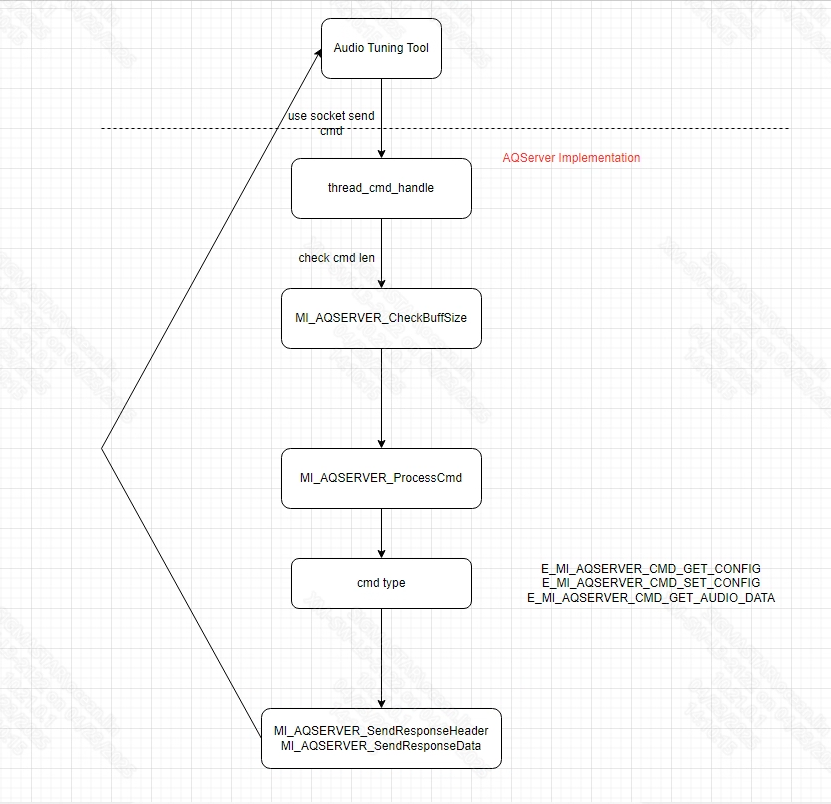
AQSERVER has two calling methods:
-
Network interaction process:
1.6. Development process
-
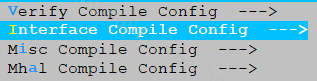
Enter the alkaid project root directory and make menuconfig.
-
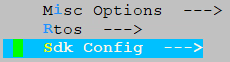
Press Enter to enter the Sdk Config sub-option
-
Press Enter to enter the Interface Compile Config sub-option

-
Press the spacebar to select the aqserver sub-module and recompile the project
After the compilation is completed, libmi_aqserver.a will be generated under sdk/interface/src/aqserver
1.7. Example Introduction
Take audio_alg_APC_demo as an example, there are two ways
1.7.1 Run with the ready-made demo
-
Step 1: The demo is stored in the sdk/verify/mi_demo/source/audio/audio_alg_APC_demo, enter the path.
-
Step 2: Run compile command: make source/audio/audio_alg_APC_demo.
-
Step 3: After successful compilation, go to the sdk/verify/mi_demo/out directory to get the demo file.
-
Step 4: Run demo
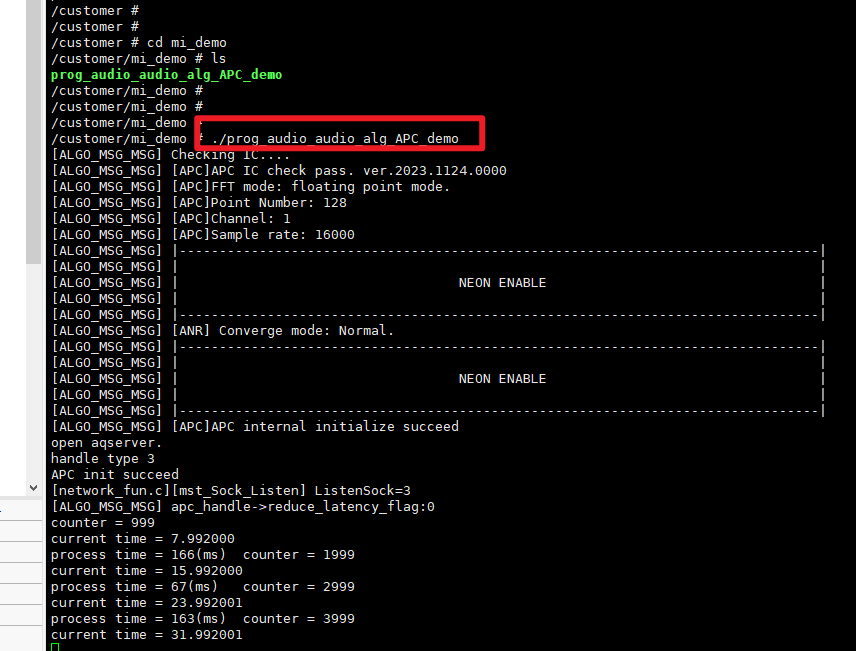
1.7.2 Integrate into demo
-
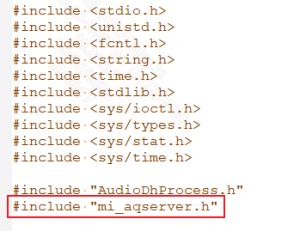
Step 1: Import mi_aqserver.h file
-
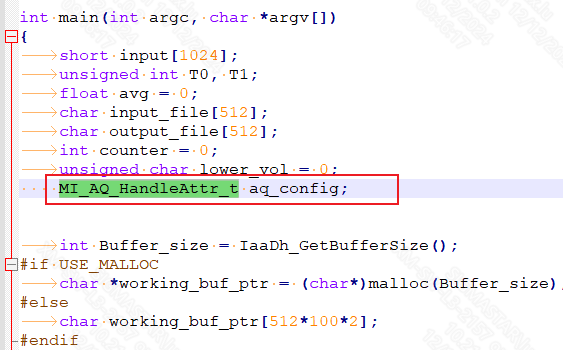
Step 2: Set the MI_AQ_HandleAttr_t variable
-
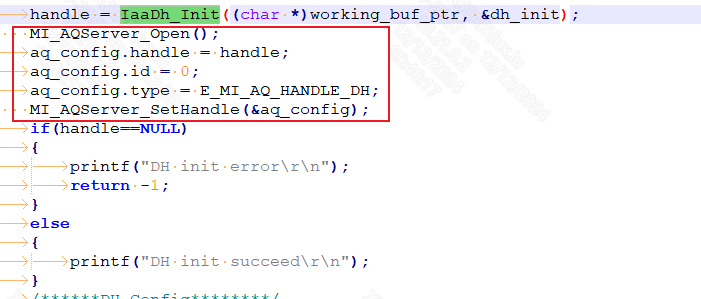
Step 3: Start aqserver and set handle
-
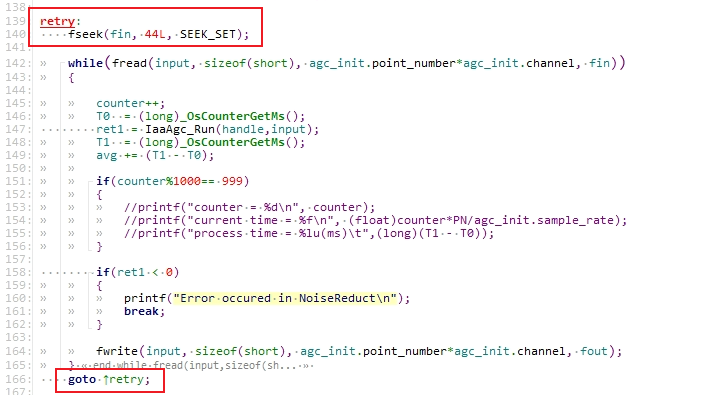
Step 4: Modify the demo to run repeatedly
-
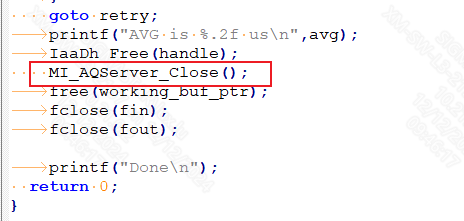
Step 5: Call MI_AQServer_Close() when exiting the demo
-
Step 6: Modify the makefile file and link the aqserver related libraries
LIBS += -lm -lmi_aqserver -lAGC_LINUX -lANR_LINUX -lEQ_LINUX -lDH_LINUX -lBF_2MIC_LINUX -lAEC_LINUX
2. API LIST
This function module provides the following APIs:
| API Name | Function |
|---|---|
| MI_AQSERVER_Open | Open the AQ server |
| MI_AQSERVER_Close | Close the AQ server |
| MI_AQSERVER_SetDataPath | Set the AQ server data storage path |
| MI_AQServer_SetHandle | Set the module type supported by AQ server |
2.1. MI_AQSERVER_Open
-
Function
Call this interface to open the AQ server.
-
Syntax
MI_S32 MI_AQSERVER_Open();
-
Return Value
-
0, AQ server open successfully.
-
Others, failed to open the AQ server.
-
-
Dependency
-
Header file: mi_aqserver.h
-
Library file: libmi_aqserver.a
-
-
Note
Currently, only one AQ server can be created. After it is created, you can use the AQ Tool to connect and debug
-
Example
/* open AQSERVER*/ ret = MI_AQServer_Open(); if (0 != ret) { Printf("open aqserver error:%x\n", ret); return ret; } -
Related APIs
2.2. MI_AQSERVER_Close
-
Function
Call this interface to close the AQ server.
-
Syntax
MI_ S32 MI_AQSERVER_Close();
-
Return Value
-
0, AQ server is close successfully.
-
Others, failed to close the AQ server.
-
-
Dependency
-
Header file: mi_aqserver.h
-
Library file: libmi_aqserver.a
-
-
Note
Calling MI_AQSERVER_Open and MI_AQSERVER_Close needs to correspond.
-
Example
/* close AQSERVER*/ ret = MI_AQSERVER_Close(); if (0 != ret) { Printf("close aqserver error:%x\n", ret); return ret; } -
Related APIs
2.3. MI_AQSERVER_SetDataPath
-
Function
Set the data storage path of the AQ server.
-
Syntax
MI_S32 MI_AQSERVER_SetDataPath(char* path);
-
Form parameter
Parameter Name Description Input/Output path Path of IQ server data, ending with \0. Input -
Return Value
-
0, Success.
-
Others, setup failed.
-
-
Dependency
-
Header file: mi_aqserver.h
-
Library file: libmi_aqserver.a
-
-
Note
-
This interface can be called before MI_AQSERVER_Open
-
Before calling, please confirm whether the path is accessible.
-
-
Example
/*declaration*/ char *data_path = "/customer/iqconfig/"; /* set AQSERVER data path*/ ret = MI_AQSERVER_SetDataPath(data_path); if (0 != ret) { Printf("set aqserver data path error:%x\n", ret); return ret; } -
Related APIs
None.
2.4. MI_AQServer_SetHandle
-
Function
Set the Audio module handle to allow users to set module type support by executing different audio demos APC/ANR/EQ/AGC/DH/AEC/BF.
-
Syntax
MI_S32 MI_AQServer_SetHandle(MI_AQ_HandleAttr_t *pHandleInfo);
-
Form parameter
Parameter Name Description Input/Output pHandleInfo supports module structure data input Input -
Return Value
-
0, Success.
-
Others, setup failed.
-
-
Dependency
-
Header file:mi_aqserver.h
-
Library file:libmi_aqserver.a
-
-
Note
- This interface can be called after MI_AQSERVER_Open
-
Example
/*declaration*/ AudioApcBufferConfig apc_switch; apc_switch.anr_enable = 1; apc_switch.eq_enable = 1; apc_switch.dr_enable = 0; apc_switch.vad_enable = 0; apc_switch.agc_enable = 1; int Buffer_size = IaaApc_GetBufferSize(&apc_switch); char working_buf_ptr[512*100*2]; FILE * fin, * fout; int ret1; AudioProcessInit apc_init; APC_HANDLE handle; int PN=128; apc_init.point_number = PN; apc_init.channel = 1; apc_init.sample_rate = IAA_APC_SAMPLE_RATE_16000; handle = IaaApc_Init((char *)working_buf_ptr, &apc_init, &apc_switch); MI_AQServer_Open(); aq_config.handle = handle; aq_config.id = 0; aq_config.type = E_MI_AQ_HANDLE_APC; /* set IQSERVER custom function*/ ret = MI_AQServer_SetHandle(&aq_config); if (0 != ret) { Printf("set aqserver handle type error:%x\n", ret); return ret; } -
Related APIs
None.
3. AQServer Data Type
| Data Type | Description |
|---|---|
| MI_AQ_HANDLE_TYPE_e | Define the supported Audio module handle types |
| MI_AQ_HandleAttr_t | Define the supported handle type structures |
3.1. MI_AQ_HANDLE_TYPE_e
-
Description
Define supported Audio module handle types
-
Definition
typedef enum { E_MI_AQ_HANDLE_ANR = 0, E_MI_AQ_HANDLE_AGC, E_MI_AQ_HANDLE_EQ, E_MI_AQ_HANDLE_APC, E_MI_AQ_HANDLE_AEC, E_MI_AQ_HANDLE_DH, E_MI_AQ_HANDLE_BF, }MI_AQ_HANDLE_TYPE_e; -
Member
Name Description E_MI_AQ_HANDLE_ANR ANR module handle type E_MI_AQ_HANDLE_AGC AGC module handle type E_MI_AQ_HANDLE_EQ EQ module handle type E_MI_AQ_HANDLE_APC APC module handle type E_MI_AQ_HANDLE_AEC AEC module handle type E_MI_AQ_HANDLE_DH DH module handle type E_MI_AQ_HANDLE_BF BF module handle type -
Related Data Type and Interface
None.
3.2. MI_AQ_HandleAttr_t
-
Description
Defines the supported handle type structures.
-
Definition
typedef struct MI_AQ_HandleAttr_s { void *handle; MI_U32 id; MI_AQ_HANDLE_TYPE_e type; } MI_AQ_HandleAttr_t; -
Member
Name Description handle Handle pointer corresponding to the handle type id Number corresponding to the number of handle type pages created type The handle type's ordinal number in the MI_AQ_HANDLE_TYPE_e enumeration -
Related Data Type and Interface
None.