MI RGN DEBUG SOP
REVISION HISTORY
| Revision No. | Description |
Date |
|---|---|---|
| 1.00 | 12/08/2023 | |
| 1.01 | 08/29/2024 |
1. Glossary
-
MI_RGN proc information
Method for MI_RGN to obtain device information, command:
cat /proc/mi_modules/mi_rgn/mi_rgn0. Refer to MI_RGN API doc----"5. PROCFS Introduction" for the meaning of each field in proc information. -
MI_RGN echo command
Commands for MI_RGN debugging, can modify device status (e.g., disable display of a HwGwin) or obtain non-text information in the device (e.g., store OSD canvas data to a specified file). For specific command usage, refer to MI_RGN API doc----"5. PROCFS Introduction".
-
GOP
Hardware name implementing OSD functionality.
-
HwGwin
Hardware unit for displaying OSD images. A GOP hardware contains at least one HwGwin. The number of HwGwins in GOP represents the maximum number of OSDs that GOP can display directly. When the number of OSDs on a channel exceeds the number of HwGwins owned by that channel's GOP hardware, the displayed OSDs need to be stitched via OSD image stitching before they can be displayed normally.
-
front buffer
For OSD only, the buffer displayed by HwGwin, with quantity not exceeding the number of HwGwins. The source of front buffer can be front buffer or stitched buffer.
-
back buffer
For OSD only, the OSD canvas updated by the user via API is the back buffer. There are one or more back buffers (maximum number not exceeding the maximum canvas count specified by the user when creating OSD handle). If OSD does not participate in stitching, its most recently updated back buffer also serves as the front buffer for HwGwin display.
-
OSD Stitching
For OSD only, uses OSD stitching algorithm to move OSD content to be stitched to an additionally allocated front buffer via BDMA. HwGwin displays the stitched front buffer, indirectly displaying all OSDs participating in stitching. BDMA transfer takes time, so OSDs participating in stitching have default update delay. If the user wants OSD display without delay (i.e., OSD can be updated to the attached data stream immediately after the user calls API), use the "realtimeflip" echo command to enable MI_RGN's real-time update function. On channels requiring stitching, MI_RGN will only allow one OSD to obtain canvas. Only after the previous OSD updates the canvas can the next OSD successfully obtain it.
2. Common RGN Issues
2.1. Common OSD Issues
2.1.1. OSD Display Corrupted
2.1.1.1. Buffer Content Incorrect
-
Steps to confirm the issue:
EXP: Mod2 dev0 chn0 outport0 channel has 2 OSDs attached, where OSD starting at position [0, 0] displays corrupted. VENC output image is as shown below:

-
First confirm the status of the problematic channel by executing command to obtain MI_RGN proc information (
cat /proc/mi_modules/mi_rgn/mi_rgn0). In this issue, we only need to focus on "region attr" and "chnport info" in the proc information. The following is the proc information returned by MI_RGN: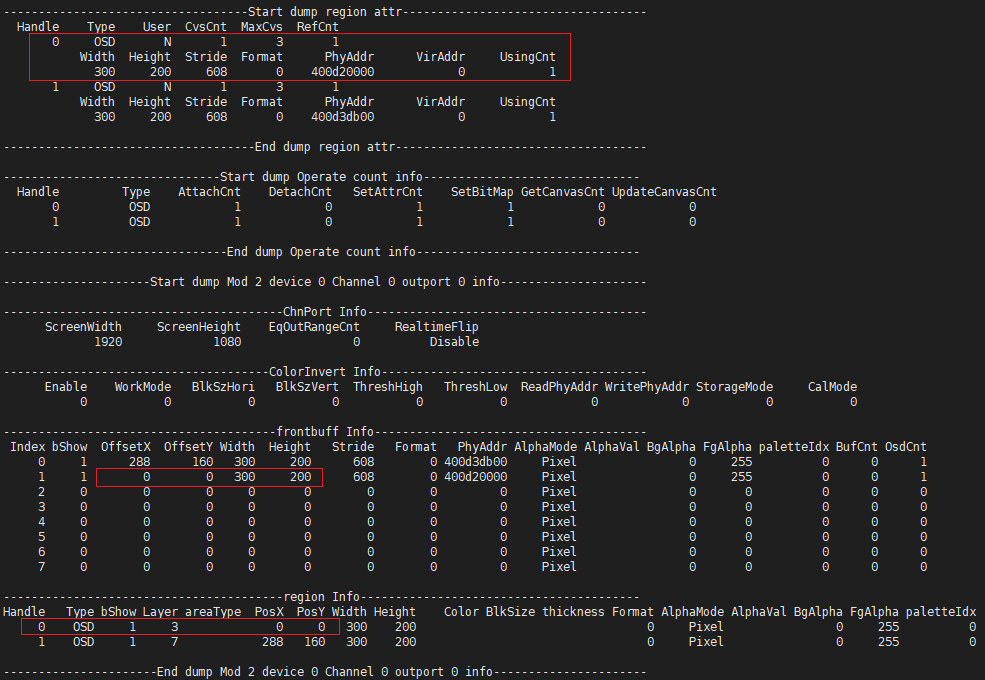
Information obtained:
-
In the "region Info" list of Mod 2 device 0 Channel 0 outport 0 info, only the OSD with handle 0 has both "PosX" and "PosY" attributes equal to 0, which can confirm the handle ID of the problematic OSD is 0;
-
In the "frontbuff Info" list of Mod 2 device 0 Channel 0 outport 0 info, all front buffers' "OsdCnt" are not greater than 1, indicating no OSD stitching;
-
In the "frontbuff Info" list of Mod 2 device 0 Channel 0 outport 0 info, only 2 front buffers have information, which can confirm the channel occupies 2 HwGwins.
-
-
Use "echo" command to save MI_RGN buffer.
Since the problematic OSD does not participate in stitching, the back buffer serves as the front buffer directly for HwGwin display. In this example, saving either back buffer or front buffer can confirm the OSD content. If the problematic OSD participates in stitching, both back buffer and front buffer need to be saved, and the content of both buffers needs to be confirmed separately.
Save back buffer cmd:
echo dumpRgnBuf [Handle] [Path] > /proc/mi_modules/mi_rgn/mi_rgn0Save front buffer cmd:
echo dumpFrontBuf [ModId] [DevId] [ChnID] [PortID] [bInputPort] [Path] > /proc/mi_modules/mi_rgn/mi_rgn0It is recommended to use software 7yuv to view the saved file. Confirm if the display is as expected. If the back buffer and front buffer are both corrupted and consistent with the corrupted phenomenon in the attached module output image, then it can be confirmed that OSD corruption is caused by incorrect back buffer content; if only the front buffer is corrupted, it indicates an OSD stitching issue; otherwise, it is not caused by buffer content issues.
-
-
Reasons for incorrect back buffer content
-
User drawing error
Can save the canvas virtual address to file before calling
MI_RGN_UpdateCanvasto check if the OSD content drawn by the user is correct. -
No cache flush
When OSD updates canvas, the driver first maps the canvas to obtain virtual address, then unmaps when the user updates the canvas. If the cache is not flushed between mapping and unmapping, when HwGwin displays, the data written by the user to the cache has not been written back to memory, resulting in OSD corruption (this error only occurs when using API
MI_RGN_GetCanvasInfo+MI_RGN_UpdateCanvasto update OSD, and only this case has this error). The user can perform a cache flush on the canvas virtual address after callingMI_RGN_GetCanvasInfoand before callingMI_RGN_UpdateCanvas. If the issue is cache-related, the problem should be fixed. If confirmed to be this issue, contact MI_RGN RD or FAE to confirm why cache flush operation in the driver did not take effect.Use MI_SYS API
MI_SYS_FlushInvCache(void *pVirtualAddress, MI_U32 u32Length)for cache flushing, whereu32Lengthequals the OSD canvas's "u32Stride" multiplied by height. -
Back buffer memory corrupted
Can save the buffer updated by the user before the user's last call to
MI_RGN_UpdateCanvasorMI_RGN_SetBitMap, and compare it with the back buffer saved by MI_RGN. If they are different, this phenomenon may exist. Use "MIU protect" tool to monitor the address range where RGN back buffer resides. To avoid false positives, contact MI_RGN RD or FAE to confirm the whitelist.
-
-
Reasons for OSD stitching issue
-
Front buffer memory corrupted
Use "MIU protect" tool to monitor the address range where RGN front buffer resides.
RGN front buffer is normally accessed by BDMA and GOP_R client, need to add these two clients to the whitelist. If unsure, contact RGN RD or FAE for confirmation.
-
Previous task releasing the front buffer address did not handle cache properly (this case manifests as CPU write memory corruption)
Try adding "Vmap" -> "Flush cache" -> "UnVmap" operations between MI_RGN allocating front buffer and BDMA operating on front buffer. Confirm whether the drawing issue still exists after modification.
-
2.1.1.2. Bandwidth Issue
-
Steps to confirm the issue
-
Dump global BW usage and send to MIU SW owner for analysis to determine if BW exceeds load. This often occurs when attached to realtime mode bound channels or DISP module.
-
Reduce resolution or simplify the scenario, then confirm OSD display. If no longer corrupted, it may be scenario BW shortage.
-
If the issue occurs probabilistically, manually increase BW to see if the reproduction probability increases or the problematic area expands. Contact RGN RD or FAE for the command.
-
-
Reasons for the issue
-
Current BW usage is too high. In this case, analyze if the scenario exceeds specifications.
-
Other IPs aggressively抢占 bandwidth too severely. Specific scenarios require specific analysis.
-
GOP internal BW setting issues (if these settings are suspected, contact RGN RD or FAE for the command)
burst length: Sets the length of data that GOP continuously reads from MIU. Setting too high or too low may both cause abnormalities;
dma FIFO threshold: GOP RDMA's fifo threshold, indicates starting to send after accumulating specified number of requests.
MCM: If the function has defects, it may cause corrupted display.
-
2.1.1.3. Other Issues
-
Steps to confirm the issue
-
Obtain RGN proc information (
cat /proc/mi_modules/mi_rgn/mi_rgn0) -
Dump related hardware registers (
/customer/riu_r [bank]);DISP: bank 0x1281,0x1282
VENC: bank 0x1683,0x1684
JPEG: bank 0x1235,0x1236
-
Package and send the information obtained from previous directions (RGN back buffer, front buffer, etc.) together to RGN RD or FAE for analysis.
-
-
Reasons for the issue
- Different format: SCL/disp gop do not support using different format gwin simultaneously. If used, OSD display will be corrupted.
2.1.2 OSD Not Displaying or Not Refreshing
2.1.2.1. OSD Display Not Updating Normally
-
Steps to confirm the issue:
exp: Mod2 dev0 chn0 outport0 channel has 2 OSDs attached, where OSD starting at position [0, 0] does not display or does not refresh.
-
Cat rgn proc information (
cat /proc/mi_modules/mi_rgn/mi_rgn0), focusing on the problematic channel's "chn port info".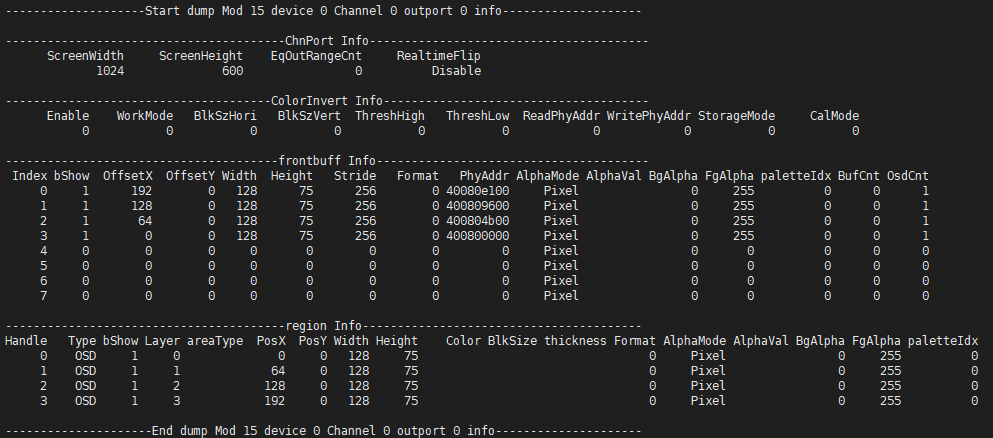
Key points to note:
Confirm if the "ScreenWidth" and "ScreenHeight" values in "ChnPort Info" match the corresponding channel's resolution. Wrong channel attached?
Confirm the "bShow" parameter in "region Info" and "frontbuff Info". If 0, the phenomenon is that this OSD is not displayed.
Confirm the "AlphaMode" in "region Info" and "frontbuff Info":
If alpha mode is "Constant alpha" and "AlphaVal" is 0, the phenomenon is OSD not displayed;
If alpha mode is "Pixel alpha", need to dump rgn's front buffer for combined confirmation:
For "ARGB" format, need to confirm the value of the alpha component in the pixel. If 0, the phenomenon is OSD not displayed. For ARGB1555 format, need to combine with "FgAlpha" and "BgAlpha". If "FgAlpha" parameter is 0, the actual transparency of pixels with alpha component equal to 1 will be 0, manifesting as not displayed from the phenomenon. Same for "BgAlpha";
If OSD format is I2/I4/I8, pixel value is an index value. During actual display, the corresponding alpha and color in the color palette are displayed. Need to confirm the value of the alpha component in the color palette corresponding to the pixel in RGN's front buffer. If 0, the phenomenon is OSD not displayed.
-
Focus on "Operate count info". This stores the number of API calls by the user for each handle.

Cat proc information multiple times to confirm if the counts of APIs
MI_RGN_SetBitMap,MI_RGN_GetCanvasInfo, andMI_RGN_UpdateCanvashave increased. If not increased, the phenomenon is OSD not refreshing.Check if
MI_RGN_GetCanvasInfoandMI_RGN_UpdateCanvascall counts are paired. On channels with OSD stitching, if an OSD continuously obtains canvas, other OSDs' calls toMI_RGN_GetCanvasInfowill exit and print errors and warnings in the serial port. Can confirm further by checking serial port logs (DualOS needs to use commandcat /proc/dualos/logto get RTOS-side logs). The phenomenon is OSD not refreshing -
Confirm the image passed by the user to MI_RGN. Save rgn's back buffer to confirm if it is as expected. cmd:
echo dumpRgnBuf [handle] [path] > /proc/mi_modules/mi_rgn/mi_rgn0. If multiple saved buffer contents are consistent with the attached module's output image, then the user's updated image has issues. The phenomenon may be OSD not displaying or not refreshing, depending on the content.Reasons for the issue:
User's buffer generation logic has issues.
User did not call APIs in the proper sequence.
User did not pass the correct image to MI_RGN.
-
2.1.2.2. API Call Rate Abnormal (only encountered when OSD has stitching)
-
Steps to confirm the issue:
-
If the problematic channel has OSD stitching, confirm the call speed of
MI_RGN_GetCanvasInfoandMI_RGN_UpdateCanvas. On channels with OSD stitching, OSDs participating in stitching will not refresh display while an OSD canvas is being obtained on the channel. If the time between the previousMI_RGN_UpdateCanvasand the nextMI_RGN_UpdateCanvasis too short, the driver cannot issue settings to the hardware in time. The phenomenon is OSD not updating. -
Confirm the call speed of
MI_RGN_SetBitMap. Same as above. -
Confirm the call speed of
MI_RGN_AttachToChn,MI_RGN_SetDisplayAttr, andMI_RGN_DetachFromChn. Same as above.
-
-
Reasons for the issue:
- When OSD has stitching, the back buffer needs to be moved to the front buffer via BDMA, and HwGwin then displays the front buffer. If the user continuously and quickly calls related APIs, causing the previous transfer operation to not complete before needing to transfer again, there is never a new displayable front buffer to replace the old front buffer. From the phenomenon, some OSDs always display the old image without refreshing or not displaying.
2.1.3. "ISP FIFO FULL" Log Appears After SCL Attaches OSD
-
Steps to confirm the issue:
- Use RGN echo command
echo setRgnOnOff [modid] [devid] [chnid] [portid] [bInputPort] [rgntype] [onoff] > /proc/mi_modules/mi_rgn/mi_rgn0(for specific usage guide refer to MI_RGN API doc) to forcibly disable display of all OSDs attached to SCL. Can re-run application to confirm if it can still be reproduced. If not reproduced, then the issue can be confirmed to be related to OSD.
- Use RGN echo command
-
Reasons for the issue:
-
This issue only occurs when ISP and SCL are bound in realtime mode. When SCL attaches OSD, SCL GOP hardware is enabled, which slows down SCL hardware operation to some extent. If SCL operation is too slow, it will cause ISP to backlog and trigger this issue. Possible reasons are as follows:
-
When GOP is enabled, SCL operation waits for data requested by GOP from MIU. If GOP's MIU access efficiency has issues, the overall SCL speed will be dragged down.
-
SCL GOP low power mode causes GOP speed to slow down.
-
-
-
Solutions:
-
Increase GOP's MIU priority.
-
Appropriately reduce the MIU priority of other IPs in the same group as SCL GOP. GOP may not win against other IPs.
-
Appropriately increase SCL clk to speed up SCL and GOP operation.
-
Disable GOP clk gating, ask the corresponding MI_RGN owner for the register.
-
2.2. Other Common Issues
2.2.1. Pass Overflow Appears After Module Attaches RGN
-
Steps to confirm the issue:
-
Cat rgn proc information (
cat /proc/mi_modules/mi_rgn/mi_rgn0), focusing on "ChnPort Time Info" of the problematic channel. This records the Enqueue and Dequeue task time in rgn for that channel. Need to confirm if the time consumption is too high. -
Can re-run application without RGN to confirm if it can still be reproduced. If not reproduced, then the issue can be confirmed to be related to RGN.
-
-
Reasons for the issue:
-
RGN internal process complexity causes Enqueue and Dequeue task time consumption to be too high, exceeding frame rate requirements.
-
RGN internal use of too many lock interfaces, causing Enqueue and Dequeue task to be frequently scheduled timeout. Common on single-core platforms.
-
-
Solutions:
- When such issues occur, need to contact MI_RGN owner or FAE for SDK optimization.