Sigmastar sdcard_sdio_debugsop Handbook
REVISION HISTORY
| Revision No. | Description |
Date |
|---|---|---|
| 1.0 | 02/21/2024 |
1. SD/SDIO Card Recognition Process Issues
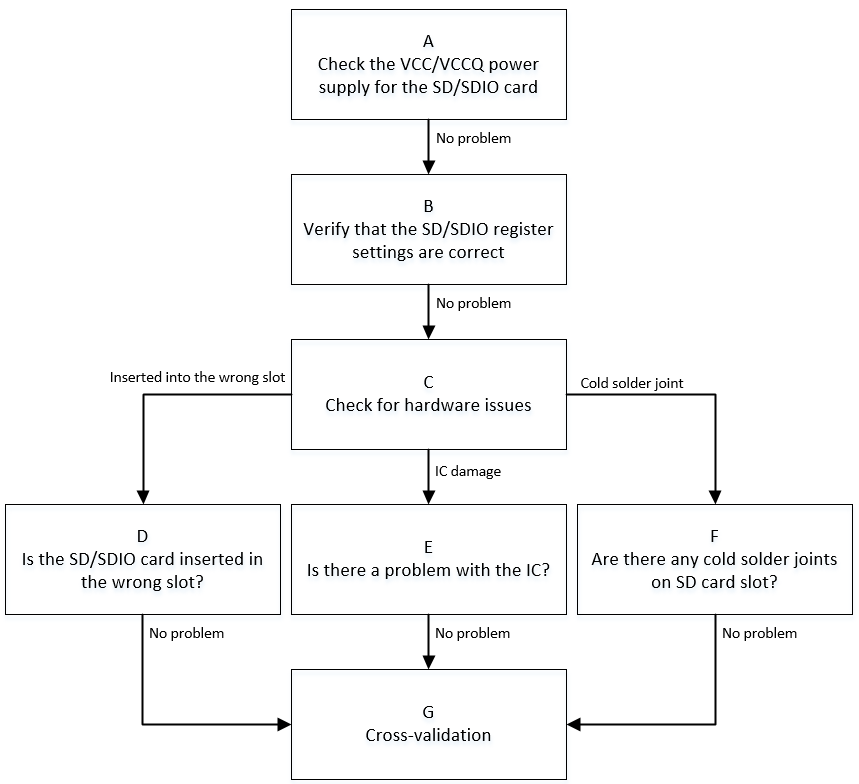
| Flow | Method | Exit Condition | Next Step | Data Required for SWRD | Related FAQ Reference |
|---|---|---|---|---|---|
| A | 1. Use a multimeter to confirm whether the SD card VCC voltage is 3.3V during the initialization phase; confirm VCCQ (I/O) voltage according to the SDIO device manual. Generally, SDIO devices can support 1.7V~3.6V range, while VCC voltage depends on the actual SDIO device situation, and the manufacturer will provide the usage manual. 2. Confirm that in the default state, clk-line is low level, and cmd/data-line is high level. 3. Confirm whether the SD/SDIO VCCQ voltage is within the 1.8V/3.3V range. |
Exit Condition 1: 1. The VCC power supply of the SD card during the initialization phase differs significantly from 3.3V, or the VCC power supply of the SDIO card does not meet the manual specifications. 2. Or the default state of bus-line is incorrect. 3. Or the VCCQ power supply of the SD/SDIO card is not within the valid 1.8V/3.3V range. > Power supply issue Exit Condition 2: Power supply is normal. > No issue |
Exit Condition 1: >Process ends Exit Condition 2: >B |
Exit Condition 1: ==>Seek CAE assistance |
|
| B | 1. Confirm whether the SD/SDIO padmux configuration matches the development board, and whether the pad conflicts with other modes. Confirmation method: cd vim arch/arm/boot/dts/iford_xxxx-padmux.dtsi SD/SDIO padmux mode will contain 'SD0_MODE' or 'PM_SDIO_MODE' keywords, and the corresponding GPIO pads need to be confirmed for multiplexing with other modules. 2. Confirm whether the SD/SDIO DTS configuration matches the currently used slot. Method: cd vim arch/arm/boot/dts/iford.dtsi For the meaning of related configuration items, please refer to 2.1 no-sdio/no-sd/no-mmc: comment out the corresponding item according to the type of device connected, and configure the other two. For example: if an SD card is connected, comment out no-sd and configure no-sdio/no-mmc. 2.2 reg/cifd-reg/pwr-save-reg: these are the bank addresses corresponding to the IP used, divided into non-pm and pm. The non-pm base is 0x1F282600, and the pm base is 0x1F008400. 2.3 ip-order/interrupts/clocks: these three must correspond one-to-one. For example, if ip-order=0 is used, the interrupts and clocks corresponding to the slot must match the current slot. non-pm ip-order is configured as 0, pm ip-order is configured as 1. |
Exit Condition 1: 1. padmux is not correctly configured or there is conflict with other modes. 2. SD/SDIO related configuration items in DTS do not match the currently used slot. > Configuration error issue Exit Condition 2: Configuration is normal. > No issue |
Exit Condition 1: >Process ends Exit Condition 2: >C |
Exit Condition 1: ==>Seek CAE to confirm the padmux situation used by the current development board, then configure the correct padmux and DTS according to the actual situation. |
|
| C | 1. Confirm whether there are hardware issues. 1.1. Scenario 1 - Wrong slot: when the development board has multiple slots, connect according to the actual padmux. 1.2. Scenario 2 - Unstable IC pin output: use a multimeter or oscilloscope to measure signals near the IC side and near the device side; there should be no unstable signal phenomenon. 1.3. Scenario 3 - SD card holder dry joint: when other conditions are confirmed normal, try the same slot's small SD card holder first. If there is no issue, try re-soldering the SD card holder. |
Exit Condition 1: 1. Confirmed that the SD card is plugged into the wrong slot. > Insert into the correct slot. Exit Condition 2: IC pin output is unstable, resulting in poor signal quality. > Replace with new IC. Exit Condition 3: SD card holder has dry joint, resulting in poor signal quality. > Re-solder the SD card holder. Exit Condition 4: Hardware is normal. > No issue |
Exit Condition 1: >Process ends Exit Condition 2: >Process ends Exit Condition 3: >Process ends Exit Condition 4: >G |
Exit Condition 2: >Seek CAE assistance Exit Condition 3: >Seek CAE assistance |
|
| G | 1. Replace with an SD/SDIO card of the same specification and test again to confirm if it is recognized normally. 2. Replace the development board and test the same specification SD/SDIO card to confirm if it is recognized normally. 3. Test the same specification SD/SDIO card on another platform to confirm if it is recognized normally. |
Exit Condition 1: After replacing with an SD/SDIO card of the same specification, it is recognized normally. > SD/SDIO device issue. Exit Condition 2: After replacing the development board, it is recognized normally. > Development board issue. Exit Condition 3: After testing on another platform, it is recognized normally. ==> Driver issue |
Exit Condition 1: >Process ends Exit Condition 2: >Process ends Exit Condition 3: ==>Process ends |
Exit Condition 3: >1. Provide serial log. >2. Use LA or oscilloscope to capture the waveform of the entire initialization process. ==>3. Under the Linux console, use the riu command to dump SDIO IP related bank information: non-pm: 0x1413/0x1038/0x103C/0x1033 pm: 0x42/0xE/0x3F |
2. SD/SDIO Communication Process Issues
| Flow | Method | Exit Condition | Next Step | Data Required for SWRD | Related FAQ Reference |
|---|---|---|---|---|---|
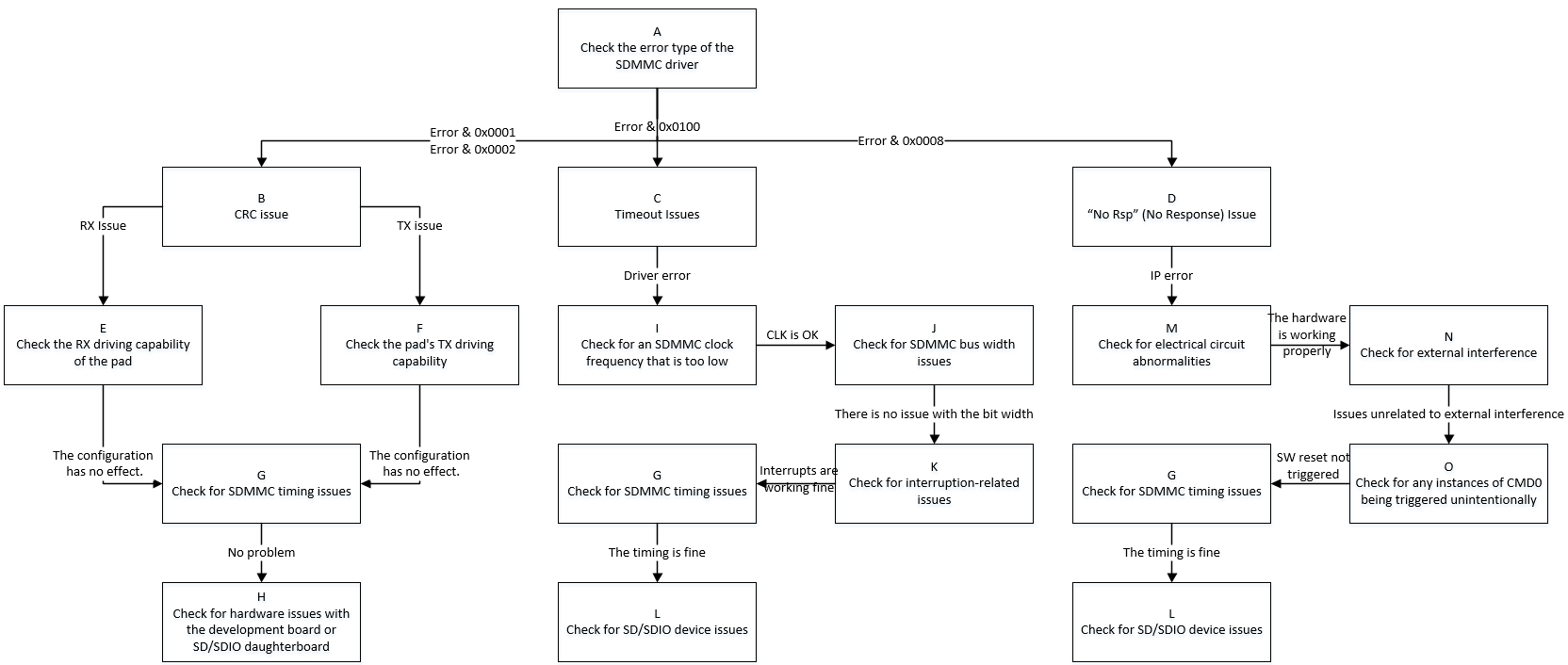
| A | Search debug log with keyword "[sdmmc" when an error occurs, mainly focusing on error numbers: 1. (E: 0x0001): Read CRC 2. (E: 0x0002): Write CRC 3. (E: 0x0010): CMD response CRC 3. (E: 0x0100): Driver reports timeout 4. (E: 0x0008): IP reports device no response |
Exit Condition 1: 1. Commands 12/13/17/18/23/24/25/52/53 and other read/write related commands report CRC errors. Exit Condition 2: 1. Commands 12/13/17/18/23/24/25/52/53 and other read/write related commands report timeout errors. Exit Condition 3: 1. Commands 12/13/17/18/23/24/25/52/53 and other read/write related commands report device no response errors. |
Exit Condition 1: >B Exit Condition 2: >C Exit Condition 3: ==>D |
||
| B | CRC issues are essentially poor signal quality. According to the CRC error type, select the best pad driving capability. | Exit Condition 1: 1. CRC error type is rx CRC, i.e., error occurs during reading. Exit Condition 2: 1. CRC error type is tx CRC, i.e., error occurs during writing. Exit Condition 3: 1. Other CRC error types. |
Exit Condition 1: >E Exit Condition 2: >F Exit Condition 3: ==>G |
||
| C | 1. When driver read/write operations report timeout, capture waveform immediately to confirm whether there are transmission performance issues. 2. If the waveform shows no problem, confirm whether the sdmmc MIE interrupt is being reported or received normally. 3. Check whether the sdmmc timing is abnormal. 4. If the above situations show no problems, consider whether the SD/SDIO device is abnormal. |
Exit Condition 1: 1. According to the waveform, the current working frequency is lower than expected. Exit Condition 2: 1. Check whether the bus width matches the expected value. Exit Condition 3: 1. According to the debug log, the relevant events when an error occurs are not triggered normally. Exit Condition 4: 1. sdmmc timing is abnormal. Exit Condition 5: 1. Due to SD/SDIO device reasons causing card busy situation. |
Exit Condition 1: >I Exit Condition 2: >J Exit Condition 3: >K Exit Condition 4: >G Exit Condition 5: ==>L |
||
| D | 1. When the sdmmc IP reports device no response, capture the waveform to confirm whether no response is received after the CMD is sent. 2. Refer to <1: SD/SDIO Card Recognition Process Issues> and check whether the related configuration is correct. 3. Give priority to checking whether the hardware electrical path is normal and whether the operating environment is under interference testing (such as electrostatic discharge, high/low temperature, etc.). 4. Search the debug log for the keyword "SAR1 SDMMC WARN trigger" to determine whether the power-off protection is triggered incorrectly. 5. Check whether the sdmmc timing is abnormal. 6. If the above situations show no problems, consider whether the SD/SDIO device is abnormal. |
Exit Condition 1: 1. Check that the configuration has no problem, but the waveform shows that no device response is received after CMD is sent. Exit Condition 2: 1. The electrical path from the chip to the SD/SDIO device sub-board has obvious signal attenuation. Exit Condition 3: 1. The current operating environment is undergoing pressure testing such as electrostatic discharge or high/low temperature. Exit Condition 4: 1. Search the log and find that power-off protection is triggered without the sdmmc being powered off. Exit Condition 5: 1. sdmmc timing is abnormal. Exit Condition 6: 1. Due to SD/SDIO device reasons causing no response. Exit Condition 7: 1. The waveform shows that the device has responded, but the IP judges it as no response. |
Exit Condition 1: >Process ends Exit Condition 2: 1. Please ask CAE to assist in troubleshooting. Exit Condition 3: >Process ends Exit Condition 4: >Process ends Exit Condition 5: >G Exit Condition 6: >L Exit Condition 7: >Process ends |
Exit Condition 1: 1. Dump debug log and DTS configuration file. Exit Condition 3: Exit Condition 4: 1. Dump debug log. Exit Condition 7: 1. Suspected CHIP design defect. |
|
| E | Refer to 《SDMMC User Guide》. | Exit Condition 1: 1. After setting the data driving level according to the actual situation, it returns to normal. Exit Condition 2: 1. After trying all data driving levels, CRC errors still occur. |
Exit Condition 1: >Process ends Exit Condition 2: >G |
||
| F | Refer to 《SDMMC User Guide》. | Same as "E" | Same as "E" | ||
| G | 1. Refer to 《SDMMC User Guide》 to comprehensively adjust the driving capability of clk/cmd line. 2. Adjust clk phase. For specific operations, refer to the 《SDMMC User Guide》. 3. Adjust the clock signal sampling mode according to the tmux table and SD/SDIO register table. 4. When using DMA mode in trans-mode, set reg_dma_rd_clk_stop to avoid data loss. 5. Use LA or oscilloscope to capture the complete waveform during the problematic stage. |
Exit Condition 1: 1. After comprehensively adjusting the driving level of signal lines, it returns to normal. Exit Condition 2: 1. After adjusting clk to four-phase or eight-phase, it returns to normal. Exit Condition 3: 1. After adjusting the clock signal sampling mode, it returns to normal. Exit Condition 4: 1. In DMA mode transmission scenario, after setting offset: 0xb bit7, it returns to normal. Exit Condition 5: 1. The above measures have no effect, and the waveform differs from the normal waveform, such as sampling lock time not meeting standards, cmd overlap, cmd minimum interval not meeting standards, etc. Exit Condition 6: 1. Confirm that the above settings are normal and the waveform is abnormal-free. |
Exit Condition 1: Exit Condition 2: Exit Condition 3: Exit Condition 4: >Process ends Exit Condition 5: >Process ends Exit Condition 6: ==>H/L |
Exit Condition 5: 1. Dump the complete debug log of the whole process, including the log from SD/SDIO init to when the problem occurs. 2. Capture the complete waveform of the abnormal scenario, preferably with the waveform of the normal scenario under the same conditions as a comparison. 3. Under the Linux console, use the riu command to dump SDIO IP related bank information: non-pm: 0x1413/0x1038/0x103C/0x1033 pm: 0x42/0xE/0x3F |
|
| H | 1. First refer to the cross-validation chapter in 2. In the default state (i.e., no data interaction), use a multimeter or oscilloscope to measure whether the electrical signals of SD/SDIO clk/cmd/data line meet expectations. 3. In the communication triggered state (i.e., data interaction), use a multimeter or oscilloscope to separately measure whether there are obvious signal differences between the chip-side and device-side electrical signals. 4. Try to enhance driving capability from a hardware perspective by adding pull-up resistors and other means. |
Exit Condition 1: 1. After cross-validation, communication returns to normal. Exit Condition 2: 1. Under default conditions, it does not meet the requirement that clk line is low level and cmd/data line is high level. Exit Condition 3: 1. There are abnormalities such as attenuation between the chip-side and device-side electrical signals. Exit Condition 4: 1. After adjusting electrical signal quality from hardware, communication returns to normal. Exit Condition 5: 1. The electrical signal is normal, but hardware adjustment has no effect. |
Exit Condition 1: >Process ends Exit Condition 2: 1. Check whether the padmux configuration matches the SD/SDIO slot currently used. 2. Under Linux, use LA or oscilloscope to manually pull up/down the SD/SDIO pin GPIO and see if it meets expectations. Exit Condition 3: Exit Condition 4: Exit Condition 5: >Process ends. |
Exit Condition 3: 1. Seek CAE assistance Exit Condition 5: 1. Synchronize hardware conditions to help RD build the reproduction environment. |
|
| I | 1. According to the manual, clarify the SD/SDIO IP version used by the current slot. 1.1 SD/SDIO 2.0 supports up to 48MHz. 1.2 SD/SDIO 3.0 supports up to 200MHz. 2. Within the frequency range allowed by the IP, confirm whether it is already at the highest level. 3. Read bank 0x1038 offset 0x43/bank 0x42 offset 0x24 to confirm whether the clk is set successfully as expected. 4.Use dd command or fio tool for testing. For specific operations, refer to |
Exit Condition 1: 1. After adjusting clk to the highest level, communication returns to normal. Exit Condition 2: 1. Adjusting clk has no effect or it is already at the highest level. Exit Condition 3: 1. The clk setting does not match the value read from the register. |
Exit Condition 1: >Process ends Exit Condition 2: >J Exit Condition 3: ==>Process ends |
Exit Condition 3: 1. non-pm dump 0x1038/0x1133 register information. pm dump 0xe register information. 2. Provide dts configuration file. 3. Provide debug Log. |
|
| J | 1. According to the SPEC document, different speed modes have corresponding supported bus widths. 1.1 SD/SDIO 2.0 can use 1bit/4bit Buswidth. 1.2 SD/SDIO 3.0 can only use 4bit width. 2. Read bank 0x1413/0x42 offset 0xb[2:1] to confirm. |
Exit Condition 1: 1. After adjusting buswidth to the maximum width corresponding to the speed mode, communication returns to normal. Exit Condition 2: 1. Adjusting buswidth has no effect or it is already at the maximum width of this speed mode. Exit Condition 3: 1. The buswidth setting does not match the value read from the register. |
Exit Condition 1: >Process ends Exit Condition 2: >K Exit Condition 3: ==>Process ends |
Exit Condition 3: 1. Dump 0x1413/0x42 register information. 2. Provide dts configuration file. 3. Provide debug Log. |
|
| K | 1. Read bank 0x1413 offset 0x0[1:0] to determine whether the read/write completion event is raised. 2. If the event has been triggered but the driver still reports timeout, give priority to checking CPU loading and interrupt trigger count situations. |
Exit Condition 1: 1. During the driver timeout period, the event is not raised. Exit Condition 2: 1. The event has been raised, and CPU loading is high or interrupts are triggered massively. Exit Condition 3: 1. The event is raised normally, and there are no other abnormalities in the environment. |
Exit Condition 1: >Process ends Exit Condition 2: Identify which process is causing high CPU loading and try to bind the sdmmc MIE interrupt to cpu1. Exit Condition 3: >G |
Exit Condition 1: 1. Try to reproduce on the standard version to help RD build the environment. |
|
| L | 1. Refer to the cross-validation and SD card holder dry joint chapters in <1: SD/SDIO Card Recognition Process Issues>. | Exit Condition 1: 1. After cross-validation or re-soldering, communication returns to normal. Exit Condition 2: 1. Confirm that the SD/SDIO device is normal. |
Exit Condition 1: >Replace the SD/SDIO device. Exit Condition 2: >Process ends |
Exit Condition 2: 1. Try to reproduce on the standard version to help RD build the environment. |
|
| M | 1. Use a multimeter or oscilloscope to measure the entire path from chip to SD/SDIO sub-board, mainly observing whether there are large differences in signals between the chip side and the SD/SDIO sub-board side. | Exit Condition 1: 1. There is obvious attenuation phenomenon in electrical signals between the chip side and the SD/SDIO sub-board side. Exit Condition 2: 1. The electrical path is normal. |
Exit Condition 1: 1. Please ask CAE to assist in troubleshooting. Exit Condition 2: ==>N |
||
| N | 1. Clarify with the customer whether the operating environment is subject to external interference, such as ongoing electrostatic discharge, high/low temperature pressure testing. | Exit Condition 1: 1. Currently undergoing pressure testing, with means such as electrostatic discharge, high/low temperature, etc. Exit Condition 2: 1. No external interference, normal operating environment. |
Exit Condition 1: >Process ends Exit Condition 2: >O |
Exit Condition 1: 1. Capture debug log and waveform. 2. Coordinate with CAE to troubleshoot together. |
|
| O | 1. Under the condition that it is clear that the operating environment is not powered off, check whether the keyword "SAR1 SDMMC WARN trigger" exists in the debug log. 2. Check whether the filtering contains "retry" and "reset" keywords related to the sdmmc driver. |
Exit Condition 1: 1. By checking the debug log, emmc/sdmmc triggers power-off protection or retry operations. Exit Condition 2: 1. The environment is not reset or the power-off protection is triggered incorrectly. |
Exit Condition 1: >Process ends Exit Condition 2: >G |
Exit Condition 1: 1. For eMMC false triggering of power-off protection. 2. If the environment has triggered reset operations, capture the debug log. |
3. Data Transfer Issues After SD/SDIO Communication Ends
| Flow | Method | Exit Condition | Next Step | Data Required for SWRD | Related FAQ Reference |
|---|---|---|---|---|---|
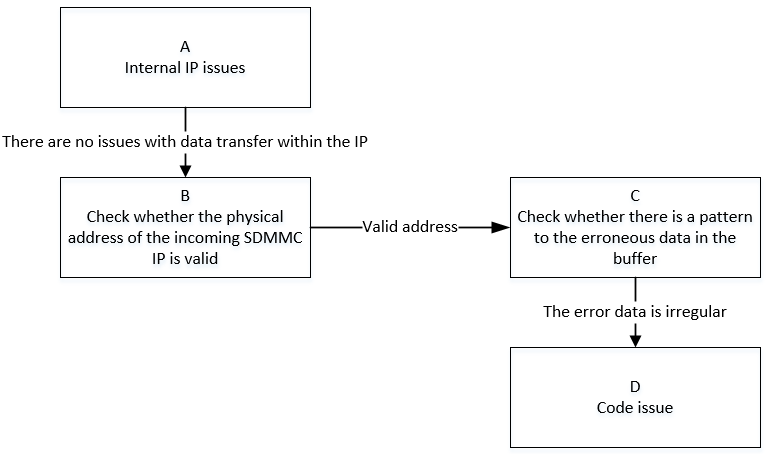
| A | 1. According to the SD/SDIO host modes in the SPEC, the entire SD/SDIO protocol system can be abstracted as host, bus, and device. 2. By confirming that padmux setting is correct and matches the current operating environment, and that the waveform and timing from LA/oscilloscope are normal, but the dma_end event cannot be waited for. 3. Combined with host mode, host cmd sending, bus communication, and device exceptions can be excluded, considering that data transfer within the IP at the host side has abnormalities. |
Exit Condition 1: 1. HW RD assists in interpreting the debug bus, and there are abnormalities within the IP, such as internal DMA transfer to MIU with no ACK, etc. Exit Condition 2: 1. sdmmc IP is normal. |
Exit Condition 1: >Process ends Exit Condition 2: >B |
||
| B | 1. Check the specification document to confirm the DRAM address space available for sdmmc IP, and then confirm whether the physical address offset passed to the sdmmc IP is legal, i.e., the address composed of bank 1413/42 offset 0x3/0x4. | Exit Condition 1: 1. The physical address offset passed to sdmmc IP exceeds the valid range. Exit Condition 2: 1. The physical address offset passed to sdmmc IP is legal and valid. |
Exit Condition 1: >Process ends Exit Condition 2: >C |
Exit Condition 1: 1. Use the standard address space allocation interface provided by the system to apply for buf. |
|
| C | 1. Construct test patterns to confirm whether there is regularity in the difference between the source pattern and the read/write obtained pattern. | Exit Condition 1: 1. Pattern errors have obvious regularity, always failing at the sdmmc driver cache-line size. Exit Condition 2: 1. Pattern errors have no obvious regularity. |
Exit Condition 1: >Process ends Exit Condition 2: >D |
Exit Condition 1: 1. Confirm whether sdmmc standard read/write interfaces are used. If not, further confirm whether the buf is non-cache. 2. Assist RD in building the reproduction environment. |
|
| D | The sdmmc driver read/write process is normal, but abnormalities occur during the data transfer process within the IP. Mainly consider the following points: 1. Whether the DMA burst length is set to 8, i.e., bank 1413/42 offset 0x2[5:4]. 2. Whether cache operations are not considered or handled incorrectly during read/write. 3. Data synchronization issues caused by modern CPU out-of-order execution. |
Exit Condition 1: 1. The DMA burst length is not set to the maximum. Exit Condition 2: 1. In the dcache-on operating environment, cache is not invalidated and flushed during buf read/write, resulting in inconsistent data retrieved. Exit Condition 3: 1. For logic that needs synchronous calls, memory barrier processing is not performed, resulting in out-of-order execution. Exit Condition 4: 1. Other issues. |
Exit Condition 1: 1. Try to manually set DMA burst to the maximum value 8. Exit Condition 2: 1. Try to execute flush operation during write, and execute invalid operation after read. Exit Condition 3: Exit Condition 4: ==>Process ends |
Exit Condition 3: Exit Condition 4: 1. Confirm the customer branch and the current status of applied patches. 2. Assist RD in building the reproduction environment. |
4. SD Card Hot Swap Related Issues
| Flow | Method | Exit Condition | Next Step | Data Required for SWRD | Related FAQ Reference |
|---|---|---|---|---|---|
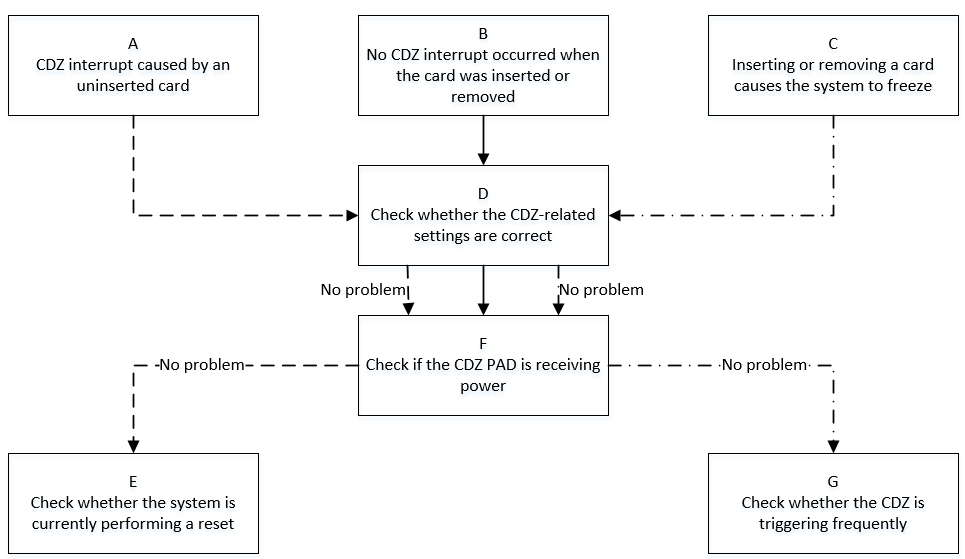
| A | 1. CDZ interrupt trigger principle: After the result of xor(src, polarity), specifically: 1.1. When the CDZ src level is 0, polarity level (0->1) will generate an interrupt. 1.2. When the CDZ src level is 1, polarity level (1->0) will generate an interrupt. 2. After system wdt_rst or STR, there will be a CDZ interrupt that meets the trigger condition. |
Exit Condition 1: 1. Confirm that the system is performing wdt_rst or STR operations. Exit Condition 2: 1. System is running normally, no wdt_rst or STR operations are performed. |
Exit Condition 1: >E Exit Condition 2: >D |
||
| B | 1. First check whether CDZ related configuration items are correctly enabled. 2. If the configuration has no problem, give priority to checking whether the SD card holder hardware has a fault and whether the CDZ pad power supply is normal. 3. According to the CDZ trigger principle in A, troubleshoot whether there is a mismatch between src and polarity in the code. |
Exit Condition 1: 1. CDZ related configuration is not correctly configured. Exit Condition 2: 1. The SD card holder has a fault causing CDZ pad power supply abnormality. Exit Condition 3: Code logic issue. |
Exit Condition 1: >D Exit Condition 2: >F Exit Condition 3: ==>Process ends |
Exit Condition 3: 1. Provide the accurate branch to RD for troubleshooting. |
|
| C | 1. First confirm whether the system abnormality is caused by the CDZ interrupt itself, or caused by the logic after the plug/unplug action. 2. Check whether there is a CDZ padmux configuration error in the CDZ related configuration items. |
Exit Condition 1: 1. CDZ related configuration is not correctly configured. Exit Condition 2: 1. Confirm that the CDZ interrupt itself is triggered frequently causing system lag. Exit Condition 3: 1. Confirm that it is the logic after plugging/unplugging the card that causes the system to freeze. |
Exit Condition 1: >D Exit Condition 2: >G Exit Condition 3: ==>Process ends |
Exit Condition 3: 1. Assist RD in building the reproduction environment. |
|
| D | 1. Confirm whether the SD/SDIO CDZ padmux configuration matches the development board and whether the pad conflicts with other modes. Confirmation method: cd vim arch/arm/boot/dts/iford_xxxx-padmux.dtsi 2. Confirm whether the SD/SDIO CDZ related configuration is correct: cd vim arch/arm/boot/dts/iford.dtsi Mainly investigate whether 'fake-cdz' and 'rev-cdz' configuration items are correct; whether 'cdz_slot0_irq' interrupt configuration is correct. |
Exit Condition 1: 1. CDZ padmux is not correctly configured. 2. CDZ related configuration items are incorrectly configured. Exit Condition 2: 1. CDZ configuration has no problem. |
Exit Condition 1: 1. Configure correctly according to padmux and actual operating environment. >Process ends Exit Condition 2: >F |
||
| E | 1. When no SD card is inserted, after the system performs wdt_rst, CDZ interrupt will be generated meeting condition 1.2 in A. 2. When no SD card is inserted, if the system performs STR, the CDZ interrupt will also be generated meeting condition 1.2 in A during the resume phase. |
Exit Condition 1: 1. Confirm that the system has triggered a reset operation. Exit Condition 2: 1. System is running normally, no related reset operations are triggered. |
Exit Condition 1: 1. Ask the intr_ctrl owner to provide a solution to mask this unexpected interrupt. Exit Condition 2: ==>Process ends |
Exit Condition 2: 1. Assist RD in building the reproduction environment. |
|
| F | 1. The CDZ pad is designed for SD card hot swap. The default state is a high-level state pulled up by external 3.3V voltage. When the SD/SDIO card is inserted into the slot, it contacts the spring and connects to ground, changing to a low-level state. 2. The CDZ interrupt is bidirectional edge-triggered. As the CDZ pad level changes due to plugging/unplugging the card, the CDZ interrupt will be triggered according to the principle in A. 3. When CDZ related configuration is correct, use LA or oscilloscope to observe whether there is fluctuation in the CDZ pad level. |
Exit Condition 1: 1. The CDZ pad level fluctuation amplitude is too large, reaching the CDZ trigger threshold. Exit Condition 2: 1. CDZ pad level is normal. |
Exit Condition 1: 1. Seek CAE to assist in troubleshooting hardware. Exit Condition 2: ==>E/G |
||
| G | 1. When the console can be accessed: linux: cat /proc/interrupts |grep cdz rtos: echo cli intrstat > /proc/dualos/rtos View the number of CDZ interrupt triggers. 2. Use the tvtool tool to view the trigger status of the CDZ interrupt corresponding to bank: 0x1009. |
Exit Condition 1: 1. CDZ interrupt is triggered abnormally frequently. After umasking the IRQ, the system returns to normal. Exit Condition 2: 1. CDZ interrupt is normal, matching the number of plug/unplug operations. |
Exit Condition 1: >Process ends Exit Condition 2: >Process ends |
Exit Condition 1: Exit Condition 2: 1. Assist RD in building the reproduction environment. |
5. Appendix
5.1 SDIO Device Initialization Process


Regardless of the command type, focus on the middle 32 bits of the request and response commands.
>>>sdio soft reset: cmd52 completes reading and writing of the CCCR register


SDIO devices complete the reset enable operation by performing cmd52 on the CCCR register at address 0x06, which is the I/O ABORT register's bit3. Generally, the first two cmd52 commands can complete normally, but it is also common for cmd52 to report a 0x8 no rsp error ("see Chapter 2 for details"). The root cause is that the sdio device has not completed the power-on initialization sequence. To solve this problem, usually configure the 'pwr-off-delay' in dtsi to more than 150ms.
>>>device go idle: valid for SDIO cards with storage



This is meaningful only for SDIO cards with storage. Generally, the SDIO WiFi card used is I/O only, and the actual soft reset is completed by the preceding cmd52.
>>>check sd card: valid for SDIO cards with storage

This command is optional for SDIO devices. Theoretically, when using SDIO devices, 'no-sd' and 'no-emmc' should be configured in dtsi, and this step will not be performed.
>>>cmd5: Get the voltage range supported by the SDIO card



For SDIO device initialization, cmd5 is the key. The preceding cmd52/0/8 can report errors and continue, because the SDIO device needs a certain time from power-on to ready, but cmd5 command failure means that there is really an exception in communication.
First ARG: 0x00000000, mainly to get the voltage support range of the SDIO device.
Second ARG: 0x00100000, sends the voltage supported by the host and triggers the device init action.
The host will poll and wait according to the response of cmd5 by testing whether the ARG bit31 is set to 1 (device ready).
>>>cmd3/cmd7: Host gets the RCA address of the SDIO card and selects the card for operation according to the address



The host gets the newly set RCA register of the SDIO card and selects to operate on this SDIO device through the cmd7 command and the address returned by cmd3.
>>>Get CIA information: CCCR/CIS information of func0




After the host and device complete the link establishment, they start to obtain the basic information of the device. By accessing func0, they read the CCCR (Card Common Control Register) information. Every device has func0, and CCCR and each FBR have 256 bytes. The init flow will obtain some key information among them.
ARG: 0x00000000, read address 0x0 of func0 (CCCR), i.e., CCCR/SDIO revision version information.
ARG: 0x00001000, read address 0x8 of func0 (CCCR), i.e., Card Capability information. The response being 0x00001013 means the device supports:
1. Do CMD52 while data transfer
2. Do multi-block xfers
3. Interrupt during 4-bit CMD53
ARG: 0x00002400, read address 0x12 of func0 (CCCR), i.e., power control information. The response being 0x00001001 means the device supports host power control.
ARG: 0x00002600, read address 0x13 of func0 (CCCR), i.e., bus speed select information. The response being 0x00001001 means the device supports High-Speed mode.




The CIS region provides more detailed information about the device.
ARG: 0x00001200/0x00001400/0x00001600, three commands to get addresses 0x9-0xb of func0 (CCCR), i.e., CIS pointer information, to access CIS region information.
ARG: 0x00200000/.../0x00202000, a series of commands is reading the Common CIS region information.
At this point, the host has obtained the func0 basic information related to the card.
>>>bus speed/bus width: Switch speed and width




ARG: 0x00002600, read address 0x13 of func0 (CCCR), i.e., bus speed select information.
ARG: 0x80002603, write address 0x13 of func0 (CCCR), i.e., bus speed enable high speed.
ARG: 0x00000E00, read address 0x7 of func0 (CCCR), i.e., bus interface control information.
ARG: 0x80000E02, write address 0x7 of func0 (CCCR), i.e., bus interface control enable 4bit.
At this point, the SDIO card will switch to 4bit 48MHz operating environment.
>>>Get CIA information: FBR/CIS information of func1




The host reads the device common control register information by accessing func0. After that, it reads the FBR/CIS information of each func from func1 to func7 according to the actual situation of the SDIO card. Reading FBR/CIS information is completely consistent with reading the CCCR/CIS common information of func0 above, except that the func number in cmd52 is changed to the corresponding func. Generally, SDIO cards support func1 functionality.
ARG: 0x00020000, read address 0x100 of func1, i.e., func1 SDUI function interface code information.
ARG: 0x00021600, read address 0x10b of func1, i.e., func1 CIS pointer address last item.
The description of cmd52 between 0x100-0x10b is omitted here.
ARG: 0x00220000/.../0x00226000, a series of commands is reading the func1 CIS region information.
At this point, the core commands involved in the SDIO card initialization process are completed.
>>>sdio card recognition successful

5.2 SD Card Initialization Process
>>>sd go idle: cmd0 makes the card enter idle state

Initialization will power on/off again, and the device enters idle state.
>>>host synchronize support voltage: make the card confirm whether it supports the voltage list provided by the host

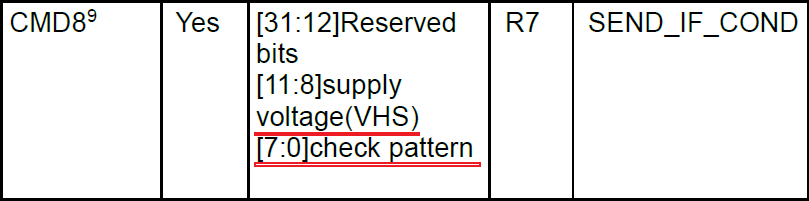
Get the voltage support range of the card. The diagram shows the 2.7~3.6V range.
>>>Get OCR information: ignore the card status for the first time

The first time cmd41 is sent during probe: the purpose is to get the OCR register information of the card, regardless of the card status.
>>>sd go idle again: cmd0 makes the card enter idle state
Adjust the host support according to the card's OCR, power on/off again, and the device enters idle state.
>>>host synchronize updated support voltage: make the card confirm whether it supports the voltage list provided by the host
>>>host synchronize capability set and confirm OCR information


Keep polling the card status, waiting for device init ready. Test whether the ARG bit31 is set to 1 (device ready).
>>>host gets card CID information: identification information such as MID/OID set at the factory

>>>cmd3/cmd9/cmd7: host gets SD card RCA address and gets CSD register information and selects card operation according to the address



>>>acmd51: Read SCR register information

The SCR register is supplementary information to the CSD register, such as spec version information, etc.
>>>acmd13: Get device status information, pass 512 bytes register information through data line

>>>host gets check func information and executes switch func information


ARG: 0x00FFFFF0, bit31 is 0, check switch-able func information, mainly involving four groups: 1. access mode 2. command system 3. driver strength 4. power limit.
ARG: 0x80FFFFF1, bit31 is 1, switch func operation, switch access mode's func1 to high-speed.
After this step, the SD clock will be adjusted to 48MHz.
>>>acmd6: Adjust device bus width

Set bus width operation, adjusting the bus width to 4bit.
After this step, because the card device is generated, it will match the card driver and generate a block device node.
>>>sd card recognition successful

5.3 Common SD/SDIO Error Waveforms and Logs
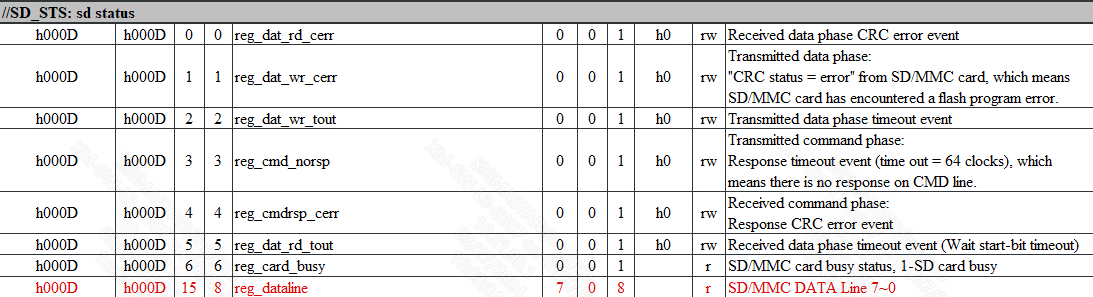
>>>reg_sdio status
>>>cmd no rsp


The host has sent cmd request and the clock is output normally, but no device response is received within 8T time.
The driver will print the SD_STS: 0x0F08 error code. The error code focuses on the lower 8 bits, which are explained by comparing with the offset: 0xd in the reg_sdio table.
>>>cmd crc



After the host normally sends cmd17/18/24/25 write commands, there is a data response on the data line. The last 5 bits of the write command dat0 are the CRC status confirmation identified by the device. Correct is '00101', error is '01011'.
The CRC of read commands is verified internally by the IP.
The driver will print SD_STS: 0x0F01 (read CRC)/SD_STS: 0x0F02 (write CRC) error code. The error code focuses on the lower 8 bits, which are explained by comparing with the offset: 0xd in the reg_sdio table.
>>>cmd timeout
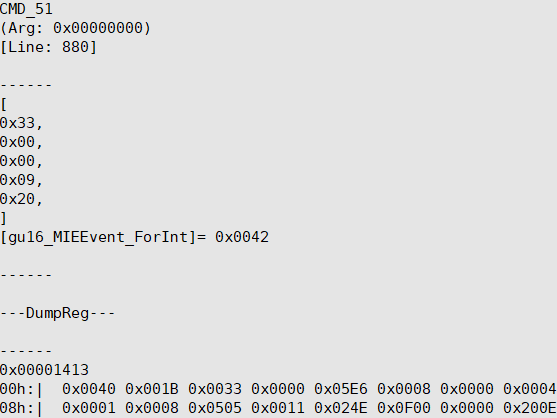

Command timeout is a judgment at the driver level, so the waveform is generally normal. It is mainly reflected in the driver's debug err log.
The driver will print (FAIL) = 0100 error code, which means the waiting time set by the driver has been reached, but the event could not be received. Refer to "2. SD/SDIO Communication Process Issues".
>>>cmd6 executes switch func error
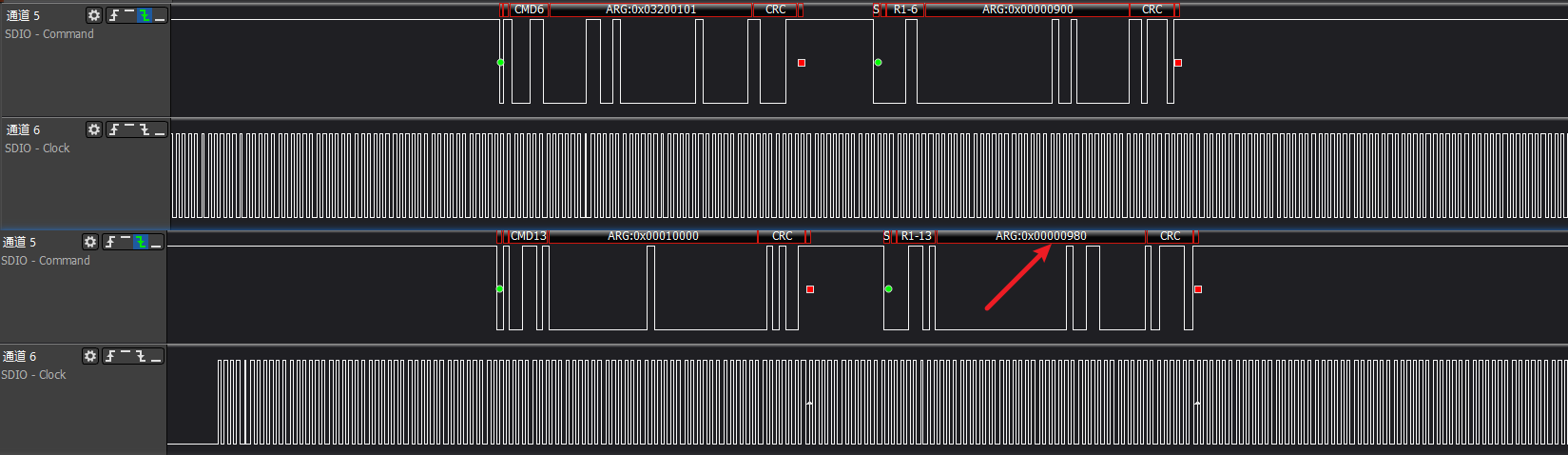
cmd6 command is special, its response is of type r1b. If cmd6 command itself executes an error, the immediately following cmd13 response will feed back the error status.
In the diagram, it is a switch error. cmd13 response status shows '980', which means device switch error.
>>>Common timing issue 1: when cmd is sent, clk is turned off
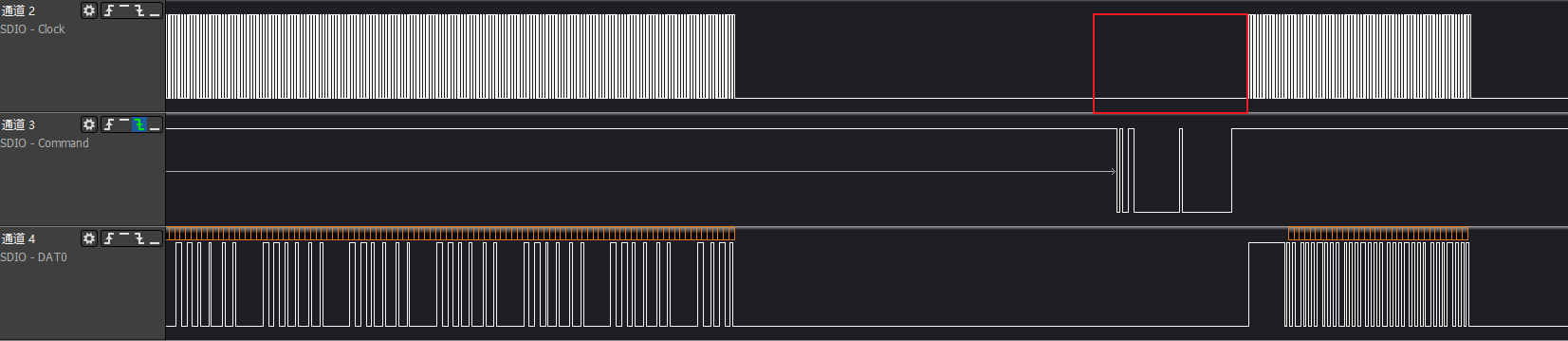
>>>Common timing issue 2: when cmd is sent, clk is abnormal, causing cmd to not be recognized normally

>>>Common timing issue 3: external interference such as electrostatic discharge, high/low temperature, causing clk abnormality
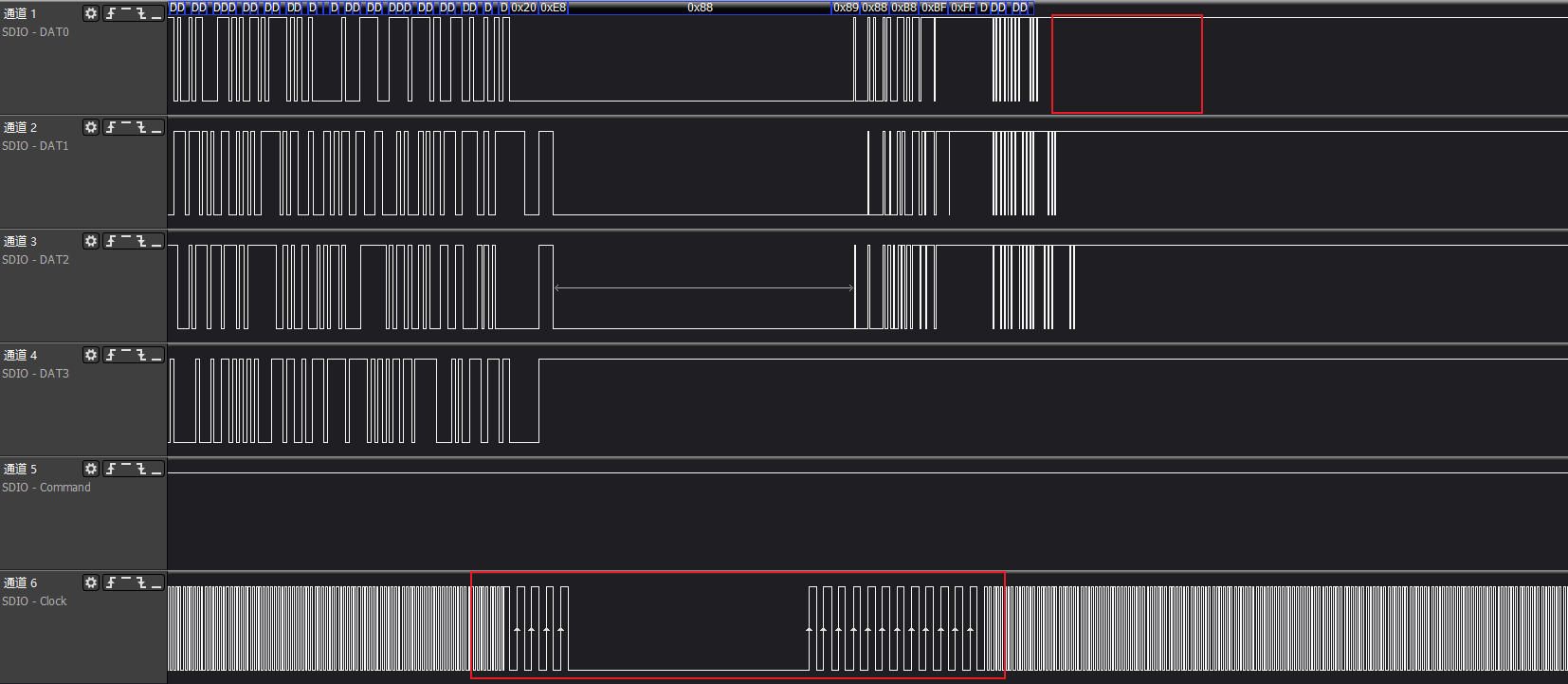
>>>Common timing issue 4: clk has almost no sampling setup time, easily causing misjudgment
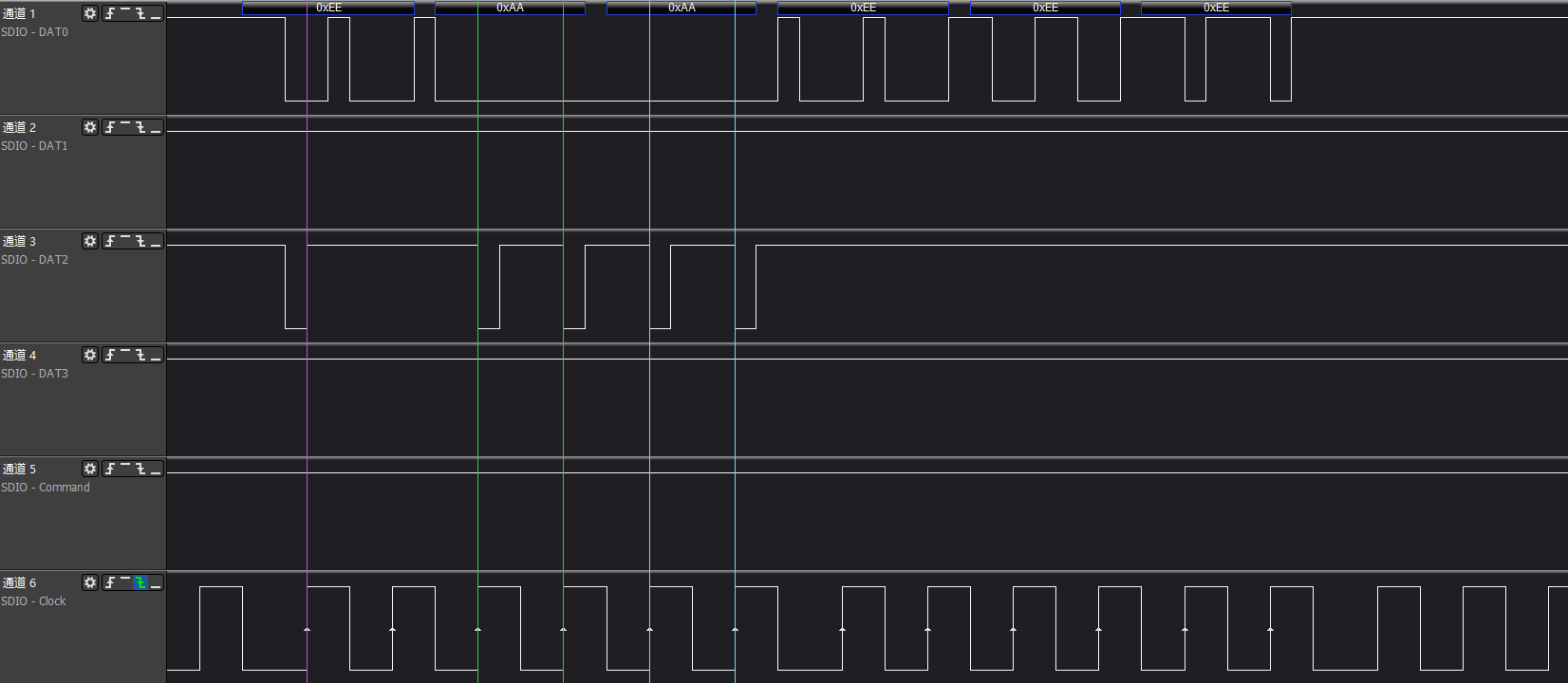
Timing issues are generally complex and require HW RD/CAE intervention to provide solutions. Common software methods usually include adjusting phase, improving driving capability, spread spectrum, etc.