SGS Audio Debug SOP Manual
REVISION HISTORY
| Revision No. | Description |
Date |
|---|---|---|
| 1.0 | 12/16/2024 | |
| 1.1 | 06/10/2025 |
Issue 1. Speaker No Sound Output
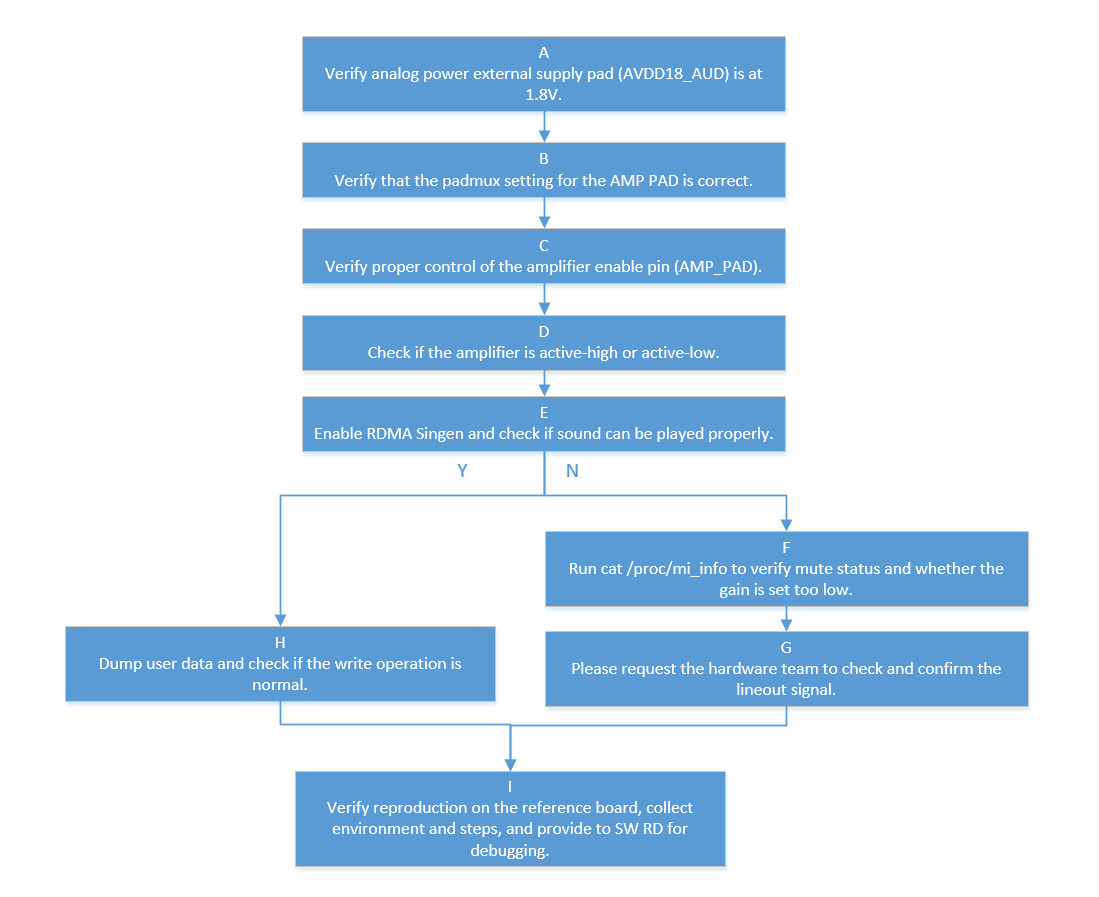
| Flow | Method | Exit Condition |
Next Step |
Materials Required for SWRD |
Related FAQ |
|---|---|---|---|---|---|
| A | During playback, use a multimeter to confirm whether AUDIO AUDD18_AUD is at 1.8V | Exit Condition 1: 1. During playback, AUDD18_AUD voltage deviates significantly from 1.8V Exit Condition 2: 2. During playback, AUDD18_AUD is stable at approximately 1.8V |
Exit Condition 1: >External power supply issue exists, seek CAE assistance. Exit Condition 2: >External power supply is normal ==>B |
||
| B | Confirm whether the AMP pad padmux setting corresponds to the board (verify if the amp pad on the EVB schematic matches the amp pad in padmux.dtis) | Exit Condition 1: 1. Pad configuration is correct Exit Condition 2: 2. Pad does not match the board |
Exit Condition 1: >C Exit Condition 2: >Please modify the amp pad in padmux.dtsi yourself |
||
| C | During playback, use a voltmeter to confirm whether the AMP pad toggles normally between high and low levels |
Exit Condition 1: 1. Can toggle normally between high and low Exit Condition 2: 2. Cannot toggle between high and low |
Exit Condition 1: >D Exit Condition 2: Trace routing abnormal>Please seek CAE assistance for troubleshooting |
||
| D | Confirm whether the customer board AMP PAD is enabled by high or low level | Exit Condition 1: 1. Enabled by high level Exit Condition 2: 2. Enabled by low level |
Exit Condition 1: >E Exit Condition 2: > Modify the parameter in the corresponding board's dtsi sound node node:amp-pad, change 1 to 0 to indicate low-level enable |
||
| E | During playback, enable RDMA Singen to confirm whether sound output is produced echo singen [SinGen Index][Enable] > /proc/mi_modules/mi_ao/mi_aox SinGen 0: Device0. SinGen 1: Device1. SinGen 2: Device2. SinGen 3: Device3. Example: echo singen 0 1 > /proc/mi_modules/mi_ai/mi_ai0, to enable Singen for Device0 |
Exit Condition 1: 1. Sound output is produced Exit Condition 2: 2. No sound output is produced |
Exit Condition 1: >H Exit Condition 2: >F |
||
| F | Cat mi proc info to confirm whether mute is enabled or gain value is set too small | Exit Condition 1: 1. Configuration issue exists Exit Condition 2: 2. No configuration issue exists |
Exit Condition 1: ==> Confirm settings with customer Exit Condition 2: ==> G |
||
| G | During playback with RDMA Singen enabled, use an oscilloscope to capture lineout output | Exit Condition 1: 1. Signal present at lineout Exit Condition 2: 2. No signal at lineout |
Exit Condition 1: >Seek CAE assistance to confirm if it is an amplifier issue Exit Condition 2: >After confirming with oscilloscope that there is no signal at the chip output, seek SWRD assistance |
Whether issue can be reproduced on reference board, environment setup method | |
| H | Dump user data to confirm whether written data is normal | Exit Condition 1: dump data is normal Exit Condition 2: dump data is abnormal |
Exit Condition 1: > Seek SW RD assistance Exit Condition 2: > Troubleshoot customer app issue |
Confirm whether issue can be reproduced on reference board, environment for reproducing the issue, and reproduction method |
Issue 2. AMIC Recording No Data
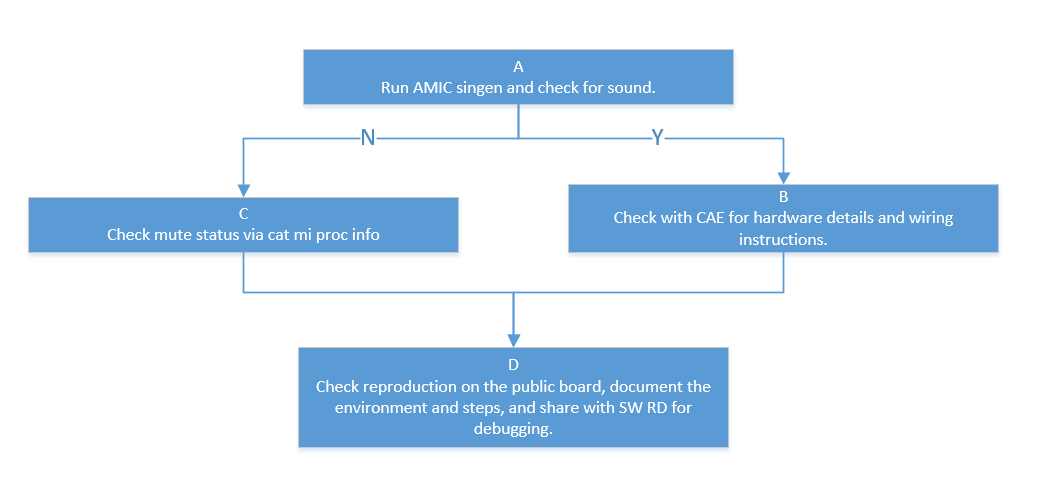
| Flow | Method | Exit Condition |
Next Step |
Materials Required for SWRD |
Related FAQ |
|---|---|---|---|---|---|
| A | During recording, enable Amic Sinegen to confirm whether sine wave can be recorded (refer to MI_AI documentation for Singen enable method) | Exit Condition 1: 1. Cannot record sound Exit Condition 2: 2. Can record sound |
Exit Condition 1: Most likely a software issue, perform software troubleshooting==>C Exit Condition 2:Most likely a hardware issue, perform hardware troubleshooting==>B |
||
| B | Seek CAE to confirm hardware issues, including Audio 1.8V power supply, AMIC bias, and AMIC wiring location, and other hardware-related issues |
Exit Condition 1: 1. Hardware confirmed no issue Exit Condition 2: 2. Hardware issue found |
Exit Condition 1: ==>D Exit Condition 2: CAE assistance |
||
| C | Cat mi proc info to confirm whether AI interface is muted | Exit Condition 1: 1. Not muted Exit Condition 2: 2. Muted |
Exit Condition 1: ==> Seek SW RD analysis Exit Condition 2: Troubleshoot customer APP settings |
Confirm whether issue can be reproduced on reference board, environment for reproducing the issue, and reproduction method |
Issue 3. I2S Codec Adaptation Issue
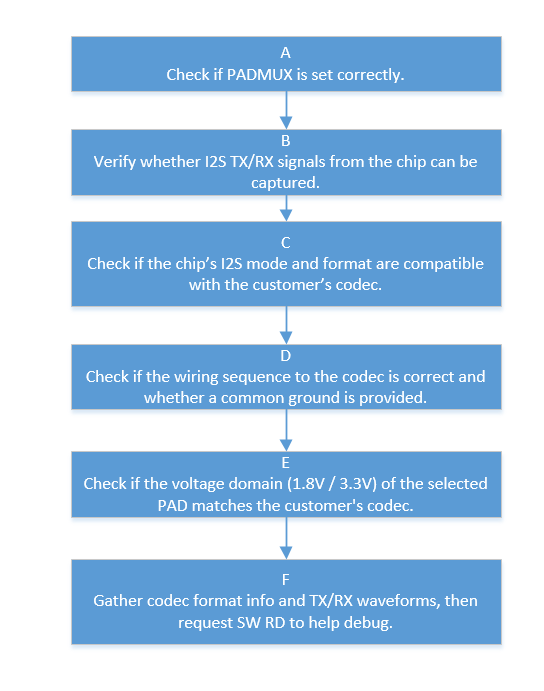
| Flow | Method | Exit Condition |
Next Step |
Materials Required for SWRD |
Related FAQ |
|---|---|---|---|---|---|
| A | Confirm whether the AUDIO I2S PAD padmux configuration corresponds to the development board, and whether the pad conflicts with other modes Method: cd vim arch/arm/boot/dts/xxx_xxxx-padmux.dtsi Search for whether I2S PAD is switched to MDRV_PUSE_I2S0_XX_XXX mode, and use IO_Check Tool to verify whether mode setting is successful(./io_check_xxx PinID) |
Exit Condition 1: 1. padmux not configured correctly or conflicts with other modes Exit Condition 2: 2. I2S PAD configuration is normal |
Exit Condition 1: >Assist customer in modifying padmux settings Exit Condition 2: > B |
||
| B | Run mi_demo prog_audio_audio corresponding I2S case and use an oscilloscope to capture Tx or Rx signals | Exit Condition 1: Normal tx rx clk data signals can be captured Exit Condition 2: Signals cannot be captured, or signals are abnormal |
Exit Condition 1: >C Exit Condition 2: > Seek CAE to confirm pad routing issues and interference issues |
||
| C | Confirm whether the I2S mode format and other formats on the chip side match the customer codec, refer to MI API documentation | Exit Condition 1: Format is normal Exit Condition 2: Format is abnormal |
Exit Condition 1: >D Exit Condition 2: >Assist customer in modifying I2S format |
||
| D | Confirm whether the wiring sequence connected to the codec is correct, and whether there is a common ground For 6-wire mode: TX_BCK<>RX_BCK TX_WCK<>RX_WCK TX_SDO<>RX_SDI PS: codec LRCK is WCK For 4-wire mode: RX_BCK<>RX_BCK RX_WCK<>RX_WCK RX_SDI<>TX_SD0 TX_SD0<==>RX_SDI |
Exit Condition 1: Wiring sequence is correct, common ground exists Exit Condition 2: Wiring sequence is abnormal, no common ground |
Exit Condition 1: ==> E Exit Condition 2: ==>Assist customer in confirming wiring sequence issues |
||
| E | Confirm whether the voltage domain 1.8V/3.3V of the selected pad matches the customer codec | Exit Condition 1: Voltage matches Exit Condition 2: Voltage does not match |
Exit Condition 1: ==> Organize customer codec information, Tx Rx waveform signals, seek SW RD assistance for troubleshooting Exit Condition 2:Seek CAE to confirm the method for switching the corresponding pad voltage domain |
Issue 4. DMIC Not Working Properly
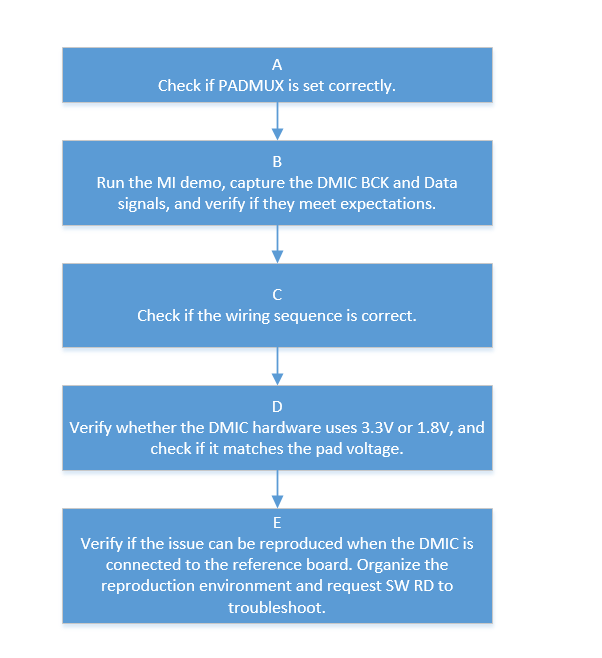
| Flow | Method | Exit Condition |
Next Step |
Materials Required for SWRD |
Related FAQ |
|---|---|---|---|---|---|
| A | Confirm whether the AUDIO DMIC PAD padmux configuration corresponds to the development board, and whether the pad conflicts with other modes Method: cd vim arch/arm/boot/dts/xxx_xxxx-padmux.dtsi Search for whether DMIC PAD is switched to MDRV_PUSE_DMIC0_XX mode, and use IO_Check Tool to verify whether mode setting is successful(./io_check_xxx PinID) |
Exit Condition 1: >padmux not configured correctly or conflicts with other modes Exit Condition 2: >DMIC PAD configuration is normal |
Exit Condition 1: >Assist customer in confirming padmux issues Exit Condition 2: > B |
||
| B | Run prog_audio_audio dmic demo and capture DMIC BCK and DMIC data | Exit Condition 1: 1. BCK at 2.4M, Data present Exit Condition 2: No BCK, No Data Exit Condition 3: BCK present, no data |
Exit Condition 1: ==>C Exit Condition 2: Seek CAE to confirm whether routing issues exist Exit Condition 3: Seek CAE to confirm whether DMIC is defective |
||
| C | Confirm whether the wiring sequence is correct DMIC wiring is relatively simple, mainly CLK, data, power, and ground |
Exit Condition 1: Wiring sequence is correct Exit Condition 2: Wiring sequence is incorrect |
Exit Condition 1: ==>D Exit Condition 2: Assist customer in clarifying wiring sequence |
||
| D | Confirm whether DMIC hardware is 3.3V or 1.8V, and confirm whether the currently selected pad is 3.3V or 1.8V; voltages must match | Exit Condition 1: 1. Voltage matches Exit Condition 2: 2. Voltage does not match |
Exit Condition 1: > Organize environment for reproducing the issue, whether customer DMIC spec can reproduce the issue on reference board, seek SW RD assistance Exit Condition 2: > Seek CAE to confirm voltage domain adjustment method |
Customer DMIC spec Reference board reproduction environment |
Issue 5. AI Interface Known Issues FAQ
5.1 AI Unable to Retrieve Data
Capture device proc information based on the specific scenario to check current buffer configuration and usage. cat /proc/mi_modules/mi_ai/mi_aix
Confirm the output buffer configuration. usrDepth and BufCntQuota represent the number of buffers available to the application and the total number of buffers respectively. Check whether usrDepth and BufCntQuota are set to 0.
 Confirm the application buffer retrieval status. usrLockedCnt indicates the number of buffers held by the application without being released. If usrLockedCnt equals usrDepth, it indicates that the application has acquired all available output buffers.
5.2. Buffer Interval Unstable (Buffer Drop)
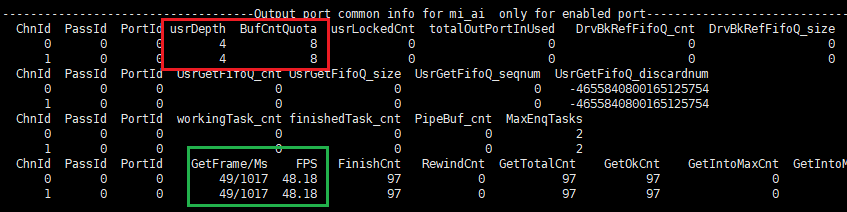
Capture device proc information based on the specific scenario to check current buffer configuration and usage. cat /proc/mi_modules/mi_ai/mi_aix
- Confirm the output buffer configuration. usrDepth and BufCntQuota represent the number of buffers available to the application and the total number of buffers respectively. Check whether usrDepth and BufCntQuota are too small, causing buffer retrieval by the application to affect normal AI thread operation.
- If buffers are sufficient but GetFrame/Ms and FPS are significantly lower than expected, organize information and contact the audio owner.
5.3. Sound Clipping with Normal Sample Values
This issue is commonly observed with AMIC and DMIC interfaces. Both interface paths have interface gain and DPGA gain. A common scenario is that interface gain is set too high, causing clipping, and then attenuation is applied through DPGA gain, resulting in sample values falling back into the normal range.
5.4. AMIC Pop Noise Issue
Root Cause: The ADC reference capacitor needs to charge to 0.9V. Recording before the capacitor is fully charged will result in noise, known as pop noise.
Solutions:
-
For chips after ifackel, fast capacitor charging design has been added. The default code includes a 50ms delay, so this issue does not occur.
-
For chips before ifackel, keep adc on needs to be enabled in the dtsi file to resolve this issue by increasing power consumption.
-
For fast-boot scenarios where timing is critical and delay is undesirable, SGS_BACH and SGS_BACH_FAST_BOOT need to be enabled in the IPL. This resolves the issue by initiating ADC reference capacitor charging during the IPL phase.
5.5. DMIC Pop Noise Issue
Two root causes:
-
DMIC hardware cannot output valid data immediately after receiving BCK. Typically, approximately 10ms is required before valid data can be output. This abnormal data is accumulated by the IC to an abnormal value, resulting in pop noise.
-
Many DMIC hardware devices have DC offset. The HPF module inside the IC can pull the DC offset back to the mid-value, but this process requires time. The presence of offset also causes pop noise.
Solutions:
- Add the dmic-delay = <80> field to the dtsi sound node; The parameter 80 represents the delay time. The pop noise issue is mitigated by delaying for 80ms.
Issue 6. AO Interface Known Issues FAQ
6.1. DAC Pop Noise Issue
Two root causes:
-
Voltage variation at the moment of DAC activation.
-
The DAC reference capacitor requires time to charge. Activating the DAC before charging is complete will result in abnormal sound.
Solutions:
-
For chips after ifackel, fast capacitor charging design has been added. A 50ms delay is implemented to wait for capacitor charging completion, which also avoids the voltage variation during DAC activation. The AMP pad is then enabled, and DAC pop noise is resolved through amp mute.
-
For chips before ifackel, keep dac on needs to be enabled in the dtsi file to resolve this issue by increasing power consumption.
Issue 7. Noise Issue When Speaker Amplifier Gain is Adjusted to 9x
Background: For customers with Pcupid IO at 1.8V, the amplifier gain is adjusted to 9x to meet expected output power. During program execution, noise can be heard from the speaker. In this scenario, audio is not enabled; only the amplifier is enabled.
Root Cause: When CPU loading is high, internal current noise from the chip couples to the amplifier through ground. When the amplifier is enabled, noise becomes audible.
Solution: This issue can only be resolved by using a differential amplifier to eliminate ground noise. Since both input terminals of the differential amplifier carry noise, the noise can be cancelled out through differential processing. Additionally, CAE assistance is required to change the Audio AUD_VRM pad connection from ground to a relatively clean ground, the same as the amplifier ground.