AOV Function Description
1. AOV Function Introduction
This document is a supplement to the content of AOV Demo Program Description, providing a more detailed introduction to AOV functionality.

As shown in the figure above. The Always On Video (AOV) all-day video monitoring solution is specially designed for outdoor monitoring scenarios, capable of achieving continuous intelligent monitoring under low-power conditions, specifically supporting the following functions:
-
Function Scenario: Achieve low-power all-day video monitoring, enabling long-term operation in battery-powered environments
-
Video Stream Processing: sensor→vif→isp→scl→venc→file storage, supporting H.264/H.265 encoding
-
Intelligent Detection: Integrated AI target detection function, supporting multi-target recognition such as human figures and vehicles
-
Adaptive Frame Rate: Intelligently switches between 1 FPS (low power) and 15 FPS (event recording) based on detection results
-
Multi-sensor Support: Supports single/dual sensor configuration
-
Supplementary Light Control: Supports three supplementary light strategies: hardware photosensitive, software photosensitive, and Fast AE
-
Audio Support: Optional audio input function, recording audio when events are triggered
2. Parameter Description
This section introduces all available parameters of the AOV Demo:
2.1. Basic Parameters
-
index: Specify sensor index, default value: 0
index 1 # 3840x2160@21fps index 2 # 2016x1512@30fps index 3 # 1920x1080@30fps index 4 # 3264x2448@30fps index 6 # 3840x2160@30fps -
dual_sensor: Enable dual sensor mode, default value: single sensor
dual_sensor -
model: Specify AI detection model path, default value:
/config/dla/spdy48.imgmodel ./spdy48.img
2.2. Encoding and Storage Parameters
-
dump: Specify video file storage path, default value: current directory
dump /mnt/sdcard/video -
store: Specify the number of video frames cached in memory, default value: 10 frames
store 10 # Write to file after caching 10 frames -
time: Set program running time (seconds), default value: 0 (unlimited)
time 3600 # Exit after running for 1 hour
2.3. Image Quality Parameters
-
iqbin_b: Specify IQ file path for the scene, default value: none
iqbin_b ./bright_api.biniqbin is packaged to the board's
/config/iqfilepath by default. It can also be manually copied from the sdk's/project/board/iford/iqfile/imx681path to the board.The iqbin selection here should correspond to the selected index number, with the following correspondence:
index 1  # imx681_8m_comake_1201_30fps.bin
index 2  # imx681_3m_comake_1201_30fps.bin
index 3  # imx681_3m_comake_1201_30fps.bin
index 4  # imx681_8m_comake_1201_30fps.bin
index 6  # imx681_8m_comake_1201_30fps.bin
2.4. Supplementary Light Control Parameters
Note
This function requires corresponding driver and hardware cooperation. It cannot be directly used on the D2 development board and requires self-configuration. Configuration can be seen in the supplementary light strategy introduction section below.
- aux_conv: Specify supplementary light strategy, default value: not enabled
aux_conv 0    # Hardware photosensitive sensor
aux_conv 1    # Software photosensitive algorithm
aux_conv 2    # Fast AE (requires sensor support)
2.5. System Configuration Parameters
- realtime: Enable VIF-ISP real-time binding mode, default value: non-real-time
realtime
2.6. Audio Parameters
Note
This function is not currently supported.
-
-ai: Enable audio input
-ai /mnt/sdcard/audioDescription: Used to enable audio input and specify the storage path for recorded audio. The demo will record audio during high frame rate scenarios.
3. Working Mode Description
The system working mode is shown in the following figure:
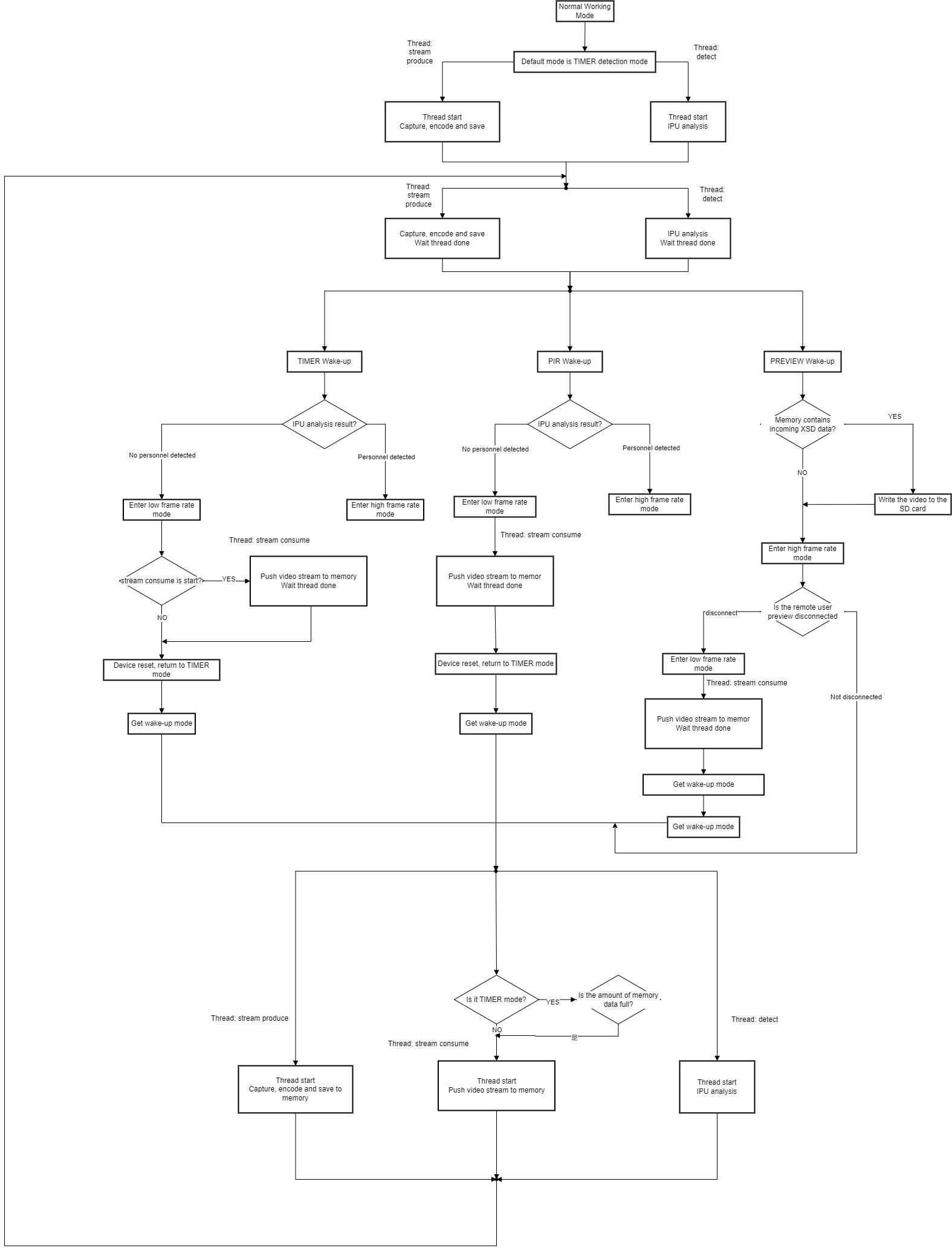
Working Flow:
-
Low Frame Rate Monitoring: Continuous monitoring at 1 FPS to save power
-
Intelligent Detection: AI analyzes video streams in real-time, detecting targets such as human figures and vehicles
-
Event Trigger: Automatically switch to 15 FPS high frame rate when targets are detected
-
High-Definition Recording: Record high-quality video and audio during events
-
Automatic Recovery: After targets leave, confirm no targets and restore low frame rate
4. Hardware Configuration Description
In the current demo, the following configuration items exist but have differences in actual use:
- PIR Sensor Wake-up: There is no PIR hardware on the board, PIR is currently simulated by buttons.
- Filter (IR-CUT) and Supplementary Light LED: There is no corresponding hardware on the board, but IR-CUT interfaces are reserved. Related operations currently have no effect and require self-configuration. Configuration methods are described below.
5. Technical Features
5.1. Basic Concepts
5.1.1. AE (Auto Exposure) Auto Exposure
AE is the abbreviation for automatic exposure control and one of the core functions of camera image processing. It automatically adjusts the camera's exposure parameters (aperture, shutter, gain, etc.) according to ambient light conditions to ensure appropriately bright images are obtained.
5.1.2. Fast AE Fast Auto Exposure
Fast AE is an enhanced feature provided by sensors that can quickly respond to ambient light changes in low frame rate scenarios. When ambient light changes drastically, traditional AE converges slowly, which may cause the image to be too dark or too bright. Fast AE can significantly shorten convergence time and improve image quality.
5.1.3. ISP (Image Signal Processor) Image Signal Processor
ISP is a hardware unit dedicated to image processing, responsible for receiving raw image data from sensors and performing a series of processing such as noise reduction, white balance, color correction, sharpening, etc., ultimately outputting high-quality video streams.
5.2. Supplementary Light Strategies
The system provides three supplementary light solutions to adapt to different environments:
5.2.1. Software Photosensitive
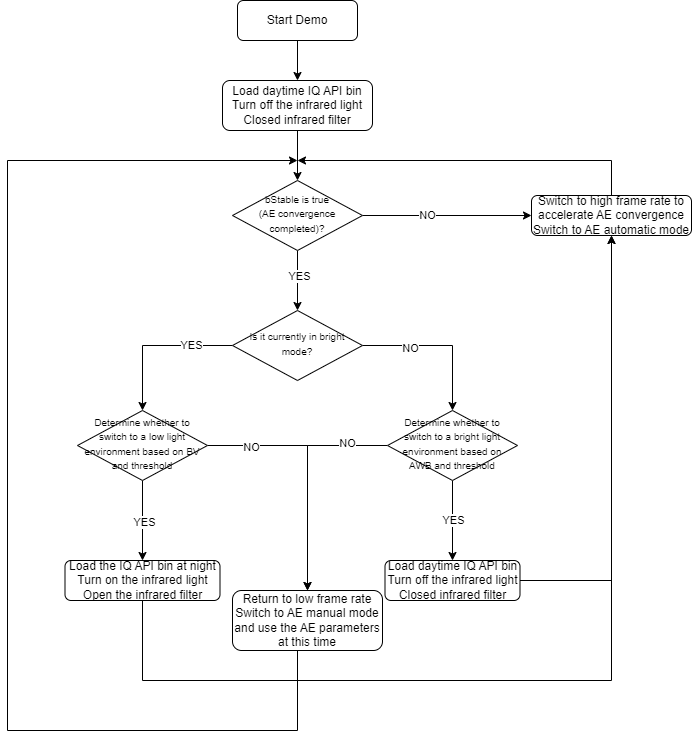
By querying the ISP AE convergence status, automatically switch to high frame rate assisted convergence when ambient light changes to ensure image quality.
Working Mechanism:
-
Query ISP AE convergence status (
bIsStable) -
When AE non-convergence is detected, switch to high frame rate mode
-
Continue monitoring until AE re-converges
-
Control supplementary light switch based on ambient changes
5.2.2. Hardware Photosensitive
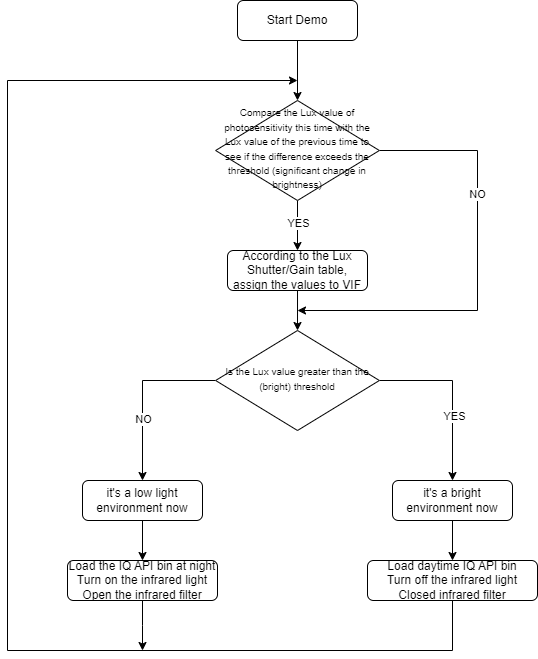
Use hardware photosensitive sensors to detect ambient light, directly controlling supplementary light switch and exposure parameters based on lux values.
Working Mechanism:
-
Read lux value from hardware photosensitive sensor
-
Compare with previous lux value to detect light changes
-
Determine ambient light status based on lux value
-
Control supplementary light switch and exposure parameters
5.2.3. Fast AE
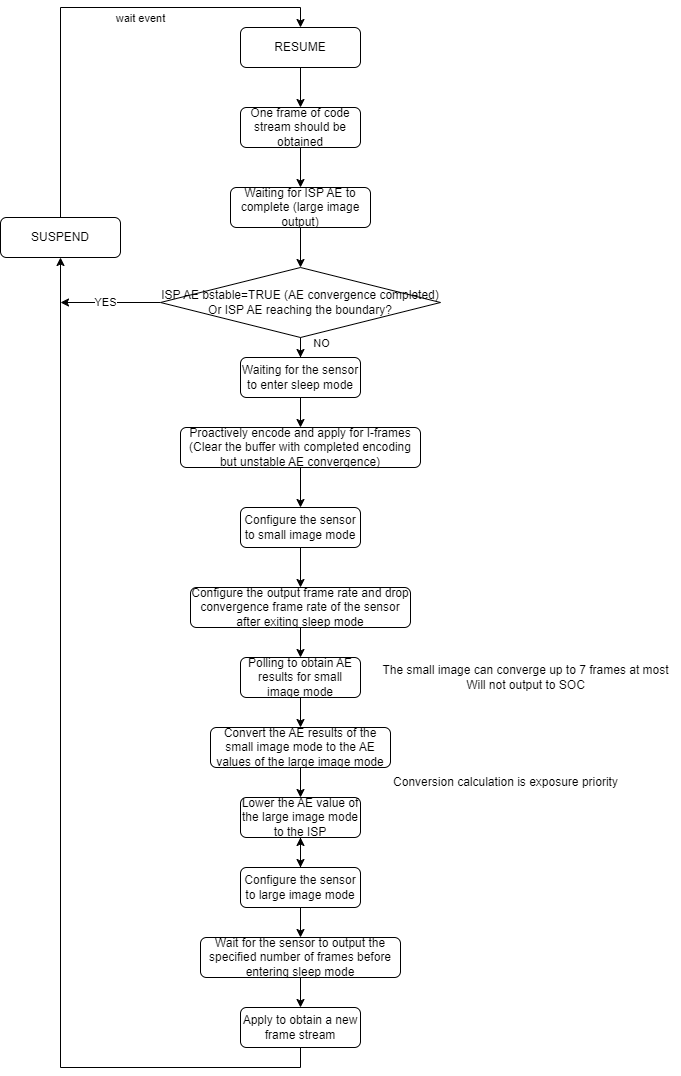
Utilize the sensor's Fast AE function to quickly respond to ambient light changes in low frame rate scenarios, especially suitable for sensors that support this feature.
Program Configuration:
// Configure in ST_Common_AovPipeInit
MI_U32 u32StreamOutCnt = 10;    // Number of output frames after Fast AE completion
MI_U32 u32DropCnt = 5;         // Number of dropped frames
MI_U32 u32RunThreshold = 3;    // Start threshold

ST_Common_FastAE_InitIspConvParam(u32StreamOutCnt, u32DropCnt, u32RunThreshold);
5.3. Supplementary Light Control in Programs
5.3.1. Supplementary Light Strategy Selection
Select supplementary light strategy through aux_conv parameter:
aux_conv 0    # Hardware photosensitive
aux_conv 1    # Software photosensitive
aux_conv 2    # Fast AE
5.3.2. Supplementary Light Control Functions
Key supplementary light control functions in the program:
-
ST_Common_AovFastAE_Run()- Execute Fast AE -
ST_Common_AovISPAdjust_HWLightSensor()- Hardware photosensitive adjustment -
ST_Common_AovSWLightSensorProcess()- Software photosensitive processing
5.3.3. Brightness Switching Processing
When ambient brightness changes are detected:
-
Load corresponding IQ configuration files
-
Control supplementary light switch
-
Reconfigure ISP parameters
-
Wait for AE convergence to complete
5.3.4. Supplementary Light Control Configuration Implementation
The D2 development board does not configure photosensitive, filter, and LED drivers by default, but all interfaces are reserved and can be configured and added for use by yourself.
Photosensitive Configuration Implementation
-
Device Node: /dev/light_sensor
-
Implementation Function: SS_Light_Senosr_Get_LightSensor_Value() (sdk/verify/common/ss_light_sensor/ss_light_sensor_api.c)
-
Implementation Method: Through ioctl system calls, using IOCTL_LIGHT_SENSOR_CONTROL_GET_LUX command to get lux value
-
Error Handling: Return ERR_HW_GETLUX_FAILED or ERR_HW_GETLUX_NOUPDATE to indicate read failure
Filter (IR-cut) Configuration Implementation
-
Device Node: /dev/light_misc
-
Implementation Function: Dev_Light_Misc_Device_Set_Ircut() (sdk/verify/sample_code/libraries/light_misc_control/light_misc_control_user/light_misc_control_api.c)
-
Control Method:
E_SWITCH_STATE_ON: Turn on IR-cut filter (day mode)
E_SWITCH_STATE_OFF: Turn off IR-cut filter (night mode)
E_SWITCH_STATE_KEEP: Keep current state
-
Implementation Method: Through ioctl system calls, using IOCTL_LIGHT_MISC_CONTROL_SET_IRCUT command
LED Configuration Implementation
-
Device Node: /dev/light_misc
-
Implementation Function: Dev_Light_Misc_Device_Set_Attr() (sdk/verify/sample_code/libraries/light_misc_control/light_misc_control_user/light_misc_control_api.c)
-
Control Mode:
E_CONTROL_TYPE_LONG_TERM_ON: Long-term on
E_CONTROL_TYPE_LONG_TERM_OFF: Long-term off
E_CONTROL_TYPE_MULTI_FRAME: Multi-frame mode
-
Implementation Method: Through ioctl system calls, using IOCTL_LIGHT_MISC_CONTROL_SET_ATTR command
5.4. Frame Rate Control Strategy
- Low Frame Rate Mode: 1 FPS, extremely low power consumption, suitable for long-term monitoring
- High Frame Rate Mode: 15 FPS, smooth image quality, suitable for event recording
- Intelligent Switching: Automatically switch based on AI detection results, balancing power consumption and image quality
5.5. Storage Management
- File Splitting: Automatically split video files according to frame rate changes
- Naming Convention:
{serial_number}_snr{sensorID}_st{frameRate}fps.es - Cache Mechanism: Batch write after caching multiple frames in memory to reduce disk I/O
- Integrity Guarantee: Use fsync to ensure data is written safely
The serial number will increase every time the frame rate changes, and the final saved files may be in the following form:
1_snr0_st_15fps.es
2_snr0_st_1fps.es
3_snr0_st_15fps.es
4_snr0_st_1fps.es
...
5.6. External MCU and SOC Power On/Off Scheme
When the SOC power-off is not completed, and an event is triggered at this time causing the SOC to power on, it may lead to system abnormalities. Related explanations and solutions can be found in External MCU and SOC Power On/Off Scheme.
6. API Description
6.1. ST_Common_AovGetDefaultAttr
-
Function
Get the default attributes of the aov handle
-
Syntax
MI_S32 ST_Common_AovPipeGetDefaultAttr(ST_Common_AovHandle_t *pstAovHandle); -
Parameters
Parameter Name Description Input/Output pstAovHandle aov handle Input/Output -
Return Value
0: Success
Non-zero: Failure
6.2. ST_Common_AovSetSuspendTime
-
Function
Set the sleep duration of the system, unit is seconds, range is [1s~2^32s)
-
Syntax
MI_S32 ST_Common_AovSetSuspendTime(MI_U32 u32SuspendSec); -
Parameters
Parameter Name Description Input/Output u32SuspendSec Sleep duration Input -
Return Value
0: Success
Non-zero: Failure
6.3. ST_Common_AovEnterSuspend
-
Function
System enters sleep state
-
Syntax
MI_S32 ST_Common_AovEnterSuspend(ST_Common_AovHandle_t *pstAovHandle); -
Parameters
Parameter Name Description Input/Output pstAovHandle aov handle Input/Output -
Return Value
0: Success
Non-zero: Failure
6.4. ST_Common_AovEnterLowPowerMode
-
Function
System enters low power mode, device powers off
-
Syntax
MI_S32 ST_Common_AovEnterLowPowerMode(ST_Common_AovHandle_t *pstAovHandle); -
Parameters
Parameter Name Description Input/Output pstAovHandle aov handle Input/Output -
Return Value
0: Success
Non-zero: Failure
6.5. ST_Common_AovEnterNormalPowerMode
-
Function
System restarts and enters normal power mode
-
Syntax
MI_S32 ST_Common_AovEnterNormalPowerMode(); -
Parameters
None
-
Return Value
0: Success
Non-zero: Failure
6.6. ST_Common_AovSetLowFps
-
Function
Switch to low frame rate
-
Syntax
MI_S32 ST_Common_AovSetLowFps(ST_Common_AovHandle_t *pstAovHandle); -
Parameters
Parameter Name Description Input/Output pstAovHandle aov handle Input -
Return Value
0: Success
Non-zero: Failure
6.7. ST_Common_AovSetHighFps
-
Function
Switch to high frame rate
-
Syntax
MI_S32 ST_Common_AovSetHighFps(ST_Common_AovHandle_t *pstAovHandle); -
Parameters
Parameter Name Description Input/Output pstAovHandle aov handle Input -
Return Value
0: Success
Non-zero: Failure
6.8. ST_Common_AovRemoteStatusCheck
-
Function
Determine the remote connection status
This interface requires customer custom implementation
-
Syntax
ST_RemoteStatus_e ST_Common_AovRemoteStatusCheck(MI_U8 *pu8SimulateCmd); -
Parameters
Parameter Name Description Input pu8SimulateCmd Use characters to simulate remote connection status Input -
Return Value
Description E_ST_REMOTE_CONNECTTING Connecting to remote E_ST_REMOTE_DISCONNECT Disconnected from remote
6.9. ST_Common_AovWakeupCheck
-
Function
Detect how the device was woken up
-
Syntax
ST_WakeupType_e ST_Common_AovWakeupCheck(ST_Common_AovHandle_t *pstAovHandle); -
Parameters
Parameter Name Description Input pstAovHandle Whether to enable test mode based on pstAovHandle->stAutoTestParam.bAutoTest Input -
Return Value
Description E_ST_WAKEUP_TIMER Timer wake-up, corresponding to rtc_alarm; if MCU replaces RTC, corresponds to MCU timer wake-up E_ST_WAKEUP_PIR PIR wake-up, corresponding to rtc_io1; if MCU replaces RTC, corresponds to MCU PIR event E_ST_WAKEUP_PREVIEW User preview wake-up, corresponding to rtc_io0; if MCU replaces RTC, corresponds to MCU user preview event
6.10. ST_Common_AovOSCheck
-
Function
Detect current OS
-
Syntax
ST_OSType_e ST_Common_AovOSCheck(); -
Parameters
None
-
Return Value
E_ST_OS_PURELINUX pure linux system E_ST_OS_DUALOS dualos
6.11. ST_Common_AovBatteryLevelCheck
-
Function
Detect device battery status
This interface requires customer custom implementation
-
Syntax
ST_BatteryLevel_e ST_Common_AovBatteryLevelCheck(MI_U8 *pu8SimulateCmd); -
Parameters
Parameter Name Description Input/Output pu8SimulateCmd Use characters to simulate battery level Input -
Return Value
E_ST_BATTERYLEVEL_NORMAL Normal battery level E_ST_BATTERYLEVEL_LOW Low battery level
6.12. ST_Common_AovStreamCreate
-
Function
Create stream handle, which is essentially a stream list
-
Syntax
MI_S32 ST_Common_AovStreamCreate(ST_Common_AovStreamHandle_t *pstStreamHandle); -
Parameters
Parameter Name Description Input/Output pstStreamHandle stream handle Output -
Return Value
0: Success
Non-zero: Failure
6.13. ST_Common_AovStreamProduce
-
Function
Provide stream, add to stream list after encoding is complete
-
Syntax
MI_S32 ST_Common_AovStreamProduce(ST_Common_AovHandle_t *pstAovHandle, ST_Common_AovStreamHandle_t *pstStreamHandle); -
Parameters
Parameter Name Description Input/Output pstAovHandle aov handle Input/Output pstStreamHandle stream handle Input/Output -
Return Value
0: Success
Non-zero: Failure
6.14. ST_Common_AovStreamConsume
-
Function
Consume the stream list, optionally write to SD card, send data to cloud
-
Syntax
MI_S32 ST_Common_AovStreamConsume(ST_Common_AovHandle_t *pstAovHandle, ST_Common_AovStreamHandle_t *pstStreamHandle); -
Parameters
Parameter Name Description Input/Output pstAovHandle aov handle Input/Output pstStreamHandle stream handle Input/Output -
Return Value
0: Success
Non-zero: Failure
6.15. ST_Common_AovDetect
-
Function
IPU recognition, change state value based on detection results, and perform post-processing (add human figure boxes)
-
Syntax
MI_S32 ST_Common_AovDetect(ST_Common_AovHandle_t *pstAovHandle); -
Parameters
Parameter Name Description Input/Output pstAovHandle aov handle Input/Output -
Return Value
0: Success
Non-zero: Failure
6.16. ST_Common_AovPipeInit
-
Function
Initialize aov pipe
-
Syntax
MI_S32 ST_Common_AovPipeInit(ST_Common_AovHandle_t *pstAovHandle); -
Parameters
Parameter Name Description Input/Output pstAovHandle aov handle Input/Output -
Return Value
0: Success
Non-zero: Failure
6.17. ST_Common_AovPipeStart
-
Function
Start aov pipe
-
Syntax
MI_S32 ST_Common_AovPipeStart(ST_Common_AovHandle_t *pstAovHandle); -
Parameters
Parameter Name Description Input/Output pstAovHandle aov handle Input/Output -
Return Value
0: Success
Non-zero: Failure
6.18. ST_Common_AovPipeStop
-
Function
Stop aov pipe
-
Syntax
MI_S32 ST_Common_AovPipeStop(ST_Common_AovHandle_t *pstAovHandle); -
Parameters
Parameter Name Description Input/Output pstAovHandle aov handle Input/Output -
Return Value
0: Success
Non-zero: Failure
6.19. ST_Common_AovPipeDeInit
-
Function
Deinitialize aov pipe
-
Syntax
MI_S32 ST_Common_AovPipeDeInit(ST_Common_AovHandle_t *pstAovHandle); -
Parameters
Parameter Name Description Input/Output pstAovHandle aov handle Input/Output -
Return Value
0: Success
Non-zero: Failure
6.20. ST_Common_AovDoAudio
-
Function
Audio input output
-
Syntax
MI_S32 ST_Common_AovDoAudio(ST_Common_AovHandle_t *pstAovHandle); -
Parameters
Parameter Name Description Input/Output pstAovHandle aov handle Input/Output -
Return Value
0: Success
Non-zero: Failure