Quick Start
Revision History
| Version | Description |
Date |
|---|---|---|
| 1.0 | 11/27/2025 |
This document aims to guide users in setting up the development environment for the COMAKE PI D2 development board and provides some simple examples to demonstrate how to build and use the Alkaid SDK development environment, including downloading the SDK, compiling it, and downloading firmware onto the development board.
1. Overview
COMAKE PI D2 is equipped with SGS's Iford series IPC SoC SSC309QL chip + WUQI Bluetooth audio SoC chip WQ7036AX.
1.1 Overall Function Introduction
- The main chip uses SSC309QL dual-core ARM Cortex-A32, with a maximum frequency of 1GHz;
- Ultra-small package BGA 8mm*9.5mm SIP LPDDR4 2Gb
- Low power consumption: 1080P@30 H264 video around 320mW, STR standby power consumption 1mW, AOV + human detection 720@1fps 30mW
- ISP supports up to 8M@30, dual-channel support, supports 3A/HDR/WDR/3DNR/LDC
- Encoder supports 4K@30 + 720@30 + 360@30 H264/H265, JPEG 4K@24
- IPU supports 1.5Top@INT8 computing power, Programmable 4/8/16-bit process
- Supports TrustZone and Security Boot
- Onboard high-spec Bluetooth audio SoC chip WQ7036AX,
- Supports BT/BLE 5.4 dual-mode protocol stack and BLE Audio
- Built-in high-performance HiFi 5 DSP and NPU, supports complex multi-microphone uplink noise reduction algorithms and keyword wake-up algorithms
- Integrated Hybrid ANC, capable of high bandwidth and deep noise cancellation for headphones
- Integrated efficient PMU, fine-tuned power management for ultra-low power applications
- Suitable for advanced TWS noise-canceling headphones and other low-power products requiring complex audio processing and voice AI capabilities
- Supports WIFI6/BT/BLE5.4 dual-mode protocols and BLE Audio
- Built-in 16bit 2Gbit LPDDR4X-3200Mbps
- Onboard EMMC capacity of 64GB
- Supports 2.8-inch SPI Panel (maximum interface Max 720*360@30fps)
- Supports 4lane or 2lane (SR00) + 2lane (SR01) MIPI RX interfaces, defaults to single-path 4lane
- Equipped with 1 USB2.0 (can be configured as host or device via software)
- Supports 2 (Chanel) * 2 (PCS) DMIC;
- Supports digital audio output;
- Supports AI Glass/AOV functions
Based on the rich features of this development board, developers can customize functions according to their needs, such as developing action cameras, hunting cameras, law enforcement devices, or professional photography cameras in the portable camera field. In the smart home sector, it can be used to develop lock products, pet robots, etc. In the personal wearable field, it can be used to develop smart glasses, smart camera headphones, and in the drone market, it can be used to develop FPV products. At the same time, the Comake community provides complete software and hardware development materials, and a detailed introduction to this development board can be found in the Development Board Interface Introduction.
2. Getting Started with Development
2.1. Hardware
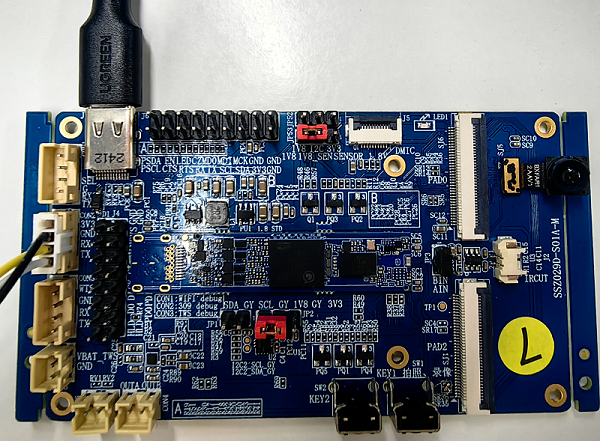
- COMAKE PI D2 development board
- USB data cable
- Serial cable
Prepare the above hardware and refer to the development board's interface introduction to connect the relevant interfaces.
Note
There are currently two hardware versions. Please refer to the v1.0 hardware guide and v2.0 hardware guide as needed.
2.2. Software
Based on the main SOC of this development board, we provide the Alkaid SDK for further application development, which is a software development package based on the Linux kernel. It includes a bootloader, kernel, rootfs, and MI multimedia modules. Users can configure and compile a runnable firmware using a makefile. The Bluetooth audio SOC is currently provided in firmware form; if there are further customization development needs, please contact us for further discussion.
The architecture of the Alkaid SDK is shown in the left side of the figure below, for further introduction please refer to SDK System Architecture Introduction .

As shown in the figure above, the Linux SDK for the ARM main SOC is responsible for handling ISP image-related functions, while the RTOS SDK for the Bluetooth audio SOC is responsible for audio, Bluetooth headset, power management, and other related functions. Data and command interactions in between are conducted through interfaces such as UART/IIS/PSPI.
2.2.1. Obtaining SDK and Images
Note
Note that this link leads to the Comake community.
2.2.2. Setting up the Compilation Environment
2.2.3. Compiling the First Burnable Image
Suggestion
There are various upgrade methods, it is recommended to prioritize using UsbFactoryTool for upgrading.