ADCLP User Guide
REVISION HISTORY
| Revision No. | Description |
Date |
|---|---|---|
| 1.0 | 01/24/2024 | |
| 1.1 | 07/24/2024 | |
| 1.2 | 03/10/2025 | |
| 1.3 | 11/27/2025 |
1. Overview
The Successive Approximation ADC uses a feedback comparison circuit structure. A brief summary of the implementation method is: add a value to the DAC to get a corresponding output analog voltage, then compare this analog voltage with the input analog voltage signal. If the two are not equal, adjust the value, until the two analog voltages are equal. The final value obtained is the desired conversion result.
2. Keyword Description
-
ADCLP
Analog-to-digital converter Low Precision (10-bit)
-
ADCMP
Analog-to-digital converter Medium Precision (12-bit)
-
upper/lower bound
ADCLP can set the upper and lower bound of the external input voltage value. If the value exceeds the range, an interrupt will be triggered.
-
reference voltage
The reference voltage used for analog-to-digital conversion calculations, which is also the maximum range. If the reference voltage is set to 1.8v, when the external input voltage is >=1.8v, the digital value reaches the maximum value of 1023.
3. Function Description
-
SAR ADCLP has a total of 5 Channels to support analog-to-digital conversion of external input voltages
-
The sampling accuracy is 10-bit, so the obtained register value range is 0~0x3ff
-
Supports two levels of reference voltage(maximum range) switching, respectively 1.8V and 1.0V
-
Supports threshold setting of external input voltage
-
Sampling frequency = 12Mhz / 104 = 115384hz (equivalent to a sampling interval of 8667ns per point on the hardware).
4. Hardware Connection
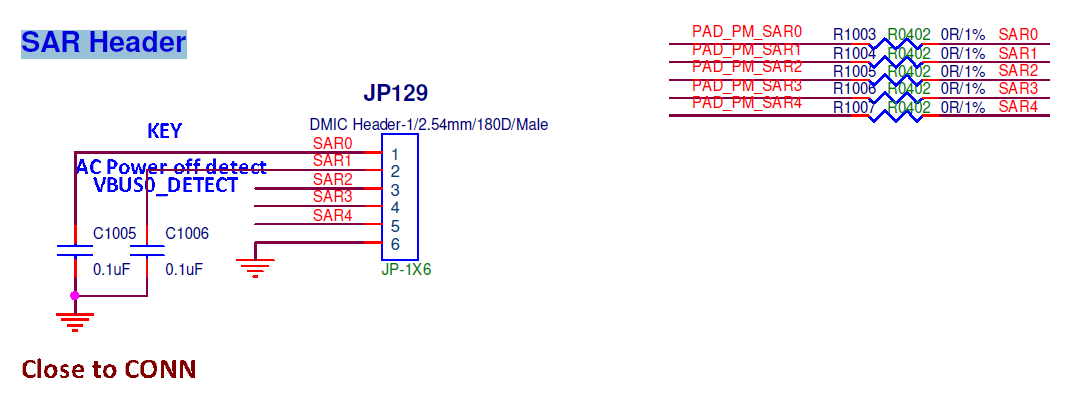
As shown in the figure below, the external voltage can be connected to the pin PAD_PM_SAR0-4:
5. Calculation
The main function of SAR ADCLP is to convert analog signals into corresponding digital signals, that is, the input voltage can be converted into digital quantities and stored in registers. The input voltage can be calculated through the formula below:
Calculation formula: voltage = (register value / full scale) * reference voltage
That is, if the value read is 0x1D2, the available voltage is about 0x1D2/0x3FF * 1.8 = 0.82v.
6. Uboot Usage
6.1. Uboot Config
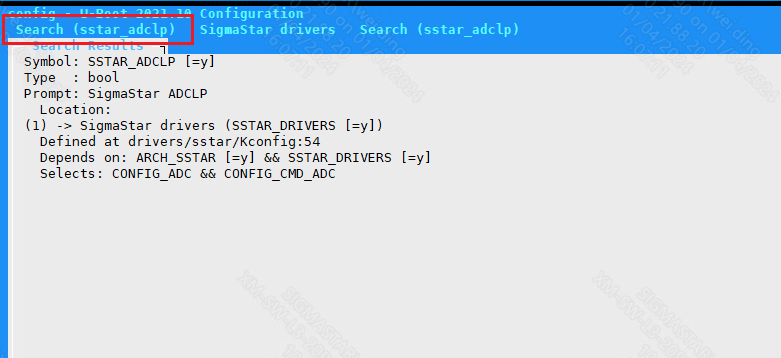
From Kconfig, you can see that to support ADCLP, you need to configure CONFIG_SSTAR_ADCLP, CONFIG_ADC, and CONFIG_CMD_ADC. To enable CONFIG_CMD_ADC, you need to configure DM_REGULATOR first.
-
Configure CONFIG_SSTAR_ADCLP
-
Configure CONFIG_ADC

-
Configure DM_REGULATOR

-
Configure CONFIG_CMD_ADC

6.2. DTS Configuration
The DTS configuration of SAR ADCLP only needs to configure the following information in iford.dtsi:
adclp: adclp {
    compatible = "sstar,adclp";
    reg = <0x1F002800 0x200>;
    chan-num = <5>;
    ref-voltage = <1800>;
    status = "okay";
};
SAR ADCLP DTS configuration instructions:
| Attribute | Description | Value | Note |
|---|---|---|---|
| compatible | Match the driver for driver registration | "sstar,adclp" | Modification not allowed |
| reg | Set the register bank address | <0x1F002800 0x200> | Modification not allowed |
| chan-num | Set the number of supported channels | 5 | Modification not allowed |
| ref-voltage | Set the level of reference voltage | in mv, can select 1800 or 1000 | Can be modified where necessary |
| status | Select whether to enable the driver | "okay" or "disable" | Can be modified where necessary |
6.3. Uboot Command Parameter Description and Usage Example
Enter adc on the command line:
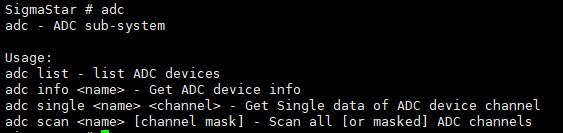
①adc list → You can check whether sar adclp is bound

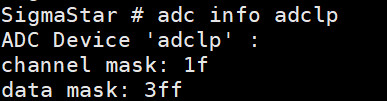
②adc info adclp → You can check the number of channels and data accuracy supported by sar adclp
As shown in the figure below, the number of channels currently supported is 5 (note that the mask is 0x1f), and the maximum data value is 0x3ff.
③adc single adclp [channel] → You can view the data of a specific channel
As shown below, the value of channel 0 is 605.
According to the formula: voltage = (data / 0x3ff) * reference voltage
In this case, the voltage is 605 / 1023 * 1.8 V = 1.065V.

④adc scan adclp [channel mask] → You can view the data of multiple channels
adc scan adclp: You can view the data of all channels
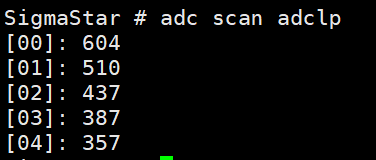
adc scan adclp 0x3: You can view the data of channel 0 and channel 1.

7. Kernel Usage
7.1. Kernel Config
SAR ADCLP associated driver module Config:
- CONFIG_IIO
SAR ADCLP driver enable requires the following configuration:
Device Drivers --->

    [*] Sstar SoC platform drivers --->

        <*> Sstar ADCLP driver
7.2. DTS Configuration
The DTS configuration of SAR ADCLP only needs to configure the following information in iford.dtsi:
adclp0: adclp0@1f002800 {
    compatible = "sstar,adclp";
    interrupt-parent = <&sstar_pm_main_intc>;
    interrupts = <INT_PMSLEEP_IRQ_SAR_KP>;
    reg = <0x1F002800 0x200>;
    clocks = <&CLK_sar>;
    interrupt-enable;
    channel = <0>;
    ref-voltage = <1800>;
    upper-bound = <0x3FF>;
    lower-bound = <0>;
    status = "ok";
};
| Attribute | Description | Value | Note |
|---|---|---|---|
| compatible | Match the driver for driver registration | "sstar,adclp" | Modification not allowed |
| interrupt-parent | Bind the interrupt controller | &sstar_pm_main_intc | Modification not allowed |
| interrupts | Bind the interrupt number | INT_PMSLEEP_IRQ_SAR_KP | Modification not allowed |
| reg | Set the register bank address | 0x1F002800 | Modification not allowed |
| clocks | Set the clock source | &CLK_sar | Modification not allowed |
| interrupt-enable | Enable the interrupt | bool type, disable by annotation | Can be modified where necessary |
| channel | Set the channel | 0~4 | Modification not allowed |
| ref-voltage | Set the level of reference voltage | in mv, can select 1800 or 1000 | Can be modified where necessary |
| upper-bound | Set the threshold upper bound voltage | 0~0x3FF, enable interrupts to be valid | Can be modified where necessary |
| lower-bound | Set the threshold lower bound voltage | 0~0x3FF, enable interrupts to be valid | Can be modified where necessary |
| status | Select whether to enable the driver | "ok" or "disable" | Can be modified where necessary |
7.3. Padmux Configuration
SAR-ADCLP does not require padmux configuration. PAD_PM_SAR0-4 is configured as ADC sampling function by default.
7.4. Module Usage
7.4.1. SYSFS Interface
-
Enter Channel 0 of SAR ADCLP sampling
cd /sys/class/sstar/adclp0/ -
Set the SAR ADCLP0 threshold (Not setting the threshold does not affect sampling)
echo 800 400 > /sys/class/sstar/adclp0/threshold -
Enable SAR ADCLP0
echo 1 > enable -
Get the SAR ADCLP0 value after sampling
cat /sys/class/sstar/adclp0/value
7.4.2. IOCTL Usage
The header file <drv_adclp.h> is located in kernel/driver/sstar/sar directory.
-
IOCTL_ADCLP_SET_BOUND
Set the sampling voltage threshold
-
IOCTL_ADCLP_READ_VALUE
Get the value after voltage conversion
...

struct adclp_bound
{
    unsigned short upper_bound;
    unsigned short lower_bound;
};

#define ADCLP_IOC_MAXNR 2

#define ADCLP_IOC_MAGIC        'a'
#define IOCTL_ADCLP_SET_BOUND  _IO(ADCLP_IOC_MAGIC, 0)
#define IOCTL_ADCLP_READ_VALUE _IO(ADCLP_IOC_MAGIC, 1)

...
Sample code
The source code is located in kernel/driver/sstar/sar/ut/ut_adclp.c
#include <fcntl.h>
#include <stdio.h>
#include <errno.h>
#include <signal.h>
#include <stdlib.h>
#include <unistd.h>
#include <string.h>
#include <sys/stat.h>
#include <sys/ioctl.h>
#include <sys/types.h>
#include <drv_adclp.h>

void sample_warn(int num)
{
    printf("adclp data exceeding the threshold\n");
}

int main(int argc, char **argv)
{
    int                fd;
    char               cmd;
    int                flags;
    unsigned short     value;
    unsigned int       channel;
    char               path[64];
    struct adclp_bound adclp_bd;

    if (argc == 2)
    {
        channel = atoi(argv[1]);
    }
    else if (argc == 4)
    {
        channel              = atoi(argv[1]);
        adclp_bd.upper_bound = atoi(argv[2]);
        adclp_bd.lower_bound = atoi(argv[3]);
    }
    else
    {
        printf("format: ut_adclp [channel] <upper> <lower>\n");
        return -1;
    }

    snprintf(path, sizeof(path), "/dev/adclp%u", channel);
    fd = open((const char *)(char *)path, O_RDWR);
    if (fd < 0)
    {
        printf("open device fail\n");
        return -1;
    }

    if (argc == 4)
    {
        ioctl(fd, IOCTL_ADCLP_SET_BOUND, &adclp_bd);
    }

    signal(SIGIO, sample_warn);

    fcntl(fd, F_SETOWN, getpid());
    flags = fcntl(fd, F_GETFL);
    fcntl(fd, F_SETFL, flags | FASYNC);

    while (1)
    {
        cmd = getchar();
        if (cmd == 'q' || cmd == 'Q')
        {
            break;
        }

        ioctl(fd, IOCTL_ADCLP_READ_VALUE, &value);
        printf("adclp%u data[%hu]\n", channel, value);
    }

    close(fd);

    return 0;
}
7.4.3. IIO SYSFS Interface
Since each channel of adclp is an independent node, it is distributed in the same way under iio sysfs:

take ii0:device0 as an example:

cat in_voltage_raw:get adc raw code
cat in_voltage_scale:get scale

at this time, the voltage is 714 * 3.225806451 = 2303 mv
7.4.4. how to use adc key
7.4.4.1 CONFIG
CONFIG_SSTAR_ADCLP=Y

CONFIG_IIO=Y

CONFIG_INPUT=Y

CONFIG_INPUT_EVDEV=Y

CONFIG_INPUT_KEYBOARD=Y

CONFIG_KEYBOARD_ADC=Y
7.4.4.2 DTS Configuration
#include "../../../../drivers/sstar/include/iford/irqs.h"
#include "../../../../drivers/sstar/include/iford/gpio.h"
#include <dt-bindings/interrupt-controller/irq.h>
#include "../../../../include/uapi/linux/input-event-codes.h"  //Generally `linux,code` use the content of input event code,this header file needs to be included when compiling
#include <dt-bindings/interrupt-controller/arm-gic.h>

   adc-keys0 {
       compatible = "adc-keys";
       io-channels = <&adclp0 0>;   //adclp0 corresponds to the 10-bit adc channel 0, and the second parameter defaults to 0
       io-channel-names = "buttons";
       poll-interval = <900>;       //unit:ms
       keyup-threshold-microvolt = <1800000>;  //voltage threshold when the button is released
       esc-key {
           linux,code = <KEY_MICMUTE>;
           label = "micmute";
           press-threshold-microvolt = <1200000>; //when the ADC voltage is 1200mv, report the KEY_MICMUTE press event
       };

       home-key {
           linux,code = <KEY_MODE>;
           label = "mode";
           press-threshold-microvolt = <1880000>;
       };

       menu-key {
           linux,code = <KEY_PLAY>;
           label = "play";
           press-threshold-microvolt = <1650000>;
       };

       vol-down-key {
           linux,code = <KEY_VOLUMEDOWN>;
           label = "volume down";
           press-threshold-microvolt = <1320000>;
       };

       vol-up-key {
           linux,code = <KEY_VOLUMEUP>;
           label = "volume up";
           press-threshold-microvolt = <825000>;
       };
   };

   adc-keys1 {
       compatible = "adc-keys";
       io-channels = <&adclp1 0>;  //adclp1 corresponds to the 10-bit adc channel 1, and the second parameter defaults to 0
       io-channel-names = "buttons";
       poll-interval = <1000>;
       keyup-threshold-microvolt = <3300000>;
       esc-key {
           linux,code = <KEY_MICMUTE>;
           label = "micmute";
           press-threshold-microvolt = <2060000>;
       };

       home-key {
           linux,code = <KEY_MODE>;
           label = "mode";
           press-threshold-microvolt = <1880000>;
       };

       menu-key {
           linux,code = <KEY_PLAY>;
           label = "play";
           press-threshold-microvolt = <1650000>;
       };

       vol-down-key {
           linux,code = <KEY_VOLUMEDOWN>;
           label = "volume down";
           press-threshold-microvolt = <1320000>;
       };

       vol-up-key {
           linux,code = <KEY_VOLUMEUP>;
           label = "volume up";
           press-threshold-microvolt = <825000>;
       };
   };
7.4.4.3 Verify adc key events
According to the above dts configuration, adc-key0 is bound to adclp channel 0, and it can be seen from the startup log that it is registered as input0:
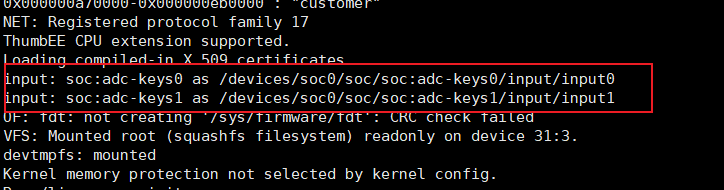
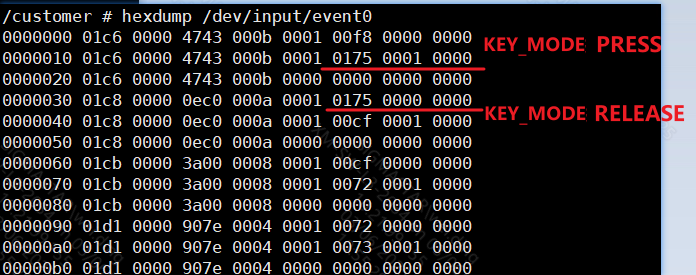
Therefore, hexdump /dev/input/event0 and adjust the voltage at the same time to get the following information:
the 6th column is the event type, 1 means EV_KEY, 0 means EV_SYN
the 7th column is the key value, 0x175 means KEY_MODE
the 8th column is the key status, 1 means pressed, 0 means lifted
8. Using API in Kernel Mode
The header file <drv_adclp_io.h> is located in kernel/driver/sstar/sar directory.
...

typedef int (*adclp_cb_t)(u8 channel);

int sstar_adclp_enable(u8 channel, u8 enable);
int sstar_adclp_get_data(u8 channel, u16 *data);
int sstar_adclp_set_bound(u8 channel, u16 max, u16 min);
int sstar_adclp_register_callback(u8 channel, adclp_cb_t cb_t);
int sstar_adclp_unregister_callback(u8 channel, adclp_cb_t cb_t);

...
sstar_adclp_enable
-
Objective
Enable the sampling function of the specified channel
-
Syntax
int sstar_adclp_enable(u8 channel, u8 enable); -
Parameter
Parameter Name Description channel Sampling channel enable Enable or not -
Return Value
Return Value Description 0 Success EINVAL Channel not supported
sstar_adclp_get_data
-
Objective
Get the external input voltage value of the specified channel
-
Syntax
int sstar_adclp_get_data(u8 channel, u16 *data) -
Parameter
Parameter Name Description channel Sampling channel data get the pointer address of the sampling result -
Return Value
Return Value Description 0 Success EINVAL Channel not supported
sstar_adclp_set_bound
-
Objective
Set the threshold for a specified channel
-
Syntax
int sstar_adclp_set_bound(u8 channel, u16 max, u16 min) -
Parameter
Parameter Name Description channel Sampling channel max Threshold upper bound min Threshold lower bound -
Return Value
Return Value Description 0 Success EINVAL Channel not supported
sstar_adclp_register_callback
-
Objective
Register the callback function of the specified channel (the same channel supports registering multiple callback functions). When the sampling result exceeds the threshold, the callback function can be used for corresponding processing.
-
Syntax
int sstar_adclp_register_callback(u8 channel, adclp_cb_t cb_t) -
Parameter
Parameter Name Description channel Sampling channel cb_t Function pointer -
Return Value
Return Value Description 0 Successful registration EINVAL Registration failed
sstar_adclp_unregister_callback
-
Objective
Release the callback function of the specified channel and the memory applied during registration.
-
Syntax
int sstar_adclp_unregister_callback(u8 channel, adclp_cb_t cb_t) -
Parameter
Parameter Name Description channel Sampling channel cb_t Function pointer -
Return Value
Return Value Description 0 Success EINVAL Registration failed
9. FAQ
Q1:SAR ADCLP Interface Does Not Exist
-
Check if the
statusof the DTS ADCLP node isok -
Check if the kernel config is configured, see [7.1. Kernel Config Configuration]
Q2: The external input voltage changes, but the SAR ADCLP sampling data does not change
-
When the PIN is in GPIO MODE, the sampling data will not change. You can read the register value to determine whether the PIN is switched to GPIO MODE:
0x14 0x11 BIT0-BIT5: Each BIT of BIT0~BIT5 corresponds to a channel. When value=0, the PIN pin of the channel is in GPIO MODE. When value=1, the PIN pin of the channel is in ADC MODE. For example, when BIT0=0, channel 0 is in GPIO MODE. When BIT1=1, channel 1 is in ADC MODE. 0x14 0x11 BIT8-BIT13: Each BIT of BIT8~BIT13 corresponds to a channel. The prerequisite is that the PIN pin is in GPIO MODE. When value=0, the PIN pin is switched to output. When value=1, the PIN pin is switched to input. 0x14 0x12 BIT0-BIT5: Each BIT of BIT0~BIT5 corresponds to a channel. The prerequisite is that the PIN pin is in GPIO MODE and is set to ouput. When value=0, the PIN pin of the channel is switched to a low level. When value=1, the PIN pin of the channel is switched to a high level. For example: riu_r 0x14 0x11 Return value: 0x3F3F -> All channels are in ADC MODE Return value: 0x3E3E -> Channel 0 is in GPIO MODE, and the rest of the channels are in ADC MODE Return value: 0x0000 -> All channels are in GPIO MODE and switched to output -
When the PIN pin register is set to non-GPIO MODE, the sampled data still does not change. You can set the PIN pin to GPIO MODE and perform an output high/low test. If the PIN pin level cannot be pulled up or down, it can be judged as a hardware problem.
Q3: The first or first few sampling data have a large deviation from the actual input voltage
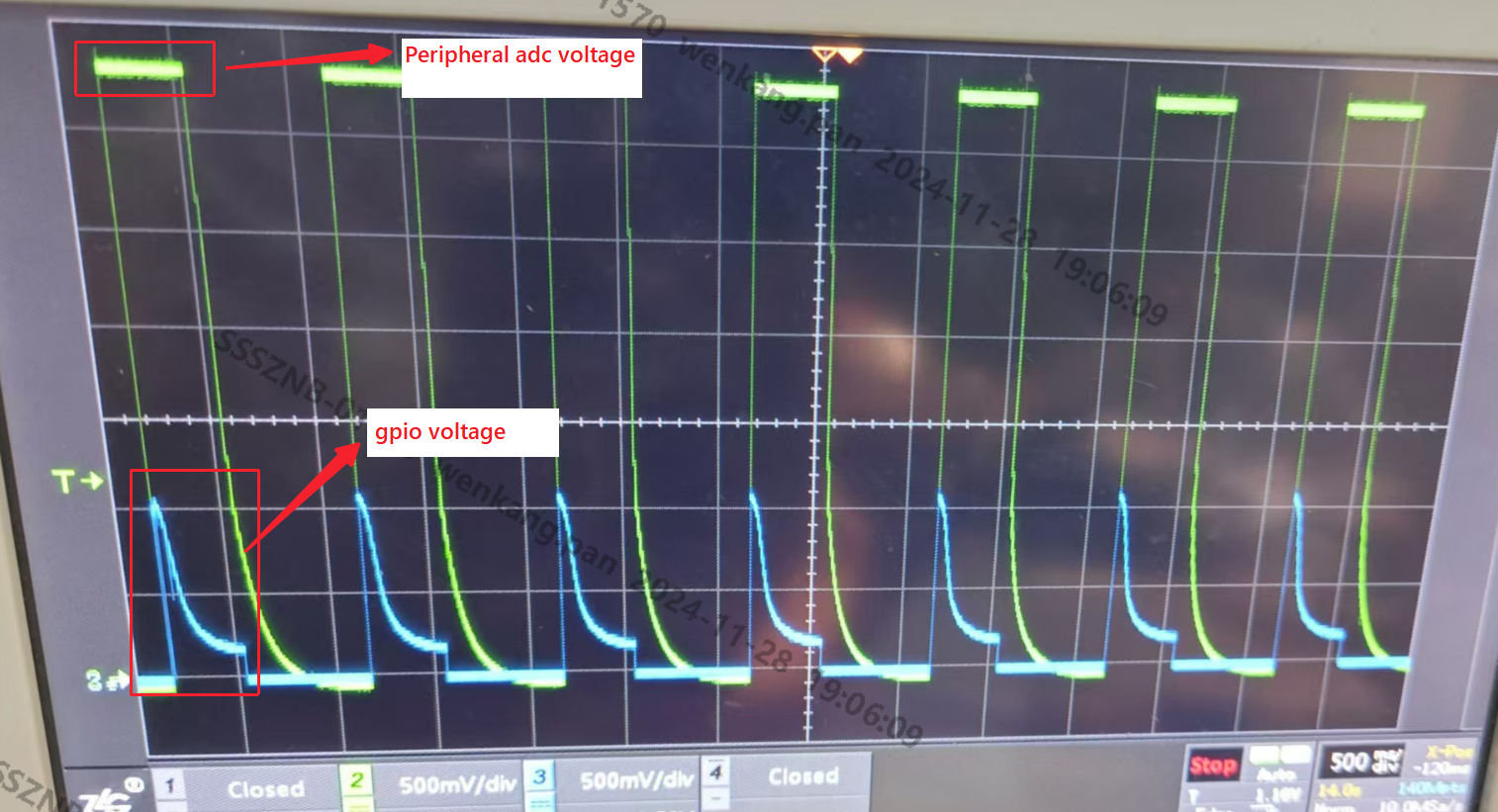
This problem is most likely related to the sampling timing. You can use GPIO as a trigger source to obtain the voltage status of the component at each sampling.
As shown in the figure below, before triggering ADC sampling, GPIO switches from high level to low level. The ADC sampling timing is just in the process of voltage decline, not when the voltage is stable. Therefore, it is judged as sampling abnormality. At this time, it is necessary to wait until the component is stable before sampling.