Audio Input Demo Program Description
REVISION HISTORY
| Revision No. | Description |
Date |
|---|---|---|
| 1.0 | 01/15/2026 |
1. Function Introduction
This demo showcases audio input functionality, using IIS RX / DMIC to receive digital audio data from external audio devices. The recording duration is 10 seconds, with the audio format being mono, a sampling rate of 16KHz, PCM format, and the recorded data can be exported to a specified path.
- IIS RX audio receiving capability
- DMIC audio receiving capability
- Audio data export functionality
Keyword Description
-
IIS RX (I2S Receive)
IIS RX is the receiving mode of the I2S bus, used to receive digital audio data from external audio devices. This demo supports receiving audio data through IIS RX.
-
DMIC (Digital Microphone Interface)
DMIC is a hardware interface specifically designed for digital microphones, enabling sound signals to be transmitted directly in digital form to the processor, avoiding noise interference during the analog-to-digital conversion process.
2. Compilation Environment Description
Note
The board has the test program packaged by default: /customer/sample_code/bin/prog_audio_ai_demo.
If you do not need to modify the test program, you can skip this section.
If you wish to modify this demo yourself, please refer to the following steps.
Step1: Before compiling the demo separately, you need to compile the SDK completely. For details, please refer to the Setting Up the Compilation Environment section.
Step2: Compile the demo separately.
cd <project_root_directory>/sdk/verify/sample_code
# Compile ai_demo
make source/iford/audio/ai_demo -j16
The path for the generated output: <project_root_directory>/sdk/verify/sample_code/out/arm/app/prog_audio_ai_demo
Step3: Copy the demo and resource files to the board.
# Copy to the board directory
/customer/sample_code/bin/
# ai_demo: Execute on the board
chmod 777 /customer/sample_code/bin/prog_audio_ai_demo
3. Hardware Confirmation
3.1 Hardware Version
Note
To use the audio input functionality, please first refer to the Differences Between V1.0 and V2.0 Hardware to confirm hardware support.
3.3 Connection Method Description
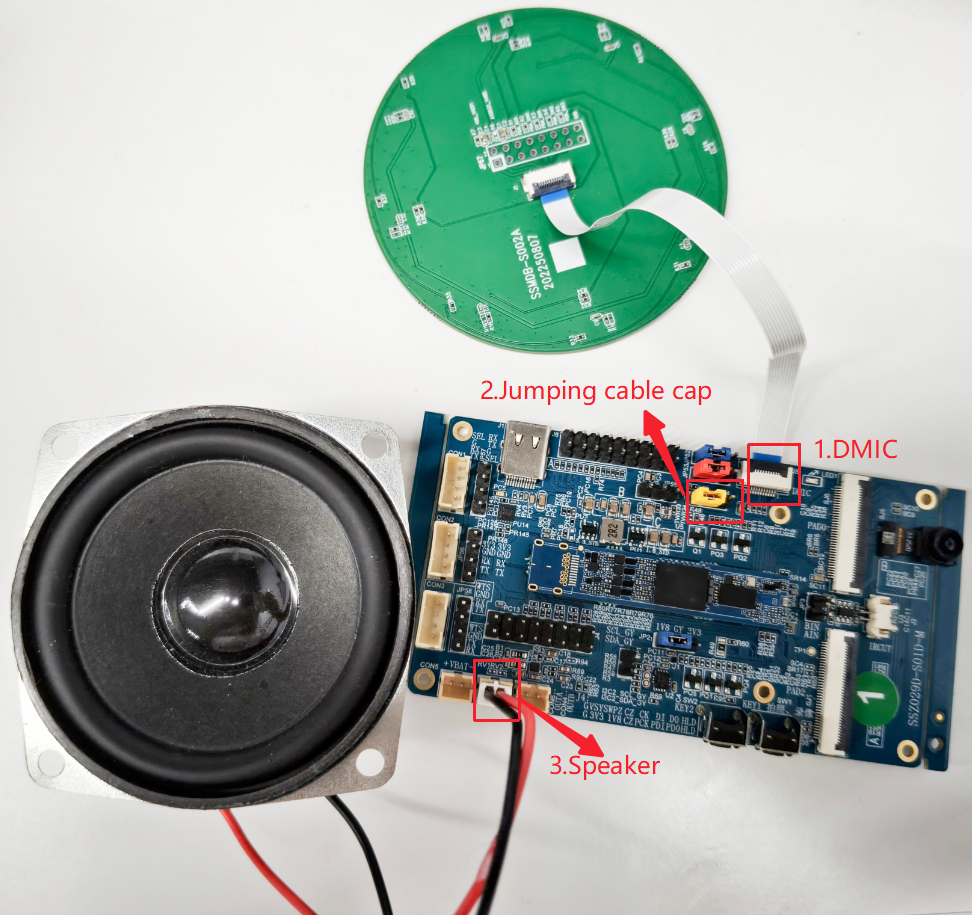
The connection method is shown in the figure below. Please note:
-
This is the DMIC input.
-
Power jumper cap for DMIC:
- When using IIS RX, if audio is routed through TWS, connect the jumper cap to the two on the left.
- When using DMIC, if audio is routed through SOC, connect to the two on the right. Refer to the diagram below for the jumper cap replacement to the right.
-
This is the speaker.
4. Running Instructions
Using IIS RX to receive audio data.
cd /customer/sample_code/bin/
./prog_audio_ai_demo iis
The demo will receive 10 seconds of audio data (mono, 16KHz, PCM format) via the IIS bus and export it to the file /customer/sample_code/bin/out/audio/ai_dump.wav.
Using DMIC to receive audio data
cd /customer/sample_code/bin/
./prog_audio_ai_demo gain 20 dmic
The demo will receive 10 seconds of audio data (mono, 16KHz, PCM format) via the DMIC and export it to the file /customer/sample_code/bin/out/audio/ai_dump.wav.