Sigmastar aesdma_debugsop Manual
REVISION HISTORY
| Revision No. | Description |
Date |
|---|---|---|
| 1.0 | 03/8/2024 |
Issue 1. AES calculation data error
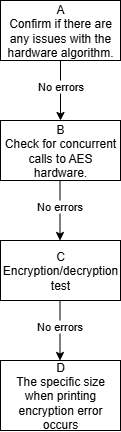
| Flow | Method | Exit Condition | Next Step | Data Required for SWRD | Related FAQ Reference |
|---|---|---|---|---|---|
| A | 1. Disable SigmaStar Crypto driver in kernel menuconfig 2. Continue running customer scenarios to check if the issue reproduces. |
Exit Condition 1: Issue reproduced == Customer application layer problem Exit Condition 2: No issue |
Exit Condition 1: > End flow Exit Condition 2: > B |
Exit Condition 1: ==> Let customer engineers check application problem independently | |
| B | Check if there are concurrent AES scenarios in customer use case. Eliminate all concurrent logic as much as possible and change to single-threaded testing | Exit Condition 1: Normal after forcing single-thread Exit Condition 2: Issue still reproduces |
Exit Condition 1: Contact owner for handling Exit Condition 2: ==> C |
||
| C | 1. Confirm at what data size AESDMA calculation fails. Prepare corresponding case as follows: cd drivers/sstar/crypto/cryptodev/examples/ make clean;make ssbuild output Run output/install/cipher_aes* and output/aes on board |
Exit Condition 1: At least one fail case exists Exit Condition 2: Test program has no issue, but actual operation has problem |
Exit Condition 1: > Report fail case to owner Exit Condition 2: > D |
||
| D | 1. Print the specific size when encryption error occurs, design demo with specific data to reproduce | Exit Condition 1: Issue can be reproduced 2: Issue cannot be reproduced |
Exit Condition 1: Contact owner for handling Exit Condition 2: Contact owner for further problem localization |
Issue 2. AES/SHA CPU loading high
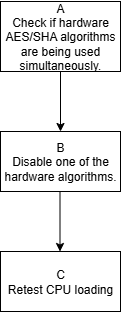
| Flow | Method | Exit Condition | Next Step | Data Required for SWRD | Related FAQ Reference |
|---|---|---|---|---|---|
| A | Check if hardware AES/SHA algorithms are used concurrently | Exit Condition 1: Yes Exit Condition 2: No |
Exit Condition 1: Enter B Exit Condition 2: Contact owner to optimize program |
||
| B | Refer to FAQ to reduce priority of one hardware algorithm (AES or SHA). Alternatively, directly disable registration of one algorithm in code. After modification, run aes/sha programs in example/output. Observe that corresponding downgraded hw algorithm prints prompt | Exit Condition 1: Printed prompt indicates driver obtained is aes-generic/sha256-generic (software generic algorithm) Exit Condition 2: Printed driver is still original hardware algorithm (sha256-sstar,*-aes-sstar) |
Exit Condition 1: ==> C Exit Condition 2: Contact owner to modify if this situation occurs |
||
| C | Re-test CPU loading when running hw aes/sha simultaneously | Exit Condition 1: CPU loading reduced Exit Condition 2: CPU loading not reduced, or reduced but does not meet customer requirement |
Exit Condition 1: End flow Exit Condition 2: Need owner to optimize code for specific scenario |
Issue 3. AESDMA response timeout
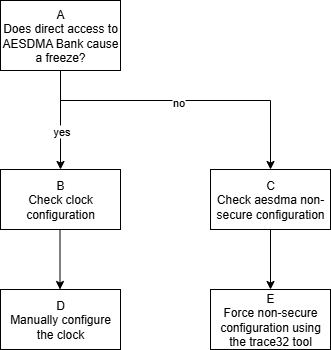
| Flow | Method | Exit Condition | Next Step | Data Required for SWRD | Related FAQ Reference |
|---|---|---|---|---|---|
| A | riu_r 1122 (aesdma bank) | Exit Condition 1: System hang Exit Condition 2: No hang, but bank reads all empty |
Exit Condition 1: >B Exit Condition 2: >C |
||
| B | Check AESDMA clock configuration | Exit Condition 1: Clock not configured correctly Exit Condition 2: Clock configured correctly |
Exit Condition 1: Enter D Exit Condition 2: Contact owner for handling |
||
| C | Use trace32 to check if AESDMA nonsecure is set | Exit Condition 1: AESDMA nonsecure not set Exit Condition 2: AESDMA nonsecure is set |
Exit Condition 1: Enter E Exit Condition 2: Contact owner for handling |
||
| D | Manually configure AESDMA clock | Exit Condition 1: Normal after configuration Exit Condition 2: Not recovered, issue still reproduces |
Exit Condition 1: Contact owner for handling Exit Condition 2: Contact owner for handling |
||
| E | Use trace32 to manually configure AESDMA nonsecure, configure bank1122 offset0 to 0x9d | Exit Condition 1: Normal after configuration Exit Condition 2: Not recovered, issue still reproduces |
Exit Condition 1: Contact owner for handling Exit Condition 2: Contact owner for handling |