RTC User Guide
REVISION HISTORY
| Revision No. | Description |
Date |
|---|---|---|
| 1.0 | 01/31/2024 |
1. Overview
Real Time Clock (hereinafter referred to as RTC) is mainly used for timing and alarm clock setting. Developed on the basis of standard LINUX framework, the RTC driver can utilize a uniform interface to operate the RTC. Moreover, additional functions related to PWC (Power Controller) have been added to the LINUX framework to meet more Sgs IP requirements.
The PWC (Power Controller) controls the high/low levels of PAD_RTC_IO4 and PAD_RTC_IO5 upon detecting a wake-up source trigger event. The PAD_RTC_IO4 and PAD_RTC_IO5 then control the external power chip, thereby assuming control over the power of the entire board.
2. KEYWORD DESCRIPTION
-
Alarm
RTC support destination installation one hard time, this RTC arrival check time, meeting RTC Alarm incident.
-
Offset
RTC support frequency shift function, ability to operate in forward/reverse direction every 32 to 1Hz time.
-
REG
Haa[b] format for textual REG transcription, display offset: 0xaa's BITb, REG uniformly exists bank: 0x34 above explanation.
3. Function description
-
RTC current use 32.768kHz frequency crystal, construction circumscribed 32K crystal. No external crystal oscillation time, RTC's internal crystal oscillation from CLK, it is easy to accept temperature, temperature is affected by external factors such as electricity, influence RTC's accuracy.
-
RTC's basic functions comprehensive support hardware time reading and setting, support hardware time reading and setting. The common units for timing and scheduling are 1 second. Some chips have millisecond-level timing capabilities, such as the Jaguar1 hardware, which supports a minimum timing interval of 31.25 milliseconds.
-
PWC support communication control PAD_RTC_IO4 and PAD_RTC_IO5 high and low power, and control mutual power source area, common wake source comprehensive: RTC Alarm, PAD_RTC_IO0, PAD_RTC_IO1, PAD_RTC_IO2, PAD_RTC_IO3.
-
The RTC_IO0 and RTC_IO1 of PWC generally need to be pulled low after RTC_IO4 and RTC_IO5 are pulled low to trigger the power-on of RTC_IO4 and RTC_IO5. Some chips (e.g., Jaguar1) support recording that IO0 and IO1 have been pulled low even before RTC_IO4 and RTC_IO5 lose power, thereby immediately powering them on again when RTC_IO4 and RTC_IO5 are powered down next time.
-
Table of RTC/PWC support information for different chips, please refer to line iford for the current document.
chipname RTC PWC ALARM HRALARM IO0 IO1 IO2 IO3 EVENT_RECORD iford Y Y Y / Y Y / / / ifado Y / Y / / / / / / pcupid Y Y Y / / Y / Y / ibopper Y / Y / / / / / / ifackel Y / Y / / / / / / jaguar1 Y Y Y Y Y Y / / Y
4. Hardware connection
4.1. RTC Crystal Frequency
The RTC currently uses a crystal oscillator with a frequency of 32.768kHz.
4.2. PWC System Architecture
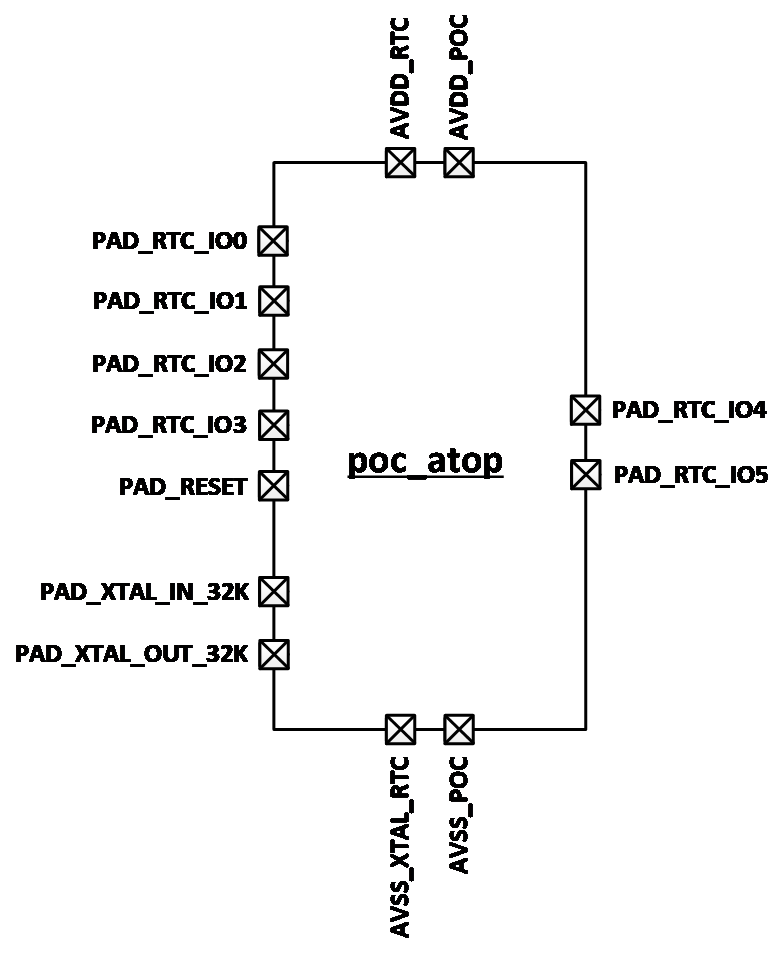
The PWC controls the high/low levels of PAD_RTC_IO4 and PAD_RTC_IO5 through a wake-up source trigger event. The PAD_RTC_IO4 and PAD_RTC_IO5 then control the external power chip, thereby assuming control over the power of the entire board.
The wake-up sources that the RTC can control include:
-
Wake-up by a combination of PAD_RTC_IO0 - PAD_RTC_IO3 keys/waveforms
-
RTC Alarm interrupt wake-up
-
sw ctrl (software control)
The system architecture is illustrated in the figure below:
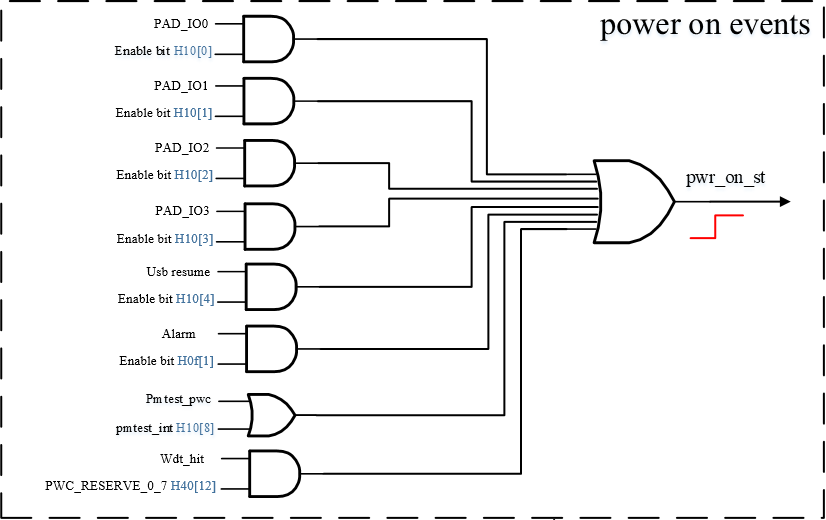
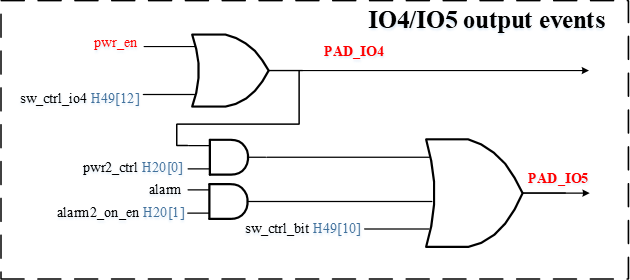
Note: The power_on_st in Figure 2-2 and the pwr_en in Figure 2-3 are hardware connected.
From Figure 2-2 and Figure 2-3, it can be seen that the event trigger of PAD_RTC_IO0 ~ PAD_RTC_IO3 and the event trigger of RTC Alarm can make the power_on_st output high level, and then pull up the level of PAD_RTC_IO4 along power_on_st->pwr_en, and at the same time the trigger of the sw ctrl event can also control the PAD_RTC_IO4 level.
Moreover, as shown in Figure 2-3, the level of PAD_RTC_IO4, the event trigger of RTC Alarm and the trigger of sw ctrl event will affect the level of PAD_RTC_IO5. So these trigger events and the interaction between PAD_RTC_IO4 and PAD_RTC_IO5 can be flexibly used to realize power control. For details on the software configuration method, please refer to the Kernel Usage chapter below.
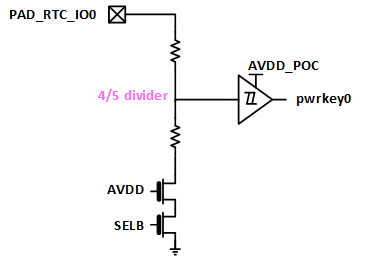
4.3. PAD_RTC_IO0 Configuration
PAD_RTC_IO0 supports pull-down mode and high-impedance mode. The default setting is pull-down mode. For details on the software configuration method, please refer to the Kernel Usage chapter below.
4.4. PAD_RTC_IO1 Configuration
PAD_RTC_IO1 supports pull-down (PD) configuration only. Modification by software is not allowed. The internal block diagram is as follows:

4.5. PAD_RTC_IO2 Configuration
PAD_RTC_IO2 supports configuration of thresholds for internal high/low voltage comparator. Besides, PAD_RTC_IO2 can selectively connect to the embedded Schmitt trigger to enable the capture of different signals. The internal block diagram of PAD_RTC_IO2 is as follows:

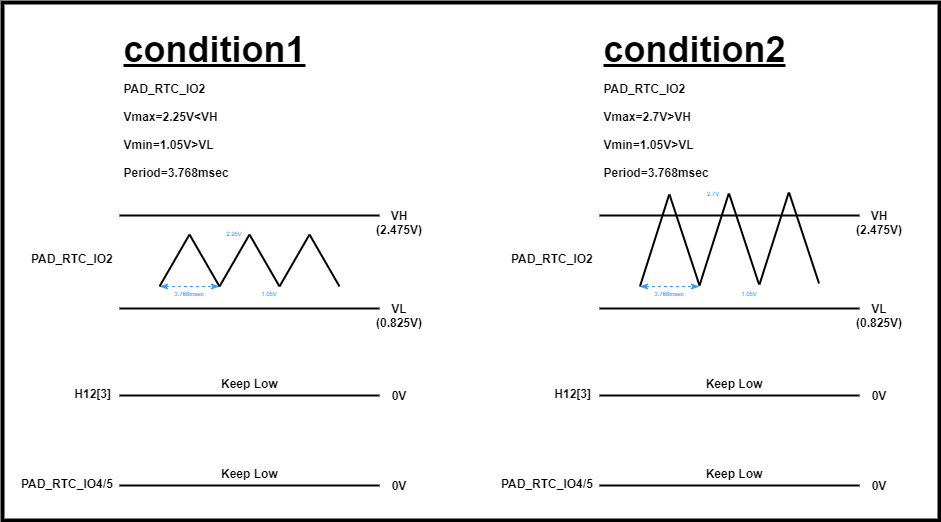
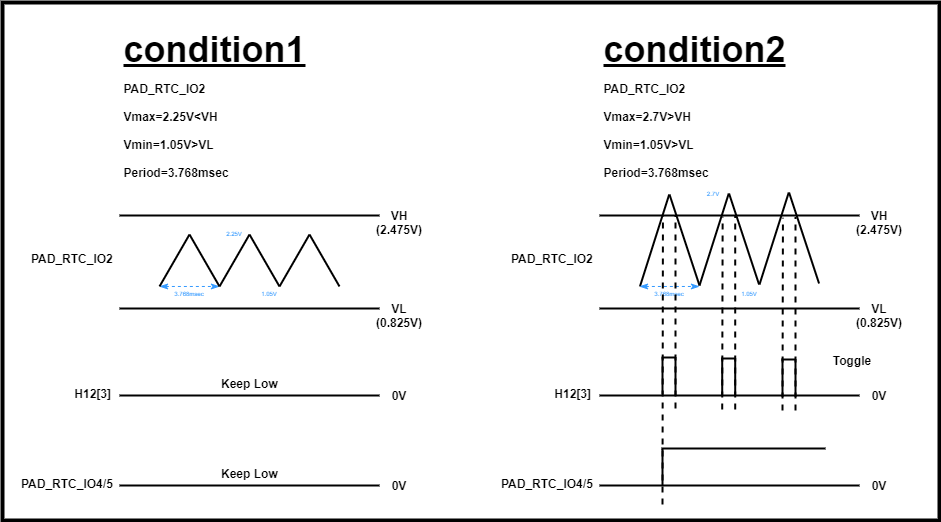
The Schmitt trigger can implement the same logic by the comparator. Currently, the driver does not support the function of switching PAD_RTC_IO2 to Schmitt trigger. The types of configuration supported by PAD_RTC_IO2 include CMPHL (compare high and low), CMPH (compare low), CMPL (compare high)
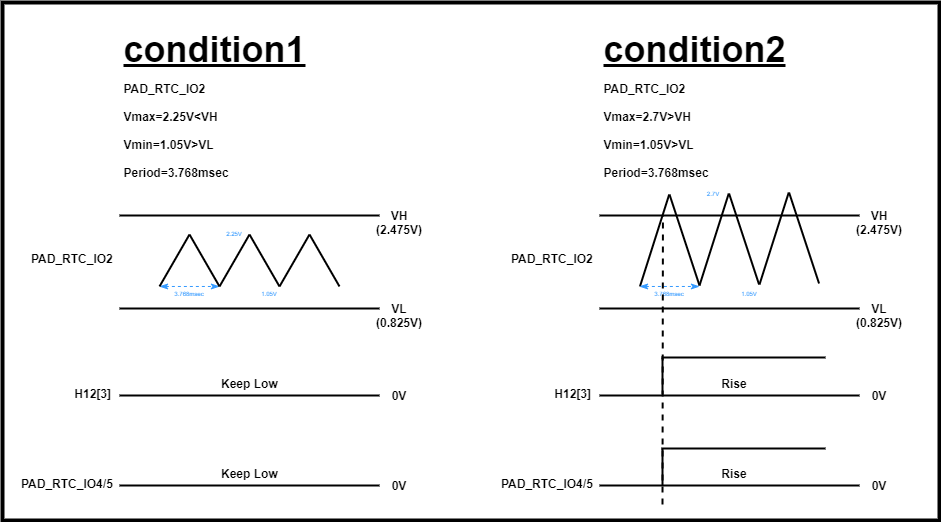
4.5.1. CMPHL
The relationship among PAD_RTC_IO2, Register Offset 0x12 and PAD_RTC_IO⅘ is as follows:

4.5.2. CMPL
The relationship among PAD_RTC_IO2, Register Offset 0x12 and PAD_RTC_IO⅘ is as follows:

4.5.3. CMPH
The relationship among PAD_RTC_IO2, Register Offset 0x12 and PAD_RTC_IO⅘ is as follows:

4.6. PAD_RTC_IO3 Configuration
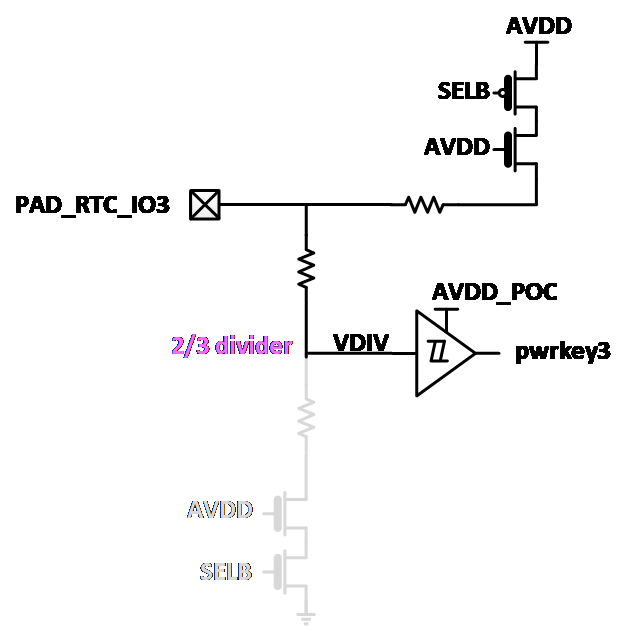
PAD_RTC_IO3 supports pull-down mode and pull-up mode. The default setting is pull-down mode.

The internal block diagram of pull-up mode is as follows:
5. Uboot usage introduction
RTC has no driver under Uboot
6. Kernel Usage
6.1. Kernel Config
Device Drivers --->

    <*> Sstar RTC Driver --->

        [*]     Sstar RTC With PWC
                  Sstar PWC IO Mode (Interrupt Mode)  --->
        [*]     Sstar RTC With Alarm
        [*]     Sstar RTC With Offset
6.2. DTS Configuration Parameter57
        rtcpwc: rtcpwc {
            compatible = "sgs,rtcpwc";
            reg = <0x1F006800 0x200>;
            interrupts=<GIC_SPI INT_IRQ_FLAG_POC IRQ_TYPE_LEVEL_HIGH>;
            // io0-hiz;
            // io2-wos = <1>;           //0:CMPHL 1:CMPHL 2:CMPL 3:CMPH
            // io2-wos-v = <0x2 0x3>;   //<vl vh> 0<vl<8 0<vh<8
            // io3-pu;
            // offset-count = <100>;
            // offset-nagative;
            // iso-auto-regen;
            /*
             * io4 control source selection
             * io0/io1/io2/io3 ctrl bit0
             * alarm ctrl           bit1
             * sw ctrl              bit2
             * support the combination of above ways
             */
            io4-enable = <7>;
            /*
             * io5 control source selection
             * io4 ctrl    bit0
             * alarm ctrl  bit1
             * sw ctrl     bit2
             * support the combination of above ways
             */
            io5-enable = <7>;   // for demo board,use 3,default hight
            // io5-no-poweroff;    // io5 keep when excute 'poweroff' use for wakeup pm51
            status = "ok";

#ifdef CONFIG_SSTAR_PWC_IO_POLLING
            poll-interval = <10>;
#endif /* CONFIG_SSTAR_PWC_IO_POLLING */
            io1 {
                num = <1>;
                keycode = <KEY_WAKEUP>;
#ifdef CONFIG_SSTAR_PWC_IO_POLLING
                debounce-interval = <10>;
#endif /* CONFIG_SSTAR_PWC_IO_POLLING */
#ifdef CONFIG_SSTAR_PWC_IO_INTERRUPT
                interrupt-parent = <&sgs_pm_gpi_intc>;
                interrupts = <INT_PM_GPI_FIQ_PAD_RTC_IO1>;
#endif /* CONFIG_SSTAR_PWC_IO_INTERRUPT */
            };
        };
| Attribute | Description | Note |
|---|---|---|
| compatible | Used to match the driver for driver registration | Modification not allowed |
| reg | Register mapped physical address | Modification not allowed |
| interrupts | Interrupt number and attributes | Modification not allowed |
| alarm-enable | Main switch of alarm function | It is suggested to enable this function |
| alarm-init-on | Trigger alarm while initializing the driver | Can be modified where necessary |
| io0-hiz | Configure PAD_RTC_IO0 as High Z mode | Can be modified where necessary; pull-down mode will be used by default if this attribute is not configured. |
| io2-wos | Configure PAD_RTC_IO2 comparator type | 0: CMPHL, 1: CMPHL, 2: CMPL, 3: CMPH. See Hardware Introduction for details. |
| io2-wos-v | Configure PAD_RTC_IO2 comparator voltage | For details, please refer to Note 1. |
| io3-pu | Configure PAD_RTC_IO3 as Pull-up mode | Can be modified where necessary; pull-down mode will be used by default if this attribute is not configured. |
| offset-count | Configure the compensation value for frequency offset | For details, please refer to Note 2. |
| offset-nagative | Configure the frequency offset as pre-compensation | Can be modified where necessary; post-compensation will be used by default if this attribute is not configured. |
| io4-enable | Used to configure the trigger mode of PAD_RTC_IO4 | For details, please refer to Note 3. |
| io5-enable | Used to configure the trigger mode of PAD_RTC_IO5 | For details, please refer to Note 3. |
| status | Driver switch | ok/disabled, can be modified where necessary |
| poll-interval | Interval of polling | Can be modified where necessary,in milliseconds |
| num | Key number | Can be modified where necessary |
| keycode | Key value | Can be modified where necessary |
| debounce-interval | Debounce of polling | Can be modified where necessary,in milliseconds |
| interrupt-parent | Interrupt parent of RTCIO | Modification not allowed |
| interrupts | Interrupt number | Modification not allowed |
| Note 1: The first value in the io2-wos-v attribute represents VL, and the second value represents VH. The values allowed by VL and VH are given in the table below. |
| Attribute Value | VL | VL Voltage | VH | VH Voltage |
|---|---|---|---|---|
| 0 | 1/16 AVDD | 0.206 | 15/16 AVDD | 3.094 |
| 1 | 2/16 AVDD | 0.413 | 14/16 AVDD | 2.888 |
| 2 | 3/16 AVDD | 0.619 | 13/16 AVDD | 2.681 |
| 3 | 4/16 AVDD | 0.825 | 12/16 AVDD | 2.475 |
| 4 | 5/16 AVDD | 1.031 | 11/16 AVDD | 2.269 |
| 5 | 6/16 AVDD | 1.238 | 10/16 AVDD | 2.063 |
| 6 | 7/16 AVDD | 1.444 | 9/16 AVDD | 1.856 |
| 7 | 8/16 AVDD | 1.650 | 8/16 AVDD | 1.650 |
The VL/VH voltage value in this table is the voltage value when AVDD is 3.3V.
The hardware default value is 3. If io2-wos attribute is defined and the io2-wos-v attribute is not defined in dtsi, then the value of io2-wos-v will be set to 0.
Note 2: The RTC counting function might have some frequency offset due to factors such as crystal oscillator tolerance, PCB tolerance, etc., which will further lead to offset in RTC timing. In order to compensate for offset caused by such manufacturing processes, the RTC features a frequency offset function. The frequency offset compensation error can be debugged and calibrated based on samples produced in the early stage of product production using the user space interface, and then configured into the driver through DTS, to achieve a certain corrective effect in the final product.
The frequency offset function of the RTC will compensate every 32 1Hz clocks. The compensation time calculation formula is:
T = 1/f × count
Let's take the currently used 32.768kHz crystal oscillator as an example. Suppose the compensation count value (offset-count) is calculated as 1, the time to compensate every 32 seconds is:
T = 1/32768 × 1 × 1000000000 ≈ 30518ns
Wherein, the maximum allowable compensation count value (offset-count) is 255. So the maximum compensation time in 24 hours is:
T = 30518ns × 255 × (24 × 60 × 60 ÷ 32) ≈ 21.0s
When the compensation count value (offset-count) is a positive number, it refers to the time calculated from the time delay. When the compensation count value (offset-count) is a negative number, it refers to the time calculated from the time advance.
Note 3: The io4-enable in dtsi corresponds to H10[3:0], H0f[1] and H49[12] referred to in Figure 2-2 and Figure 2-3 of the Hardware Introduction chapter. For example, if the current io4-enable is set to 3, then H0F[0] is 1 and H0F[1] is 1 too. This means that PAD_RTC_IO4 can be controlled by PAD_RTC_IO0-3 and RTC Alarm at the same time. Apart from the above two control sources, PAD_RTC_IO4 can also be controlled through SW Ctrl method, by setting io4-enable to '7', corresponding to H49[12]. In this way, PAD_RTC_IO4 can be controlled by PAD_RTC_IO0-3, RTC Alarm and SW Ctrl method at the same time.
The attributes of io5-enable correspond to H20[0], H20[1] and H49[10] referred to in Figure 2-3 of the Hardware Introduction chapter. For example, if the current io5-enable is set to 2, then H20[0] is 0 and H20[1] is 1. This means that PAD_RTC_IO5 is not under control by PAD_RTC_IO4; the state of PAD_RTC_IO5 is controlled by RTC Alarm alone. Similar to PAD_RTC_IO4, PAD_RTC_IO5 can also be controlled through SW Ctrl method, by setting io5-enable to ‘7’, corresponding to H49[10]. In this way, PAD_RTC_IO5 can be controlled by PAD_RTC_IO4, RTC Alarm and SW Ctrl method at the same time.
The key wake-up truth table is as follows:
| PAD | Event | Power On | Remark | PAD_RTC_IO4 | PAD_RTC_IO5 | |
|---|---|---|---|---|---|---|
| PAD_RTC_IO0 | PD | rise | >VIH | default | rise | rise |
| HIZ | rise | >VIH | rise | rise | ||
| PAD_RTC_IO1 | PD | rise | >VIH | default | rise | rise |
| PAD_RTC_IO2 | CMPH | rise | >VIH | rise | rise | |
| CMPL | fall | <VIL | rise | rise | ||
| CMPHL | rise | >VIH | default | rise | rise | |
| schmitt | rise | >VIH | rise | rise | ||
| PAD_RTC_IO3 | PD | rise | >VIH | default | rise | rise |
| PU | fall | <VIL | rise | rise | ||
6.3. Padmux configuration
RTC does not require Padmux configuration
6.4. RTC Command Operation
6.4.1. Showing System Clock
Command:date

6.4.2. Setting System Clock
Command: date MMDDhhmmYYYY.ss
MM: month (01-12)
DD: day (01-31)
Hhmm: time (0000-2359)
YYYY: year [optional]
ss: seconds (00-59) [optional]

6.4.3. Showing RTC Clock
Command: hwclock

6.4.4. Setting RTC Clock to System Clock
Command: hwclock –w

6.5. RTC Application Programming and Operation
The application can run the /dev/rtc0 file through ioctl to read or set the RTC Clock and Alarm Clock. For details about the code, please refer to driver/sgs/rtc/ut/rtc_ut.c. In the following sections, we will demonstrate how to operate the RTC via rtc_ut.
6.5.1. Reading System Clock
Command: ./rtc_ut

6.5.2. Setting System Clock
Command: ./rtc_ut -w -s "2021-11-3 20:10:30"
Description: Set RTC Clock to November 3, 2021 20:10:30

Command: ./rtc_ut -w -o 10
Description: Set RTC Clock to the current time plus 10 seconds

6.5.3. Reading Alarm Clock
Command: ./rtc_ut -a

6.5.4. Setting Alarm Clock
Command: ./rtc_ut -a -w -s "2021-11-3 20:20:30"
Description: Set RTC Alarm Clock to November 3, 2021 20:20:30

The application will sleep until triggered by the alarm clock.
Command: ./rtc_ut -w -a -o 10
Description: Set RTC Clock to the current time plus 10 seconds

6.6. Custom-defined User Space Interface
6.6.1. User Space Interface
Since the RTC framework of the kernel cannot fully satisfy the coding requirements of Sgs RTCPWC hardware design, the RTC driver has self-defined some files in sys file system for extended functions. These files are located at: /sys/class/mstar/rtcpwc/.
| File | Description |
|---|---|
| alarm_timer | Used to view and set the alarm time. The output value is a countdown timer, and the input value increases the countdown time. |
| wakeup_event | Used to view the wake-up source of PWC, the wakeup_event will be updated on the next power-down/power-up cycle. |
| event_state | Used to view the real-time status of PWC Event. |
| count_status | Used to view the number of driver error counts, for use in debugging |
| offset_count | Used to adjust the count value of frequency compensation |
To set the alarm timer to 30 seconds later, use the command below:
1. echo 30 > alarm_timer
To view the alarm timer, use the command below:
1. cat alarm_timer
To set the offset compensation count value to positive 100 (see Note 3 in 2.3 DTS Configuration Parameter for details on the count value calculation), use the command below:
1. echo 100 > offset_count
To set the offset compensation count value to negative 100, use the command below:
1. echo -100 > offset_count
To view the current offset compensation count value, use the command below:
1. cat offset_count
To view the state of xtal, use the command below:
1. cat xtal_state
7. API reference
RTC has no open API.
8. FAQ
Q1: Hardware clock stops working
-
Type the command
hwclockmultiple times to confirm whether the clock is beating. If it is beating, it is normal. Otherwise, proceed to the next step -
Read the RTC register multiple times to determine whether bank: 0x34's 0x9&0xA is beating, and take a screenshot to save the register information
-
Check whether the RTC's external crystal oscillator working status and RTC power supply are normal
Q2: Alarm stops working
-
echo [time] > /sys/class/sgs/rtcpwc/alarm_time
-
cat /proc/interrupts
-
Wait for Alarm to be triggered and confirm whether the number of Alarm interrupt triggers has increased
Q3: Abnormal power control scenario
-
Oscilloscope measures RTC_IO4&5 waveforms before and after the problem
-
Confirm whether the behavior of the waveform conforms to the expected power-on and power-off operations.