TrustZone Application
REVISION HISTORY
| Revision No. | Description |
Date |
|---|---|---|
| 1.0 | 05/22/2023 |
1. TRUSTZONE USAGE
1.1. TA Image Signature
After the original TA image file is generated, the file will be signed to generate the final xxx.ta file, which will be saved in the REE file system. The original TA image file is signed by calling optee_os/scripts/sign_encrypt.py, using the RSA2048 private key in the optee_os/keys/ directory. The developer needs to use the self-generated private key to sign the TA, and replace the corresponding public key in the optee_os/keys/ directory for signature verification during the running process. Note that optee_os needs to be recompiled.
-
openssl genrsa -out /path/to/private_key.pem 2048
-
openssl rsa -in /path/to/private_key.pem -pubout -out /path/to/public_key.pem
-
vim optee_os/mk/config.mk modification
-
TA_SIGN_KEY is the specified /path/to/private_key.pem path name and file name
-
TA_PUBLIC_KEY is the specified /path/to/public_key.pem path name and file name
-
sign_encrypt.py digest --key /path/to/private_key.pem --uuid $(user-ta-uuid) --in $(user-ta-uuid).stripped.elf (generate $(user-ta-uuid).dig)
-
base64 --decode $(user-ta-uuid).dig | openssl pkeyutl -sign -inkey /path/to/private_key.pem -pkeyopt digest:sha256 -pkeyopt rsa_padding_mode:pss -pkeyopt rsa_pss_saltlen:digest -pkeyopt rsa_mgf1_md:sha256 | base64 > $(user-ta-uuid).sig (generate $(user-ta-uuid).sig)
-
sign_encrypt.py stitch --key /path/to/public_key.pem --uuid $(user-ta-uuid) --in $(user-ta-uuid).stripped.elf (generate $(user-ta-uuid).ta)
1.2. TA Image Encryption
TA can encrypt the content during the compilation phase. When loading TA, if it is found to be encrypted TA, it will decrypt it.
1.2.1 TA encyption option
-
In the TA's Makefile, add CFG_ENCRYPT_TA=y. Take Hello world example as an example, add a line CFG_ENCRYPT_TA=y in optee_examples/hello_world/ta/Makefile. The compiled TA content will be encrypted.
-
It is not necessary to add the CFG_ENCRYPT_TA=y option in OPTEE's Makefile.
1.2.2 Key assignment
- TA_ENC_KEY: The key used to encrypt TA during TA compilation. Specified in optee_os/ta/arch/arm/link.mk, this key will be generated by tee_otp_get_ta_enc_key() in the system, and the default tee_otp_get_ta_enc_key() behavior is to generate TA_ENC_KEY with HUK. The TA_ENC_KEY in Figure. 1 is generated with the default HUK. Please note that this part of the native code is only for demonstration purposes, please replace your own key.
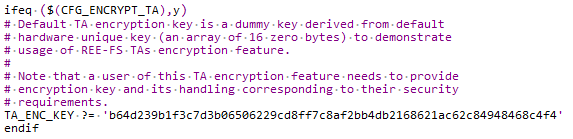
Figure 1: TA key assignment
1.3. Secure storage
1.3.1 Secure storage introduction
Secure storage is the way TEE stores data, which can only be accessed by TA. The stored content includes:
- Key
- Normal data
OPTEE contains two kinds of secure storage:
- REE-FS
- use REE file system as storage
- CFG_REE_FS=y
- Replay Protected Memory Block (RPMB)
- a partition with security attributes in eMMC
- CFG_RPMB_FS=y
SGS chip supports REE-FS by default and REE-FS will be used as the introduction here.
1.3.2 Basic file operation process
- TA calls the GP Trusted Storage API to write a persistent object
- Calling system calls in TEE Trusted Storage service
- Then call TEE file operation, encrypt the data, and send REE file operation and encrypted data to TEE supplicant
- After receiving the encrypted data, TEE supplicant stores it in the REE file system
1.3.3 Secure storage key management
When OP-TEE initializing, it will first generate an SSK and store it in secure memory. The process is as follows:
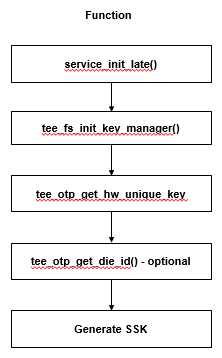
Figure 2: SSK generating process when booting
Secure storage uses 3 kinds of keys:
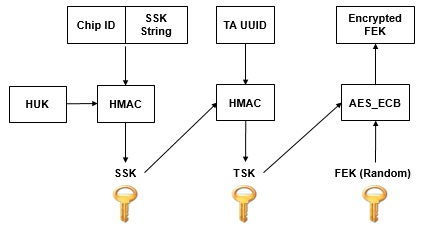
Figure 3: secure storage keys
- Secure storage key (SSK)
- An unique key on each OPTEE secure storage device
- Generated at boot time and stored in secure memory
- SSK is generated by HMAC-SHA256 of hardware unique key(HUK) and Chip ID/SSK String
- SSK String is used to prevent other systems on the device from generating the same SSK at the same time
- TA storage key (TSK)
- An unique key of TA on each device
- Generated by HMAC-SHA256 of SSK and TA UUID
- File encryption key (FEK)
- An unique key of each file
- Used to encrypt and decrypt files
- Generated with PRNG, encrypted by TSK and stored in meta file
1.3.4 Secure storage porting
- Store method of HUK and chip ID in SGS OTP
- There are eight keys (128-bits) from OTP_Key1 to OTP_Key8. You can select any one of them as the storage field of HUK
- There are two fields (64-bits) UUID and UUID2. You can use any field as the storage field for Chip ID
- Compile options related to key management in OP-TEE
- CFG_CORE_HUK_SUBKEY_COMPAT (default value is y), set whether the SSK generation is compatible with HUK, Chip ID and SSK String
- CFG_CORE_HUK_SUBKEY_COMPAT_USE_OTP_DIE_ID (default value is n), set whether the Chip ID can be obtained by OTP die ID
- Customizable API in key management
- tee_otp_get_hw_unique_key(): how platform obtains HUK. It must be implemented
- tee_otp_get_die_id(): how platform obtains Chip ID
1.3.5 Secure storage performance test
OPTEE xtest provides secure storage performance benchmark tests
- ./xtest –t benchmark 1001 (test write)
- ./xtest –t benchmark 1002 (teest read)
- ./xtest –t benchmark 1003 (test re-write)
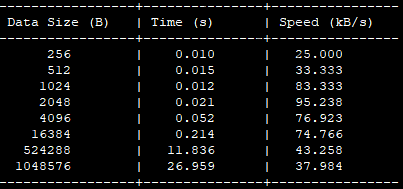
Figure 4: secure storage performance test