MI FB DEBUG SOP
REVISION HISTORY
| Revision No. | Description |
Date |
|---|---|---|
| 1.00 | 12/08/2023 | |
| 1.01 | 12/10/2024 |
1. Glossary
-
disp_path
MI_FB directly displays UI and hardware mouse on the DISP module. The FB image can be directly output to the screen through the DISP module. This mode is applicable to chips where DISP supports GOP hardware.
-
video_path
MI_FB indirectly overlays the FB image onto modules that support OSD overlay (SCL/VENC/DISP, etc.) via MI_RGN. This mode is applicable when users want to overlay images onto video streams via Framebuffer, or when DISP does not support GOP hardware.
-
Pixel alpha value
The alpha component calculation method varies for different color format pixels. In MI_FB, a smaller alpha value indicates greater transparency, with 0 representing fully transparent, and the maximum value representing fully opaque (ARGB1555 format is an exception).
-
For RGB formats (e.g., RGB565), the alpha value of all pixels defaults to 255.
-
For ARGB formats (e.g., ARGB8888, ARGB4444, ARGB1555), the pixel alpha value refers to the alpha component bits in the pixel. In ARGB8888, the alpha component occupies bits[24:31], totaling 8 bits, with a value range of 0-255; in ARGB4444, the alpha component occupies bits[12:15], totaling 4 bits, with a value range of 0-15; in ARGB1555, the alpha component occupies bit[15], totaling 1 bit, with a value range of 0-1. When bit[15] = 0, the actual pixel alpha value equals the "alpha0" value in the alpha attribute; when bit[15] = 1, the actual pixel alpha value equals the "alpha1" value in the alpha attribute.
-
For Index formats (e.g., I2, I4, I8), pixel values store only the Index. The specific ARGB values need to be determined by looking up the "Cmap" table (in "video_path", FB's Cmap cannot be set; users need to set MI_RGN's palette table instead). The format in "Cmap" is ARGB8888, where the alpha component has 8 bits, with a value range of 0-255.
-
-
Waterline value
GOP hardware uses DMA FIFO to cache data returned from MIU and reads data from the DMA FIFO for display. The cached data in FIFO has a default threshold, called the "waterline value". When the remaining data in FIFO is less than or equal to the "waterline value", GOP hardware sends a request to MIU again to obtain new data. Under normal display conditions, the "waterline value" does not need to be adjusted.
-
The larger the "waterline value", the less likely the data in the FIFO will be depleted, and UI is less likely to display misalignment/flickering.
-
The smaller the "waterline value", the more easily the data in the FIFO may be depleted, and UI is more likely to display misalignment/flickering.
-
2. Common FB Issues
2.1. mi_fb.ko Loading Failed
-
Steps to confirm the issue:
-
Check the logs for mi_fb.ko loading failure to determine the failure type:
(1). Log:
insmod: can't insert '/xxx/mi_fb.ko': unknown symbol in module or invalid parameter(2). Log:
Must support at least one disp path, please check memuconfig config(3). Log:
parsing ini config failed
-
-
Reasons for "unknown symbol" log
Missing mi_fb.ko dependencies; further kmsg log retrieval is required to identify specific missing dependencies.
cat /proc/kmsgMissing symbol type Example Cause Solution Linux framebuffer framework register_framebuffer,framebuffer_alloc...Linux framebuffer framework compiled as module (fb.ko) and fb.ko not loaded before mi_fb.ko. Load fb.ko before mi_fb.ko, or compile Linux framebuffer framework into the kernel. DISP MHAL_DISP_DeviceGetInstance,MHAL_DISP_DeviceGetDisplayInfo...mi_disp.ko not loaded first. Load mi_disp.ko before mi_fb.ko; or disable FB's "disp_path" (if user does not need to display FB UI on DISP module). RGN mi_rgn_GetWinInstance,MHAL_RGN_GetInternalApismi_rgn.ko not loaded first. Load mi_rgn.ko before mi_fb.ko; if only missing mi_rgn_GetWinInstanceand user does not need to display FB UI on modules other than DISP, can choose to disable FB's "video_path". -
Reasons for "please check menuconfig config" log
Neither "disp_path" nor "video_path" was enabled during MI_FB compilation. MI_FB requires at least one of "disp_path" or "video_path" options to be enabled during compilation.
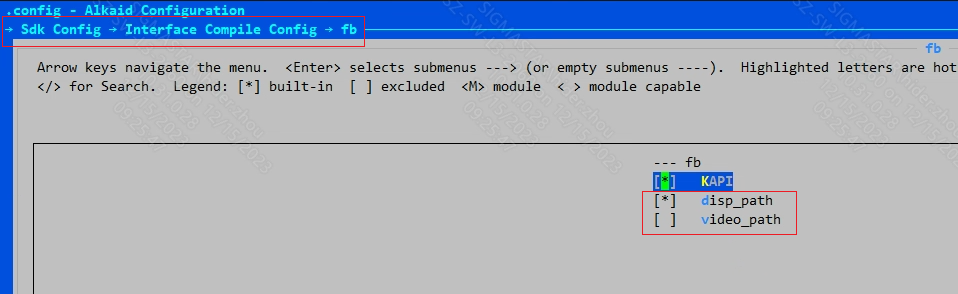
-
Reasons for "parsing ini config failed" log
MI_FB configuration file
config.jsondoes not exist or configuration failed. Please check the configuration file; if needed, contact FAE for assistance.
2.2. FB UI Not Displayed
-
Steps to confirm the issue:
EXP: MI_FB /dev/fb0 UI is not displayed.
-
Obtain FB proc information (
cat /proc/mi_modules/mi_fb/mi_fbX"X is the fb device sub-device number"). Partial content is shown below.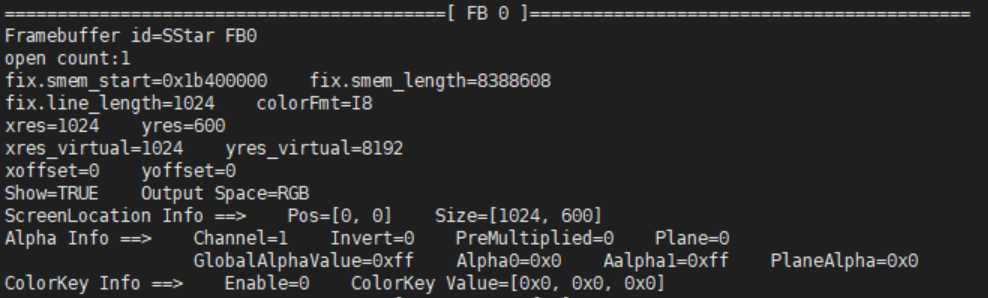
From the above proc information:
-
Attributes "xres", "yres", "xres_virtual", "yres_virtual", "xoffset", "yoffset" confirm the UI dimensions are 1024x600, and the UI display content is at position [0, 0] of the entire framebuffer.
-
The "Show" attribute is TRUE. If this attribute is FALSE, FB UI will not be displayed.
-
The "colorFmt" attribute is I8, indicating the UI color format is Index-8 format. To determine pixel color and transparency, the Cmap set by MI_FB must be referenced (for "video_path", Cmap is determined by the parameter of MI_RGN API
MI_RGN_Init). -
In "Alpha Info", the "Channel" attribute is 1, indicating transparency mode is pixel mode; "Invert" is 0, indicating transparency inversion is not enabled. If the pixel's alpha component is 0, FB UI will not be displayed.
-
The "Enable" attribute of "ColorKey Info" is 0, indicating ColorKey function is not enabled. If ColorKey is enabled and the specified color matches the FB UI pixel color, those pixels will not be displayed.
-
-
Save framebuffer to file
cmd
cp /dev/fbX [path]/[file name]After execution, a file named [file name] will be generated in the specified [path]. It is recommended to use the software "7yuv" to open and view the file. If the user has not drawn the UI to the correct area of the framebuffer, the UI cannot be displayed normally. If the alpha component of the UI pixel finally expresses a transparency value of 0 (transparency value close to 0 may also make UI unclear), the UI will not be displayed.
-
-
Reasons for UI not being displayed
proc information Cause Solution "xres", "yres", "xres_virtual", "yres_virtual" Defined area size does not match user expectations. If the user does not call ioctl FBIOPAN_DISPLAY,FBIOPUT_VSCREENINFO, orFBIOSET_DISPLAYLAYER_ATTRIBUTESto modify framebuffer screen size, the user needs to modify "fb_width" and "fb_height" in MI_FB configuration fileconfig.json(default values for "xres" and "xres_virtual" are "fb_width", default value for "yres" is "fb_height", "yres_virtual" should not be less than "yres"); if the user modifies screen size after opening fb, check if parameters are correct."xoffset", "yoffset" Visible screen offset position is not at the user-updated framebuffer location. The user needs to confirm if the parameters of ioctl FBIOPAN_DISPLAYare correct."Show" UI display attribute is FALSE. The user needs to confirm if the parameters of ioctl FBIOSET_SHOWare correct. Can be quickly modified via echo command (cmdecho SHOW GUI [enable] > /proc/mi_modules/mi_fb/mi_fbX)"colorFmt" and "Alpha Info" Final expressed value of pixel alpha attribute is close to 0. This situation needs to be analyzed in combination with the user-saved framebuffer file (refer to step 2). When "Channel" attribute is 1, transparency mode is pixel mode; in this mode, the user needs to confirm the pixel alpha value of each pixel (refer to "Pixel alpha value" in "1. Glossary"); when "Channel" is 0, transparency mode is global mode; in this mode, the user needs to confirm the "GlobalAlphaValue". Then determine the transparency inversion attribute. If "Invert" attribute is 1, transparency inversion is enabled, actual transparency value = 255 - current transparency value. If the final calculated actual transparency value is close to 0, FB UI will not be displayed. If this cause is confirmed, the user needs to adjust alpha attribute (global mode cmd echo GLOBAL_ALPHA GUI [GlobalAlpha] > /proc/mi_modules/mi_fb/mi_fbx. Pixel mode and color format is ARGB1555, cmdecho ALPHA01 GUI [alpha0] [alpha1] > /proc/mi_modules/mi_fb/mi_fbX) or UI alpha component."ColorKey Info" ColorKey is enabled and specified color matches user's UI color (usually partial UI disappearance). Disable colorkey function (cmd echo COLORKEY GUI 0 0 0 0 > /proc/mi_modules/mi_fb/mi_fbX), or adjust the color specified by colorkey (cmdecho COLORKEY GUI 1 [R] [G] [B] > /proc/mi_modules/mi_fb/mi_fbX) or UI color.
2.3. FB UI Color Abnormal
-
Steps to confirm the issue:
-
Obtain FB proc information (
cat /proc/mi_modules/mi_fb/mi_fbX"X is the fb device sub-device number"). Partial content is shown below.From the "colorFmt" attribute, it can be seen that the FB color format is "I8". If the user fails to set cmap correctly, the UI display color will be incorrect (this issue only occurs when color format is "I8").
-
-
Reasons for the issue
-
User is not using UI with the correct color format.
-
cmap setting failed. (When using "video_path", FB's Cmap cannot be set; users need to set MI_RGN's palette table instead)
-
"fb_hwlayer_dst" and "fb_hwlayer_outputcolor" in config.json configuration items do not match.
(1). By default, only the first color space conversion unit is enabled for DISP video layer; in this case, confirm "fb_hwlayer_outputcolor = 0".
(2). If only the second color space conversion unit is enabled for DISP video layer, the following conditions must be met:
a. "fb_hwlayer_dst = 3" and "fb_hwlayer_outputcolor = 1"
b. "fb_hwlayer_dst = 12" and "fb_hwlayer_outputcolor = 0"
-