Comake Pi D2 Hardware Description
REVISION HISTORY
| Revision No. | Description |
Date |
|---|---|---|
| 1.0 | 11/24/2025 |
1. Introduction to Comake PI D2 V1.0
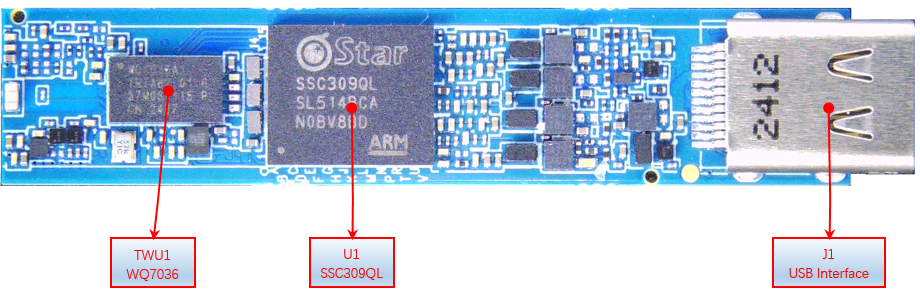
This guide will help you quickly get started with the COMAKE PI D2 development board and provide detailed information about this development board. The COMAKE PI D2 development board is based on the Sgs IPC main control chip SSC309QL and the WQ7036AX Bluetooth audio SoC, comprising a main board and an expansion board. For details, please refer to the subsequent sections.
1.1. System Introduction
- Power Input: 5V 1A, or 5V 2A (Type-C)
- Supports AI Glass/AOV and other functions
- The main chip is SSC309QL dual-core ARM Cortex-A32, with a maximum frequency of 1GHz;
- Onboard high-spec Bluetooth audio SoC chip WQ7036AX, suitable for advanced TWS noise-canceling headphones and other low-power products requiring complex audio processing and voice AI capabilities
- Supports WIFI6/BT/BLE5.4 dual-mode protocols and BLE Audio;
- VDD_CPU Voltage: default 0.9V, software settings can adjust voltage according to frequency;
- VDD_Core Voltage: default 0.9V, software settings can adjust voltage according to frequency;
- DRAM Voltage: LPDDR4X-1.8V, 1.1V, 0.6V;
- IO Voltage: 1.8V/3.3V
- Built-in 16bit 2Gbit LPDDR4X-3200Mbps
- Onboard 1.8V_EMMC capacity: 64GB;
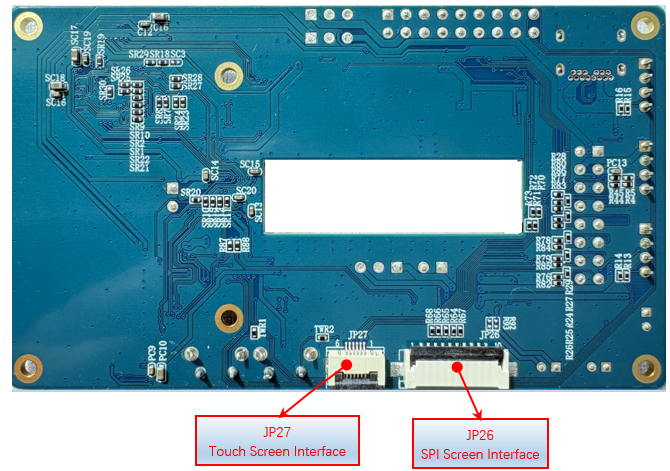
- Supports 2.8-inch SPI Panel (maximum interface 720*360@30fps);
- Supports 4lane or 2lane (SR00) + 2lane (SR01) MIPI RX interfaces
- Equipped with 1 USB2.0 (can be configured as host or device via software);
- Supports 2 (Chanel) * 2 (PCS) DMIC;
- Supports digital audio output;
- Chip operating temperature range: -20°C ~ +70°C;
- Main Board Size:L(49mm)、W(10.2mm)、Thk(0.8mm)
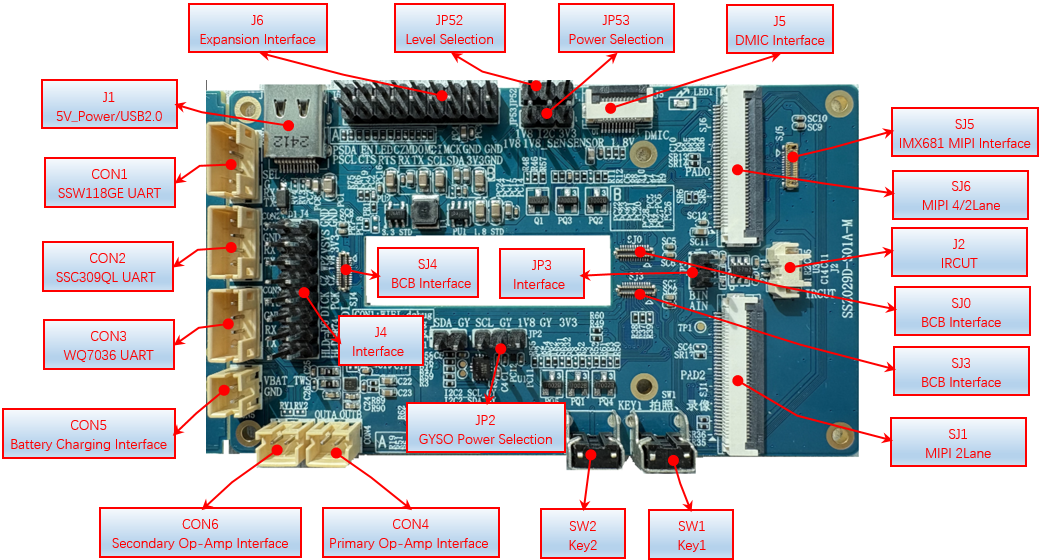
- Expansion Board Size:L(92mm)、W(53.8mm)、Thk(1.6mm)
2. Interface Module Diagrams
2.1. Main Board Interface Module Diagram

2.2. Expansion Board Interface Module Diagram
3. Detailed Description of Some Interface Modules
3.1 DC 5V 1A(J1)
J1 is a DC 5V Type-C power interface, supporting USB2.0.
3.2 Battery Interface (CON5)
TWS_Vbat battery interface, note that when using Type-C to charge the battery, NC expansion board R49 resistor is needed.
3.3 Photo/Video KEY (SW1)
Short press to take a photo, long press to record video.
3.4 Extended Button (SW2)
Extended function button.
3.5 SSC309QL Debug Uart Interface (CON2)
SSC309QL Debug Uart, with a default baud rate of 115200, defaults to EMMC boot. CON2 can also switch to I2C mode, using the SigmaStar ISP Tool to upgrade uboot and read register information.
3.6 SSW118GE Debug Uart Interface (CON1)
SSW118GE WIFI Debug Uart, with a default baud rate of 115200.
3.7 WQ7036AX Debug Uart Interface (CON3)
WQ7036AX Debug Uart interface, with a default baud rate of 2M.
3.8 Primary Op-Amp Speaker Interface (CON4)


The primary op-amp is AW88082 digital op-amp, with I2S signals coming from TWS WQ7036AX. To verify, R92, R93 need to be confirmed.
3.9 Secondary Op-Amp Interface (CON6)
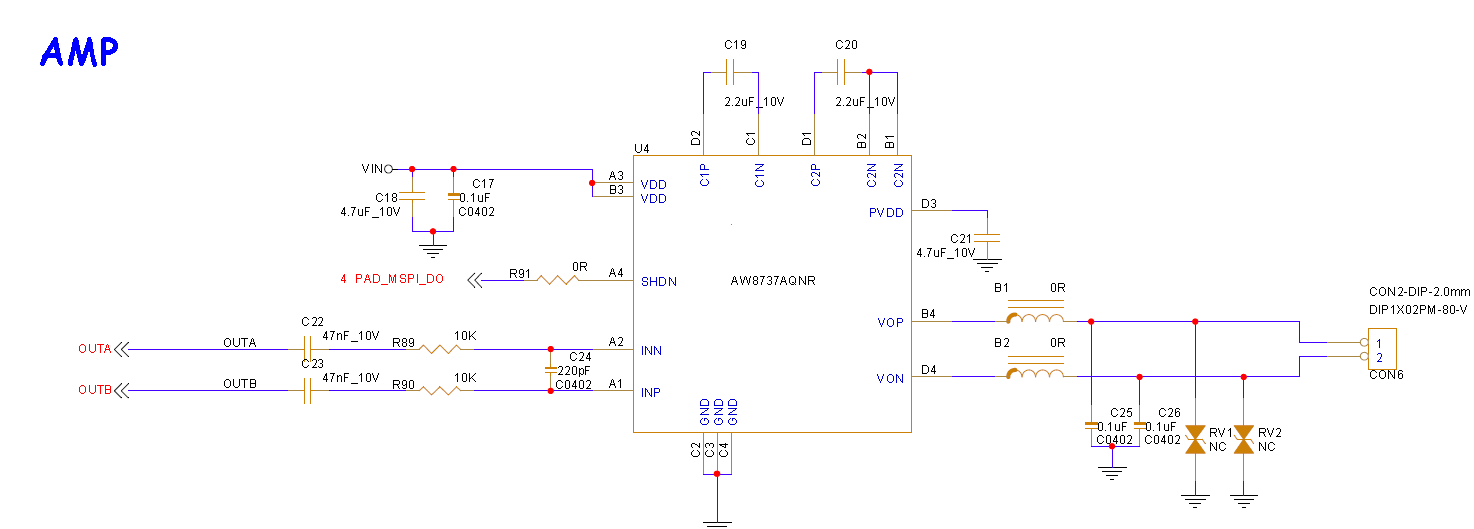
If the volume of the primary op-amp is insufficient, the secondary op-amp on the expansion board can be used. Ensure to disconnect the series resistors R92\R93 of the primary op-amp.
3.10 DMIC Interface (J5)
WQ7036AX's DMIC expansion interface, supports up to 4 DMICs, power controlled by TWS WQ7036AX.


3.11 GYSO Level Selection (JP2)
The expansion board GYSO supports free selection of IIC, and power supports switching between 3.3V/1.8V. The default IIC is in SSC309QL's I2CM0, and the default level is selected to be 1.8V. GYSO power is controlled by TWS WQ7036AX.

3.12 IRCUT Interface (J2)
IRCUT control interface, the default control IO needs to select to connect to JP3.


3.13 MIPI 4/2Lane Interface (SJ6)
Default supports MIPI 4Lane/2Lane; if connecting 4Lane for resolutions above 4K, remove the residual connections to the SJ5 seat.

| NC | SR1、SR2、SR7、SR8、SR21、SR22、SR23、SR24、SR25、SR26、SR27、SR28 |
|---|---|
3.14 IMX681 Module Interface (SJ5)
SJ5 is the IMX681 module interface, also compatible with the IMX471 module interface.

3.15 MIPI01 PAD2 2LANE Interface (SJ1)
SJ1 will be used when verifying MIPI 2Lane + 2Lane.

if connecing Sesnor using interface SJ1/SJ6 ,Requires NC components as follows to reduce signal residuals.
| NC | SR1、SR2、SR5、SR6、SR9、SR10、SR13、SR14、SR21、SR22、SR23、SR24、SR25、SR26、SR27、SR28 |
|---|---|
Note
Note: The C version mainboard's I2C2 SDA/SCL for MIPI PAD2 is reversed, so the expansion board has made cross-connections for this signal.

3.16 BCB Expansion Interface (SJ4, SJ0, SJ3)
SJ0 can connect to IMX681/471 module.

SJ3 and SJ4 are expansion IO interfaces, which can connect to different peripheral mainboards to verify different functions.


3.17 Sensor_1.8V Power Selection (JP53)
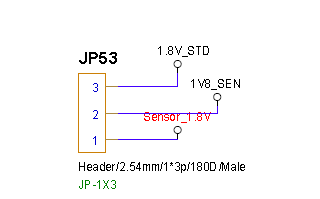
Select whether the 1.8V power for the sensor comes from the main board or the expansion board: 1.8V_STD is the expansion board power / Sensor_1.8V comes from the main board.
3.18 Expansion Interface (J4)

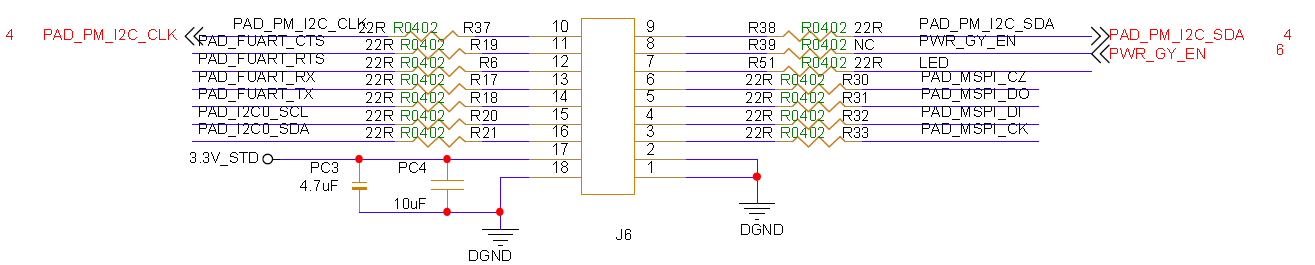
3.19 Expansion Interface (J6)
3.20 EMMC (MU1)
EMMC supports EMMC4.3 by default, with a maximum of 48MHz.