ALSA Audio Capture and Playback Program Description
1. Demo Test Item Description
This demo can test the ALSA interface and scenarios under the Comake PI D2 B environment, including recording, playback, DMIC/ECHO tests, and supports recording gain and playback volume settings.
2. Compilation Environment Description
Note
Generally, the corresponding programs have already been packaged on the board by default, so program compilation is not mandatory. You can directly find prog_audio_alsa_ai_ao_demo in the /customer/sample_code/bin folder on the board. If you cannot find the file or need to modify the program, you can refer to the following steps.
2.1. In the project path, select defconfig based on the board (nand/nor, ddr model, etc.) for full package compilation;
For example, for Comake PI D2 B model board, set the toolchain and use the emmc configuration command as follows; for other boards, refer to the specific model's Development Environment Setup.
export ARCH=arm
export CROSS_COMPILE=arm-linux-gnueabihf-
export PATH=/tools/toolchain/gcc-sigmastar-9.1.0-2019.11-x86_64_arm-eabi/bin:/tools/toolchain/gcc-11.1.0-20210608-sigmastar-glibc-x86_64_arm-linux-gnueabihf/bin:$PATH
make ipc_iford.emmc.glibc-11.1.0-ext4fs.ssc029d.256.bga8_lpddr4x_d2_full_defconfig
make clean;make image -j16;
2.2. Enter the sdk/verify/sample_code/ directory and execute:
make clean; make source/iford/audio/alsa_ai_ao_demo
Place the executable file prog_audio_alsa_ai_ao_demo from the out directory onto the board at the path /customer/sample_code/bin and change the permissions to 777.
Simultaneously place the dependency files on the board side at /customer/3rd_party_libs/alsa/res/alsa, and place the libraries on the board side at /config/lib;
Dependency file path:
sdk/verify/sample_code/source/iford/audio/alsa/res/alsa
libs path:
sdk/verify/sample_code/source/iford/audio/alsa/glibc/11.1.0/arm
3. Runtime Environment Description
Note
If you are using the code package we provided and have compiled with the defconfig from the example, then the following dts configurations do not need to be modified as they are already configured by default.
The currently running board model is Comake PI D2 B.
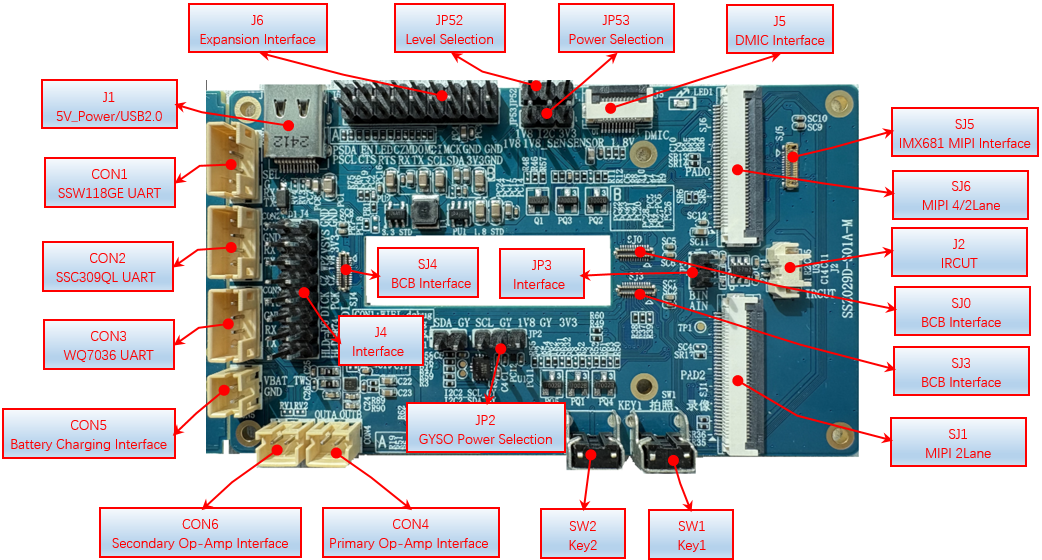
3.1. DMIC connects to J5, and the speakers connect to CON4;
3.2. The padmux configuration in (kernel/arch/arm/boot/dts/iford-ssc029d-s01a-d2-full-padmux.dtsi) is as follows, while commenting out the conflicting pins:
#if 1
                //LINEOUT AMP
                <PAD_MSPI_DO            PINMUX_FOR_GPIO_MODE             MDRV_PUSE_AIO_AMP_PWR>,
#endif
#if 1
                //DMIC
                <PAD_SD0_CMD            PINMUX_FOR_DMIC_2CH_MODE_1             MDRV_PUSE_DMIC0_D0>,
                <PAD_SD0_CLK            PINMUX_FOR_DMIC_2CH_MODE_1             MDRV_PUSE_DMIC0_CLK>,
#endif
4. Command Execution and Result Description
Execute cd /customer/sample_code/bin to navigate to the corresponding file path.
Execute the following command first:
export ALSA_CONFIG_DIR=/customer/3rd_party_libs/alsa/res/alsa
4.1. Command line usage format: ./prog_audio_alsa_ai_ao_demo [usecase] -i [interface] [options]
The optional relationship between usecase and interface is as follows:
| usecase | interface |
|---|---|
| capture | adc_a/adc_b/dmic/echo_rx/i2s_a_rx/i2s_b_rx/i2s_c_rx |
| playback | dac/echo_tx/i2s_a_tx/i2s_b_tx/i2s_c_tx |
| pass_mix | adc_a/adc_b-dac hardware mixing, including playing audio and AI-AO direct connection |
| pass_echo | echo_tx-echo_rx echo collection |
The options are explained in the following table:
| options | Meaning | options | Meaning |
|---|---|---|---|
| -A | Audio card number for capturing | -F | Path to save captured audio file, wav format |
| -a | Audio card number for playback | -f | Audio file path for playback, wav format |
| -D | Device number for capturing audio | -T | Duration for captured audio, in seconds |
| -d | Playback device number | -t | Duration for playback audio, in seconds |
| -C | Number of channels for capturing audio | -V | Captured audio gain, percentage, 0-100 |
| -c | Number of channels for playback audio | -v | Playback audio volume, percentage, 0-100 |
| -R | Sampling rate for captured audio | -r | Sampling rate for playback audio |
| -i | Selection of audio input source for capture. |
4.2. Example explanations:
// Use DMIC to record for 10 seconds, recording gain set to 60%, audio saved in test.wav
./prog_audio_alsa_ai_ao_demo capture -i dmic -F test_dmic.wav -A 0 -D 0 -R 8000 -C 1 -T 10 -V 60
// Use SPEAKER to play audio for 10 seconds, volume set to 40%
./prog_audio_alsa_ai_ao_demo playback -i dac -f ./test.wav -a 0 -d 0 -c 2 -t 10 -v 40
// Play an audio segment, starting echo collection for speaker echoes, recording gain 50%, playback volume 40%, duration 10s
./prog_audio_alsa_ai_ao_demo pass_echo -i echo_tx-echo_rx -f ./48K_16bit_STERO_30s.wav -F echorx.wav  -a 0 -d 0 -r 48000 -t 10 -v 40 -A 0 -D 0 -R 48000 -T 10 -C 2 -V 50
5. Key Code Implementation Description
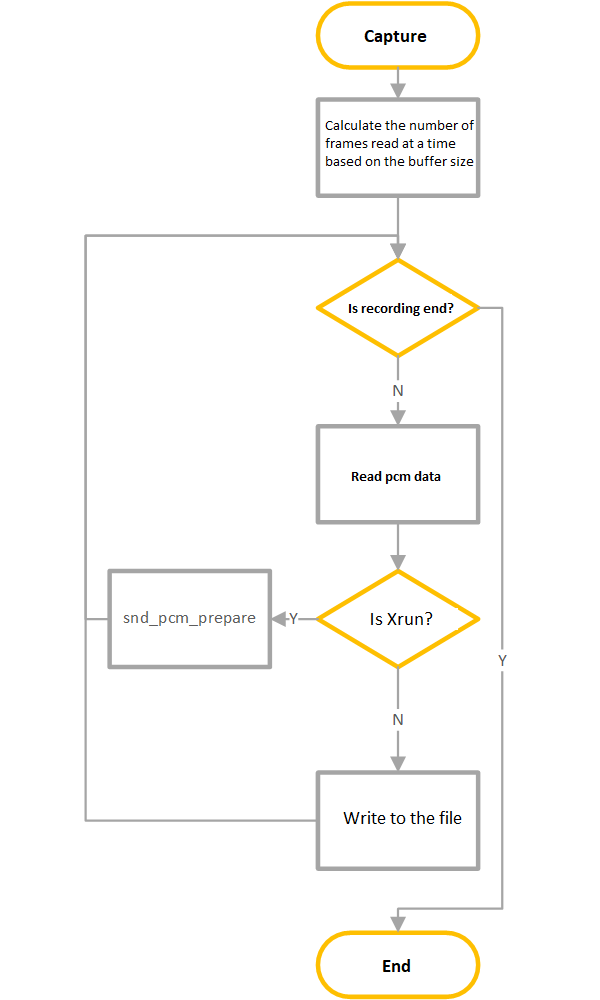
5.1. The overall flowchart for recording is as follows:
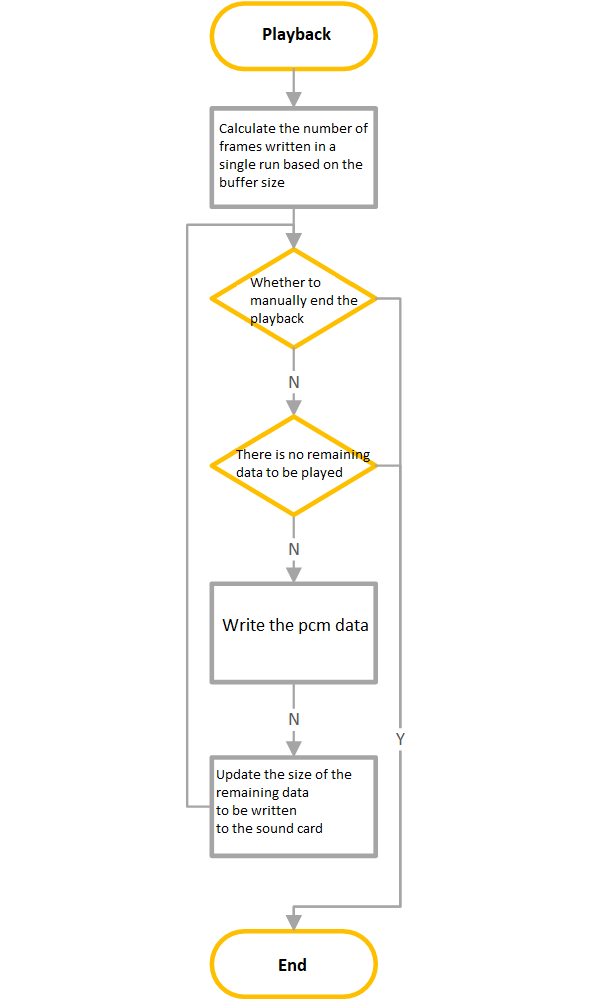
5.2. The overall flowchart for playing audio is as follows:
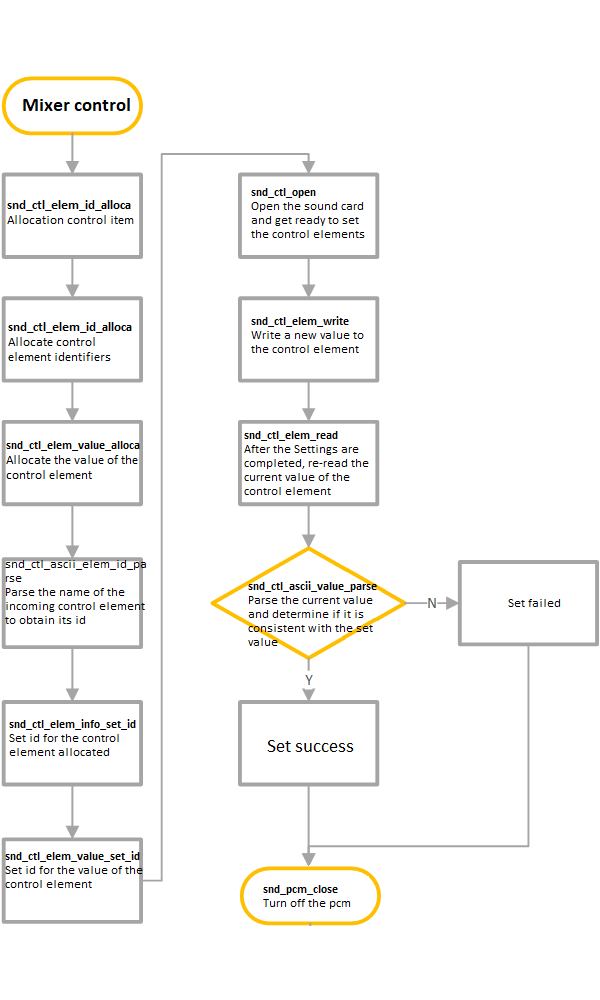
5.3. The ALSA mixer control flow is as follows: