Linux System Debug SOP
REVISION HISTORY
| Revision No. | Description |
Date |
|---|---|---|
| 1.0 | 12/21/2023 |
Preface
This document is written for FAE and software development personnel, aiming to introduce how to conduct preliminary troubleshooting when customers encounter Linux system-related issues during the development process, and to provide relevant information to RD for analysis after confirming it is a Sigmastar SDK issue.
1. Memory Leak Issues
When the system experiences OOM during operation, or when available or free memory continuously decreases as seen in /proc/meminfo, it is advisable to first check for memory leak issues.
1.1 Determine if it is a user or kernel memory leak
The information printed during OOM is similar to that in meminfo, and memory usage-related data can be obtained from the printed information.
OOM
If OOM's active_anon and inactive_anon are relatively large, it may indicate a memory leak at the application layer.
If OOM's slab_reclaimable and slab_unreclaimable are relatively large, it may indicate a memory leak in the kernel.
/proc/meminfo
If /proc/meminfo's Active (anon) and Inactive (anon) or AnonPages are relatively large, it may indicate a memory leak at the application layer.
If /proc/meminfo's SReclaimable and SUnreclaim are relatively large, it may indicate a memory leak in the kernel.
1.2 Application Layer Memory Leak
1.2.1 The application does not explicitly call malloc-like interfaces
The user did not explicitly call malloc and similar interfaces to request memory, but caused memory leaks through other interfaces, such as not actively reclaiming threads after they finish.
1.2.1.1 /proc/$pid/maps or pmap
In this case, you can check whether the size of 8192K anonymous pages in /proc/$pid/maps or pmap has increased. (8192 is the default stack size for glibc user threads, while uclibc uses 2044K. The reason it is not 1024K-aligned is because 4K is used as a guard page.)
Thread stack leaks:
- Roughly calculate the number of all thread stacks of the current process:
pmap pid | grep 8192 | wc -l. If this number keeps increasing, it indicates a possible thread stack leak. - However, if the app only has a few more thread stacks than at the beginning but does not keep increasing, and still finds more thread stacks after all threads exit, it does not necessarily indicate a thread stack leak; it may be due to the glibc stack cache (default is 40M, i.e., 5 threads).
- Generally, this is caused by not calling
pthread_join()after a thread exits or not callingpthread_detach()before a thread exits.
1.2.1.2 /proc/$pid/status
You can also check /proc/$pid/status to see if the Threads field has increased.
1.2.2 tcmalloc heap profile
If the app does not have exit logic and cannot use ASAN to scan for memory leaks, consider using tcmalloc.
The required libraries need to be downloaded from the release versions of gperftools and libunwind and extracted:
# Compile libunwind, the .so location is build/lib/libunwind.so.8
./configure --host=arm-linux-gnu CXX=arm-linux-gnueabihf-g++ CC=arm-linux-gnueabihf-gcc --enable-cxx-exceptions --disable-tests --prefix=$PWD/build
make install

# Compile gperftools, the .so location is build/lib/libtcmalloc.so.4.5.16
./configure --host=arm-linux-gnu CXX=arm-linux-gnueabihf-g++ CC=arm-linux-gnueabihf-gcc --prefix=$PWD/build \
                CPPFLAGS="-I$PWD/../libunwind-1.8.1/build/include" \
                CFLAGS="-I$PWD/../libunwind-1.8.1/build/include" \
                LDFLAGS="-L$PWD/../libunwind-1.8.1/build/lib" LIBS="-lunwind"
make install
The app needs to be compiled with -g. The app on the board can be stripped, but the .ARM.exidx section must be retained, which can be confirmed via arm-linux-gnueabihf-readelf -S app. The app used for local pprof analysis must have -g (because backtrace unwind only needs the .ARM.exidx section to get function addresses, but pprof needs debug info to print line numbers when analyzing results).
Also, if using uclibc, in addition to -g, you need to add -funwind-tables, because the uclibc toolchain does not seem to generate the .ARM.exidx section by default.
Compilation notes for the app:
- The app needs to be compiled with
-gbecause pprof analysis results require line numbers. - The app on the board can be stripped, but the
.ARM.exidxsection must be retained, which can be confirmed byarm-linux-gnueabihf-readelf -S app. - The app used for local pprof analysis must have
-g(because recording backtrace only requires function address information, but pprof analysis results need to print function names, which requires debug information). - If using uclibc toolchain, in addition to
-g,-funwind-tablesneeds to be added, as the uclibc toolchain does not seem to generate.ARM.exidxby default.
Run the app (remember to rename it to libunwind.so.8) and add the following environment variables:
# First, copy libunwind.so.8 and libtcmalloc.so.4.5.16 to the device
mkdir /mnt/mmc/profile
export HEAPPROFILESIGNAL=12 HEAPPROFILE=/mnt/mmc/profile/profile UNW_ARM_UNWIND_METHOD=4
# You can also add HEAP_PROFILE_MMAP=true HEAP_PROFILE_MMAP_LOG=yes to capture app mmap information, but you cannot capture thread stack mmap because glibc calls __mmap.
export LD_LIBRARY_PATH=/dir/to/libunwind.so.8 # Directory where libunwind.so.8 is located
LD_PRELOAD=/path/to/libtcmalloc.so.4.5.16 ./app
During the run, periodically execute kill -12 pid, and a snapshot of malloc usage will be generated in the /mnt/mmc/profile/ directory.
Analyze the results on the host (the app here needs to be unstripped and compiled with -g):
pprof --lines --text --show_bytes app profile.0001.heap --lib_prefix=$PWD. If you do not add--show_bytes, it will display in MB.- If the first step's result only shows addresses without function names, you may need to copy the corresponding unstripped so to the host, for example,
/config/lib/libxx.so, which meansmkdir ./config/liband copy it. - The first output result mainly looks at the first column, which is the number of bytes allocated but not freed for each function.
A more direct method is to compare the results of two runs: pprof --lines --text --show_bytes [app] profile.0002.heap --lib_prefix=$PWD --base=profile.0001.heap. If a certain line's first column value increases significantly, it indicates that the corresponding function may have a memory leak.
1.3 Kernel Memory Leak
1.3.1 slab memory
Commonly, check slab_reclaimable and slab_unreclaimable during OOM, and check SReclaimable and SUnreclaim in meminfo, especially for unreclaimable memory. If these items consume too much memory, you can enable the kernel's native slub debug mechanism for debugging.
slub debug configuration items:
CONFIG_SLUB=y
CONFIG_SLUB_DEBUG=y
CONFIG_SLUB_DEBUG_ON=y
CONFIG_SLUB_STATS=y
# Identify which slab is leaking memory. The leaking one typically has continuously increasing active_objs.
cat /proc/slabinfo
slabinfo - version: 2.1
# name            <active_objs> <num_objs> <objsize> <objperslab> <pagesperslab> : tunables <limit> <batchcount> <sharedfactor> : slabdata <active_slabs> <num_slabs> <sharedavail>
mi_vif_internal        0     18    448   18    2 : tunables    0    0    0 : slabdata      1      1      0
mi_vif_internal        0     18    448   18    2 : tunables    0    0    0 : slabdata      1      1      0
mi_scl_internal        8     20   1600   20    8 : tunables    0    0    0 : slabdata      1      1      0
cmdq_pool              5     20    400   20    2 : tunables    0    0    0 : slabdata      1      1      0
mi_sys_ringpool        0      0    576   28    4 : tunables    0    0    0 : slabdata      0      0      0
mi_sys_bufhandl      520    576    512   16    2 : tunables    0    0    0 : slabdata     36     36      0
mi_sys_meta_buf        0      0   1152   28    8 : tunables    0    0    0 : slabdata      0      0      0
mi_sys_cust_all        0      0   1152   28    8 : tunables    0    0    0 : slabdata      0      0      0
g_miSysChunkCac      540    616    576   28    4 : tunables    0    0    0 : slabdata     22     22      0
g_miSysMmaAlloc    34396  34408   1408   23    8 : tunables    0    0    0 : slabdata   1496   1496      0

# xxx is the name above, e.g., g_miSysMmaAlloc
cat /sys/kernel/slab/xxx/alloc_calls
1.3.2 vmalloc memory
You can check the usage of memory allocated through vmalloc in meminfo's VmallocUsed.
Although some kernel versions do not count this item, you can also check related memory usage through the following method:
cat /proc/vmallocinfo
Note: Mainly compare the number of pages allocated in vmallocinfo, where the page allocation number for vmap can be ignored.
1.3.3 Memory allocated through CamOs API
Memory allocated through the CamOs API may be the slab memory mentioned above or memory allocated through vmalloc.
For the usage of this part of memory, you can use the mechanism to monitor memory allocated by CAM OS API.
How to enable the mechanism:
-
Enable the macro CONFIG_TRACE_CAM_OS_MEM in the kernel.
-
Enable the TRACE_CAM_OS_MEM feature through Alkaid's menuconfig option. Execute make menuconfig in the project path, option path: Customer_Options -→> Trace Cam Os Mem, as shown in the figure below:
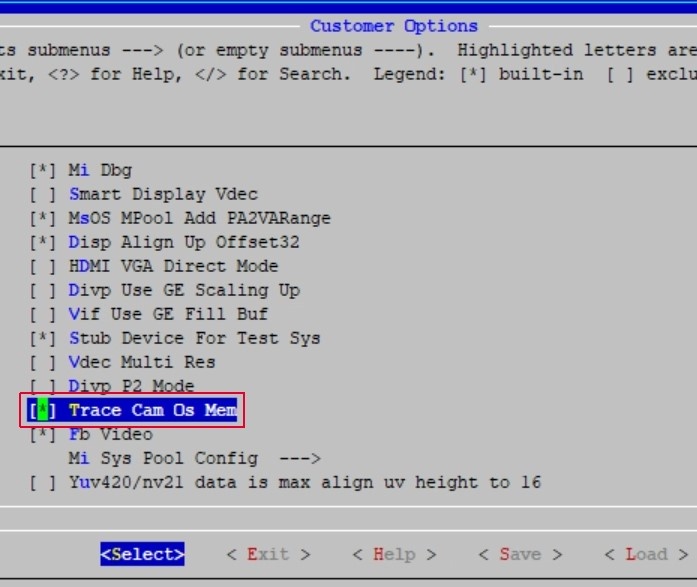
This feature will record trace information in the following APIs:
CamOsMemAlloc
CamOsMemAllocAtomic
CamOsMemCalloc
CamOsMemCallocAtomic
CamOsMemCacheAlloc
CamOsMemCacheAllocAtomic
CamOsContiguousMemAlloc
If enabled successfully, there will be two proc entries: mem_filter and mem_stat under /proc/mi_modules/common on the platform.
cat /proc/mi_modules/common/mem_filter: View the modules that can be monitored.echo trace 5 > /proc/mi_modules/common/mem_filter: Select the module of interest to monitor memory consumption, e.g., selecting module MI_SYS with index 5.echo trace 40 > /proc/mi_modules/common/mem_filter: Setting a value greater than 39 allows viewing memory monitoring information for all modules, e.g., setting 40.echo showall 1 > /proc/mi_modules/common/mem_filter: Locate where modules call CAM OS API to allocate memory.
| Information Entry | Meaning |
|---|---|
| ModuleName | The monitored module |
| TotalSize | The memory size allocated by the corresponding module |
| TraceInfo | The kernel memory size consumed for each record, which is the memory consumed by this feature |
| TotalCount | The total number of records in this monitoring session |
| TraceCost | The memory consumed by this feature in this monitoring session, equal to TraceInfo multiplied by TotalCount |
| HighTotal | The peak total memory allocated by all modules in this session |
| CamTotal | The total memory allocated by all modules in this session |
If you need to view the function information for memory allocation by all modules, you can use the following commands:
echo trace 10 > /proc/mi_modules/common/mem_filter
echo showall 1 > /proc/mi_modules/common/mem_filter

# 23 indicates that 1 identical API allocation with the same size is omitted in between.
cat /proc/mi_modules/common/mem_stat
--------------------------- CamOsMemory Usage state ---------------------------
Function Caller                                                         Ptr             BytesReq
--------------------------------------------------------------------------------
[kernel]:
_CamProcCreateEntryNode+0x6f/0x12a                                      c2199a00        38
...(23)
0xbfdc907f                                                              c20a0200        d0
...(1)
_CamProcCreateEntryNode+0x6f/0x12a                                      c1f79100        38
.....
By comparing the results of mem_stat before and after, you can identify the location of the memory leak.
1.3.4 kmemleak tool
For kernel memory leak issues, you can use the kernel's native tool kmemleak for analysis.
How to enable kmemleak:
Kernel hacking → Memory Debugging → Kernel memory leak detector
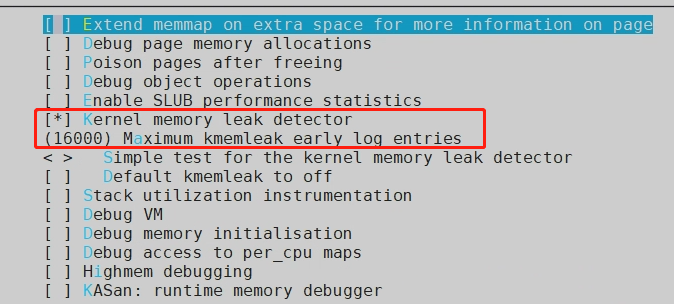
Enable the corresponding kmemleak configuration item:

1) Clear kmemleak history to record new data:
echo clear > /sys/kernel/debug/kmemleak
2) Enable kmemleak for memory leak detection scanning:
echo scan > /sys/kernel/debug/kmemleak

echo scan=n > /sys/kernel/debug/kmemleak  # Set automatic scanning every n seconds, default is 600s
3) View kmemleak memory leak detection results:
cat /sys/kernel/debug/kmemleak
Running Steps:
1) echo clear > /sys/kernel/debug/kmemleak       // Clear cache

2) echo scan=10 > /sys/kernel/debug/kmemleak     // Start scanning, set scan interval to 10s
3) insmod kmemleak_test.ko

4) cat /sys/kernel/debug/kmemleak

unreferenced object 0xe1be4000 (size 4000):
  comm "insmod", pid 869, jiffies 4294948352 (age 31.890s)
  hex dump (first 32 bytes):
    0d 00 00 00 04 00 00 00 ff ff ff ff ad 00 00 00  ................
    01 00 00 00 02 00 00 00 ec 51 75 bf 98 01 00 00  .........Qu.....
  backtrace:
    [<c0092a8b>] __vmalloc_node+0x2f/0x38
    [<c0092ab7>] vmalloc+0x23/0x30
    [<bf75501f>] kmemleak_test+0x1e/0x54 [kmemleak_test]          // gdb can locate the vmalloc line
    [<bf75700d>] 0xbf75700d
    [<c00095bf>] do_one_initcall+0xcf/0x104
    [<c005ebc1>] do_init_module+0x39/0x12c
    [<c005ffc7>] load_module+0x12d1/0x13b6
    [<c0060159>] SyS_init_module+0xad/0xb8
    [<c000d2e1>] ret_fast_syscall+0x1/0x4c
    [<ffffffff>] 0xffffffff
Note: After enabling CONFIG_TRACE_CAM_OS_MEM in the kernel config, kmemleak will not be able to track memory leaks from cam os api, because all pointers allocated by cam os will be added to the hash list. If there is a memory leak, the pointer to the leaked memory will still exist in the hash list, and kmemleak will scan this pointer when scanning memory, leading the kernel to mistakenly believe there is no memory leak.
1.3.5 Using page_owner
When the above methods do not reveal the root cause of kernel memleak, you can use the kernel's native page owner mechanism, which records the owner of each allocated page and the call stack of the owner that allocated the page.
Configuration needed to enable the page_owner mechanism:
- Add kernel configuration CONFIG_PAGE_OWNER=y.
- Add page_owner=on to the bootargs parameter.
After enabling the feature, you can see the following node in proc:
/sys/kernel/debug/page_owner
For the subsequent usage tutorial, you can refer to:
Documentation/vm/page_owner.rst
...

1) Build user-space helper::

    cd tools/vm
    make page_owner_sort

2) Enable page owner: add "page_owner=on" to boot cmdline.

3) Do the job what you want to debug

4) Analyze information from page owner::

    cat /sys/kernel/debug/page_owner > page_owner_full.txt
    ./page_owner_sort page_owner_full.txt sorted_page_owner.txt

   See the result about who allocated each page
   in the ``sorted_page_owner.txt``.
Compile the page_owner_sort tool, then cat the node and sort the output. Then manually review the data.
Below is an example output from page_owner:
/mnt/slab_diff/0804 # tail -n 20 ./sorted_page_owner2.txt

1 times:
Page allocated via order 8, mask 0x52dc0(GFP_KERNEL|__GFP_NOWARN|__GFP_NORETRY|__GFP_COMP|__GFP_ZERO), pid 2298, ts 7180405565150 ns, free_ts 7170863960659 ns
 get_page_from_freelist+0x1b5/0x402
 __alloc_pages_nodemask+0xc9/0x5de
 kmalloc_order+0x1f/0x44
 kvmalloc_node+0x39/0x88
 CamOsMemCalloc+0x35/0x44
 IqInit+0x11/0x8c [mi_isp]
 CameraIspAlgo_3A_IQ_Init+0x481/0x53e [mi_isp]
 CameraCreateIspInstance+0x29b/0x2f8 [mi_isp]
 MHalVpeCreateIspInstance+0xff/0x158 [mi_isp]
 MI_ISP_DRVCFG_CreateInstance+0xb9/0x19c [mi_isp]
 MI_ISP_IMPL_CreateChannel+0x619/0x6c4 [mi_isp]
 MI_ISP_IOCTL_CreateChannel+0x31/0x74 [mi_isp]
 MI_DEVICE_Ioctl+0xfd/0x1f0 [mi_common]
 vfs_ioctl+0x11/0x1c
 sys_ioctl+0x8b/0x4b2
 ret_fast_syscall+0x1/0x5c
The size corresponding to each order (page frame) is as follows:
- order 0: 4KB
- order 1: 8KB
- order 2: 16KB
- order 3: 32KB
- order 4: 64KB
- order 5: 128KB
- order 6: 256KB
- order 7: 512KB
- order 8: 1MB
- order 9: 2MB
This also corresponds one-to-one with the page frame counts in buddyinfo:
 cat /proc/buddyinfo
Node 0, zone   Normal     28     22     15     14      5      7     10      5      5    128
Based on the remaining page frame count, we can calculate the LowFree size in meminfo. MemFree = HighFree + LowFree, so we can calculate the remaining memory.
Going back to the page_owner result above, we can clearly see: Page allocated via order 8, mask 0x52dc0(GFP_KERNEL|__GFP_NOWARN|__GFP_NORETRY|__GFP_COMP|__GFP_ZERO), pid 2298, ts 7180405565150 ns, free_ts 7170863960659 ns
Information about this page frame:
- order 8 allocated 1MB of memory
- The mask value
- The pid value
tsrepresents the timestamp when the page was allocated, i.e., the time point of page allocation.free_tsrepresents the timestamp of the last page release, i.e., the time point when the page was last freed.
By comparing these two timestamps, you can calculate the elapsed time from allocation to the last release. This can be useful for analyzing page usage, memory reclamation, etc.
We can see that free_ts is less than ts, which means the memory was allocated but not freed. From the call stack, we can see that IqInit allocated 1MB of memory without freeing it.
2. High CPU Loading Issues
2.1 top
top can simply analyze the overall CPU loading and memory, confirming which thread or process has a higher CPU loading.
After entering top, press 1 to list the loading of each CPU:
- us indicates user, sy indicates system, hi indicates hard irq, si indicates soft irq, st indicates steal time (hypervisor).
- By looking at the line for CPUx in top, you can locate high CPU loading issues that are not in thread context, such as high si and hi can also lead to delayed thread scheduling.
Mem: 74864K used, 1720804K free, 853776K shrd, 0K buff, 17924K cached
CPU0:  0.0% us  5.3% sy  0.0% ni 94.6% idle  0.0% io  0.0% hi  0.0% si  0.0% st
CPU1:  0.1% us  3.5% sy  0.0% ni 96.2% idle  0.0% io  0.0% hi  0.0% si  0.0% st
CPU2:  0.0% us  0.0% sy  0.0% ni  100% idle  0.0% io  0.0% hi  0.0% si  0.0% st
CPU3:  0.7% us  1.5% sy  0.0% ni 97.6% idle  0.0% io  0.0% hi  0.0% si  0.0% st
Load average: 14.05 14.05 14.01 1/108 1028
PID  PPID USER     STAT   VSZ %VSZ CPU %CPU COMMAND
996   993 root     S    58088  3.2   1  1.2 ./prog_vif_isp_scl_ut param_snr0_venc.ini
1003     2 root     DW       0  0.0   1  1.0 [isp0_P0_MAIN]
942     2 root     DW       0  0.0   1  0.1 [IspMidThreadWq]
997     2 root     DW       0  0.0   0  0.1 [vif0_P0_MAIN]
1028  1014 root     R     2432  0.1   2  0.1 top
1009     2 root     DW       0  0.0   2  0.0 [venc0_P0_MAIN]
937     2 root     DW       0  0.0   0  0.0 [IspDriverThread]
12     2 root     IW       0  0.0   3  0.0 [rcu_preempt]
2.2 perf
top can only locate the approximate problematic area but cannot pinpoint the specific location causing high CPU loading.
You need to use perf and FlameGraph to locate the specific code location:
# Copy perf to the device and execute the following 2 commands, then copy the generated perf.unfold out
# -a indicates --all-cpus, -g indicates capturing kernel and user; sleep 1 indicates exit capture after 1 second, you can increase this value to extend the capture time.
perf record -a -g sleep 1
perf script -i perf.data > perf.unfold
# Use the captured perf data to generate a flame graph
# https://github.com/brendangregg/FlameGraph.git, after entering the project directory, execute the command
./stackcollapse-perf.pl ./perf.unfold > report.data && ./flamegraph.pl report.data > report.svg
If the captured part is ? (unknown) or an address, you may need to compile the corresponding app binary and so with -g.
2.3 Instantaneous High CPU Loading Issues
Since FlameGraph displays CPU loading over a period of time, it cannot observe instantaneous spikes in CPU loading.
Here, it is recommended to use flamescope, which only depends on Python, so it can run on Linux or Windows:
# The method of capturing on the device is the same
perf record -a -g sleep 1
perf script -i perf.data > perf.unfold

# Environment setup
git clone https://github.com/Netflix/flamescope
cd flamescope
# The flamescope on the master branch has issues, replace it with the app/public from tag v0.2.0
git checkout -b v2.0.0 v2.0.0
cp app/public ..
git checkout master
cp -r ../public app
pip install -r requirements.txt

# Copy the captured data to example for visualization
cp [path/to/perf.unfold] example/
python run.py
Open 127.0.0.1:5000 and then open perf.unfold to see a graph with the x-axis as seconds and the y-axis as milliseconds. Clicking on any two points will open the flame graph for that period.
3. Deadlock Issues
3.1 Concept of Deadlock
A deadlock refers to a state where multiple processes (or threads) are blocked due to long-term waiting for resources held by other processes. When the waiting resources are not released, the deadlock will persist. Once a deadlock occurs, the program itself cannot resolve it and can only rely on external forces to restore the program's operation, such as restarting or watchdog resets.
3.2 Mutual Exclusion Deadlock Analysis
Mainly divided into D state deadlock and R state deadlock.
3.2.1 D State Deadlock Analysis
D state deadlock refers to a process waiting for I/O resources that cannot be satisfied, remaining in TASK_UNINTERRUPTIBLE sleep state for a long time (the system default configuration is 120 seconds). You can locate the specific issue using the mi_sys's show_threads command. Usage: To be on-site when the deadlock occurs:
-
Open a new window and in this window:
cat /proc/kmsgThis step is very important because capturing kmsg logs is more complete than serial port logs.
-
In another window:
echo show_threads > /proc/mi_modules/mi_sys/mi_sys0 -
Analyze the output of kmsg.
3.2.2 R State Deadlock Analysis
A process remains in TASK_RUNNING state for a long time (the system default configuration is 60 seconds) monopolizing the CPU without switching. Generally, this is due to the process disabling preemption or interrupts for a long time while executing tasks or in an infinite loop. This often leads to mutual locking between multiple CPUs, causing the entire system to be unable to schedule normally, resulting in the watchdog thread being unable to execute, and ultimately leading to a watchdog reset and restart. This issue is often caused by improper handling of concurrent operations between CPUs, such as atomic operations and spinlocks. The deadlock types detected by the Lockdep deadlock detection tool introduced later are R state deadlocks.
3.3 Spinlock Deadlock Analysis
Spinlock deadlocks can be roughly divided into soft lockup and hard lockup.
Soft lockup: Refers to the CPU running in kernel space and not experiencing task scheduling for an extended period.
Hard lockup: Refers to the CPU not experiencing interrupts for a specified time. Different lockups have different analysis methods for resolution.
3.3.1 Soft Lockup Analysis
For soft lockup, you can use the Linux kernel's soft lockup detector.
-
Principle The soft lockup detector starts a watchdog thread for each CPU and sets scheduling attributes to allow execution only on the corresponding CPU. The purpose of this thread is similar to a hardware watchdog, to "feed the dog" (update the timestamp watchdog_touch_ts). If this thread is normally scheduled by the CPU, the watchdog_touch_ts will be updated, thus not triggering a soft lockup alarm.
Checking for watchdog timeout occurs in the CPU arch timer interrupt handling function. If the system is abnormal, such as a thread using preempt_disable() and not calling preempt_enable() for a long time, the watchdog thread will not get CPU execution, leading to a timeout.
-
Usage Kernel Config Option:
CONFIG_LOCKUP_DETECTOR=yAfter recompiling the kernel, reboot to reproduce the issue and capture logs for analysis.
3.3.2 Hard Lockup Analysis
For hard lockup, there are currently no other good features on native ARM Linux to locate the issue. You can use Trace32 or Lockdep to locate the problem.
3.3.3 Trace32 Analysis
In addition to the above solutions, you can connect to Trace32 to see the real context running on each core, which is the most intuitive. After connecting to Trace, enter the command 'frame' to pop up the stack information for core0 by default. Switch cores using the lower right corner to view the context of the desired core. For more specific usage methods, refer to Trace32 training.
3.4 General Analysis Methods for Deadlocks
Whether it is a spinlock or mutual exclusion (excluding semaphores), for reproducible scenarios, you can enable a deadlock detection feature in the Linux kernel called "Lockdep." Use the methods introduced later to enable Lockdep, then reproduce the issue and analyze the logs to identify the true cause of the deadlock.
3.4.1 Introduction to Lockdep
The Linux kernel provides a deadlock debugging module called Lockdep, which tracks the state of each lock and the dependencies between various locks, ensuring that the dependencies between locks are correct through a series of verification rules. Lockdep detects deadlocks for spinlocks, rwlocks, mutexes, and rwsems, as well as incorrect releases of locks and erroneous behaviors such as sleeping in atomic operations.
3.4.2 Using Lockdep
You can choose one of the following two methods, with the second being more convenient and quicker.
-
Compile the kernel separately to enable it. In menuconfig or defconfig, enable the following options:
CONFIG_DEBUG_LOCK_ALLOC=y CONFIG_PROVE_LOCKING=y CONFIG_LOCKDEP=y CONFIG_LOCK_STAT=y CONFIG_DEBUG_LOCKDEP=y CONFIG_TRACE_IRQFLAGS=y CONFIG_DEBUG_ATOMIC_SLEEP=y -
Compile the entire Alkaid package. Refer to L3 WIKI "Compile Alkaid Debug Version," and compile the entire image with DEBUG=4, i.e.:
make image DEBUG=4 -jN
4. Memory Access Issues
Crashes are the most common manifestation of memory access issues (including accessing invalid pointers, assertion failures, printing variable values that do not meet expectations, etc.).
4.1 SDK Alignment
If you find strange behaviors when calling the mi API (for example, the values printed in the kernel differ from those obtained by the user), first check whether the release SDK is aligned, including header files, ko, so, etc.
If alignment has been confirmed but issues still exist, check whether there are any precompiled algorithm library sos that separately used statically linked SDK .as. The confirmation method is as follows:
# MI_SYS_ChnInputPortGetBufPa is just an example; it should be replaced with the mi API that exhibits strange behavior.
# If you can find the same API in the so (T indicates the test segment), it proves that libxxxx.so is linked to the SDK's .a, and you need to compile libxxxx.so with the new SDK.
arm-linux-gnueabihf-nm libtest.so | grep MI_SYS_ChnInputPortGetBufPa
0000000000002a20 T MI_SYS_ChnInputPortGetBuf
arm-linux-gnueabihf-nm libxxxx.so | grep MI_SYS_ChnInputPortGetBufPa
0000000000002a20 T MI_SYS_ChnInputPortGetBuf
4.2 ASAN (Userspace)
Common memory access issues in userspace:
- SIGSEGV: Null pointer, using an uninitialized pointer, memory out of bounds.
- libc or very stable third-party libraries encountering assertion failures leading to abort: possibly due to memory out of bounds or used after free.
- No crash, but some variable values are abnormal: possibly due to memory out of bounds or used after free.
The most effective tool for locating memory access issues in userspace is ASAN.
4.2.1 Basic Usage of ASAN
To use ASAN to scan for memory access issues in userspace:
- You need to enable 3 compilation options
-g -fsanitize=address -fno-omit-frame-pointerfor all compiled libraries and binaries; you can omit-fno-omit-frame-pointerbut need to retain the.ARM.exidxsection when stripping. - Packaging can be stripped, but compilation must have -g and retain unstripped binaries or sos, otherwise addr2line cannot resolve file and line numbers.
- ASAN can also be statically linked; just add ld flags:
-static-libasan, so you do not need to add theLD_PRELOADenvironment variable at runtime; if using uclibc, you may also need to add ld flags:-lasan.# main.c reference # int main(int argc, char *argv[]) # { # char *a = malloc(10); # free(a); # a[1] = 1; # return 0; # } arm-linux-gnueabihf-gcc -g -fsanitize=address -fno-omit-frame-pointer main.c # Copy /tools/toolchain/gcc-11.1.0-20210608-sigmastar-glibc-x86_64_arm-linux-gnueabihf/arm-linux-gnueabihf/lib/libasan.so.6.0.0 to the device, # and rename it to libasan.so.6; run the previously compiled a.out on the device. LD_PRELOAD=/path/to/libasan.so.6 ./a.out # ASAN runtime result as follows, focus on the stack address at the time of the crash. # ==803==ERROR: AddressSanitizer: heap-use-after-free on address 0xb41007b1 at pc 0x00010653 bp 0xbed15c80 sp 0xbed15c84 # WRITE of size 1 at 0xb41007b1 thread T0 # #0 0x10650 (/mnt/a.out+0x10650) # #1 0xb68b6bc4 in __libc_start_main (/lib/libc.so.6+0x17bc4) # The following a.out needs to be unstripped and compiled with -g. arm-linux-gnueabihf-addr2line -e a.out 0x10650 main.c:8
Going through the above steps usually allows you to capture the code location of the memory access issue, but understanding why the memory access occurred requires detailed code analysis.
4.2.2 OOM After Enabling ASAN
ASAN will occupy twice the original memory (with an additional 2 times CPU overhead).
- If the app runs out of memory shortly after enabling ASAN, you may need to reduce the MMA to enable it; if it still cannot be enabled due to insufficient memory, consider trimming some functionalities; you can also try enabling swap.
- If the app runs for a long time before encountering OOM, you can set the environment variable
ASAN_OPTIONS=quarantine_size_mb=50to limit the size of the quarantine area (default is 250MB).
To enable swap when memory is insufficient:
- Open kernel config:
CONFIG_SWAP, no need to recompile the SDK ko. - Create a swap file (can be executed on a Linux server):
dd if=/dev/zero of=./swap bs=1M count=250 && mkswap ./swap(adjusting the count value can adjust the swap size), copy the swap file to the SD card or eMMC. - Enable swap on the device:
swapon /mnt/sd/swap, confirm thatSwapFreein/proc/meminfois greater than 0, indicating successful enabling;echo 200 > /proc/sys/vm/swappinessadjusts the tendency to use swap.
Note that even after enabling swap, there may still be insufficient memory.
If the customer is arm64 but cannot enable ASAN due to insufficient memory, consider using hwasan (which only increases memory usage by 30%-50% and has no memory consumption for the quarantine area, but functions identically to ASAN). The differences in usage compared to ASAN are:
- Change
-fsanitize=addressto-fsanitize=hwaddress. - Change the copied libasan.so to libhwasan.so.
4.2.3 Unable to Reproduce Issues After Enabling ASAN
If you cannot reproduce issues after enabling ASAN, it is likely necessary to recompile precompiled libraries (.so or .a) using ASAN, such as the SDK or precompiled algorithm libraries.
Compile the SDK with ASAN: make DEBUG=256 image -j8.
4.2.4 uclibc ASAN
Since uclibc cannot compile an ASAN version by default, libsanitizer have to be modified to adapt uclibc toolchain.
Usage method: Place libasan.a and libasan_preinit.o in the uclibc toolchain directory arm-sigmastar-linux-uclibcgnueabihf-9.1.0/arm-sigmastar-linux-uclibcgnueabihf/lib, and since it is statically linked, there is no need to add the LD_PRELOAD parameter at runtime; other usage methods remain the same.
4.3 KASAN (Kernel)
Kernel memory access issues:
- BUGON: Native kernel code BUGON, or BUGON confirmed to be absolutely impossible, may be due to used after free or memory out of bounds.
- Variables turning into values that should not appear (may not panic): likely due to used after free or memory out of bounds.
- Reading or writing illegal addresses may produce the following prints:
Unable to handle kernel paging request at virtual addressaddress between user and kernel address ranges- The reason may be: used after free or memory out of bounds has altered the pointer's value, or an uninitialized pointer was used.
KASAN switch CONFIG_KASAN, kernel and userspace are different; KASAN cannot be used by compiling just a single ko; the release must include the KASAN SDK, and the compile command is make DEBUG=2 image -j8.
A few issues to note after enabling KASAN:
- Insufficient flash space: You can enable
CONFIG_KASAN_OUTLINEto generate a smaller binary; the default isCONFIG_KASAN_INLINE=y, which is twice as fast as outline. - If OOM occurs, please refer to the handling methods for ASAN.
- To see file and line numbers through gdb, debug info is required, i.e.,
CONFIG_DEBUG_INFO=y.
Here is an intentionally written used after free:
MI_S32 MI_SYS_Cmd_ProcShowThreads(/*...*/)
{
    char * a = kmalloc(10, GFP_KERNEL);
    // ...
    kfree(a);
    a[0] = 1;
    return MI_SUCCESS;
}
KASAN log:
BUG: KASAN: use-after-free in MI_SYS_Cmd_ProcShowThreads+0x100/0x110 [mi_sys]
Write of size 1 at addr c3e34600 by task sh/1521

CPU: 0 PID: 1521 Comm: sh Tainted: P           O      5.10.117-android12-9-00500-gfdf36a84d0fb-dirty #1
Hardware name: SStar Soc (Flattened Device Tree)
[<c0214440>] (unwind_backtrace) from [<c020dd6c>] (show_stack+0x10/0x14)
[<c020dd6c>] (show_stack) from [<c122bdf8>] (dump_stack_lvl+0x80/0xac)
[<c122bdf8>] (dump_stack_lvl) from [<c04b9380>] (print_address_description+0x5c/0x2ec)
[<c04b9380>] (print_address_description) from [<c04b999c>] (kasan_report+0x16c/0x1a4)
[<c04b999c>] (kasan_report) from [<bf1149bc>] (MI_SYS_Cmd_ProcShowThreads+0x100/0x110 [mi_sys])
[<bf1149bc>] (MI_SYS_Cmd_ProcShowThreads [mi_sys]) from [<bf120260>] (MI_SYS_DEBUG_ProcOnExecCmd+0x80/0x98 [mi_sys])
[<bf120260>] (MI_SYS_DEBUG_ProcOnExecCmd [mi_sys]) from [<bf11af88>] (_MI_SYS_Proc_DevCommonWrite+0x1d8/0x17f8 [mi_sys])
[<bf11af88>] (_MI_SYS_Proc_DevCommonWrite [mi_sys]) from [<c0dda378>] (_CamProcWriteLinux+0x11c/0x180)
[<c0dda378>] (_CamProcWriteLinux) from [<c05b7e8c>] (proc_reg_write+0xc8/0x124)
[<c05b7e8c>] (proc_reg_write) from [<c04ea264>] (vfs_write+0x1c8/0x51c)
[<c04ea264>] (vfs_write) from [<c04ea744>] (ksys_write+0x8c/0xfc)
[<c04ea744>] (ksys_write) from [<c0200140>] (ret_fast_syscall+0x0/0x50)
Exception stack(0xe0057fa8 to 0xe0057ff0)
7fa0:                   0000000d a5e02064 00000001 a5e02064 0000000d ffffffff
7fc0: 0000000d a5e02064 00000080 00000004 a6399138 b69b694c 0149b31c b69b6955
7fe0: 00000000 b69b6918 0147fb5d a6379ce0

Allocated by task 1521:
__kasan_kmalloc+0xa0/0xac
MI_SYS_Cmd_ProcShowThreads+0x30/0x110 [mi_sys]
MI_SYS_DEBUG_ProcOnExecCmd+0x80/0x98 [mi_sys]
_MI_SYS_Proc_DevCommonWrite+0x1d8/0x17f8 [mi_sys]
_CamProcWriteLinux+0x11c/0x180
proc_reg_write+0xc8/0x124
vfs_write+0x1c8/0x51c
ksys_write+0x8c/0xfc
ret_fast_syscall+0x0/0x50
0xb69b6918

Freed by task 1521:
kasan_set_track+0x28/0x30
kasan_set_free_info+0x20/0x34
____kasan_slab_free+0xec/0x114
__kasan_slab_free+0x14/0x1c
kfree+0xa8/0x42c
MI_SYS_Cmd_ProcShowThreads+0xf8/0x110 [mi_sys]
MI_SYS_DEBUG_ProcOnExecCmd+0x80/0x98 [mi_sys]
_MI_SYS_Proc_DevCommonWrite+0x1d8/0x17f8 [mi_sys]
_CamProcWriteLinux+0x11c/0x180
proc_reg_write+0xc8/0x124
vfs_write+0x1c8/0x51c
ksys_write+0x8c/0xfc
ret_fast_syscall+0x0/0x50
0xb69b6918

# gdb to check the code location based on the stack information from the BUG line.
arm-linux-gnueabihf-gdb interface/src/sys/mi_sys.ko
(gdb) b *(MI_SYS_Cmd_ProcShowThreads+0x100)
Breakpoint 1 at 0x4ab70: file xxxxx.c, line 575.
CONFIG_KASAN_SW_TAGS corresponds to user hwasan and can only be used on 64-bit platforms. After enabling it, it can reduce KASAN's memory usage.
4.4 HW Watchpoints (Kernel)
If you cannot reproduce the issue after enabling KASAN, and the variable being accessed is always the same with very few changes, consider using HW Watchpoints, but this method has a very limited scope of use.
If you need to add it to the SDK's ko, you need to change register_wide_hw_breakpoint() in kernel/events/hw_breakpoint.c from gpl to EXPORT_SYMBOL.
#include <linux/perf_event.h>
#include <linux/hw_breakpoint.h>

static int len = 0;
static void sample_hbp_handler(struct perf_event *bp, struct perf_sample_data *data, struct pt_regs *regs)
{
    pr_info("value is changed\n");
    dump_stack();
}
MI_S32 MI_SYS_Cmd_ProcShowThreads(/*...*/)
{
    struct perf_event_attr attr;

    hw_breakpoint_init(&attr);
    attr.bp_type = HW_BREAKPOINT_W | HW_BREAKPOINT_R;
    attr.bp_addr = (u32)&len;
    attr.bp_len = HW_BREAKPOINT_LEN_4;
    register_wide_hw_breakpoint(&attr, sample_hbp_handler, NULL);

    len = 1; // Writing to the variable here will trigger an interrupt to call sample_hbp_handler.
    // ...
    return MI_SUCCESS;
}
The log shows that the last write to memory was in the function MI_SYS_Cmd_ProcShowThreads.
Exception stack(0xc2461ca8 to 0xc2461cf0)
1ca0:                   00000000 2e58b000 401c8642 00000001 c09ea6c8 00000000
1cc0: bf0f3d58 bf0dee34 bf0b4f8c 00000000 00000001 c2461d9c c2461cc0 c2461cf8
1ce0: c01093c0 bf0b502c 60000013 ffffffff
r7:c2461cdc r6:ffffffff r5:60000013 r4:bf0b502c
[<bf0b4f8c>] (MI_SYS_Cmd_ProcShowThreads [mi_sys]) from [<bf0bbac8>] (MI_SYS_DEBUG_ProcOnExecCmd+0x74/0x90 [mi_sys])
r6:c2461e0c r5:c2461da8 r4:00000010
[<bf0bba54>] (MI_SYS_DEBUG_ProcOnExecCmd [mi_sys]) from [<bf0bb0b8>] (_MI_SYS_Proc_DevCommonWrite+0x21c/0x2bc [mi_sys])
r10:c35cbacc r9:00000000 r8:c2461e0c r7:00000000 r6:bf0bba54 r5:bf0f3db8
r4:00000001
[<bf0bae9c>] (_MI_SYS_Proc_DevCommonWrite [mi_sys]) from [<c058367c>] (_CamProcWriteLinux+0xac/0x118)
r10:00000000 r9:c2461f58 r8:0000000d r7:000d2598 r6:c19b2cec r5:c35cbac0
r4:0000000d
[<c05835d0>] (_CamProcWriteLinux) from [<c01e3898>] (proc_reg_write+0x98/0xa8)
r7:000d2598 r6:c1d34500 r5:c05835d0 r4:c1ba0e00
[<c01e3800>] (proc_reg_write) from [<c0167f84>] (vfs_write+0xc0/0x1b0)
r9:c01e3800 r8:000d2598 r7:c09ea6c8 r6:c2461f58 r5:c1d34500 r4:0000000d
[<c0167ec4>] (vfs_write) from [<c01681cc>] (ksys_write+0x78/0xc4)
r9:0000000d r8:c2461f64 r7:c09ea6c8 r6:000d2598 r5:c2461f58 r4:c1d34500
[<c0168154>] (ksys_write) from [<c0168230>] (sys_write+0x18/0x1c)
r9:c2460000 r8:c0008664 r7:00000004 r6:000d2598 r5:b6fce0c0 r4:000c5ea0
[<c0168218>] (sys_write) from [<c0008420>] (ret_fast_syscall+0x0/0x50)
4.5 Dump Kernel Image
If the kernel panic occurs at different locations each time, and often involves kernel native code, it may be suspected that instability in the DDR is causing it.
By dumping the .text section of the kernel, you can confirm whether the DDR is unstable:
- Open the System.map file in the kernel directory, find
__start_rodataand_text, and calculate the length of the .text section:size = __start_rodata - _text - Use
cat /proc/iomemto get the starting address of the .text section, but since the dump requires the MIU address, you need to subtract the starting address of the System RAM, i.e.,addr = kernel-code-start - system-ram-start - Close the serial port (input 11111 on the serial port), open the TV tool, and perform the operations shown in the image below.
- Export the .text section of vmlinux:
arm-linux-gnueabihf-objcopy -j .text -O binary vmlinux k_text.bin - Compare the file exported from RAM with the .text exported from vmlinux; it is normal for many small binary segments to differ (due to static keys). If a large segment shows differences, you may suspect DDR stability.
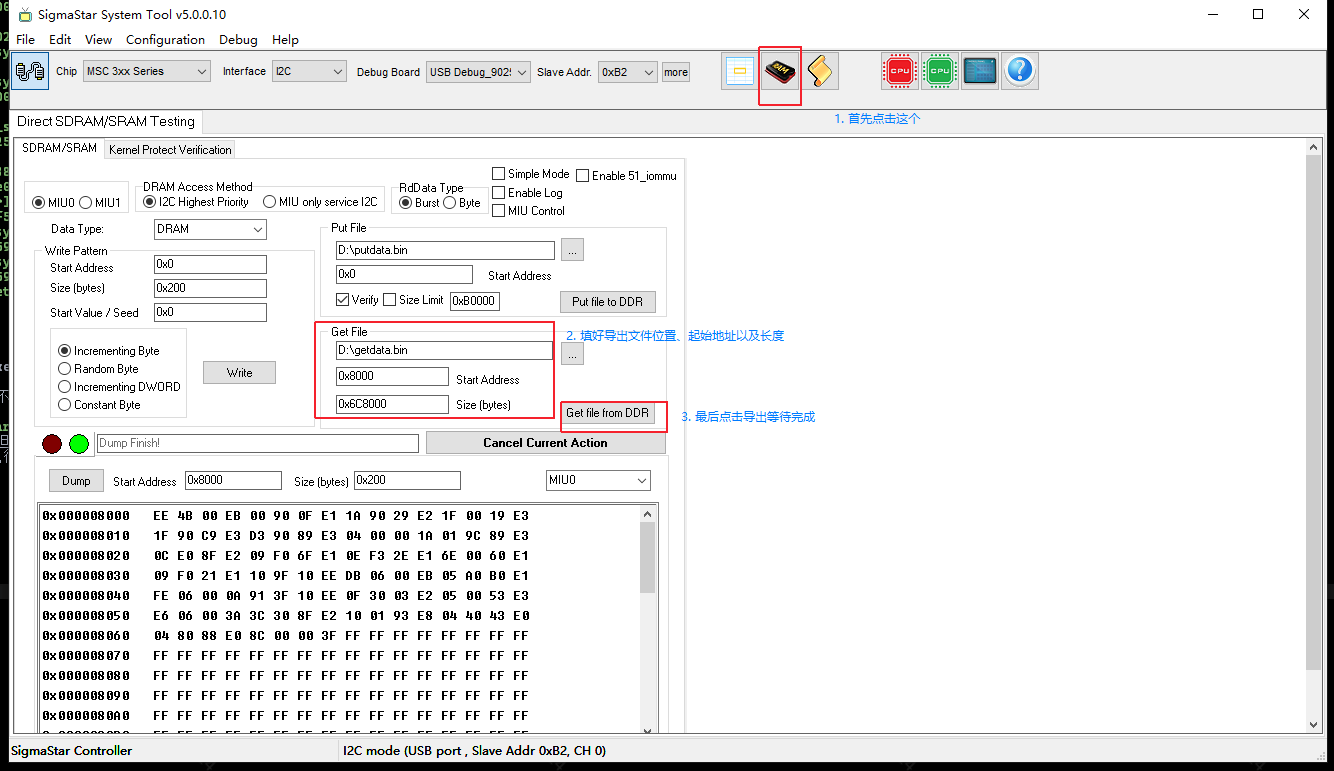
Three steps to execute in the Linux kernel directory:
# 1. size = 0xc06d0000 - 0xc0008000 = 0x6C8000
cat System.map
c0008000 T _text
...
c06d0000 R __start_rodata

# 2. addr = 0x1000008000 - 0x1000000000 = 0x8000
cat /proc/iomem
...
1000000000-107fffffff : System RAM
1000008000-100097cfff : Kernel code
10009e4000-1000b01d23 : Kernel data

# 3. Export vmlinux .text
arm-linux-gnueabihf-objcopy -j .text -O binary vmlinux k_text.bin
5. CPU No Exception Log Hang Issue
5.1. Dump log_buf
When the CPU hangs without any exception logs, some important log information may not have been printed in time. You can obtain this log information by dumping the system's log buffer.
There are several methods to determine the log buffer address:
-
arm-linux-gnueabihf-sigmastar-9.1.0-gdb vmlinuxReading symbols from vmlinux... (gdb) info address __log_buf Symbol "__log_buf" is static storage at address 0xc041a090. -
cat System.map | grep __log_bufc041a090 b __log_buf -
Different chips may vary; for I6C, you can use TV TOOL to dump bank 0x1004 data, where the addresses of __log_buf are recorded at offsets 0x8 and 0x9.
After finding the __log_buf address, you can use TV TOOL or Trace32 and other tools to dump the corresponding memory log information.
The log_buf address found above is 0xc041a090. When using TV TOOL to dump the log buffer, note that the log_buf address needs to be changed to 0x41a090 (subtracting 0xc0000000), and the length for dumping the log buffer is generally set to 0x8000. Refer to the steps 1, 2, and 3 in the image below.
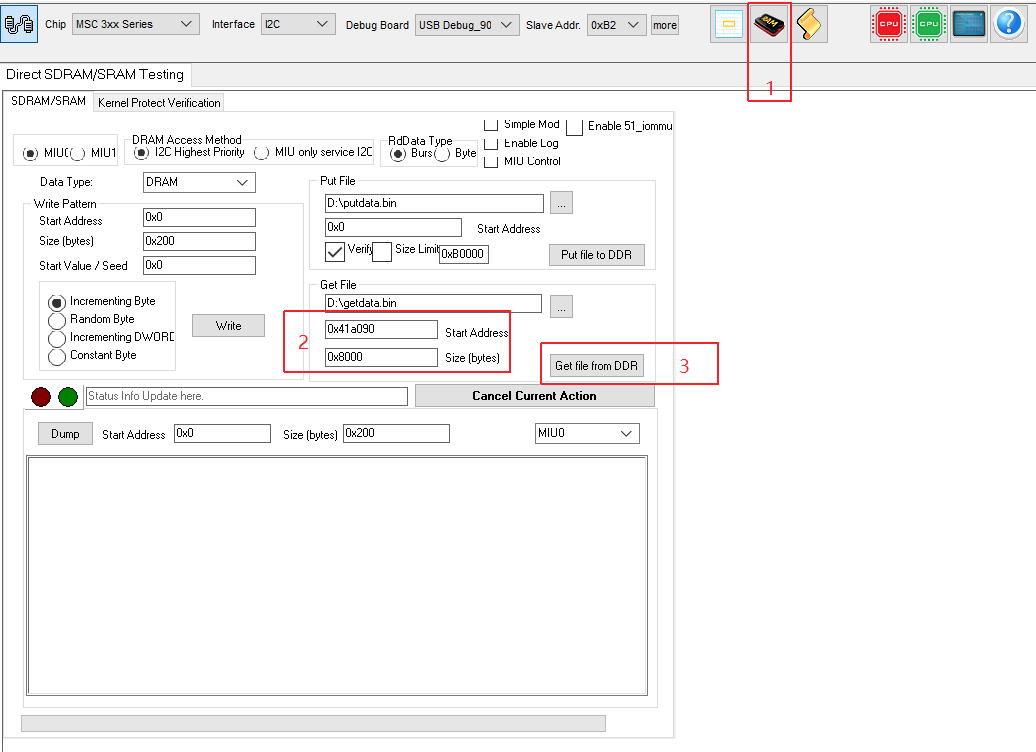
5.2. Debugging with Trace32
When the system hangs, you can use the Trace32 debugging tool to view information about various threads, CPU register information, cache line information, and DRAM data.
Generally, the preparations before using Trace32 are as follows:
-
If the EVB board has a JTAG header, you can connect it directly to Trace32.
If the demo board or customer board does not have a JTAG header, you can ask the hardware owner for assistance.
-
Prepare the corresponding chip's cmm script for use in Trace32; you can ask SI for it.
-
Switch to the appropriate JTAG mode for Trace32; specific commands can be obtained from SI.
The command to switch for Souffle EVB is:
/customer/riu_w 0x103c 0x60 0x0200The command to switch for Iford EVB is:
/customer/riu_w 0x103c 0x60 0x80
6. RCU Related Issues
If an RCU stall warning occurs, it can immediately be suspected that too many interrupts are being triggered (which is the case in most situations). If the backtrace printed during the RCU stall contains two gic_handle_irq, it can generally be pinpointed as an interrupt issue. Thus, the problem shifts to identifying which interrupt is occurring too frequently.
This can be divided into two situations:
- Serial port or telnet is operable
Use
cat /proc/interruptsmultiple times to identify suspicious IRQs. -
Unable to operate the board (1) You can use TV TOOL to check the registers of the main interrupt controller to see which interrupt is occurring continuously.
[main interrupt controller registers]
   Souffle:  /customer/riu_r 0x1009
         Check fiq offset: 0x4c 0x4d 0x4e 0x4f
         Check irq offset: 0x5c 0x5d 0x5e 0x5f
   Iford: /customer/riu_r 0x1009
         Check fiq offset: 0x4c 0x4d 0x4e 0x4f
         Check irq offset: 0x5c 0x5d 0x5e 0x5f
(2) Enable CONFIG_SSTRA_IRQ_DEBUG_TRACE, which will count the number of times each interrupt occurs and print the statistics when a soft lockup occurs.