SPI Usage Reference
REVISION HISTORY
| Revision No. | Description |
Date |
|---|---|---|
| 1.0 | 10/09/2022 | |
| 1.1 | 11/24/2025 |
1. Overview
Serial Peripheral Interface (SPI) is a high-speed synchronous serial interface technology introduced by Motorola. It is mainly used in devices such as EEPROM, Flash, Real-Time Clock (RTC), Digital-to-Analog Converter (ADC), and Digital Signal Processor (DSP).
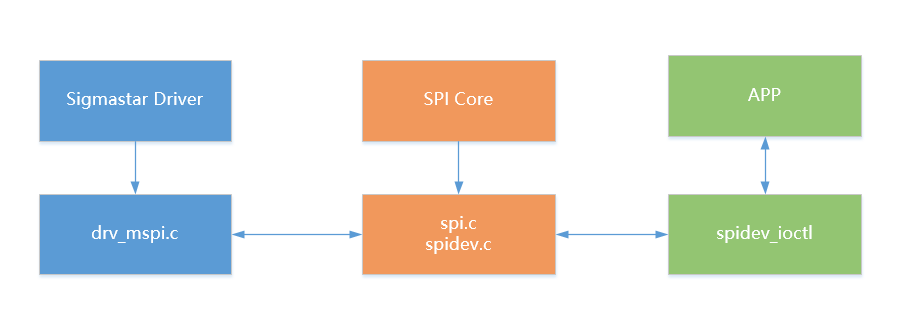
The simplified framework of the SPI driver is shown in the figure above. The Sigmastar driver registers the controller and device with the SPI Core. The user APP interacts with the underlying hardware through the file interface created by the SPI device, thereby realizing read and write functions.
2. Keyword Description
-
MISO / SDO: Master input, slave output (data comes from the slave device)
-
MOSI / SDI: Master output, slave input (data comes from the master device)
-
SCLK / SCK: Serial clock signal, generated by the master and sent to the slave device
-
CS / SS: Slave Select signal, sent by the master to control which slave device to communicate with; usually an active low signal
-
CPOL / CKP: Clock polarity, indicating the default high/low level of the clock signal
-
CPHA / CKE: Clock phase, indicating the specific phase of the clock signal during data acquisition
-
SPI Mode: Configuring the SPI clock polarity and phase allows for output of four SPI modes.
SPI Mode CPOL CPHA 0 [00] 0 0 1 [01] 0 1 2 [10] 1 0 3 [11] 1 1
3. Function Description
-
MSPI (Master SPI) can only be used as a master device, not a slave device.
-
Supports full-duplex read/write and half-duplex read/write in FIFO mode; only supports half-duplex read/write in DMA mode.
-
Supports 4-wire communication (MISO + MOSI + SCLK + CS) and 3-wire communication (MOSI + SCLK + CS).
-
8-byte read/write buffer (FIFO mode); byte transmission width is configurable from 1 bit to 16 bits.
-
Supports GPIO chip select; needs to be added from the dtsi. See section 6.2.3. cs-ext for details.
-
Source Clock: 12MHz, 104MHz, 108MHz, 144MHz. The actual selectable SPI communication frequency range consists of 8 division levels for each Source Clock (division coefficients of 2, 4, 8, 16, 32, 64, 128, 256), totaling 32 levels. Therefore, the SPI communication frequency range is 46875KHz to 72MHz. The target frequency can be set by assigning a value to the
max_speed_hzvariable in thestruct mspi_setupstructure (refer to section 6.3.1. User-space Read/Write SPI). The actual communication frequency will be selected from the level closest to but less than the target frequency. The frequency level table is as follows.NO. SPI Clock Rate 1 46875 2 93750 3 187500 4 375000 5 421861 6 421875 7 562500 8 750000 9 843723 10 843750 11 1125000 12 1500000 13 1687446 14 1687500 15 2250000 16 3000000 17 3374892 18 3375000 19 4500000 20 6000000 21 6749785 22 6750000 23 9000000 24 13499571 25 13500000 26 18000000 27 26999143 28 27000000 29 36000000 30 53998287 31 54000000 32 72000000
The differences in the number and functions of MSPI supported by different chips are shown in the table below.
| **chipname**    | **mspi number** | **auto-cs function** | **dma nohandshake function** |
| ----------- | ------ | ----------- | ----------- |
| iford       | 1 | N | N |
| souffle     | 4 | N | N |
| ifado       | 2 | N | N |
| pcupid      | 2 | N | N |
| ibopper     | 1 | Y | N |
| ifackel     | 2 | Y | N |
| jaguar1     | 4 | Y | Y |
-
The register banks and maximum number of supported software chip selects for the MSPI of different chips are as follows:
MSPI Bus bank addr cs_num 0 1110H 2 1 1119H(pcupid) or 1111H(Other chips) 2 2 1112H 2 3 1113H 2
4. Hardware Connection
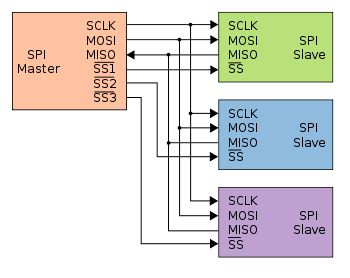
MSPI only supports a one-master-many-slave architecture. As the name suggests, there can be only one master device and one or more slave devices on one bus. The slave device select signal line, often called the chip select signal line, is also known as CS or SS, hereinafter referred to as SS. When multiple SPI slave devices are connected to the SPI master, the other signal lines of the device, SCLK, MOSI, and MISO, are simultaneously connected in parallel to the same SPI bus. That is, regardless of the number of slave devices, only these three lines are used. Each slave device has its own independent SS signal line, which occupies a dedicated pin on the master. The number of chip select signal lines corresponds to the number of slave devices. The SPI protocol does not have device addresses; it uses the SS signal line for addressing. When the master wants to select a slave device, it sets the SS signal line of that slave device to a low level (the default is low). The slave device is then selected, i.e., the chip select is active. The master then begins SPI communication with the selected slave device. Therefore, SPI communication starts when the SS line is low and ends when the SS line is high.
5. U-Boot Usage Introduction
5.1. U-Boot Config Configuration
The following configurations need to be selected when compiling U-Boot:
SigmaStar drivers->

    <*> SigmaStar MSPI->

Device drivers->

    Generic Driver Options->

        <*> Enable Driver Model

Device drivers->

    <*> SPI Support->

        <*> Enable Driver Model for SPI drivers

Command line interface->

    Device access commands->

        <*> sspi - Command to access spi device
5.2. Uboot DTS Configuration
spi0: spi0@1F222000 {
    compatible = "sstar,mspi";
    reg = <0x1F222000 0x200>;
    mspi-group = <0>;
    use-dma = <0>;
    cs-num = <2>;
    cs-ext = <PAD_UNKNOWN>;
    4to3-mode;
    clk-out-mode = <27000000>;
    status = "okay";
};
| Attributes | Description | Remarks |
|---|---|---|
| compatible | Used for driver registration matching; must match the code | Do not modify |
| reg | Used to specify the address of the SPI register bank | No modification needed |
| mspi-group | Used to specify the SPI peripheral serial number | No modification needed |
| use-dma | Used to specify whether to enable DMA mode | Can be modified as needed |
| cs-num | Used to specify the number of CS pads included with the Engine | Used in conjunction with cs-ext |
| cs-ext | Used to specify the pad index to use in addition to the CS included with the Engine | Can be modified as needed |
| 4to3-mode | Used to specify whether to enable 4Wires as 3Wires | Can be modified as needed |
| clk-out-mode | Used to specify whether to enable clk-out-mode | Can be modified as needed |
| status | Used to select whether to enable the SPI master driver | Can be modified as needed |
5.3. Uboot cmd parameter description and example screenshots

| Parameters | Setting Value | Description |
|---|---|---|
| 1 | sspi | Command Name |
| 2 | 0:0.1@750000 | SPI Bus:CS:SPI Mode:Frequency |
| 3 | 16 | Data length to be sent is 16 bits |
| 4 | 55 | Hexadecimal data to be sent is 0x55 |
6. Kernel Usage Introduction
6.1. Kernel Config Configuration
The following configurations need to be selected when compiling the Kernel:
Device drivers->

    [*] SStar SoC platform drivers->

        <*> SStar MSPI driver

Device drivers->

    [*] SPI support->

        <*>   User mode SPI device driver support
6.2. DTS Configuration
spi0@0 {
    compatible = "sstar,mspi";
    mspi-group = <0>;
    #ifdef CONFIG_CAM_CLK
    camclk = <CAMCLK_mspi0>;
    #else
    clocks = <&CLK_mspi0>;
    #endif
    reg = <0x1F222000 0x200>;
    interrupts = <GIC_SPI INT_IRQ_MSPI_0 IRQ_TYPE_LEVEL_HIGH>;
    use_dma = <0>;
    cs-num = <2>;
    //cs-ext = <PAD_SAR_ADC_18>;
    //4to3-mode;
    //clk-out-mode = <27000000>;
    status = "ok";
    spi_device0@0 {
        compatible = "sgs,mspidev";
        reg = <0>;
    };

    spidev0@1 {
        compatible = "lwn,bk4";
        spi-max-frequency = <2000000>;
        reg = <1>;
    };
};
The following attributes can be configured in the SPI master driver:
| Attribute | Description | Remarks |
|---|---|---|
| compatible | Used for driver registration matching; must match the code | Do not modify |
| reg | Used to specify the address of the SPI register bank | No modification needed |
| interrupts | Used to specify the hardware interrupt number and attributes used | No change needed |
| clocks | Used to specify the clock source used | No change needed |
| mspi-group | Used to specify the SPI peripheral serial number | No modification needed |
| use-dma | Used to specify whether DMA mode is enabled | Can be modified as needed |
| clk-out-mode | Used to specify whether clk-out-mode is enabled | Can be modified as needed |
| cs-num | Used to specify the number of CS pads included with the Engine | Used in conjunction with cs-ext |
| cs-ext | Used to specify the pad index to be used in addition to the CS pads included with the Engine | Can be modified as needed |
| 4to3-mode | Specifies whether to enable 4Wires as 3Wires | Can be modified as needed |
| status | Selects whether to enable the SPI master driver | Can be modified as needed |
| spidev | Registers SPI devices; user space exposes the node /dev/spidev*.*, reg indicates which chip select is selected | Can be added or removed as needed |
6.2.1. dma mode
The SigmaStar SPI Master supports two basic communication modes: buffer mode and DMA mode. When the SPI Master is in buffer mode, the SPI Master driver writes the data to be sent into the SPI Master's transmit buffer and reads the received data from the receive buffer. The transmit and receive buffers are registers in the SPI Master peripheral, each with a capacity of 8 * 2 bytes. Because software intervention is required when the SPI Master is operating in buffer mode, the waveform is affected by software scheduling, resulting in a certain interval between each transmission.
When the SPI Master is in DMA mode, the driver only needs to set the address of the data to be sent and the address where the received data will be stored in the SPI Master's DMA-related registers. The SPI Master will then automatically and continuously send and receive data without software intervention. Therefore, the SPI waveform continuity is better when the SPI Master is operating in DMA mode.
When the amount of data sent or received between the SPI Master and the SPI Device is small, buffer mode can be considered for higher efficiency. When the SPI Master and SPI Device communicate with a large amount of data being sent or received, such as receiving data from an SPI sensor, using buffer mode for this type of high-volume data communication can lead to high CPU usage and impact system efficiency. In such scenarios, DMA mode should be considered.
[Note] Currently, the SigmaStar SPI Master DMA mode only supports half-duplex operation, where the SPI Master's transmit and receive operations share the same DMA channel. When the device requires full-duplex communication, it can only use buffer mode. The use-dma attribute specifies whether to use buffer mode or DMA mode when operating in half-duplex mode. When the Device driver requires full-duplex communication, the Master driver will automatically switch to buffer mode. Full-duplex mode can be enabled by specifying transmission parameters when DMA mode is enabled. Therefore, if you wish to use full-duplex mode, you can also specify the use-dma attribute.
6.2.2. cs-num
The maximum value is the number of CS (computer nodes) preset by the hardware, such as CS0 and CS1. If CS1 is not needed, you can directly set cs-num = 1. When CONFIG_SPI_SPIDEV is enabled, the driver will register device nodes based on the sum of the number of cs-num and cs-ext. Note that if a DTSI node has SPI child nodes, the child nodes will be prioritized for kernel space, and the registration of device nodes for user space will fail.
As shown in the DTSI code above, if the spi0 node does not have an lsm6dso@0 child node, then when CONFIG_SPI_SPIDEV is enabled, you can see four nodes in the /dev/ directory: spidev0.0 (mspi0 cs0), spidev0.1 (mspi0 cs1), spidev1.0 (mspi1 cs0), and spidev1.1 (mspi1 cs1), i.e., spidev##bus.##cs. After adding this child node, spidev0.0 fails to register with the user space, as we can see in the log output:
chipselect x already in use
At this point, spidev0.0 in the /dev directory will no longer exist.
6.2.3. cs-ext
The driver implements the function of adding additional CS pins. When the hardware's default CS pins are insufficient, we can configure additional CS pins in the DTSI as an extension. The configuration method is to enable the cs-ext attribute under the DTSI node and configure the pad ID to be used as the CS extension. It is also recommended to configure the corresponding pad in xxx-padmux.dtsi as GPIO MODE. The following example shows using PAD_SAR_ADC17 as a CS extension:
1. <PAD_PM_MSPI0_CZ        PINMUX_FOR_SPI0_MODE_1        MDRV_PUSE_SPI0_DO>,
2. <PAD_PM_MSPI0_DI        PINMUX_FOR_SPI0_MODE_1        MDRV_PUSE_SPI0_DI>,
3. <PAD_PM_MSPI0_CK        PINMUX_FOR_SPI0_MODE_1        MDRV_PUSE_SPI0_CK>,
4. <PAD_PM_MSPI0_DO        PINMUX_FOR_SPI0_MODE_1        MDRV_PUSE_SPI0_CZ>,
5. <PAD_PM_INTOUT          PINMUX_FOR_SPI0_CZ1_MODE_1    MDRV_PUSE_SPI0_CZ2>,
6. <PAD_I2C0_SCL           PINMUX_FOR_GPIO_MODE          MDRV_PUSE_SPI0_CZ3>,
6.2.4. clk-out-mode
clk-out-mode is a special mode supported by the SigmaStar SPI Master. When the SPI Master is in clk-out-mode, the SPI Master's MOSI and MISO no longer send or receive data according to the given data, and the SPI Master's Clock signal continuously outputs a square wave. This function is used when the clock output by the SPI Master is used as the working clock for other devices. The value of the clk-out-mode attribute specifies the frequency of the output clock. Configuring clk-out-mode simply requires enabling the corresponding clk-out-mode attribute in the DTSI and configuring the desired waveform frequency:
clk-out-mode = <3750000>; // Enable clk-out-mode, output 3.75MHz frequency waveform
6.2.5. 4 to 3 mode
Some platforms' SPI Master 3-wire mode does not support DMA mode. If 3-wire DMA mode communication is required, the 4 to 3 mode can be enabled. Hardware-wise, short-circuit the Master's MOSI and MISO pins and connect them to the Device's SDAT pin, as shown in the diagram below:
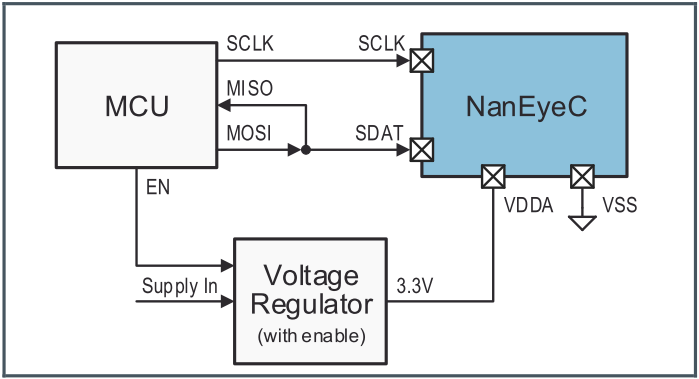
When the driver is reading data, it automatically switches MOSI to GPIO Input Mode to avoid interfering with the MISO waveform input, thus enabling the four-wire mode to be used as a three-wire mode. To use this function, simply enable the 4to3-mode attribute in the dtsi node, i.e.:
4to3-mode; // Enable 4to3-mode
6.3. PADMUX Configuration
The configuration method for padmux in both U-Boot and Kernel environments is the same. Simply add the following code to the corresponding padmux.dtsi file based on the selected pins. Taking MSPI1 as an example, each PADMUX mode requires configuring 4 pins:
/ MODE 1
<PAD_PM_SPI_CK PINMUX_FOR_MSPI1_MODE_1 MDRV_PUSE_SPI1_CK>;
<PAD_PM_SPI_DI PINMUX_FOR_MSPI1_MODE_1 MDRV_PUSE_SPI1_DI>;
<PAD_PM_SPI_DO PINMUX_FOR_MSPI1_MODE_1 MDRV_PUSE_SPI1_DO>;
<PAD_PM_SPI_CZ PINMUX_FOR_MSPI1_MODE_1 MDRV_PUSE_SPI1_CZ>;

// MODE 2
<PAD_PM_SR1_INT PINMUX_FOR_MSPI1_MODE_2 MDRV_PUSE_SPI1_CK>;
<PAD_PM_SR1_D5  PINMUX_FOR_MSPI1_MODE_2 MDRV_PUSE_SPI1_DI>;
<PAD_PM_SR1_D6  PINMUX_FOR_MSPI1_MODE_2 MDRV_PUSE_SPI1_DO>;
<PAD_PM_SR1_D7  PINMUX_FOR_MSPI1_MODE_2 MDRV_PUSE_SPI1_CZ>;
The first column is the pin index number, which can be found in /drivers/sstar/include/{chipname}/gpio.h;
The second column is the mode definition, located in the hal_gpio_st_padmux_info array in /drivers/sstar/gpio/{chipname}/hal_pinmux.c. This array lists the multiplexing relationships of all pins; you can query this array to see which multiplexing functions a pin supports;
The third column is the pin and its associated mode index name, which can be found in /drivers/sstar/include/drv_puse.h.
6.4. Module Usage Introduction
6.4.1. User-Space Read/Write SPI
-
To use the kernel's built-in test program spidev_test.c, you need to modify the configuration file to enable the CONFIG_SPI_SPIDEV option and configure the spidev sub-node in the DTS. The kernel will eventually generate the spidevX.X file in the /dev folder.
-
User-space test cases: Execute
makein the tools/spi/ directory to obtain the executable file spidev_test.Common operations of
spidev_testinclude:Parameters Description -D Selects the device node to operate on, such as: /dev/spidev0.0, default is: /dev/spidev1.1 -s Selects the SPI clock rate, in Hz -H Used with -O to select the SPI communication timing -O Used with -H to select the SPI communication timing -C Specifies CS as active high -L Specifies the byte order as LSB -3 Specifies the communication mode as three-wire mode -v Specifies to print the sent and received data content -i Specifies the file to send (binary file) -o Specifies the path to save the received data as a file (binary file) -p Specifies the data to send, such as: "1234\xde\xad" The features currently supported by the driver are listed in the table above. For detailed usage instructions, please refer to the help command:
spidev_test help. Parameters can be freely combined; please adjust them as needed. -
The following is an example of the core send/receive functions of spidev_test:
static void transfer(int fd, uint8_t const *tx, uint8_t const *rx, size_t len) { int ret; int out_fd; struct spi_ioc_transfer tr = { .tx_buf = (unsigned long)tx, .rx_buf = (unsigned long)rx, .len = len, .delay_usecs = delay, .speed_hz = speed, .bits_per_word = bits, }; if (mode & SPI_TX_QUAD) tr.tx_nbits = 4; else if (mode & SPI_TX_DUAL) tr.tx_nbits = 2; if (mode & SPI_RX_QUAD) tr.rx_nbits = 4; else if (mode & SPI_RX_DUAL) tr.rx_nbits = 2; if (!(mode & SPI_LOOP)) { if (mode & (SPI_TX_QUAD | SPI_TX_DUAL)) tr.rx_buf = 0; else if (mode & (SPI_RX_QUAD | SPI_RX_DUAL)) tr.tx_buf = 0; } ret = ioctl(fd, SPI_IOC_MESSAGE(1), &tr); if (ret < 1) pabort("can't send spi message"); if (verbose) hex_dump(tx, len, 32, "TX"); if (output_file) { out_fd = open(output_file, O_WRONLY | O_CREAT | O_TRUNC, 0666); if (out_fd < 0) pabort("could not open output file"); ret = write(out_fd, rx, len); if (ret != len) pabort("not all bytes written to output file"); close(out_fd); } if (verbose || !output_file) hex_dump(rx, len, 32, "RX"); } -
When
.rx_buffinstruct spi_ioc_transfer tris not null and.tx_buffis null, the MSPI Master performs a half-duplex read operation; when.rx_buffis null and.tx_buffis not null, a half-duplex write operation is performed; when neither.rx_buffnor.tx_buffis null, even if DMA mode is enabled, a full-duplex read/write operation in FIFO mode is performed. The corresponding waveform diagram is as follows:
In the diagram, MOSI corresponds to the data in .tx_buff, and MISO corresponds to the data in .rx_buff.
6.4.2. Kernel-mode SPI Read/Write
For kernel-mode MSPI read/write, refer to the implementation in /drivers/spi/spidev.c. The interface is encapsulated, and the structures spi_transfer and spi_message are initialized. Then, the kernel interface spidev_sync() is called.
spidev_sync_read(struct spidev_data *spidev, size_t len)
{
    struct spi_transfer t = {
            .rx_buf     = spidev->rx_buffer,
            .len        = len,
            .speed_hz   = spidev->speed_hz,
        };
    struct spi_message  m;

    spi_message_init(&m);
    spi_message_add_tail(&t, &m);
    return spidev_sync(spidev, &m);
}

spidev_sync_write(struct spidev_data *spidev, size_t len)
{
    struct spi_transfer t = {
            .tx_buf     = spidev->tx_buffer,
            .len        = len,
            .speed_hz   = spidev->speed_hz,
        };
    struct spi_message  m;

    spi_message_init(&m);
    spi_message_add_tail(&t, &m);
    return spidev_sync(spidev, &m);
}
7. FAQ
7.1 SPI Communication Waveform Not Captured
-
Check if the driver loads correctly and for any errors during startup.
-
Confirm the Padmux configuration is correct.
-
Check for hardware circuit abnormalities. Configure the pins to GPIO output mode and measure the GPIO high and low levels with a voltmeter to ensure normal transitions.
7.2 SPI Cannot Read Device Data
-
Confirm if the MSSPI clock rate is greater than the peripheral's maximum supported clock.
-
Confirm data pin connections are correct. MSPI's DO should be MISO, and DI should be MOSI.
-
Capture the transmitted waveform and check if it matches the peripheral's requirements.
-
Check if the peripheral is functioning correctly.
7.3 Waveform Chaos
-
Confirm voltage matching.
-
The pin's drive capability may be insufficient; increase the pin's drive capability.