MI IVE DEBUG SOP
REVISION HISTORY
| Revision No. | Description |
Date |
|---|---|---|
| 1.00 | 02/22/2024 |
1. Introduction
This document aims to introduce how to perform preliminary investigation when encountering MI IVE-related issues, quickly locate problems, and what information needs to be provided to IVE owner for analysis after determining it is a Sigmastar SDK issue.
-
Supports
cat /proc/mi_modules/mi_ive/mi_ive0to obtain proc information. Diagram is as follows: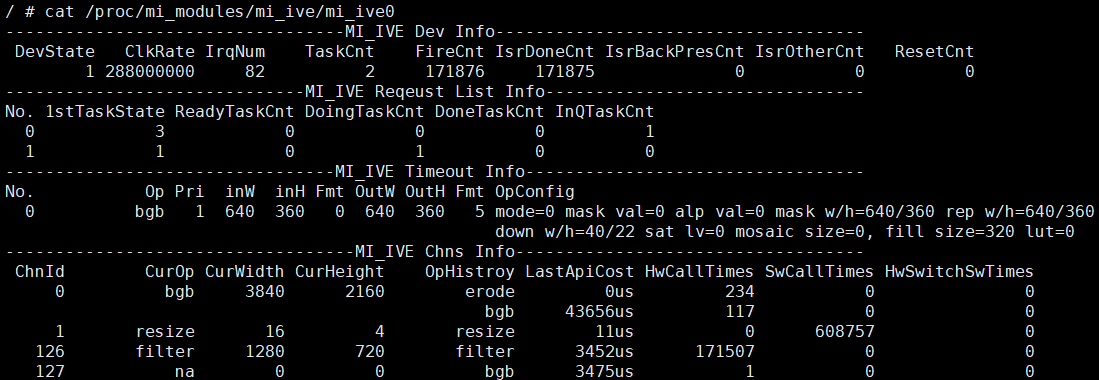
2. Common IVE Issues
2.1 Insufficient Performance
Debug flow reference diagram:

Debug flow:
| Flow | Verification Method | Exit Condition | Next Step | Information to Provide | Related FAQ |
|---|---|---|---|---|---|
| A | Refer to IVE API documentation section 4.1 Intelligent Acceleration Hardware API Implementation for confirmation | Exit Condition 1: No hardware acceleration support Exit Condition 2: Has hardware acceleration support | Exit Condition 1: B Exit Condition 2: C | ||
| B | Use top and other methods to check cpu loading usage | Exit Condition 1: Too high -> Adjust App thread priority Exit Condition 2: Normal -> Confirm with IVE owner if operator has optimization space | Process ends | Exit Condition 2: Operator parameter configuration: Input/output image/memory resolution, memory configuration information, control parameter information | |
| C | Refer to IVE API documentation section 4.3 Intelligent Acceleration Engine Usage Limitations for confirmation | Exit Condition 1: Does not meet hardware acceleration requirements -> Adjust parameters according to documentation Exit Condition 2: Meets hardware acceleration support | Exit Condition 1: Process ends Exit Condition 2: D | ||
| D | Use the following Method 1 for confirmation | Exit Condition 1: Not using hardware acceleration -> Confirm with IVE owner Exit Condition 2: Using hardware acceleration | Exit Condition 1: Process ends Exit Condition 2: E | Exit Condition 1: Operator parameter configuration: Input/output image/memory resolution, memory configuration information, control parameter information | |
| E | Use the following Method 2 for confirmation | Exit Condition 1: Does not meet usage expectations -> Adjust clk and retest Exit Condition 2: Meets expectations -> Confirm with IVE owner | Process ends | Exit Condition 2: Operator parameter configuration: Input/output image/memory resolution, memory configuration information, control parameter information |
-
Method 1. Use the following commands for confirmation. If the register values read by
/customer/riu_rshow no change before and after app runs, it indicates the operator is not actually using hardware acceleration./customer/riu_w 0x151e 0x10 0x1f /customer/riu_w 0x1520 0x02 0x3 /customer/riu_r 0x151e 0x10 /customer/riu_r 0x1520 0x02 /customer/riu_r 0x151f 0x4 /customer/riu_r 0x1520 0x69 // Run app for testing /customer/riu_r 0x151e 0x10 /customer/riu_r 0x1520 0x02 /customer/riu_r 0x151f 0x4 /customer/riu_r 0x1520 0x69- Can also be confirmed through proc information. Before calling
MI_IVE_Destroy, obtain proc information. IfHwCallTimescount is 0, it indicates the operator is not actually using hardware acceleration.
- Can also be confirmed through proc information. Before calling
-
Method 2. Use the following commands to confirm actual clk rate used:
/customer/riu_r 0x1038 0x6a // bit[11:10]=0x0: 288M // bit[11:10]=0x1: 216M // bit[11:10]=0x2: 384M // bit[11:10]=0x3: 432M - OD- Can also be confirmed through proc information. After obtaining proc information, confirm actual clk rate used directly according to
ClkRate.
- Can also be confirmed through proc information. After obtaining proc information, confirm actual clk rate used directly according to
2.2 Effect Abnormal
Debug flow:
| Flow | Verification Method | Exit Condition | Next Step | Information to Provide | Related FAQ |
|---|---|---|---|---|---|
| A | Refer to corresponding sections of IVE API documentation for each operator, confirm if parameter settings meet expected effect settings | Exit Condition 1: Parameter abnormal -> Modify parameters and retest Exit Condition 2: Parameter normal | Process ends | Exit Condition 2: Operator parameter configuration: Input/output image/memory resolution, memory configuration information, control parameter information | Refer to the IVE API documentation to confirm the operator parameter settings |
-
Example 1 as shown below: For Filter operator with the same mask parameter settings, different shift parameters result in large output effect differences.

2.3 Memory Overrun Issue
IVE memory overrun example: Log with Name=IVE indicates IVE encountered memory overrun; where IsWrite=0 indicates read memory overrun, IsWrite=1 indicates write memory overrun.
[MI WRN] MI_SYS_Mma_MmuCallback [mi_sys][369]: [MI_SYS_Mma_MmuCallback] Status=0x2, PhyAddr=0x40260000, ClientId=0x1c,Name=IVE IsWrite=0

[MI WRN] MI_SYS_Mma_MmuCallback [mi_sys][369]: [MI_SYS_Mma_MmuCallback] Status=0x6, PhyAddr=0x406e0000, ClientId=0x1c,Name=IVE IsWrite=1
Debug flow:
| Flow | Verification Method | Exit Condition | Next Step | Information to Provide | Related FAQ |
|---|---|---|---|---|---|
| A | Confirm if memory size configuration matches resolution For 1280x720 input resolution ->U8C1 format image requires memory size of 1280x720x1 ->YUV422_YUYV format image requires memory size of 1280x720x2 | Exit Condition 1: Mismatch -> Modify memory configuration and retest Exit Condition 2: Match | Process ends | Exit Condition 2: 1. Operator parameter configuration: Input/output image/memory resolution, memory configuration information, control parameter information 2. Step 1 debug information |
- Step 1. Configure and capture information according to the following steps:
vi /config/modparam.json # Add or update "debugMmu":1 in E_MI_MODULE_ID_SYS node
reboot

echo debug_mmu debug_log 1 1 1 0 > /proc/mi_modules/mi_sys/mi_sys0 # Output IVE internal allocate/free memory information log & memory usage during memory overrun
// echo debug_mmu debug_log 0 0 0 0 > /proc/mi_modules/mi_sys/mi_sys0 # Close
cat /proc/kmsg

// Run app for testing in other console, provide kmsg with memory overrun log
2.4 Other Abnormal Issues
For other issues, after using IVE, follow the steps below to capture information multiple times and confirm with IVE owner.
cat /proc/mi_modules/mi_ive/debug_hal/ive_axi
cat /proc/mi_modules/mi_ive/mi_ive0
/customer/riu_r 0x151e
/customer/riu_r 0x151f
/customer/riu_r 0x1520
/customer/riu_r 0x1038 0x6a