VENC Debug SOP
REVISION HISTORY
| Revision No. | Description |
Date |
|---|---|---|
| 1.0 | 02/22/2024 |
Introduction
This document is intended for FAEs and software development personnel. It provides guidance on the initial analysis and troubleshooting of common problems encountered with VENC (H.264/H.265/JPEG) encoding-related issues during development. It also outlines the information and commands that should be collected and provided when the issue was suspected to be SDK issue.
1. Basic Operations and Commands for Debugging
1.1 proc echo commands
| Function | Dump input buffer |
|---|---|
| Command | echo dump_in [ChnId] [num] [dump_path] > /proc/mi_modules/mi_venc/mi_venc[DevID] |
| Parameter Description | [ChnId]: Channel number [num]: Total number of frames to dump_in [dump_path]: Path to save the file [DevID]: Device number, 0 for H264/H265 encoding, 8 for Jpe |
| Example | echo dump_in 0 10 /mnt > /proc/mi_modules/mi_venc/mi_venc0 |
| Function | Dump output stream |
|---|---|
| Command | echo dump_out [ChnId] [num] [dump_path] > /proc/mi_modules/mi_venc/mi_venc[DevID] |
| Parameter Description | [ChnId]: Channel number [num]: Total number of frames to dump_out [dump_path]: Path to save the file [DevID]: Device number, 0 for H264/H265 encoding, 8 for Jpe |
| Example | echo dump_out 0 100 /mnt > /proc/mi_modules/mi_venc/mi_venc0 |
| Function | Drop/Release the corresponding channel output task |
|---|---|
| Command | echo drop_out [ChnId] [Status] > /proc/mi_modules/mi_venc/mi_venc[DevID] |
| Parameter Description | [ChnId]: Channel number, 'a' means all channels [Status]: r : release the corresponding channel output task d : drop the corresponding channel output task [DevID]: Device number, 0 for H264/H265 encoding, 8 for Jpe |
| Example | echo drop_out 0 d > /proc/mi_modules/mi_venc/mi_venc0 Description: drop channel 0 output task echo drop_out 0 r > /proc/mi_modules/mi_venc/mi_venc0 Description: release channel 0 output task echo drop_out a d > /proc/mi_modules/mi_venc/mi_venc0 Description: drop the whole channel output task echo drop_out a r > /proc/mi_modules/mi_venc/mi_venc0 Description: release the whole channel output task |
| Function | Drop/Release the corresponding channel input task |
|---|---|
| Command | echo drop_in [ChnId] [Status] > /proc/mi_modules/mi_venc/mi_venc[DevID] |
| Parameter Description | [ChnId]: Channel number, 'a' means all channels [Status]: r : release the corresponding channel input task d : drop the corresponding channel input task [DevID]: Device number, 0 for H264/H265 encoding, 8 for Jpe |
| Example | echo drop_in 0 d > /proc/mi_modules/mi_venc/mi_venc0 Description: drop channel 0 input task echo drop_in 0 r > /proc/mi_modules/mi_venc/mi_venc0 Description: release channel 0 input task echo drop_in a d > /proc/mi_modules/mi_venc/mi_venc0 Description: drop the whole channel input task echo drop_in a r > /proc/mi_modules/mi_venc/mi_venc0 Description: release the whole channel input task |
| Function | Dynamically modify Venc SDK log level |
|---|---|
| Command | echo [log_level] > proc/mi_modules/mi_venc/debug_level |
| Parameter Description | [log_level]: Log level, range [2,7], default is 2, larger value means more prints |
| Example | echo 7 > proc/mi_modules/mi_venc/debug_level |
1.2 proc cat commands
Function |
Command |
|---|---|
| Get encoding Proc h264/5 pipeline information | cat /proc/mi_modules/mi_venc/mi_venc0 |
| Get encoding Proc Jpe pipeline information | cat /proc/mi_modules/mi_venc/mi_venc8 |
| Get encoding Proc additional Hal Device information | cat /proc/mi_modules/mi_venc/debug_hal/dev_info |
| Get encoding Proc additional Hal Channel information | cat /proc/mi_modules/mi_venc/debug_hal/ctx_info |
| Get encoding H264/H265 clock information | cat /proc/mi_modules/mi_venc/debug_hal/ven_clock* |
| Get encoding Jpe clock information | cat /proc/mi_modules/mi_venc/debug_hal/jpe_clock |
1.3 Additional notes
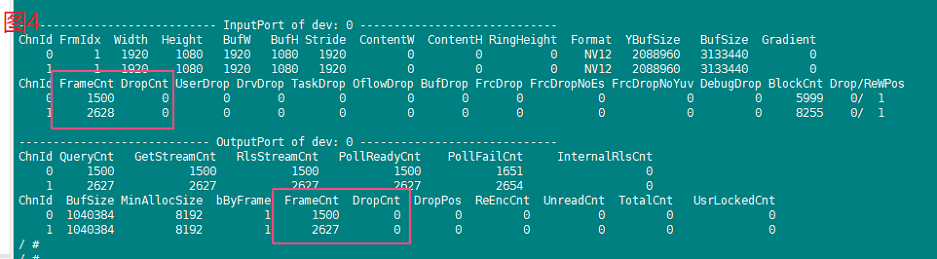
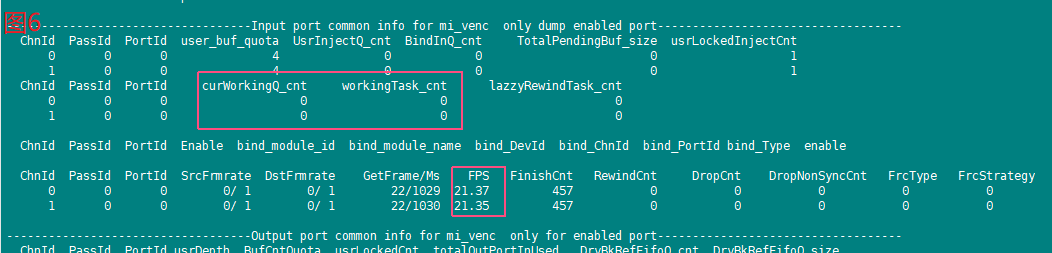
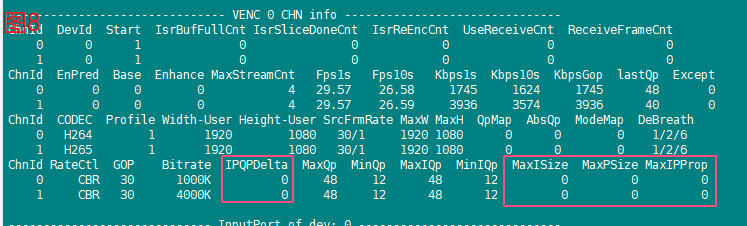
- Screenshots in proc may have minor differences due to version iterations, please focus only on the red boxed parts.
- For bitstream corruption check(or analysis) , H264/H265 can use VLC player or bitstream analysis tool Intel Video Pro Analyzer and JPE use normal image tools.
- When seeking Venc Owner analysis, please provide as much as possible: a. All proc cat commands, executed 3 times consecutively b. Serial log and Kmsg c. Previous module SCL proc d. Pipeline.
2. Basic Analysis of Common Issues
2.1 Bitstream Corruption
Refer to the debug flow diagram below:
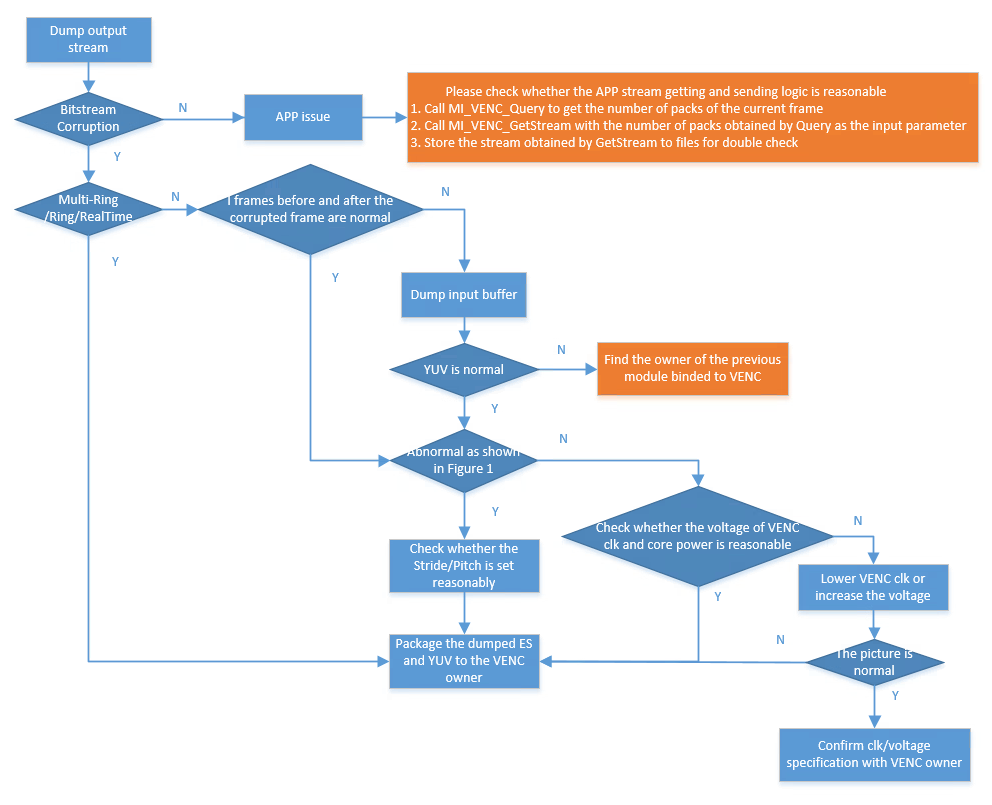
Figure 1

Bitstream corruption here does not include mosaic effect. Theoretically, mosaics may occur because encoding is lossy when the bitrate is low and image quality is poor.
2.2 No Stream During Playback
Refer to the debug flow diagram below:
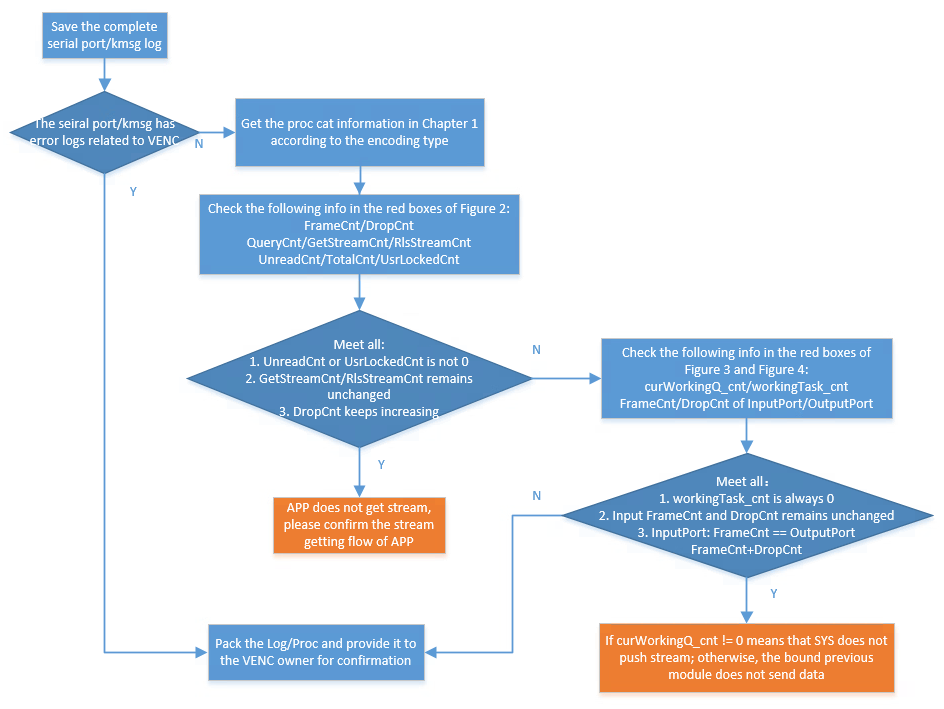
Figure 2
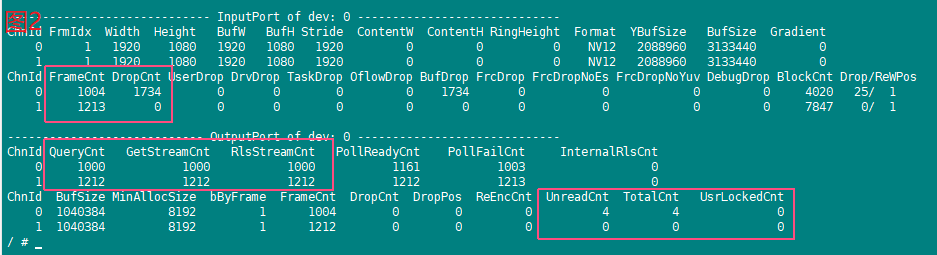
Figure 3

Figure 4
2.3 Frame Rate Anomaly
Refer to the debug flow diagram below:
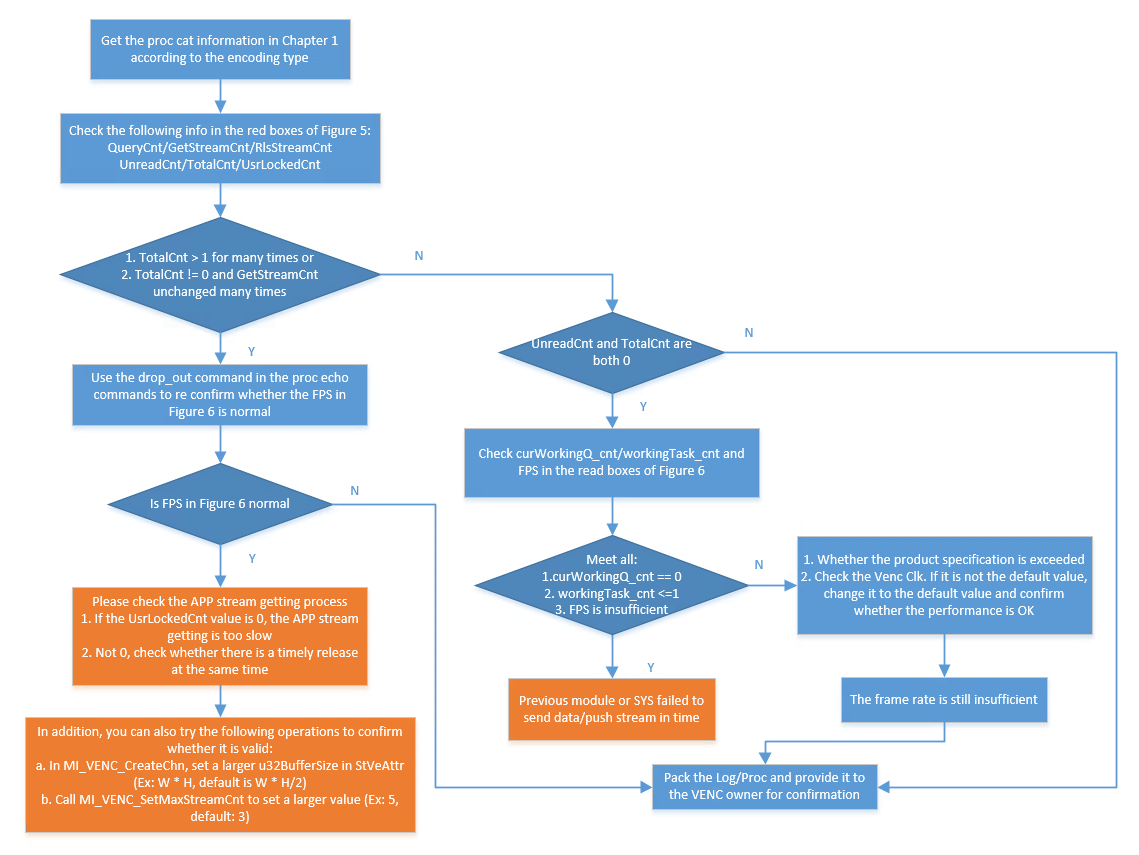
Figure 5

Figure 6
2.4 Insufficient or Excessive Bitrate
Refer to the debug flow diagram below:
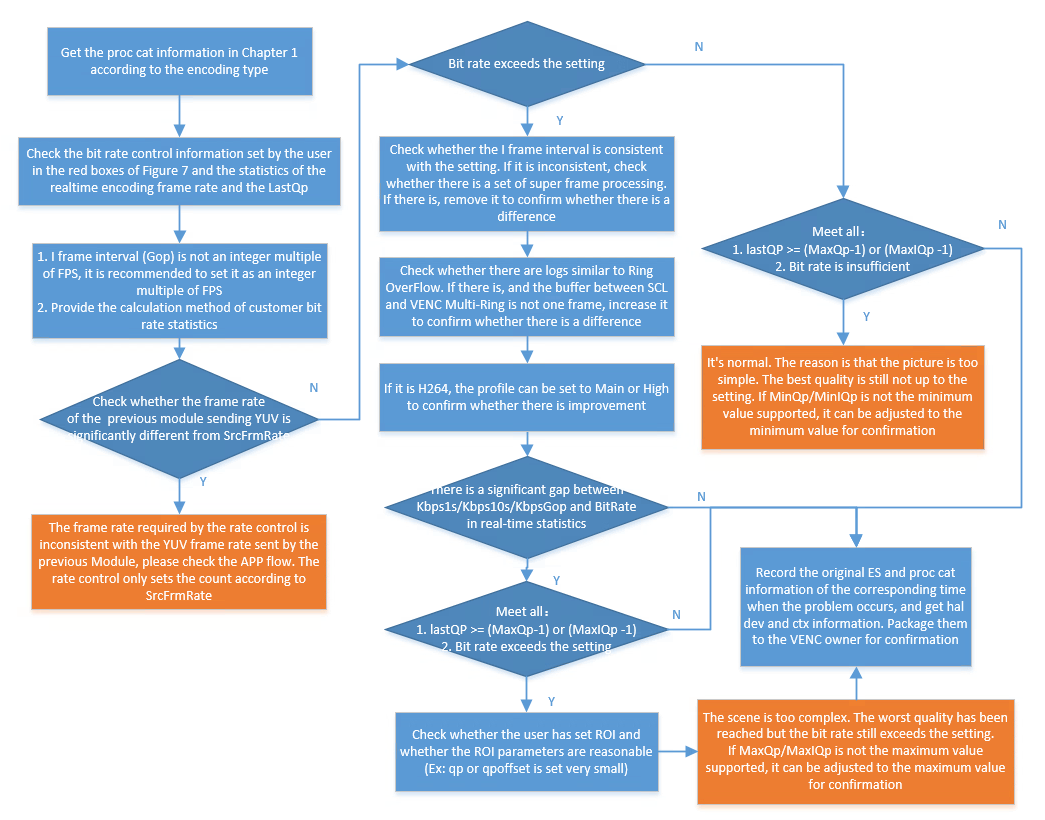
Figure 7
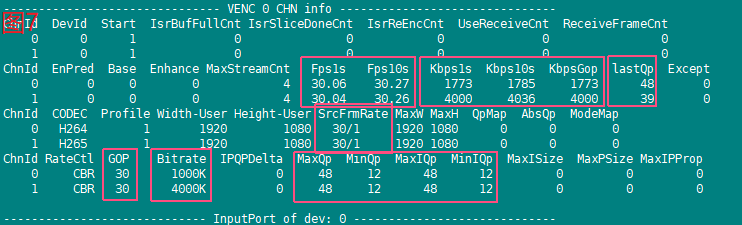
Note the following items when checking real-time bitrate in the flow diagram:
- Only CBR has insufficiency issues; other rate control modes only have excess issues.
- For Kbps1s/Kbps10 H264/H265, due to differences in I-frame interval (Gop) settings, the value may be larger when I-frames are included and smaller when not. Try to use Gop as the reference. For accuracy, if Gop is set to more than 6s during KbpsGop statistics, it will be forced to 2s statistics.
- JPE has no concept of P-frames; check Kbps1s directly.
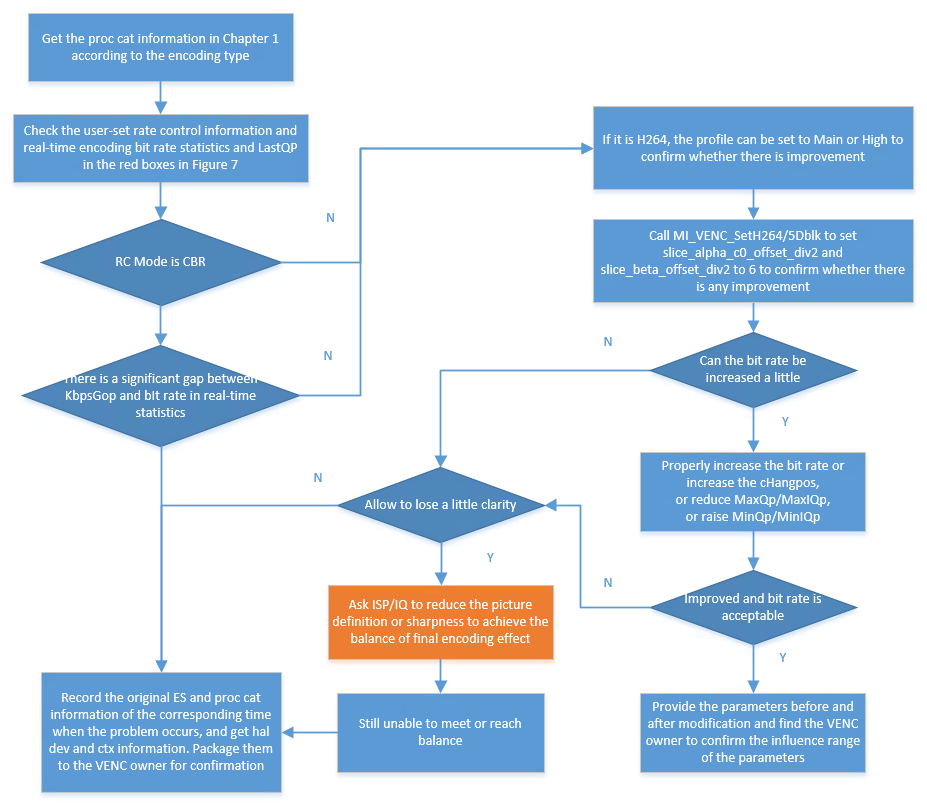
2.5 Mosaic Effect
Refer to the debug flow diagram below:
2.6 I-Frame Size Too Large
Refer to the debug flow diagram below:
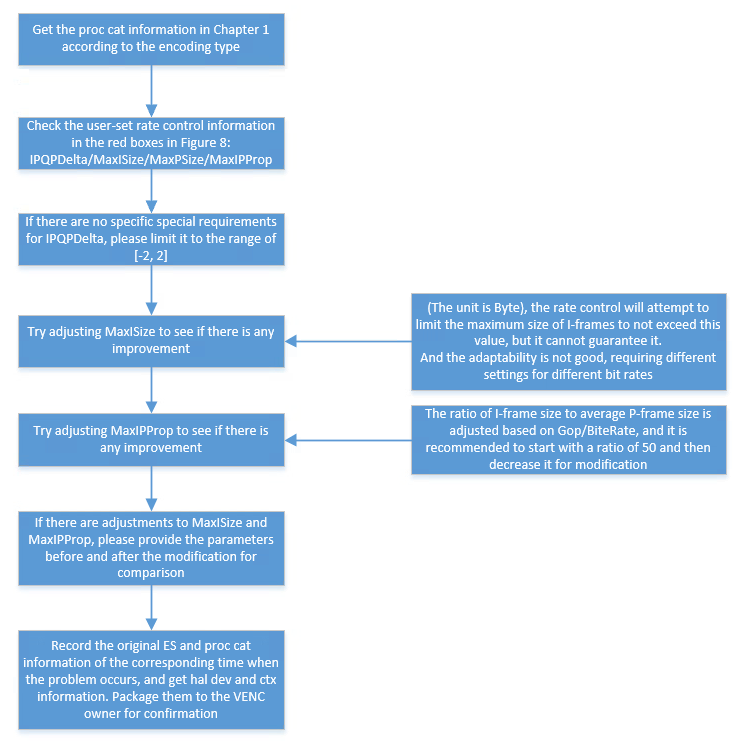
Figure 8
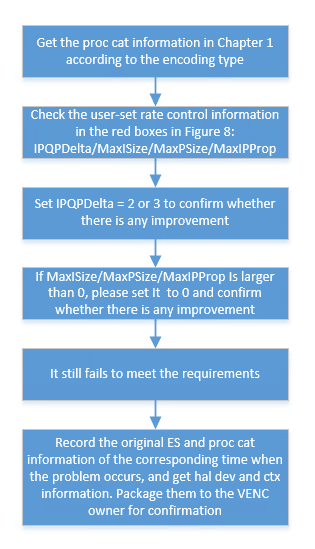
2.7 Breathing Effect
Refer to the debug flow diagram below:
2.8 Color Difference
Please call the API MI_VENC_SetH264Trans/MI_VENC_SetH265Trans and set the parameter s32ChromaQpIndexOffset to a negative value (e.g., -12/-6) to confirm if there is any improvement.
Theoretically, the smaller the value, the better the effect, but if the value is too small, the overall Qp will be raised by about 1, requiring a balance between overall image quality and color difference issues. If no improvement, please capture YUV and the original bitstream and provide them to the VENC Owner for confirmation.