MI HDMI API
REVISION HISTORY
| Revision No. | Description |
Date |
|---|---|---|
| 2.03 | 04/12/2018 | |
| 2.04 | 06/12/2019 | |
| 2.05 | 01/12/2020 | |
| 2.06 | 04/26/2020 | |
| 2.07 | 08/04/2020 | |
| 2.08 | 04/22/2021 | |
| 2.09 | 05/17/2021 | |
| 2.10 | 08/05/2021 | |
| 08/25/2021 | ||
| 2.11 | 09/16/2021 | |
| 2.12 | 11/29/2021 | |
| 2.13 | 02/26/2022 | |
| 2.14 | 06/10/2022 | |
| 2.15 | 08/09/2024 | |
| 2.16 | 05/19/2025 | |
| 2.17 | 10/30/2025 | |
| 2.18 | 01/07/2026 |
1. SUMMARY
1.1. Module Description
HDMI (High-Definition Multimedia Interface) is a proprietary audio/video interface for transmitting uncompressed video data and compressed or uncompressed digital audio data from an HDMI-compliant source device.
HDMI can be divided into TX and Rx Device. TX is the source device used to transmit data to RX (sink device such as tv/monitor). At present, this module only supports HDMITX based on HDMI ver1.4.
1.2. Basic Structure

1.3. Function Introduction and Working Principle
1.3.1 Function Introduction
-
MI HDMI is used to output timing to TV/monitor, and the current protocol specification is 1.4. Therefore, the maximum resolution can only reach 4kp@30fps
-
Supports hot plugging and can register callback to return to user mode
-
Does not support HDCP
-
Does not support I mode output (interlaced output)
-
Does not support CEC
-
Only supports videos with color depth of 8-bit, not 10bit/12bit
-
The output color domain supports YUV444/RGB444, but not YUV422. If it is DVI mode, only RGB444 is supported
-
Timing comes from Disp and is directly connected to hardware internally, meaning that timing must be aligned with Disp settings.
-
HDMI mode can output audio, DVI mode does not output audio
-
When outputting audio, its audio sample and channel must be aligned with the AO (audio output) dev (directly connected to the internal hardware), and cannot be output separately. It must be output together with the video.
-
Audio format: sample rate: 32k, 44.1k, 48k, channel: 2
1.3.2 Working Principle
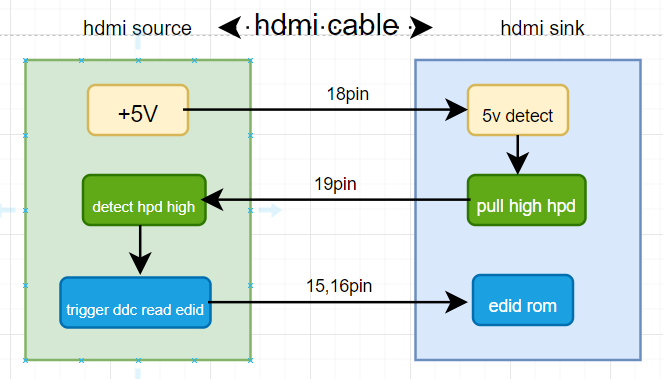
After setting the corresponding screen parameters for disp load and setting the timing (if audio output is required, the relevant settings must be set to audio output dev), then use this timing setting (and audio parameters) to set it to HDMI, and HDMI will send the timing to the monitor or TV according to the protocol. The timing related configuration can refer to the instructions in the mi-disp API doc. The specific HDMI protocol handshake reference is as follows:
-
The HDMI device provides 5V power after connecting to the HDMI cable, and the RX device pulls up the hpd pin when it detects 5V power
-
When tx detects that hpd is pulled high, it reads the internal edid information of rx end.
-
Analyze the corresponding timing based on the edid information, and then determine whether it can be sent with the timing set by Disp.
1.4. Application Scenarios
Cooperate with disp/audio output to output HDMI timing images to sink devices such as monitors or televisions.
1.5. Chip Differences
| Platform Features |
Taiyaki/Takoyaki | Tiramisu | Muffin | Mochi | Ibopper | Mhera |
|---|---|---|---|---|---|---|
| 1920x1080P@24 | Y | Y | Y | Y | Y | Y |
| 1920x1080P@25 | Y | Y | Y | Y | Y | Y |
| 1920x1080P@30 | Y | Y | Y | Y | Y | Y |
| 1920x1080P@50 | Y | Y | Y | Y | Y | Y |
| 1920x1080P@60 | Y | Y | Y | Y | Y | Y |
| 1280x720P@60 | Y | Y | Y | Y | Y | Y |
| 1280x720P@50 | Y | Y | Y | Y | Y | Y |
| 720x576P@50 | Y | Y | Y | Y | Y | Y |
| 720x480P@60 | Y | Y | Y | Y | Y | Y |
| 1280x1024P@60 | Y | Y | Y | Y | Y | Y |
| 1024x768P@60 | Y | Y | Y | Y | Y | Y |
| 1440x900P@60 | Y | Y | Y | Y | Y | Y |
| 1600x1200P@60 | Y | Y | Y | Y | Y | Y |
| 1280x800P@60 | Y | Y | Y | Y | Y | Y |
| 1366x768P@60 | Y | Y | Y | Y | Y | Y |
| 1680x1050P@60 | Y | Y | Y | Y | Y | Y |
| 3840x2160P@30 | Y | Y | Y | Y | Y | Y |
| 3840x2160P@24 | Y | Y | Y | Y | Y | Y |
| 3840x2160P@25 | Y | Y | Y | Y | Y | Y |
| 2560x1440P@30 | N | Y | Y | Y | Y | Y |
| 2560x1440P@50 | N | Y | Y | Y | Y | Y |
| 2560x1440P@60 | N | Y | Y | Y | Y | Y |
| Audio_32K | Y | Y | Y | Y | Y | Y |
| Audio_48K | Y | Y | Y | Y | Y | Y |
| 1920x1080P@59.94 | N | Y | Y | Y | Y | Y |
| 1920x1080P@29.97 | N | Y | Y | Y | Y | Y |
| 1280x720P@59.94 | N | Y | Y | Y | Y | Y |
| 1280x720P@29.97 | N | Y | Y | Y | Y | Y |
| 3840x2160P@29.97 | N | Y | Y | Y | Y | Y |
| 800x600P@60 | N | Y | Y | Y | Y | Y |
| 1280x720P@24 | N | N | Y | Y | Y | Y |
| 1280x720P@25 | N | N | Y | Y | Y | Y |
| 1280x720P@30 | N | N | Y | Y | Y | Y |
| 1920x1080P@23.98 | N | N | Y | Y | Y | Y |
| 640x480P@60 | N | N | Y | Y | Y | Y |
| 848x480P@60 | N | N | Y | Y | Y | Y |
| 1280x768P@60 | N | N | Y | Y | Y | Y |
| 1280x960P@60 | N | N | Y | Y | Y | Y |
| 1360x768P@60 | N | N | Y | Y | Y | Y |
| 1400x1050P@60 | N | N | Y | Y | Y | Y |
| 1600x900P@60 | N | N | Y | Y | Y | Y |
| 1920x1200P@60 | N | N | Y | Y | Y | Y |
| 1920x1440P@60 | N | N | Y | Y | Y | Y |
| 2560x1600P@60 | N | N | Y | Y | Y | Y |
1.6. Development Process
1.6.1 Compilation Configuration
Enter the root directory of the alkaid project, make menuconfig, and enable the hdmi sub-module. The path is as follows:
```
Generic Options -> Interface Compile Config -> hdmi
```
Recompile the project. After compilation, mi_hdmi.ko will be generated under sdk/interface/src/hdmi.
1.6.2 Interface Call
HDMI user development mainly calls the HDMI interface to implement HDMI configuration and start timing sending. Mainly initialization, opening the device, setting parameters, and startup.
Please refer to Chapter 2 API List for a detailed introduction of API parameters.
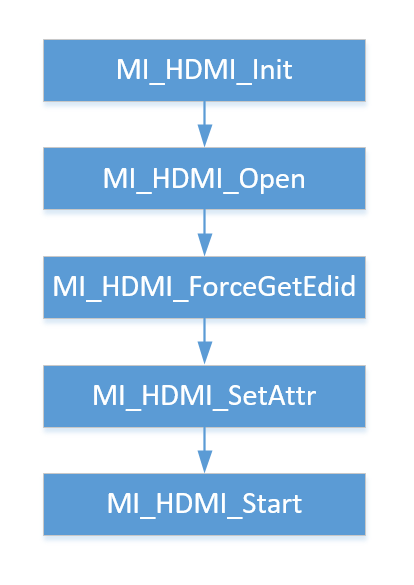
The interface call is divided into the following steps:
-
Initialize the HDMI module. And register hot plug events, mainly calling back plug and unplug events to the app.
-
Open HDMI
-
Obtain the edid of RX Sink devices such as monitors or televisions
-
Configure according to the timing supported by sink
-
Start HDMI
1.7. Example Introduction
This example introduces the process of calling HDMI functions.
Function Overview:
-
Initialize Disp device: Configure HDMI interface properties.
-
Initialize AO Device (optional): Configure AO Device parameters
-
Obtain the Edid of the sink device, parse it, and configure Disp/HDMI according to the timing supported by the sink device.
-
Configure and start HDMI.
-
Stop and release HDMI.
#include <stdio.h>
#include <unistd.h>
#include <string.h>
#include <pthread.h>
#include <sys/prctl.h>
#include <poll.h>
#include <fcntl.h>
#include <stdlib.h>
#include <signal.h>
#include <assert.h>
#include <sys/resource.h>
#include <sys/mman.h>
#include <sys/types.h>
#include <sys/time.h>
#include <sys/stat.h>
#include "mi_sys.h"
#include "mi_disp.h"
#include "mi_ao.h"
#include "mi_common.h"
#include "mi_hdmi.h"
MI_HDMI_InitParam_t stInitParam;
MI_HDMI_Attr_t stAttr;
MI_HDMI_Edid_t stEdid;
//initial DISP Device parameter and configure hdmi interface
stPubAttr.eIntfSync = E_MI_DISP_OUTPUT_1080P60; // output Timing:1080P60
stPubAttr.eIntfType = E_MI_DISP_INTF_HDMI;      // interface type:HDMI
MI_DISP_SetPubAttr(DispDev, &stPubAttr);        // configure DISP Device parameter
MI_DISP_Enable(DispDev);                        // start DISP Device
//initial AO Device parameter
MI_AO_Open(0, &pstAudioOutCtx->stAoAttr);
MI_AO_AttachIf(pstAudioOutCtx->DevId, E_MI_AO_IF_HDMI_A, 0);
MI_AO_SetVolume(pstAudioOutCtx->DevId, 5, 5, E_MI_AO_GAIN_FADING_OFF);
/* initial and start hdmi */
stInitParam.pCallBackArgs = NULL;
stInitParam.pfnHdmiEventCallback = NULL;
memset(&stInitParam, 0, sizeof(MI_HDMI_InitParam_t));
MI_HDMI_Init(&stInitParam);
MI_HDMI_Open(0);
/* Get the timing supported by sink devices */
MI_HDMI_ForceGetEdid(0, &stEdid);
...parser...
/* Configure according to the timing supported by sink */
MI_HDMI_GetAttr(0, &stAttr);
stAttr.stVideoAttr.bEnableVideo = TRUE;
stAttr.stVideoAttr.eOutputMode = E_MI_HDMI_OUTPUT_MODE_HDMI;
stAttr.stVideoAttr.eTimingType = E_MI_HDMI_TIMING_1080_60P;
stAttr.stVideoAttr.eColorType= E_MI_HDMI_COLOR_TYPE_YCBCR444;
stAttr.stVideoAttr.eDeepColorMode = E_MI_HDMI_DEEP_COLOR_24BIT;
stAttr.stAudioAttr.bEnableAudio = TRUE;
stAttr.stAudioAttr.bIsMultiChannel = FALSE;
stAttr.stAudioAttr.eBitDepth = E_MI_HDMI_BIT_DEPTH_16;
MI_HDMI_SetAttr(0, &stAttr);
MI_HDMI_Start(0);
....
/* stop HDMI */
MI_HDMI_Stop(0);
MI_HDMI_Close(0);
MI_HDMI_DeInit();
2. API LIST
The MI HDMI module provides the following APIs:
| Name of API | Function |
|---|---|
| MI_HDMI_Init | Initialize HDMI |
| MI_HDMI_DeInit | Deinitialize HDMI |
| MI_HDMI_Open | Open HDMI |
| MI_HDMI_Close | Close HDMI |
| MI_HDMI_SetAttr | Set HDMI attribute |
| MI_HDMI_GetAttr | Get HDMI attribute |
| MI_HDMI_Start | Start HDMI |
| MI_HDMI_Stop | Stop HDMI |
| MI_HDMI_GetSinkInfo | Get HDMI Sink side capability information |
| MI_HDMI_SetAvMute | Set HDMI audio/video mute function |
| MI_HDMI_ForceGetEdid | Get HDMI EDID information |
| MI_HDMI_SetDeepColor | Set HDMI Deep Color mode |
| MI_HDMI_GetDeepColor | Get HDMI Deep Color mode |
| MI_HDMI_SetInfoFrame | Set HDMI Info Frame |
| MI_HDMI_GetInfoFrame | Get current HDMI Info Frame |
| MI_HDMI_SetAnalogDrvCurrent | Set HDMI Channel Driving Current |
| MI_HDMI_InitDev | Initialize HDMI Device |
| MI_HDMI_DeInitDev | De-initialize HDMI Device |
2.1. MI_HDMI_Init
-
Function
Initialize HDMI module
-
Syntax
MI_S32 MI_HDMI_Init(MI_HDMI_InitParam_t *pstInitParam); -
Parameter
Parameter Name Description Input/Output pstInitParam Pointer to initialization parameter structure Input -
Return Value
-
Zero: Successful
-
Non-zero: Failed, see error code for details
-
-
Requirement
-
Header: mi_hdmi.h, mi_hdmi_datatype.h
-
Library: libmi_hdmi.a / libmi_hdmi.so
-
-
Note
-
After HDMI calls back the registered event, system will inform App in the form of callback that a suspected hot-plugging event had happened. If user considers it not necessary to make any special response against the corresponding event, the function pointer in the initialization parameter structure can be set to NULL.
-
The following diagram shows the implementation of hotplug:

-
-
Example
1. MI_HDMI_InitParam_t stHdmiPara; 2. MI_HDMI_Attr_t stAttr; 3. MI_HDMI_TimingType_e eTimingType; 4. /* enable DISP */ 5. eTimingType = E_MI_HDMI_TIMING_1080_60P; 6. /* enable HDMI */ 7. stHdmiPara.pCallBackArgs = NULL; 8. stHdmiPara.pfnHdmiEventCallback = NULL; 9. MI_HDMI_Init(&stHdmiPara); 10. MI_HDMI_Open(0); 11. /* get support timming of sink device*/ 12. MI_HDMI_ForceGetEdid(0, &stEdid); 13. ... 14. /* set the source output timming according to sink edid */ 15. MI_HDMI_GetAttr(0, &stAttr); 16. stAttr.stVideoAttr.eOutputMode = E_MI_HDMI_OUTPUT_MODE_HDMI; 17. stAttr.stVideoAttr.bEnableVideo = TRUE; 18. stAttr.stVideoAttr.eTimingType = E_MI_HDMI_TIMING_1080_60P; 19. stAttr.stVideoAttr.eColorType= E_MI_HDMI_COLOR_TYPE_YCBCR444; 20. stAttr.stVideoAttr.eDeepColorMode = E_MI_HDMI_DEEP_COLOR_24BIT; 21. stAttr.stAudioAttr.bEnableAudio = FALSE; 22. stAttr.stAudioAttr.bIsMultiChannel = FALSE; 23. stAttr.stAudioAttr.eBitDepth = E_MI_HDMI_BIT_DEPTH_16; 24. MI_HDMI_SetAttr(0, &stAttr); 25. MI_HDMI_Start(0); 26. /* stop HDMI */ 27. MI_HDMI_Stop(0); 28. MI_HDMI_Close(0); 29. MI_HDMI_DeInit(); -
Related API
2.2. MI_HDMI_DeInit
-
Function
Deinitialize HDMI
-
Syntax
MI_S32 MI_HDMI_DeInit(); -
Return Value
-
Zero: Successful
-
Non-zero: Failed, see error code for details
-
-
Requirement
-
Header: mi_hdmi.h, mi_hdmi_datatype.h
-
Library: libmi_hdmi.a / libmi_hdmi.so
-
-
Example
See the example given in MI_HDMI_Init.
-
Related API
2.3. MI_HDMI_Open
-
Function
Open HDMI
-
Syntax
MI_S32 MI_HDMI_Open(MI_HDMI_DeviceId_e eHdmi); -
Parameter
Parameter Name Description Input/Output eHdmi HDMI interface number
Parameter range: 0Input -
Return Value
-
Zero: Successful
-
Non-zero: Failed, see error code for details
-
-
Requirement
-
Header: mi_hdmi.h, mi_hdmi_datatype.h
-
Library: libmi_hdmi.a / libmi_hdmi.so
-
-
Note
You should call MI_HDMI_Init before opening HDMI.
Repeated opening of HDMI will return a successful message.
-
Example
See the example given in MI_HDMI_Init.
-
Related API
2.4. MI_HDMI_Close
-
Function
Close HDMI
-
Syntax
MI_S32 MI_HDMI_Close(MI_HDMI_DeviceId_e eHdmi); -
Parameter
Parameter Name Description Input/Output eHdmi HDMI interface number Input Parameter range: 0 -
Return Value
-
Zero: Successful
-
Non-zero: Failed, see error code for details
-
-
Requirement
-
Header: mi_hdmi.h, mi_hdmi_datatype.h
-
Library: libmi_hdmi.a / libmi_hdmi.so
-
-
Note
Repeated closing of HDMI will return a successful message.
-
Example
See the example given in MI_HDMI_Init.
-
Related API
2.5. MI_HDMI_SetAttr
-
Function
Set HDMI attribute
-
Syntax
MI_S32 MI_HDMI_SetAttr(MI_HDMI_DeviceId_e eHdmi, MI_HDMI_Attr_t *pstAttr); -
Parameter
Parameter Name Description Input/Output eHdmi HDMI interface number
Parameter range: 0Input pstAttr Pointer to HDMI attribute structure Input -
Return Value
-
Zero: Successful
-
Non-zero: Failed, see error code for details
-
-
Requirement
-
Header: mi_hdmi.h, mi_hdmi_datatype.h
-
Library: libmi_hdmi.a / libmi_hdmi.so
-
-
Note
-
You should open HDMI before setting HDMI attribute.
-
It is suggested that you set HDMI attribute before calling MI_HDMI_Start.
-
If HDMI attribute is to be set after calling MI_HDMI_Start, you should call MI_HDMI_Stop to disable AV mute and set the new HDMI attribute.
-
If the option of audio transfer is enabled, the transfer of video must be enabled too.
-
-
Example
1. MI_HDMI_InitParam_t stHdmiPara; 2. MI_HDMI_Attr_t stAttr; 3. MI_HDMI_TimingType_e eTimingType; 4. /* Enable DISP */ 5. /* Set Hdmi attribute */ 6. MI_HDMI_Stop(0); 7. MI_HDMI_GetAttr(0, &stAttr); 8. /* Change attribute,such as timing */ 9. stAttr.stVideoAttr.eTimingType = E_MI_HDMI_TIMING_720_60P; 10. MI_HDMI_SetAttr(0, &stAttr); 11. MI_HDMI_Start(0); -
Related API
2.6. MI_HDMI_GetAttr
-
Function
Get HDMI attribute
-
Syntax
MI_S32 MI_HDMI_GetAttr(MI_HDMI_DeviceId_e eHdmi, MI_HDMI_Attr_t *pstAttr); -
Parameter
Parameter Name Description Input/Output eHdmi HDMI interface number
Parameter range: 0Input pstAttr Pointer to HDMI attribute structure Output -
Return Value
-
Zero: Successful
-
Non-zero: Failed, see error code for details
-
-
Requirement
-
Header: mi_hdmi.h, mi_hdmi_datatype.h
-
Library: libmi_hdmi.a / libmi_hdmi.so
-
-
Example
See the example given in MI_HDMI_Init.
-
Related API
2.7. MI_HDMI_Start
-
Function
Start HDMI
-
Syntax
MI_S32 MI_HDMI_Start(MI_HDMI_DeviceId_e eHdmi); -
Parameter
Parameter Name Description Input/Output eHdmi HDMI interface number
Parameter range: 0Input -
Return Value
-
Zero: Successful
-
Non-zero: Failed, see error code for details
-
-
Requirement
-
Header: mi_hdmi.h, mi_hdmi_datatype.h
-
Library: libmi_hdmi.a / libmi_hdmi.so
-
-
Note
Before starting HDMI, call MI_HDMI_Open first.
-
Example
See the example given in MI_HDMI_Init.
-
Related API
2.8. MI_HDMI_Stop
-
Function
Stop HDMI
-
Syntax
MI_S32 MI_HDMI_Stop(MI_HDMI_DeviceId_e eHdmi); -
Parameter
Parameter Name Description Input/Output eHdmi HDMI interface number
Parameter range: 0Input -
Return Value
-
Zero: Successful
-
Non-zero: Failed, see error code for details
-
-
Requirement
-
Header: mi_hdmi.h, mi_hdmi_datatype.h
-
Library: libmi_hdmi.a / libmi_hdmi.so
-
-
Related API
2.9. MI_HDMI_GetSinkInfo
-
Function
Get HDMI Sink side capability information
-
Syntax
MI_S32 MI_HDMI_GetSinkInfo(MI_HDMI_DeviceId_e eHdmi, MI_HDMI_SinkInfo_t *pstSinkInfo); -
Parameter
Parameter Name Description Input/Output eHdmi HDMI interface number
Parameter range: 0Input pstSinkInfo Pointer to HDMI Sink side capability structure Output -
Return Value
-
Zero: Successful
-
Non-zero: Failed, see error code for details
-
-
Requirement
-
Header: mi_hdmi.h, mi_hdmi_datatype.h
-
Library: libmi_hdmi.a / libmi_hdmi.so
-
-
Note
-
Before calling this function, open HDMI first. To ensure HDMI has been opened successfully, we suggest waiting for 500ms or so after you have called MI_HDMI_Open interface.
-
Call this function after HDMI is started and the cable plugged in.
-
This function is normally used when inserting an event handling function or after getting EDID by force.
-
-
Example
1.  MI_HDMI_InitParam_t stHdmiPara;

2.  MI_HDMI_Attr_t  stAttr;

3.  MI_HDMI_TimingType_e eTimingType;

4.  MI_HDMI_SinkInfo_t stSinkInfo;

5.  /* Enable DISP */

6.  /* Enable HDMI */

7.  /* Get HDMI Sink Info */

8.  MI_HDMI_GetSinkInfo(0, &stSinkInfo);
2.10. MI_HDMI_SetAvMute
-
Function
Set HDMI AV mute function
-
Syntax
MI_S32 MI_HDMI_SetAvMute(MI_HDMI_DeviceId_e eHdmi, MI_BOOL bAvMute); -
Parameter
Parameter Name Description Input/Output eHdmi HDMI interface number
Parameter range: 0Input bAvMute HDMI AV mute function
1: Enable AV mute
0: Disable AV muteInput -
Return Value
-
Zero: Successful
-
Non-zero: Failed, see error code for details
-
-
Requirement
-
Header: mi_hdmi.h, mi_hdmi_datatype.h
-
Library: libmi_hdmi.a / libmi_hdmi.so
-
-
Note
Need to call MI_HDMI_Start before calling this Mute feature.
-
Example
1.  MI_HDMI_Start(0);

2.  MI_HDMI_SetAvMute(0, MI_TRUE);
2.11. MI_HDMI_ForceGetEdid
-
Function
Get HDMI EDID information
-
Syntax
MI_S32 MI_HDMI_ForceGetEdid(MI_HDMI_DeviceId_e eHdmi, MI_HDMI_Edid_t *pstEdidData); -
Parameter
Parameter Name Description Input/Output eHdmi HDMI interface number
Parameter range: 0Input pstEdidData HDMI EDID information Output -
Return Value
-
Zero: Successful
-
Non-zero: Failed, see error code for details
-
-
Requirement
-
Header: mi_hdmi.h, mi_hdmi_datatype.h
-
Library: libmi_hdmi.a / libmi_hdmi.so
-
-
Note
Before calling this function, open HDMI first.
-
Example
1.  MI_HDMI_InitParam_t stHdmiPara;

2.  MI_HDMI_Attr_t stAttr;

3.  MI_HDMI_Edid_t stEdidData;

4.  /* Enable DISP */

5.  /* Enable HDMI */

6.  /* Get HDMI EDID */

7.  MI_HDMI_ForceGetEdid(0, &stEdidData);
2.12. MI_HDMI_SetDeepColor
-
Function
Set Deep Color mode
-
Function
MI_S32 MI_HDMI_SetDeepColor(MI_HDMI_DeviceId_e eHdmi, MI_HDMI_DeepColor_e eDeepColor); -
Parameter
Parameter Name Description Input/Output eHdmi HDMI interface number
Parameter range: 0Input eDeepColor HDMI Deep Color mode Input -
Return Value
-
Zero: Successful
-
Non-zero: Failed, see error code for details
-
-
Requirement
-
Header: mi_hdmi.h, mi_hdmi_datatype.h
-
Library: libmi_hdmi.a / libmi_hdmi.so
-
-
Note
-
This function is a high-level interface, normally not in use
-
Before calling this function, open HDMI first
-
This interface can be used to set the Deep Color mode
-
This API is currently not supported.
-
-
Example
1.  MI_HDMI_InitParam_t stHdmiPara;

2.  MI_HDMI_Attr_t  stAttr;

3.  /* Enable DISP*/

4.  /* Enable HDMI */

5.  /* Set Deep color mode */

6.  MI_HDMI_SetDeepColor (0, E_MI_HDMI_DEEP_COLOR_24BIT);
2.13. MI_HDMI_GetDeepColor
-
Function
Get Deep Color mode
-
Syntax
MI_S32 MI_HDMI_GetDeepColor(MI_HDMI_DeviceId_e eHdmi, MI_HDMI_DeepColor_e *peDeepColor); -
Parameter
Parameter Name Description Input/Output eHdmi HDMI interface number
Parameter range: 0Input peDeepColor Pointer to HDMI Deep Color mode Output -
Return Value
-
Zero: Successful
-
Non-zero: Failed, see error code for details
-
-
Requirement
-
Header: mi_hdmi.h, mi_hdmi_datatype.h
-
Library: libmi_hdmi.a / libmi_hdmi.so
-
-
Note
-
This function is a high-level interface, normally not in use.
-
Before calling this function, open HDMI first.
-
This API is currently not supported.
-
-
Related API
2.14. MI_HDMI_SetInfoFrame
-
Function
Set HDMI InfoFrame
-
Syntax
MI_S32 MI_HDMI_SetInfoFrame(MI_HDMI_DeviceId_e eHdmi, MI_HDMI_InfoFrame_t *pstInfoFrame); -
Parameter
Parameter Name Description Input/Output eHdmi HDMI interface number
Parameter range: 0Input pstInfoFrame Pointer to image InfoFrame structure Input -
Return Value
-
Zero: Successful
-
Non-zero: Failed, see error code for details
-
-
Requirement
-
Header: mi_hdmi.h, mi_hdmi_datatype.h
-
Library: libmi_hdmi.a / libmi_hdmi.so
-
-
Note
-
This interface is normally used in user state callback function for setting InfoFrame attribute. For other cases, this interface is basically not required.
-
Before calling this function, open HDMI first
-
This interface supports setting of AVI, SPD and AUDIO InfoFrame only. Setting other than these types of InfoFrame would be invalid.
-
-
Example
1. MI_HDMI_DeviceId_e eHdmi = E_MI_HDMI_ID_0; 2. MI_HDMI_InfoFrame_t stAviInfoFrame = {E_MI_HDMI_INFOFRAME_TYPE_AVI}; 3. MI_HDMI_InfoFrame_t stAudInfoFrame = {E_MI_HDMI_INFOFRAME_TYPE_AUDIO}; 4. MI_HDMI_InfoFrame_t stSpdInfoFrame = {E_MI_HDMI_INFOFRAME_TYPE_SPD}; 5. /* AviInfoFrame */ 6. stAviInfoFrame.unInforUnit.stAviInfoFrame.bEnableAfdOverWrite = 0; 7. ... 8. /* AudioInfoFrame */ 9. stAudInfoFrame.unInforUnit.stAudInfoFrame.u32ChannelCount = 2; 10. ... 11. /* SpdInfoFrame */ 12. stSpdInfoFrame.unInforUnit.stSpdInfoFrame.au8VendorName[0] = 0; 13. ... 14. MI_HDMI_SetInfoFrame(eHdmi, &stAviInfoFrame); -
Related API
2.15. MI_HDMI_GetInfoFrame
-
Function
Get HDMI InfoFrame
-
Syntax
MI_S32 MI_HDMI_GetInfoFrame(MI_HDMI_DeviceId_e eHdmi, MI_HDMI_InfoFrameType_e eInfoFrameType, MI_HDMI_InfoFrame_t* pstInfoFrame); -
Parameter
Parameter Name Description Input/Output eHdmi HDMI interface number
Parameter range: 0Input eInfoFrameType InfoFrame type Input pstInfoFrame Pointer to image InfoFrame structure Output -
Return Value
-
Zero: Successful
-
Non-zero: Failed, see error code for details
-
-
Requirement
-
Header: mi_hdmi.h, mi_hdmi_datatype.h
-
Library: libmi_hdmi.a / libmi_hdmi.so
-
-
Note
This interface is normally used in user state callback function for setting InfoFrame attribute. For other cases, this interface is basically not required.
2.16. MI_HDMI_SetAnalogDrvCurrent
-
Function
Set HDMI Channel Driving Current
-
Syntax
MI_S32 MI_HDMI_SetAnalogDrvCurrent(MI_HDMI_DeviceId_e eHdmi,MI_HDMI_AnalogDrvCurrent_t *pstAnalogDrvCurrent); -
Parameter
Parameter Name Description Input/Output eHdmi HDMI interface number
Parameter range: 0Input pstAnalogDrvCurrent Structure of HDMI Channel Current Input -
Return Value
-
Zero: Successful
-
Non-zero: Failed, see error code for details
-
-
Requirement
-
Header: mi_hdmi.h, mi_hdmi_datatype.h
-
Library: libmi_hdmi.a / libmi_hdmi.so
-
-
Note
-
This interface is a high-level interface which allows users to adjust channel current.
-
Before calling this function, open HDMI first.
-
Use before setting is recommended.
-
-
Example
1.  MI_HDMI_AnalogDrvCurrent_t CurInfo = {};

2.  memset(&CurInfo, 0xFF, sizeof(CurInfo));

3.  MI_HDMI_SetAnalogDrvCurrent(g_HdmiAttr.eHdmi, &CurInfo);
2.17. MI_HDMI_InitDev
-
Function
Initialize HDMI Device.
-
Syntax
MI_S32 MI_HDMI_InitDev(MI_HDMI_InitParam_t *pstInitParam); -
Parameter
Parameter Name Description Input/Output pstInitParam HDMI Init Param Input -
Return Value
-
Zero: Successful
-
Non-zero: Failed, see error code for details
-
-
Requirement
-
Header: mi_hdmi.h, mi_hdmi_datatype.h
-
Library: libmi_hdmi.a / libmi_hdmi.so
-
-
Note
For Version 2.06 and above, we recommend using this interface to replace the original MI_HDMI_Init interface.
2.18. MI_HDMI_DeInitDev
-
Function
De-initialize HDMI Device.
-
Syntax
MI_S32 MI_HDMI_DeInitDev(void); -
Return Value
-
Zero: Successful
-
Non-zero: Failed, see error code for details
-
-
Requirement
-
Header: mi_hdmi.h, mi_hdmi_datatype.h
-
Library: libmi_hdmi.a / libmi_hdmi.so
-
-
Note
For Version 2.06 and above, we recommend using this interface to replace the original MI_HDMI_DeInit interface.
3. HDMI DATA TYPE
The HDMI related data types are listed in the table below:
| Data type | Description |
|---|---|
| MI_HDMI_DeviceId_e | Define HDMI interface number |
| MI_HDMI_InitParam_t | Define HDMI initialization attribute structure |
| MI_HDMI_EventCallBack | Define HDMI callback function |
| MI_HDMI_EventType_e | Define HDMI event notification enumeration |
| MI_HDMI_Attr_t | Define HDMI attribute structure |
| MI_HDMI_TimingType_e | Define HDMI video format enumeration |
| MI_HDMI_OutputMode_e | Define HDMI color space type enumeration |
| MI_HDMI_ColorType_e | Define HDMI color type enumeration |
| MI_HDMI_DeepColor_e | Define HDMI deep color mode enumeration |
| MI_HDMI_SampleRate_e | Define HDMI audio output sampling rate enumeration |
| MI_HDMI_BitDepth_e | Define HDMI audio output sampling bit width enumeration |
| MI_HDMI_SinkInfo_t | Define HDMI Sink side capability level structure |
| MI_HDMI_Edid_t | Define HDMI EDID information structure |
| MI_HDMI_InfoFrameType_e | Define HDMI InfoFrame type enumeration |
| MI_HDMI_AviInfoFrameVer_t | Define AVI InfoFrame structure |
| MI_HDMI_AudInfoFrameVer_t | Define AUDIO InfoFrame structure |
| MI_HDMI_SpdInfoFrame_t | Define SPD InfoFrame structure |
| MI_HDMI_InfoFrameUnit_u | Define HDMI InfoFrame complex |
| MI_HDMI_AnalogDrvCurrent_t | Define HDMI Channel Current structure |
NOTE: This section includes most of the key data types. For data types not listed here, please refer to mi_hdmi_datatype.h.
3.1. MI_HDMI_DeviceId_e
-
Description
Define HDMI interface number
-
Definition
typedef enum { E_MI_HDMI_ID_0 = 0, E_MI_HDMI_ID_MAX } MI_HDMI_DeviceId_e; -
Member
Member Description E_MI_HDMI_ID_0 HDMI interface 0
3.2. MI_HDMI_InitParam_t
-
Description
Define HDMI initialization attribute structure
-
Definition
typedef struct MI_HDMI_InitParam_s { MI_HDMI_EventCallBack pfnHdmiEventCallback; void *pCallBackArgs; }MI_HDMI_InitParam_t; -
Member
Member Description pfnHdmiEventCallback Event callback function pCallBackArgs Callback function parameter private data -
Note
After HDMI initialization, the corresponding hot-plugging event will be returned as long as the callback of Init is not null. If the reporting of such event is not required, you can set the function pointer in the initialization parameter structure to NULL.
-
Related Data Type and Interface
MI_HDMI_Init
3.3. MI_HDMI_EventCallBack
-
Description
Define HDMI callback function
-
Definition
typedef MI_S32 (*MI_HDMI_EventCallBack) (MI_HDMI_DeviceId_e eHdmi, MI_HDMI_EventType_e event, void *pEventParam, void *pUsrParam); -
Member
Member Description MI_HDMI_EventType_e HDMI event type pEventParam pUsrParam Event private data
3.4. MI_HDMI_EventType_e
-
Description
Define HDMI event notification enumeration
-
Definition
typedef enum { E_MI_HDMI_EVENT_HOTPLUG = 0, E_MI_HDMI_EVENT_NO_PLUG, E_MI_HDMI_EVENT_MAX } MI_HDMI_EventType_e; -
Member
Member Description E_MI_HDMI_EVENT_HOTPLUG HDMI hot-plugging event E_MI_HDMI_EVENT_NO_PLUG HDMI Cable no connection event -
Related Data Type and Interface
3.5. MI_HDMI_Attr_t
-
Description
Define HDMI attribute structure
-
Definition
typedef struct MI_HDMI_Attr_s { MI_BOOL bConnect; MI_HDMI_VideoAttr_t stVideoAttr; MI_HDMI_AudioAttr_t stAudioAttr; MI_HDMI_EnInfoFrame_t stEnInfoFrame; } MI_HDMI_Attr_t; typedef struct MI_HDMI_VideoAttr_s { MI_BOOL bEnableVideo; MI_HDMI_TimingType_e eTimingType; MI_HDMI_OutputMode_e eOutputMode; MI_HDMI_ColorType_e eColorType; MI_HDMI_ColorType_e eInColorType; MI_HDMI_DeepColor_e eDeepColorMode; MI_HDMI_UserTiming_t stUserTiming; } MI_HDMI_VideoAttr_t; typedef struct MI_HDMI_AudioAttr_s { MI_BOOL bEnableAudio; MI_BOOL bIsMultiChannel; MI_HDMI_SampleRate_e eSampleRate; MI_HDMI_BitDepth_e eBitDepth; } MI_HDMI_AudioAttr_t; typedef struct MI_HDMI_EnInfoFrame_s { MI_BOOL bEnableAviInfoFrame; MI_BOOL bEnableAudInfoFrame; MI_BOOL bEnableSpdInfoFrame; } MI_HDMI_EnInfoFrame_t; -
Member
Member Description bEnableVideo Video enable eTimingType Video format. This parameter must be consistent with the video output configuration format. eOutputMode HDMI video output mode eColorType HDMI output color type eInColorType HDMI input color type eDeepColorMode DeepColor output mode MI_HDMI_DEEP_COLOR_24BIT is by default not supported. Supports only MI_HDMI_DEEP_COLOR_30BIT, MI_HDMI_DEEP_COLOR_36BIT, and MI_HDMI_DEEP_COLOR_48BIT. stUserTiming Custom resolution such as width/height/frame rate. Must be consistent with display timing setting bEnableAudio Audio enable bIsMultiChannel Multi-channel selection 0: 2-channel 1: 8-channel eSampleRate Audio sampling rate. This parameter must be consistent with the AO configuration. eBitDepth Audio bit width, default is 16. This parameter must be consistent with the AO configuration. bEnableAviInfoFrame AVI InfoFrame enable Enable is suggested. bEnableAudInfoFrame Audio InfoFrame enable Enable is suggested bEnableSpdInfoFrame SPD InfoFrame enable -
Note
You may set the HDMI attribute based on the suggested values.
-
Related Data Type and Interface
3.6. MI_HDMI_TimingType_e
-
Description
Define HDMI video format enumeration
-
Definition
typedef enum { E_MI_HDMI_TIMING_480_60I = 0, E_MI_HDMI_TIMING_480_60P = 1, E_MI_HDMI_TIMING_576_50I = 2, E_MI_HDMI_TIMING_576_50P = 3, E_MI_HDMI_TIMING_720_50P = 4, E_MI_HDMI_TIMING_720_60P = 5, E_MI_HDMI_TIMING_1080_50I = 6, E_MI_HDMI_TIMING_1080_50P = 7, E_MI_HDMI_TIMING_1080_60I = 8, E_MI_HDMI_TIMING_1080_60P = 9, E_MI_HDMI_TIMING_1080_30P = 10, E_MI_HDMI_TIMING_1080_25P = 11, E_MI_HDMI_TIMING_1080_24P = 12, E_MI_HDMI_TIMING_4K2K_30P = 13, E_MI_HDMI_TIMING_1440_50P = 14, E_MI_HDMI_TIMING_1440_60P = 15, E_MI_HDMI_TIMING_1440_24P = 16, E_MI_HDMI_TIMING_1440_30P = 17, E_MI_HDMI_TIMING_1470_50P = 18, E_MI_HDMI_TIMING_1470_60P = 19, E_MI_HDMI_TIMING_1470_24P = 20, E_MI_HDMI_TIMING_1470_30P = 21, E_MI_HDMI_TIMING_1920x2205_24P = 22, E_MI_HDMI_TIMING_1920x2205_30P = 23, E_MI_HDMI_TIMING_4K2K_25P = 24, E_MI_HDMI_TIMING_4K1K_60P = 25, E_MI_HDMI_TIMING_4K2K_60P = 26, E_MI_HDMI_TIMING_4K2K_24P = 27, E_MI_HDMI_TIMING_4K2K_50P = 28, E_MI_HDMI_TIMING_2205_24P = 29, E_MI_HDMI_TIMING_4K1K_120P = 30, E_MI_HDMI_TIMING_4096x2160_24P = 31, E_MI_HDMI_TIMING_4096x2160_25P = 32, E_MI_HDMI_TIMING_4096x2160_30P = 33, E_MI_HDMI_TIMING_4096x2160_50P = 34, E_MI_HDMI_TIMING_4096x2160_60P = 35, E_MI_HDMI_TIMING_1024x768_60P = 36, E_MI_HDMI_TIMING_1280x1024_60P = 37, E_MI_HDMI_TIMING_1440x900_60P = 38, E_MI_HDMI_TIMING_1600x1200_60P = 39, E_MI_HDMI_TIMING_1280x800_60P = 40, E_MI_HDMI_TIMING_1366x768_60P = 41, E_MI_HDMI_TIMING_1680x1050_60P = 42, E_MI_HDMI_TIMING_1920x1080_5994P = 43, E_MI_HDMI_TIMING_1920x1080_2997P = 44, E_MI_HDMI_TIMING_1280x720_5994P = 45, E_MI_HDMI_TIMING_1280x720_2997P = 46, E_MI_HDMI_TIMING_3840x2160_2997P = 47, E_MI_HDMI_TIMING_800x600_60P = 48, E_MI_HDMI_TIMING_1280x720_24P = 49, E_MI_HDMI_TIMING_1280x720_25P = 50, E_MI_HDMI_TIMING_1280x720_30P = 51, E_MI_HDMI_TIMING_1920x1080_2398P = 52, E_MI_HDMI_TIMING_640x480_60P = 53, E_MI_HDMI_TIMING_848x480_60P = 54, E_MI_HDMI_TIMING_1280x768_60P = 55, E_MI_HDMI_TIMING_1280x960_60P = 56, E_MI_HDMI_TIMING_1360x768_60P = 57, E_MI_HDMI_TIMING_1400x1050_60P = 58, E_MI_HDMI_TIMING_1600x900_60P = 59, E_MI_HDMI_TIMING_1920x1200_60P = 60, E_MI_HDMI_TIMING_1920x1440_60P = 61, E_MI_HDMI_TIMING_2560x1600_60P = 62, E_MI_HDMI_TIMING_USER = 63, E_MI_HDMI_TIMING_MAX, } MI_HDMI_TimingType_e; -
Note
-
It is essential that you set the corresponding HDMI format based on the video output format.
-
The timing set by App must match with the DISP module timing. That is, the HDMI timing must be consistent with DISP module timing.
-
-
Related Data Type and Interface
3.7. MI_HDMI_OutputMode_e
-
Description
Define HDMI output mode type enumeration
-
Definition
typedef enum { E_MI_HDMI_OUTPUT_MODE_HDMI = 0, E_MI_HDMI_OUTPUT_MODE_HDMI_HDCP, E_MI_HDMI_OUTPUT_MODE_DVI, E_MI_HDMI_OUTPUT_MODE_DVI_HDCP, E_MI_HDMI_OUTPUT_MODE_AUTO, E_MI_HDMI_OUTPUT_MODE_MAX, } MI_HDMI_OutputMode_e; -
Member
Member Description E_MI_HDMI_OUTPUT_MODE_HDMI HDMI Output Mode E_MI_HDMI_OUTPUT_MODE_HDMI_HDCP HDMI with HDCP Output Mode E_MI_HDMI_OUTPUT_MODE_DVI DVI Output Mode E_MI_HDMI_OUTPUT_MODE_DVI_HDCP DVI with HDCP Output Mode E_MI_HDMI_OUTPUT_MODE_AUTO Automatic selection via EDID -
Related Data Type and Interface
3.8. MI_HDMI_ColorType_e
-
Description
Define HDMI color space type enumeration
-
Definition
typedef enum { E_MI_HDMI_COLOR_TYPE_RGB444 = 0, E_MI_HDMI_COLOR_TYPE_YCBCR422, E_MI_HDMI_COLOR_TYPE_YCBCR444, E_MI_HDMI_COLOR_TYPE_YCBCR420, E_MI_HDMI_COLOR_TYPE_AUTO, E_MI_HDMI_COLOR_TYPE_MAX } MI_HDMI_ColorType_e; -
Member
Member Description E_MI_HDMI_COLOR_TYPE_RGB444 RGB444 Output Mode E_MI_HDMI_COLOR_TYPE_YCBCR422 YCBCR422 Output Mode E_MI_HDMI_COLOR_TYPE_YCBCR444 YCBCR444 Output Mode E_MI_HDMI_COLOR_TYPE_YCBCR420 YCBCR420 Output Mode E_MI_HDMI_COLOR_TYPE_AUTO Automatic selection via EDID -
Related Data Type and Interface
3.9. MI_HDMI_DeepColor_e
-
Description
Define HDMI deep color mode enumeration
-
Definition
typedef enum { E_MI_HDMI_DEEP_COLOR_24BIT = 0x00, E_MI_HDMI_DEEP_COLOR_30BIT, E_MI_HDMI_DEEP_COLOR_36BIT, E_MI_HDMI_DEEP_COLOR_48BIT, E_MI_HDMI_DEEP_COLOR_MAX, } MI_HDMI_DeepColor_e; -
Member
Member Description E_MI_HDMI_DEEP_COLOR_24BIT HDMI Deep Color 24-bit Mode E_MI_HDMI_DEEP_COLOR_30BIT HDMI Deep Color 30-bit Mode E_MI_HDMI_DEEP_COLOR_36BIT HDMI Deep Color 36-bit Mode E_MI_HDMI_DEEP_COLOR_48BIT HDMI Deep Color 48-bit Mode -
Related Data Type and Interface
3.10. MI_HDMI_SampleRate_e
-
Description
Define HDMI audio output sampling rate enumeration
-
Definition
typedef enum { E_MI_HDMI_AUDIO_SAMPLERATE_UNKNOWN = 0, E_MI_HDMI_AUDIO_SAMPLERATE_32K = 1, E_MI_HDMI_AUDIO_SAMPLERATE_44K = 2, E_MI_HDMI_AUDIO_SAMPLERATE_48K = 3, E_MI_HDMI_AUDIO_SAMPLERATE_88K = 4, E_MI_HDMI_AUDIO_SAMPLERATE_96K = 5, E_MI_HDMI_AUDIO_SAMPLERATE_176K = 6, E_MI_HDMI_AUDIO_SAMPLERATE_192K = 7, E_MI_HDMI_AUDIO_SAMPLERATE_MAX, } MI_HDMI_SampleRate_e; -
Note
When the App is setting the sampling rate, it needs to match the sampling rate of the Audio module, and the sampling rate of HDMI needs to be consistent with the sampling rate of the Audio module.
-
Related Data Type and Interface
3.11. MI_HDMI_BitDepth_e
-
Description
Define HDMI audio output sampling bit width enumeration
-
Definition
typedef enum { E_MI_HDMI_BIT_DEPTH_8 = 8, E_MI_HDMI_BIT_DEPTH_16 = 16, E_MI_HDMI_BIT_DEPTH_18 = 18, E_MI_HDMI_BIT_DEPTH_20 = 20, E_MI_HDMI_BIT_DEPTH_24 = 24, E_MI_HDMI_BIT_DEPTH_32 = 32, E_MI_HDMI_BIT_DEPTH_MAX }MI_HDMI_BitDepth_e; -
Related Data Type and Interface
3.12. MI_HDMI_SinkInfo_t
-
Description
Define HDMI Sink side capability structure
-
Definition
typedef struct MI_HDMI_Sink_Info_s { MI_BOOL bConnected; MI_BOOL bSupportHdmi; MI_HDMI_TimingType_e eNativeTimingType; MI_BOOL abVideoFmtSupported[E_MI_HDMI_TIMING_MAX]; MI_BOOL bSupportYCbCr444; MI_BOOL bSupportYCbCr422; MI_BOOL bSupportYCbCr; MI_BOOL bSupportxvYcc601; MI_BOOL bSupportxvYcc709; MI_U8 u8MdBit; MI_BOOL abAudioFmtSupported[MI_HDMI_MAX_ACAP_CNT]; MI_U32 au32AudioSampleRateSupported[MI_HDMI_MAX_AUDIO_SAMPLE_RATE_CNT]; MI_U32 u32MaxPcmChannels; MI_U8 u8Speaker; MI_U8 au8IdManufactureName[4]; MI_U32 u32IdProductCode; MI_U32 u32IdSerialNumber; MI_U32 u32WeekOfManufacture; MI_U32 u32YearOfManufacture; MI_U8 u8Version; MI_U8 u8Revision; MI_U8 u8EdidExternBlockNum; MI_U8 au8IeeRegId[3];//IEEE registeration identifier MI_U8 u8PhyAddr_A; MI_U8 u8PhyAddr_B; MI_U8 u8PhyAddr_C; MI_U8 u8PhyAddr_D; MI_BOOL bSupportDviDual; MI_BOOL bSupportDeepColorYcbcr444; MI_BOOL bSupportDeepColor30Bit; MI_BOOL bSupportDeepColor36Bit; MI_BOOL bSupportDeepColor48Bit; MI_BOOL bSupportAi; MI_U32 u8MaxTmdsClock; MI_BOOL bILatencyFieldsPresent; MI_BOOL bLatencyFieldsPresent; MI_BOOL bHdmiVideoPresent; MI_U8 u8VideoLatency; MI_U8 u8AudioLatency; MI_U8 u8InterlacedVideoLatency; MI_U8 u8InterlacedAudioLatency; } MI_HDMI_SinkInfo_t; -
Member
Member Description bConnected Device connected or not bSupportHdmi HDMI supported or not. If HDMI is not supported, the device is a DVI device. eNativeTimingType Display device physical resolution abVideoFmtSupported Video capability
1: The display format is supported
0: The display format is not supportedbSupportYCbCr YCBCR display supported or not
1: YCBCR display is supported
0: Only RGB display is supportedbSupportxvYCC601 xvYCC601 color format supported or not bSupportxvYCC709 xvYCC709 color format supported or not u8MdBit Transmit profile supported by xvYCC601
1: P0; 2: P1; 4: P2abAudioFmtSupported Audio capability. Please refer to EIA-CEA-861-D Table 37
1: Display format supported
0: Display format not supportedu32AudioSampleRateSupported Audio sampling rate capability. 0 means invalid setting, and others supported audio sampling rate. u32MaxPcmChannels Maximum audio PCM channel number u8Speaker Speaker position, please refer to SpeakerDATABlock definition given in EIA-CEA-861-D. u8IDManufactureName Device manufacturer ID u32IDProductCode Device ID u32IDSerialNumber Device serial number u32WeekOfManufacture Device week of manufacture u32YearOfManufacture Device year of manufacture u8Version Device version u8Revision Device revision au8EDIDExternBlockNum EDID external block number au8IEERegId 24-bit IEEE Registration Identifier (0x000C03) u8PhyAddr_A CEC physical address A u8PhyAddr_B CEC physical address B u8PhyAddr_C CEC physical address C u8PhyAddr_D CEC physical address D bSupportDVIDual DVI dual-link operation supported or not bSupportDeepColorYCBCR444 YCBCR 4:4:4 Deep Color Mode supported or not bSupportDeepColor36Bit Deep Color 36-bit Mode supported or not bSupportDeepColor48Bit Deep Color 48-bit Mode supported or not bSupportAI AI Mode supported or not u8MaxTMDSClock Maximum TMDS clock bLatencyFieldsPresent Latency field bHDMIVideoPresent Video Latency and Audio Latency fields present or not u8VideoLatency Video latency u8AudioLatency Audio latency u8InterlacedVideoLatency Video latency under interlaced video mode u8InterlacedAudioLatency Audio latency under interlaced audio mode -
Related Data Type and Interface
3.13. MI_HDMI_Edid_t
-
Description
Define HDMI EDID information structure
-
Definition
typedef struct MI_HDMI_Edid_s { MI_BOOL bEdidValid; MI_U32 u32Edidlength; MI_U8 au8Edid[512]; } MI_HDMI_Edid_t; -
Member
Member Description bEdidValid EDID information valid or not u32Edidlength EDID information data length, normally 256 bytes au8Edid EDID raw data buffer -
Related Data Type and Interface
3.14. MI_HDMI_InfoFrameType_e
-
Description
Define HDMI InfoFrame type enumeration
-
Definition
typedef enum { E_MI_HDMI_INFOFRAME_TYPE_AVI = 0, E_MI_HDMI_INFOFRAME_TYPE_SPD, E_MI_HDMI_INFOFRAME_TYPE_AUDIO, E_MI_HDMI_INFOFRAME_TYPE_MAX } MI_HDMI_InfoFrameType_e; -
Member
Member Description E_MI_HDMI_INFOFRAME_TYPE_AVI AVI InfoFrame type E_MI_HDMI_INFOFRAME_TYPE_SPD SPD InfoFrame type E_MI_HDMI_INFOFRAME_TYPE_AUDIO AUDIO InfoFrame type -
Related Data Type and Interface
3.15. MI_HDMI_AviInfoFrameVer_t
-
Description
Define AVI InfoFrame structure
-
Definition
typedef struct MI_HDMIAviInforFrameVer_s { MI_BOOL bEnableAfdOverWrite; MI_U8 A0Value; MI_HDMI_ColorType_e eColorType; MI_HDMI_Colorimetry_e eColorimetry; MI_HDMI_ExtColorimetry_e eExtColorimetry; MI_HDMI_YccQuantRange_e eYccQuantRange; MI_HDMI_TimingType_e eTimingType; //trans to MS_VIDEO_TIMING in impl MI_HDMI_VideoAfdRatio_e eAfdRatio; MI_HDMI_ScanInfo_e eScanInfo; MI_HDMI_AspectRatio_e eAspectRatio; } MI_HDMI_AviInfoFrameVer_t; -
Member
Member Description eColorType Color space type eScanInfo Scan information enumeration variable eColorimetry Color space matrix eAspectRatio Aspect ratio enumeration variable eExtColorimetry External color space matrix eTimingType Video format type eYccQuantRange YCC color space range -
Note
For the enumeration members of each member variable, see mi_hdmi_datatype.h.
-
Related Data Type and Interface
3.16. MI_HDMI_AudInfoFrameVer_t
-
Description
Define AUDIO InfoFrame structure
-
Definition
typedef struct MI_HDMI_AudInfoFrameVer_s { MI_U32 u32ChannelCount; MI_HDMI_AudioCodeType_e eAudioCodeType; MI_HDMI_SampleRate_e eSampleRate; } MI_HDMI_AudInfoFrameVer_t; -
Member
Member Description u32ChannelCount Channel number eAudioCodeType Audio code type eSampleRate Sampling rate, suggested value is 0.
0: Decided by stream header
1: 32kHz
2: 44.1 kHz
3: 48 kHz
4: 88.2 kHz
5: 96 kHz
6: 176.4 kHz
7: 192 kHz -
Related Data Type and Interface
3.17. MI_HDMI_SpdInfoFrame_t
-
Description
Define SPD InfoFrame structure
-
Definition
typedef struct MI_HDMI_SpdInfoFrame_s { MI_U8 au8VendorName[8]; MI_U8 au8ProductDescription[16]; } MI_HDMI_SpdInfoFrame_t; -
Member
Member Description au8VendorName[8] Vendor name au8ProductDescription[16] Product Description -
Related Data Type and Interface
3.18. MI_HDMI_InfoFrameUnit_u
-
Description
Define HDMI InfoFrame complex
-
Definition
typedef union { MI_HDMI_AviInfoFrameVer_t stAviInfoFrame; MI_HDMI_AudInfoFrameVer_t stAudInfoFrame; MI_HDMI_SpdInfoFrame_t stSpdInfoFrame; } MI_HDMI_InfoFrameUnit_u; -
Member
Member Description stAviInfoFrame AVI InfoFrame stAudInfoFrame AUD InfoFrame stSpdInfoFrame SPD InfoFrame -
Related Data Type and Interface
3.19. MI_HDMI_AnalogDrvCurrent_t
-
Description
Define HDMI Channel Driving Current Structure
-
Definition
typedef struct MI_HDMI_AnalogDrvCurrent_s { MI_U8 u8DrvCurTap1Ch0; MI_U8 u8DrvCurTap1Ch1; MI_U8 u8DrvCurTap1Ch2; MI_U8 u8DrvCurTap1Ch3; MI_U8 u8DrvCurTap2Ch0; MI_U8 u8DrvCurTap2Ch1; MI_U8 u8DrvCurTap2Ch2; MI_U8 u8DrvCurTap2Ch3; MI_U8 u8DrvCurPdRtermCh; MI_U8 u8DrvCurPdLdoPreDrvCh; MI_U8 u8DrvCurPdLdoMuxCh; } MI_HDMI_AnalogDrvCurrent_t; -
Member
Member Description u8DrvCurTap1Ch0 Tap1 Channel 0 Driving Current Setting u8DrvCurTap1Ch1 Tap1 Channel 1 Driving Current Setting u8DrvCurTap1Ch2 Tap1 Channel 2 Driving Current Setting u8DrvCurTap1Ch3 Tap1 Channel 3 Driving Current Setting u8DrvCurTap2Ch0 Tap2 Channel 0 Driving Current Setting u8DrvCurTap2Ch1 Tap2 Channel 1 Driving Current Setting u8DrvCurTap2Ch2 Tap2 Channel 2 Driving Current Setting u8DrvCurTap2Ch3 Tap2 Channel 3 Driving Current Setting u8DrvCurTap2Ch1 Tap2 Channel 1 Driving Current Setting u8DrvCurTap2Ch2 Tap2 Channel 2 Driving Current Setting u8DrvCurTap2Ch3 Tap2 Channel 3 Driving Current Setting u8DrvCurPdRtermCh 50ohm Impedance matching,signal worse if disable,default enable u8DrvCurPdLdoPreDrvCh PreDriver LDO power,signal off if disable,default enable u8DrvCurPdLdoMuxCh Mux LDO power,signal off if disable,default enable -
Related Data Type and Interface
4. ERROR CODE
The table below lists the HDMI API error codes.
| Error Code | Macro Definition | Description |
|---|---|---|
| 0xA00B1003 | MI_ERR_HDMI_INVALID_PARAM | Invalid parameter |
| 0xA00B2001 | MI_ERR_HDMI_INVALID_DEVID | Invalid device ID |
| 0xA00B101F | MI_ERR_HDMI_DRV_FAILED | HDMI drive failed |
| 0xA00B2015 | MI_ERR_HDMI_NOT_INIT | HDMI not initialized |
| 0xA00B2008 | MI_ERR_HDMI_NOT_SUPPORT | Operation not supported |
| 0xA00B11E0 | MI_ERR_HDMI_UNSUPPORT_TIMING | Unsupported output timing |
| 0xA00B11E1 | MI_ERR_HDMI_UNSUPPORT_COLORTYPE | Unsupported color type |
| 0xA00B11E4 | MI_ERR_HDMI_UNSUPPORT_ACODETYPE | Unsupported audio code type |
| 0xA00B11E5 | MI_ERR_HDMI_UNSUPPORT_AFREQ | Unsupported audio frequency |
| 0xA00B11E6 | MI_ERR_HDMI_EDID_HEADER_ERR | EDID header decoding failed |
| 0xA00B11E7 | MI_ERR_HDMI_EDID_DATA_ERR | EDID data error |
| 0xA00B11E8 | MI_ERR_HDMI_EDID_PRASE_ERR | EDID parse error |
5. PROCFS INTRODUCTION
5.1. cat
-
Debug info
# cat /proc/mi_modules/mi_hdmi/mi_hdmi0 --------------------------------------- HDMI0 Dev Info ------------------------------------- Hdmi Module swVerion = 0x210 InitFlag bHdmiTxRuning PowerOnOff bSignalOnOff IsbAvMute bAvOnOff Init Open On On UnMute Off EnableVideo TimingType OutputMode InColor OutColor DeepColorMode Enable 4k2k@30 HDMI RGB444 RGB444 24Bit EnableAudio IsMultiChannel BitDepth CodeType SampleRate Disable No 16Bit PCM 48K bEnableAviInfoFrame bEnableAudInfoFrame bEnableSpdInfoFrame true true true -
Debug info analysis
Records the current HDMI usage status and device attributes. These can be dynamically obtained for debugging and testing.
-
Parameter description
Parameter Description device info swVerion HDMI module software version number InitFlag Whether HDMI module is initialized
Init: initialized
UnInit: not initializedbHdmiTxRuning Whether HDMI TX is running
Open: opened
Close: closedPowerOnOff Whether HDMI power is on
On: on
Off: offbSignalOnOff Whether HDMI signal is outputting
On: on
Off: offIsbAvMute Whether audio/video is muted
UnMute: not muted
Mute: mutedbAvOnOff AV output switch
On: on
Off: offEnableVideo Whether video is enabled
Enable: enabled
Disable: disabledTimingType Current HDMI output resolution, displayed as resolution description string, e.g. 4k2k@30 OutputMode HDMI output mode
HDMI: HDMI mode
DVI: DVI mode
HDMI_HDCP / DVI_HDCP: HDCP mode
AUTO: auto modeInColor HDMI input color space, e.g. RGB444 / YUV422 / YUV444 / YUV420 / AUTO OutColor HDMI output color space, e.g. RGB444 / YUV422 / YUV444 / YUV420 / AUTO DeepColorMode Color bit depth
24Bit: E_MI_HDMI_DEEP_COLOR_24BIT
30Bit: E_MI_HDMI_DEEP_COLOR_30BIT
36Bit: E_MI_HDMI_DEEP_COLOR_36BIT
48Bit: E_MI_HDMI_DEEP_COLOR_48BITEnableAudio Whether audio is enabled
Enable: enabled
Disable: disabledIsMultiChannel Whether multi-channel
No: 2-channel
Yes: 8-channelaudio info BitDepth Audio sample bit depth, e.g. 8Bit / 16Bit / 18Bit / 20Bit / 24Bit / 32Bit CodeType Audio output coding format
PCM: PCM
NON_PCM: non-PCMSampleRate Audio output sample rate, e.g. 32K / 44K / 48K / 88K / 96K / 176K / 192K infoframe bEnableAviInfoFrame Whether AVI InfoFrame is enabled
true: enabled
false: disabledbEnableAudInfoFrame Whether AUDIO InfoFrame is enabled
true: enabled
false: disabledbEnableSpdInfoFrame Whether SPD InfoFrame is enabled
true: enabled
false: disabled