MI IVE DEBUG SOP
REVISION HISTORY
| Revision No. | Description |
Date |
|---|---|---|
| 1.00 | 11/06/2025 |
Preface
This document aims to introduce how to perform preliminary troubleshooting when encountering MI IVE-related issues, quickly locate problems, and determine what information needs to be provided to the IVE owner for analysis after confirming that the issue is an Sgs SDK problem.
-
Supports retrieving proc information using
cat /proc/mi_modules/mi_ive/mi_ive0. The schematic diagram is shown below: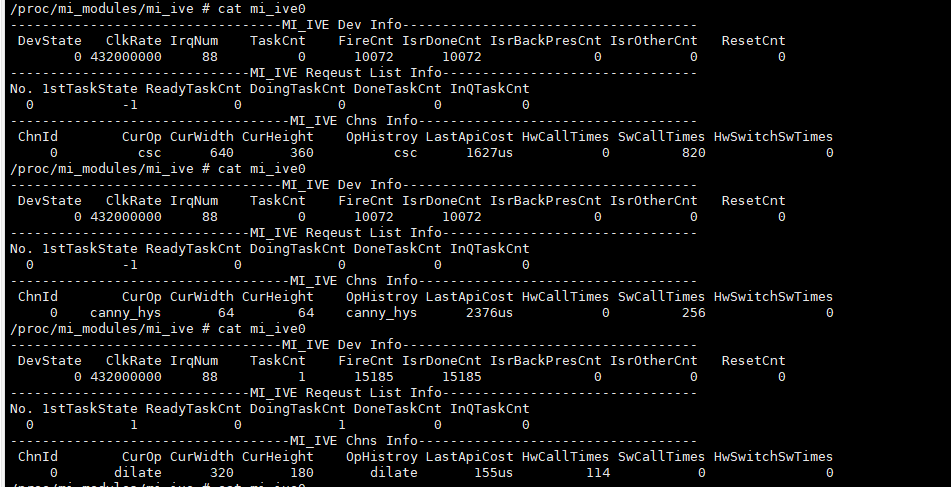
1. Common IVE Issues
1.1. Performance Issues
Debug flow reference diagram:

Debug flow:
| Flow | Verification Method | Exit Condition | Next Step | Information Required | Related FAQ References | |
|---|---|---|---|---|---|---|
| A | Refer to section 4.1 Intelligent Acceleration Hardware API Implementation in the IVE API document for verification | Exit condition 1: No hardware acceleration support Exit condition 2: Hardware acceleration supported | Exit condition 1: B Exit condition 2: C | |||
| B | Use tools such as top to check CPU loading usage | Exit condition 1: Too high -> Adjust App thread priority Exit condition 2: Normal -> Confirm with IVE owner whether there is room for operator optimization | Flow ends | Exit condition 2: Operator parameter configuration: resolution of input/output image/memory, memory configuration information, control parameter information | ||
| C | Refer to section 4.3 Intelligent Acceleration Engine Usage Limitations in the IVE API document for verification | Exit condition 1: Does not meet hardware acceleration requirements -> Adjust parameters according to documentation Exit condition 2: Meets hardware acceleration support requirements | Exit condition 1: Flow ends Exit condition 2: D | |||
| D | Use Method 1 below for verification | Exit condition 1: Hardware acceleration not used -> Confirm with IVE owner Exit condition 2: Hardware acceleration used | Exit condition 1: Flow ends Exit condition 2: E | Exit condition 1: Operator parameter configuration: resolution of input/output image/memory, memory configuration information, control parameter information | ||
| E | Use Method 2 below for verification | Exit condition 1: Does not meet usage expectations -> Adjust clk and retest Exit condition 2: Meets expectations -> Confirm with IVE owner | Flow ends | Exit condition 2: Operator parameter configuration: resolution of input/output image/memory, memory configuration information, control parameter information |
-
IVE API document path
alkaid\project\release\docs\platform\MI\ive_zh.md
-
Check CPU loading
echo H | top -d 1 -n 100 | grep -v "grep"
-
Method 1. Use the following commands for verification. If the register values read by
/customer/riu_rdo not change before and after the app runs, it indicates that the operator is not actually using hardware acceleration.Souffle/iFord/pCupid/iFackel/jaguar1/mHera:
/customer/riu_w 0x151e 0x10 0x1f
// Run app for testing
/customer/riu_r 0x151e 0x10
/customer/riu_r 0x151f 0x4
iFado:
/customer/riu_w 0x1520 0x10 0x1f
// Run app for testing
/customer/riu_r 0x1520 0x10
/customer/riu_r 0x1521 0x4
iFliegen/iHalo:
/customer/riu_w 0x1190 0x10 0x1f // Run app for testing /customer/riu_r 0x1190 0x10 /customer/riu_r 0x1191 0x4- It can also be verified through proc information. Before calling
MI_IVE_Destroy, obtain proc information. If theHwCallTimescount is 0, it indicates that the operator is not actually using hardware acceleration.
- It can also be verified through proc information. Before calling
-
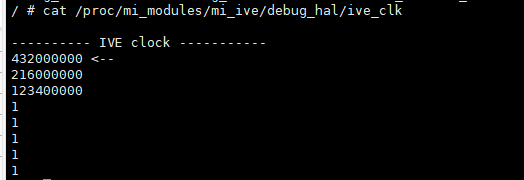
Method 2. Use the following commands to verify the actual clk rate being used:
Souffle/iFado:
/customer/riu_r 0x1038 0x6a
// bit8 = 0x1: disable clk
// bit9 = 0x1: invert clk
// bit[12:10]: 0~3 correspond to different ive clk, refer to /proc/mi_modules/mi_ive/debug_hal/ive_clk for specific support on each chip
iFord/pCupid/iFackel/jaguar1/iFliegen/iHalo/mHera:
/customer/riu_r 0x1038 0x6a // bit8 = 0x1: disable clk // bit9 = 0x1: invert clk // bit[11:10]: 0~3 correspond to different ive clk, refer to /proc/mi_modules/mi_ive/debug_hal/ive_clk for specific support on each chip- It can also be verified through proc information. After obtaining proc information, confirm the actual clk rate being used directly based on
ClkRate.
- It can also be verified through proc information. After obtaining proc information, confirm the actual clk rate being used directly based on
1.2. Abnormal Output
Debug flow:
| Flow | Verification Method | Exit Condition | Next Step | Information Required | Related FAQ References |
|---|---|---|---|---|---|
| A | Refer to the corresponding section in the IVE API document based on the operator to confirm whether the parameter settings meet the expected output settings | Exit condition 1: Abnormal parameters -> Modify parameters and retest Exit condition 2: Normal parameters | Flow ends | Exit condition 2: Operator parameter configuration: resolution of input/output image/memory, memory configuration information, control parameter information |
-
Example 1 is shown below: For the Filter operator, different shift parameters with the same mask parameter settings will cause significant differences in output effect.

1.3. Memory Overwrite Issues
IVE memory overwrite example: log containing Name=IVE indicates that IVE has experienced a memory overwrite; IsWrite=0 indicates a read memory overwrite, IsWrite=1 indicates a write memory overwrite.
[MI WRN] MI_SYS_Mma_MmuCallback [mi_sys][369]: [MI_SYS_Mma_MmuCallback] Status=0x2, PhyAddr=0x40260000, ClientId=0x1c,Name=IVE IsWrite=0

[MI WRN] MI_SYS_Mma_MmuCallback [mi_sys][369]: [MI_SYS_Mma_MmuCallback] Status=0x6, PhyAddr=0x406e0000, ClientId=0x1c,Name=IVE IsWrite=1
Debug flow:
| Flow | Verification Method | Exit Condition | Next Step | Information Required | Related FAQ References |
|---|---|---|---|---|---|
| A | Confirm whether the memory size configuration matches the resolution For example, 1280x720 input resolution ->U8C1 format image requires memory size of 1280x720x1 ->YUV422_YUYV format image requires memory size of 1280x720x2 | Exit condition 1: Mismatch -> Modify memory configuration and retest Exit condition 2: Matched | Flow ends | Exit condition 2: 1. Operator parameter configuration: resolution of input/output image/memory, memory configuration information, control parameter information 2. Step 1 debug information |
- Step 1. Configure and capture information according to the following steps:
vi /config/modparam.json # Add or update "debugMmu":1 in the E_MI_MODULE_ID_SYS node
reboot

echo debug_mmu debug_log 1 1 1 0 > /proc/mi_modules/mi_sys/mi_sys0 # Output IVE internal allocate/free memory information log & memory usage when memory overwrite occurs
// echo debug_mmu debug_log 0 0 0 0 > /proc/mi_modules/mi_sys/mi_sys0 # Close
cat /proc/kmsg

// Run app for testing on another console, provide kmsg with memory overwrite log
1.4. Other Abnormal Issues
For other issues, during IVE usage, capture information multiple times according to the following steps and confirm with the IVE owner.
cat /proc/mi_modules/mi_ive/ive_axi
cat /proc/mi_modules/mi_ive/mi_ive0

Souffle/iFord/pCupid/iFackel/jaguar1/mHera:

    /customer/riu_r 0x151e
    /customer/riu_r 0x151f
    /customer/riu_r 0x1520
    /customer/riu_r 0x1038 0x6a

iFado:

    /customer/riu_r 0x1520
    /customer/riu_r 0x1521
    /customer/riu_r 0x1038 0x6a

iFliegen/iHalo:

    /customer/riu_r 0x1190
    /customer/riu_r 0x1191
    /customer/riu_r 0x1038 0x6a