VDEC Debug SOP
REVISION HISTORY
| Revision No. | Description |
Date |
|---|---|---|
| 1.0 | Initial release | 2/22/2024 |
| 1.1 | Add kmsg | 4/24/2024 |
| 1.2 | Add common commands | 12/3/2024 |
| 1.3 | Update proc fs | 6/9/2025 |
| 1.4 | Update flowchart | 5/12/2026 |
Preface
The purpose of this document is to introduce how to conduct preliminary troubleshooting when customers encounter VDEC-related issues during development, and to provide relevant information to technical support for analysis after confirming that the issue is caused by Sgs SDK.
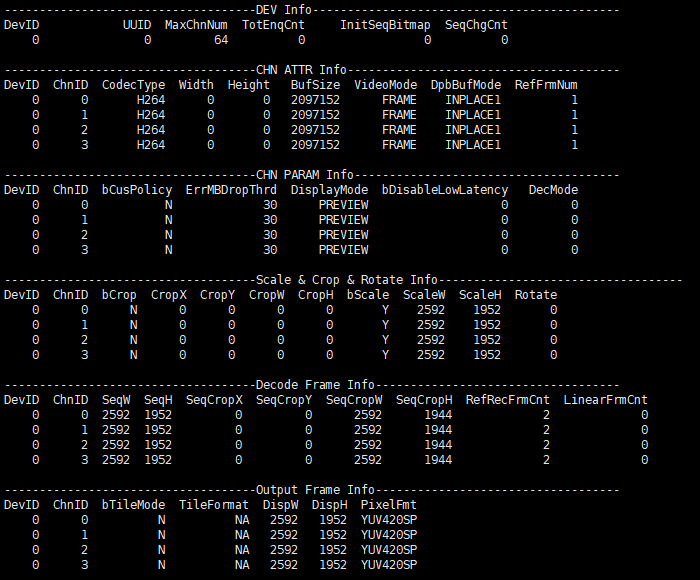
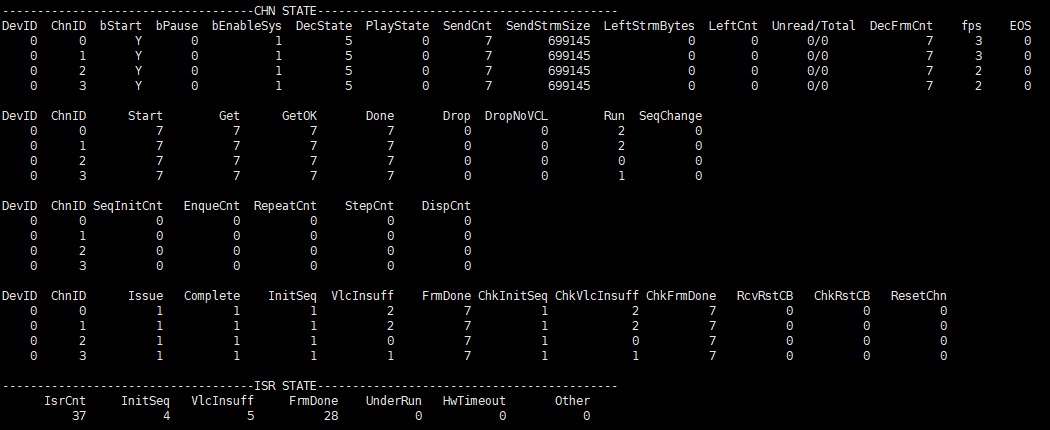
Use the following command to obtain MI VDEC proc information:
cat /proc/mi_modules/mi_vdec/mi_vdec0
For this command, it will only print proc information for device 0. If you are using chip that supports multiple devices(refer to API document of MI_VDEC module for more information about device supporting number), please use the proc path corresponding to the device ID. For example, for device 1, the proc path you need to use is as follows: /proc/mi_modules/mi_vdec/mi_vdec1. For convenience, the following documentation will only use device 0 as an example. You need to use the correct proc path according to the specific device ID that you are using.
Use the following command to dump input/output data:
// Store bitstream data from the specified channel input to the specified path
echo dumpbs [chn] [path] > /proc/mi_modules/mi_vdec/mi_vdec0
// Store decoded output data frames from the specified channel to the specified path
echo dumpfb [chn] [port] [path] [frmcnt] [bDumpAll] [bDetile] > /proc/mi_modules/mi_vdec/mi_vdec0
Use the following command to obtain the clk rate used by VDEC, where "←" indicates the currently selected value:
cat /proc/mi_modules/mi_vdec/debug_hal/vdec_clock
cat /proc/mi_modules/mi_vdec/debug_hal/vdec_clock_2nd
cat /proc/mi_modules/mi_vdec/debug_hal/vdec_clock_axi
1. No Decoding Output
Example confirmation of no decoding output:

Check the above information multiple times through cat /proc/mi_modules/mi_vdec/mi_vdec0. DecFrmCnt counts the number of successfully decoded output frames. If this value does not change, it indicates that there is no decoding output.

| Flow | Method | Exit Condition | Next Step | Information to provide to technical support |
|---|---|---|---|---|
| A | cat /proc/mi_modules/mi_vdec/mi_vdec0 | Exit Condition 1: SendCnt and SendStrmSize are empty => User app issue, no stream pushing Exit Condition 2: SendCnt and SendStrmSize are not empty | Exit Condition 1: => End of process, please check stream pushing in app by user. Exit Condition 2: =>B | / |
| B | cat /proc/mi_modules/mi_vdec/mi_vdec0 | Exit Condition 1: DecState value is less than or equal to 2 => Indicates that valid bitstream header information was not found. Further analysis is required to confirm the reason for failed seq init Exit Condition 2: DecState value is greater than 2 | Exit Condition 1: => C Exit Condition 2: => End of process, report problem to technical support | Exit Condition 2: => dump es |
| C | echo dumpbs [chn] [path] > /proc/mi_modules/mi_vdec/mi_vdec0 | / | D | / |
| D | Use third-party ES analyzer to view es | Exit Condition 1: Image abnormal => Bitstream issue Exit Condition 2: Image normal | Exit Condition 1: => End of process, please confirm bitstream by user Exit Condition 2: => End of process, report problem to technical support | Exit Condition 2: => Provide uart log, kmsg, proc and dump es when issue reproduces |
2. Error/Warning Messages Output
Example of error/warning messages:
[vdec-e][dev0 ch0] decode error 0x20000 warnning 0x0 eStatus 0x20004
[vdec-w][dev0 ch0] decode warnning 0x40000 eStatus 0x8

| Flow | Method | Exit Condition | Next Step | Information to provide to technical support |
|---|---|---|---|---|
| A | echo dumpbs [chn] [path] > /proc/mi_modules/mi_vdec/mi_vdec0 | / | B | / |
| B | Provide error/warning logs and ES to technical support | / | C | / |
| C | Technical support feedback that ES is abnormal. | Exit Condition 1: Es is abnormal => Bitstream issue Exit Condition 2: ES is normal | Exit Condition 1: => End of process, please confirm bitstream by user Exit Condition 2: => End of process, report problem to technical support | Exit Condition 2: => dump es |
3. Decoding Timeout Reset
Example of large reset appearing in log:
[MI WRN ]: _MI_SYS_Pass_TryDequeueOutputTaskNoLock[4857]: [thread:vdec0_P0_MAIN] mod[8] dev[0] pass[0] chn[13] output not finished more than 20360ms
Example of small reset appearing in log:
[MI WRN ]: MI_VDEC_CORE_CheckDecodeStatus[2072]: Dev 0 Chn 0 do reset, bWaitReset:1.

| Flow | Method | Exit Condition | Next Step | Information to provide to technical support |
|---|---|---|---|---|
| A | Determine from the log whether large reset occurred | Exit Condition 1: Large reset did not occur Exit Condition 2: Large reset occurred | Exit Condition 1: => B Exit Condition 2: => End of process, report problem to technical support | Exit Condition 2: => Provide uart log, kmsg, proc and dump es when issue reproduces |
| B | echo dumpbs [chn] [path] > /proc/mi_modules/mi_vdec/mi_vdec0 | / | C | / |
| C | Use third-party ES analyzer to view es | Exit Condition 1: Image abnormal => Bitstream issue Exit Condition 2: Image normal | Exit Condition 1: => End of process, please confirm bitstream by user Exit Condition 2: => End of process, report problem to technical support | Exit Condition 2: => Provide uart log, kmsg, proc and dump es when issue reproduces |
4. Insufficient Performance

| Flow | Method | Exit Condition | Next Step | Information to provide to technical support |
|---|---|---|---|---|
| A | 1. echo setperf on > /proc/mi_modules/mi_vdec/mi_vdec0 2. cat /proc/mi_modules/mi_vdec/mi_vdec0 multiple times to check if ifps value is stable | Exit Condition 1: Unstable => Stream pushing issue Exit Condition 2: Stable | Exit Condition 1: => End of process, please confirm stream pushing speed rate in app Exit Condition 2: => B | / |
| B | cat /proc/mi_modules/mi_vdec/mi_vdec0 multiple times to check if Drop value is non-zero and increasing | Exit Condition 1: Yes => Frame dropping exists Exit Condition 2: No | Exit Condition 1: => Go to chapter "6. Frame Dropping" for confirmation Exit Condition 2: => C | / |
| C | 1. cat /proc/mi_modules/mi_vdec/debug_hal/dev_info to check current clk gear selection 2. Contact technical support to confirm whether current clk gear meets performance expectations | Exit Condition 1: Clk gear selection does not match performance expectations => Adjust clk gear and retest Exit Condition 2: Clk gear selection matches performance expectations | Exit Condition 1: => End of process, please confirm clk gear Exit Condition 2: => D | / |
| D | 1. Enable frame dropping switch: echo dropoutbuf on > /proc/mi_modules/mi_vdec/mi_vdec0 2. Confirm whether performance expectations are met after enabling frame dropping switch | Exit Condition 1: Met => Post-processing module issue Exit Condition 2: Not met | Exit Condition 1: => End of process, report this phenomenon to technical support Exit Condition 2: => End of process, report problem to technical support | Exit Condition 2: => Provide uart log, kmsg and proc when issue reproduces |
5. Decoded Artifacts

| Flow | Method | Exit Condition | Next Step | Information to provide to technical support |
|---|---|---|---|---|
| A | echo dumpbs [chn] [path] > /proc/mi_modules/mi_vdec/mi_vdec0 | / | B | / |
| B | Use third-party ES analyzer to view es | Exit Condition 1: Image artifacts => Bitstream issue Exit Condition 2: Image no artifacts | Exit Condition 1: => End of process, please confirm bitstream by user Exit Condition 2: => C | / |
| C | 1. Dump decoded output YUV: echo dumpfb [chn] [port] [path] [frmcnt] [bDumpAll] [bDetile] > /proc/mi_modules/mi_vdec/mi_vdec0 2. Check if the image from output YUV is normal through tool software | Exit Condition 1: Normal Exit Condition 2: Abnormal | Exit Condition 1: => End of process, report this phenomenon to technical support Exit Condition 2: => D | / |
| D | 1. If current eDpbBufMode setting is not NORMAL mode, adjust eDpbBufMode to E_MI_VDEC_DPB_MODE_NORMAL 2. Check if the image is normal | Exit Condition 1: Normal Exit Condition 2: Abnormal | Exit Condition 1: => End of process, contact technical support to understand the limitations of DPB buffer mode. Exit Condition 2: => End of process, report problem to technical support | Exit Condition 2: => Provide uart log, kmsg, proc and dump es/YUV when issue reproduces |
6. Frame Dropping
Example confirmation of frame dropping:

Check the above information multiple times through cat /proc/mi_modules/mi_vdec/mi_vdec0. Drop counts the number of frame drops. If Drop value is non-zero and increasing, it indicates that frame dropping has occurred.

| Flow | Method | Exit Condition | Next Step | Information to provide to technical support |
|---|---|---|---|---|
| A | echo dumpbs [chn] [path] > /proc/mi_modules/mi_vdec/mi_vdec0 | / | B | / |
| B | Use third-party ES analyzer to view es, to check if ES is normal | Exit Condition 1: Normal Exit Condition 2: Abnormal | Exit Condition 1: => End of process, report problem to technical support Exit Condition 2: => C | / |
| C | 1. cat /proc/mi_modules/mi_vdec/mi_vdec0 to check bCusPolicy and ErrMBDropThrd, confirm whether customized error frame output control policy is effective and current frame dropping threshold 2. Adjust frame dropping threshold to confirm if improvement is achieved | Exit Condition 1: Improved Exit Condition 2: Not improved | Exit Condition 1: => End of process, please confirm error frame output policy by user Exit Condition 2: => End of process, report problem to technical support | Exit Condition 2: => Provide uart log, kmsg, proc and dump es when issue reproduces |
7. Firmware Loading Failure
Example of firmware loading failure:
[vdec-e]fw ver:24020217 mismatch driver:23121922, pls check fwVPU_if.h and chagall.bin/chagall.h in folder mhal/chip_commom/vcodec/hal/xxx/
[vdec-e]Failed to vpu init with bitcode, ret: 0x0000001e.
[vdec-e]>>>>>>>>>>>>>>>>>>>>>>>>>>>>>>><<<<<<<<<<<<<<<<<<<<<<<<<<<<<<<
[vdec-e]>>>>>>>>>>>>>>>>>>>>>vdec load firmware fail<<<<<<<<<<<<<<<<<<
[vdec-e]>>>>>>>>>>>>>>>>>>>>>>>>>>>>>>><<<<<<<<<<<<<<<<<<<<<<<<<<<<<<<

| Flow | Method | Exit Condition | Next Step | Information to provide to technical support |
|---|---|---|---|---|
| A | Check from the log whether "fw ver:xxxxxxxx mismatch driver:xxxxxxxx" message appeared | Exit Condition 1: Appeared => Please confirm whether ko or chagall.bin has been replaced by mistake Exit Condition 2: Did not appear | Exit Condition 1: => End of process Exit Condition 2: => End of process, report problem to technical support | Exit Condition 2: => Provide uart log, kmsg and proc when issue reproduces |