MI FB DEBUG SOP
REVISION HISTORY
| Revision No. | Description |
Date |
|---|---|---|
| 1.00 | 12/08/2023 | |
| 1.01 | 12/03/2024 |
1. Terminology
-
disp_path
The method by which MI_FB directly displays UI and hardware cursor on the DISP module. The FB image can be output directly to the screen through the DISP module. This method is applicable to chips that support GOP hardware in the DISP module.
-
video_path
The method by which MI_FB indirectly overlays the FB screen onto modules supporting OSD via MI_RGN (such as SCL/VENC/DISP, etc.). This method is applicable when users want to overlay screens onto video streams in a Framebuffer manner, or when DISP does not support GOP hardware.
-
Pixel alpha value
The calculation method for the alpha component of pixels varies among different color formats. In MI_FB, a smaller alpha value indicates greater transparency. 0 represents completely transparent, while the maximum value represents completely opaque (the ARGB1555 format is an exception).
-
RGB format (e.g., RGB565): All pixel alpha values default to 255.
-
ARGB format (e.g., ARGB8888, ARGB4444, ARGB1555): The pixel alpha value must be referenced from the alpha component bits in the pixel. In ARGB8888 format, the alpha component occupies bit[24:31] totaling 8 bits, with a value range of 0-255. In ARGB4444 format, the alpha component occupies bit[12:15] totaling 4 bits, with a value range of 0-15. In ARGB1555 format, the alpha component occupies bit[15] totaling 1 bit, with a value range of 0-1. For pixels where bit[15] = 0, the actual pixel alpha value equals the "alpha0" value in the alpha attribute. For pixels where bit[15] = 1, the actual pixel alpha value equals the "alpha1" value in the alpha attribute.
-
Index format (e.g., I2, I4, I8): Pixel values only store the Index. The specific ARGB value must be determined by looking up the "Cmap" table (in "video_path" mode, FB's Cmap cannot be set; users need to set MI_RGN's palette table instead). The format in "Cmap" is ARGB8888, where the alpha component has 8 bits with a value range of 0-255.
-
-
Waterline value
The GOP hardware uses a DMA FIFO to cache data returned by the MIU and reads data from the DMA FIFO for display. The cached data in the FIFO has a default threshold called the "waterline value." When the remaining data in the FIFO is less than or equal to the "waterline value," the GOP hardware sends another request to the MIU to obtain new data. Under normal display conditions, adjustment of the "waterline value" is not required.
-
The larger the "waterline value," the less likely the data in the FIFO will be exhausted, reducing the likelihood of UI/Cursor display misalignment or flickering.
-
The smaller the "waterline value," the more likely the data in the FIFO will be exhausted, increasing the likelihood of UI/Cursor display misalignment or flickering.
-
2. FB Common Issues
2.1. mi_fb.ko Loading Failure
-
Troubleshooting Steps:
-
Check the logs of mi_fb.ko loading failure to confirm the failure type:
(1). Log:
insmod: can't insert '/xxx/mi_fb.ko': unknown symbol in module or invalid parameter(2). Log:
Must support at least one disp path, please check memuconfig config(3). Log:
parsing ini config failed
-
-
Cause of "unknown symbol" Log
Missing dependencies for mi_fb.ko. Further analysis of the Linux kmsg log is required to identify specific missing dependencies.
cat /proc/kmsgMissing symbol type Example Cause Solution Linux framebuffer framework register_framebuffer,framebuffer_alloc...The Linux framebuffer framework was compiled as a module (fb.ko) and fb.ko was not loaded before mi_fb.ko. Load fb.ko before loading mi_fb.ko, or compile the Linux framebuffer framework into the kernel. DISP MHAL_DISP_DeviceGetInstance,MHAL_DISP_DeviceGetDisplayInfo...mi_disp.ko was not loaded first. Load mi_disp.ko before loading mi_fb.ko; or disable the "disp_path" of fb (if the user does not need to display FB UI on the DISP module). RGN mi_rgn_GetWinInstance,MHAL_RGN_GetInternalApismi_rgn.ko was not loaded first. Load mi_rgn.ko before loading mi_fb.ko; if only mi_rgn_GetWinInstanceis reported as missing and the user does not need to display FB UI on modules other than DISP, the "video_path" of fb can be disabled. -
Cause of "please check menuconfig config" Log
During compilation of MI_FB, neither "disp_path" nor "video_path" was enabled. MI_FB requires that at least one of "disp_path" or "video_path" options must be enabled during compilation.
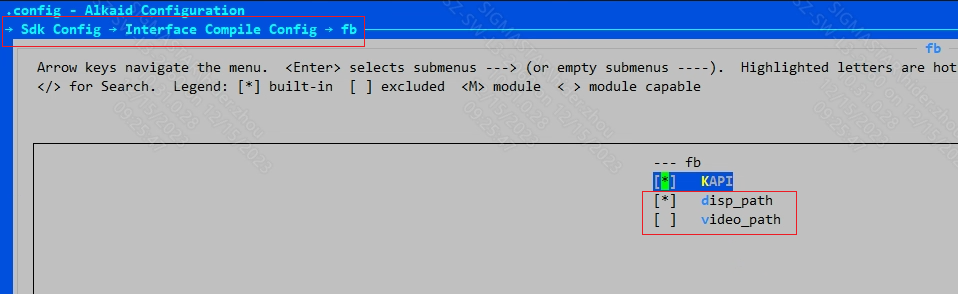
-
Cause of "parsing ini config failed" Log
The MI_FB configuration file
config.jsondoes not exist or the configuration is invalid. Please check the configuration file.For configuration method reference, see the fb_en.md - Configure MI_FB startup parameters chapter.
2.2. FB UI Not Displaying
-
Troubleshooting Steps:
Example: MI_FB /dev/fb0 UI is not displaying.
-
Obtain FB proc information (
cat /proc/mi_modules/mi_fb/mi_fbX"X is the minor device number of the fb device"). Below is partial content.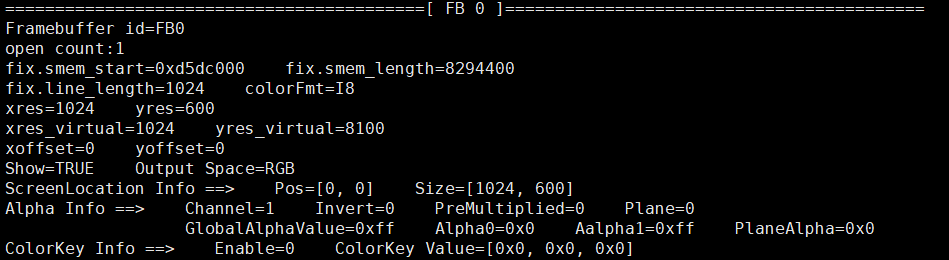
From the above proc information, it can be seen:
(1). Attributes such as "xres", "yres", "xres_virtual", "yres_virtual", "xoffset", "yoffset" confirm that the UI dimensions are 1024x600, and the UI displayed content is at position [0, 0] of the entire framebuffer.
(2). The "Show" attribute is TRUE. If this attribute is FALSE, the FB UI will not display.
(3). The "colorFmt" attribute is I8, indicating that the UI color format is Index-8 format. To determine the pixel color and transparency, the Cmap set by MI_FB must be used (in "video_path" mode, the Cmap is determined by the parameters of MI_RGN API
MI_RGN_Init).(4). In "Alpha Info", the "Channel" attribute is 1, indicating that the transparency mode is pixel mode; "Invert" is 0, indicating that transparency inversion is not enabled. If the alpha component of the pixel is 0, the FB UI will not display.
(5). The "Enable" attribute in "ColorKey Info" is 0, indicating that the ColorKey function is not enabled. If ColorKey is enabled and the specified color matches the color of FB UI pixels, those pixels will not display.
-
Save framebuffer to file
Command
cp /dev/fbX [path]/[file name]After execution, a file named [file name] will be generated at the specified [path]. It is recommended to use the software "7yuv" to open the file and view the screen. If the user has not drawn the UI to the correct area of the framebuffer, the UI cannot display normally. If the transparency value finally expressed by the alpha component corresponding to the UI pixel is 0 (if the transparency value is close to 0, the UI may also be unclear), then the UI will not display.
-
-
Causes of UI Not Displaying
proc information Cause Solution "xres", "yres", "xres_virtual", "yres_virtual" The defined region dimensions do not meet user expectations. If the user will not call ioctl FBIOPAN_DISPLAY,FBIOPUT_VSCREENINFOorFBIOSET_DISPLAYLAYER_ATTRIBUTESto modify the framebuffer screen dimensions, then the user needs to modify "fb_width" and "fb_height" in the MI_FB configuration fileconfig.json(the default values for "xres" and "xres_virtual" are "fb_width", the default value for "yres" is "fb_height", and "yres_virtual" is not less than "yres"). If the user will modify the screen dimensions after opening fb, the user needs to check whether the parameters are correct."xoffset", "yoffset" The visible screen offset position is not at the position where the user updated the framebuffer. The user needs to confirm whether the parameters for calling ioctl FBIOPAN_DISPLAYare correct."Show" UI display attribute is FALSE. The user needs to confirm whether the parameters for calling ioctl FBIOSET_SHOWare correct. It can be quickly modified through the echo command (cmdecho SHOW GUI [enable] > /proc/mi_modules/mi_fb/mi_fbX)."colorFmt" and "Alpha Info" The final expressed value of pixel alpha attribute is close to 0. This type of situation needs to be analyzed together with the framebuffer file saved by the user (refer to step 2). When "Channel" attribute is 1, the transparency mode is pixel mode. In this mode, the user needs to confirm the pixel alpha value of each pixel (refer to "pixel alpha value" in "1. Terminology" of this document). When "Channel" is 0, the transparency mode is global mode. In this mode, the user needs to confirm the value of "GlobalAlphaValue". Then determine the transparency inversion attribute. If the "Invert" attribute is 1, it indicates that transparency inversion is enabled, and the actual transparency value = 255 - current transparency value. If the calculated actual transparency value is close to 0, the FB UI will not display. If this cause is confirmed, the user needs to adjust the alpha attribute (global mode cmd echo GLOBAL_ALPHA GUI [GlobalAlpha] > /proc/mi_modules/mi_fb/mi_fbx; pixel mode and color format is ARGB1555 cmdecho ALPHA01 GUI [alpha0] [alpha1] > /proc/mi_modules/mi_fb/mi_fbX) or the alpha component of the UI."ColorKey Info" ColorKey is enabled and the specified color matches the user's UI color (typically partial UI disappears). Disable the colorkey function (cmd echo COLORKEY GUI 0 0 0 0 > /proc/mi_modules/mi_fb/mi_fbX), or adjust the color specified by colorkey (cmdecho COLORKEY GUI 1 [R] [G] [B] > /proc/mi_modules/mi_fb/mi_fbX) or the UI color.
2.3. FB UI Color Abnormality
-
Troubleshooting Steps:
-
Obtain FB proc information (
cat /proc/mi_modules/mi_fb/mi_fbX"X is the minor device number of the fb device"). Below is partial content.From the "colorFmt" attribute, it can be seen that the FB color format is "I8". If the user's cmap setting is unsuccessful, the UI display color will be incorrect (this type of problem only occurs when the color format is "I8").
-
-
Causes of the Issue
-
The user is not using UI with the correct color format.
-
The cmap setting is unsuccessful. (In "video_path" mode, FB's Cmap cannot be set; users need to set MI_RGN's palette table instead)
-
The configuration items "fb_hwlayer_dst" and "fb_hwlayer_outputcolor" in config.json do not match.
(1). By default, the DISP video layer only has the first color space conversion unit enabled. In this case, it is sufficient to confirm that "fb_hwlayer_outputcolor = 0".
(2). If the DISP video layer only has the second color space conversion unit enabled, the following conditions must be met:
a. "fb_hwlayer_dst = 3" and "fb_hwlayer_outputcolor = 1"
b. "fb_hwlayer_dst = 12" and "fb_hwlayer_outputcolor = 0"
-
2.4. FB UI/CURSOR Stripes/Flickering Abnormality
-
Problem Phenomenon:
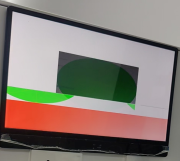
From the screen, it can be observed that the UI/Cursor exhibits stripe displacement/flickering phenomena.
Example: Cursor showing stripes
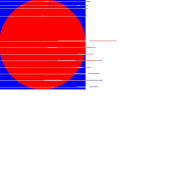
Example: UI showing misalignment
-
Troubleshooting Steps:
-
For UI: Use
cp /dev/fbX [path]/[file name]to save the UI image to a file. -
For Cursor: Use
echo DUMP_CURSOR [path] > /proc/mi_modules/mi_fb/mi_fbXto save the cursor image to a file. -
Confirm whether the saved image file meets expectations (no stripes/tearing).
-
-
Causes of the Issue:
-
Insufficient bandwidth, GOP unable to acquire sufficient bandwidth.
-
Data in the GOP hardware DMA FIFO is exhausted, and data returned from the MIU has not yet been stored in the DMA FIFO, resulting in insufficient data for display.
-
-
Solution:
-
Adjust GOP Bandwidth Priority
(1). Client Names
Check IP client names:
cat /sys/devices/system/miu/miu0/clientWhere Cursor corresponds to GOP0, UI corresponds to GOP1
(2). Adjust UI/Cursor Priority
Command:
echo qos [r/w] [name/id] [0~7] > clientUI/Cursor only have read tasks, so only r priority needs to be set
Cursor:
echo qos r GOP0 5 > /sys/device/system/miu/miu0/clientUI:
echo qos r GOP1 5 > /sys/device/system/miu/miu0/client(3). Limit Other IPs
Check IPs currently competing for bandwidth
cat /sys/devices/system/miu/miu0/bw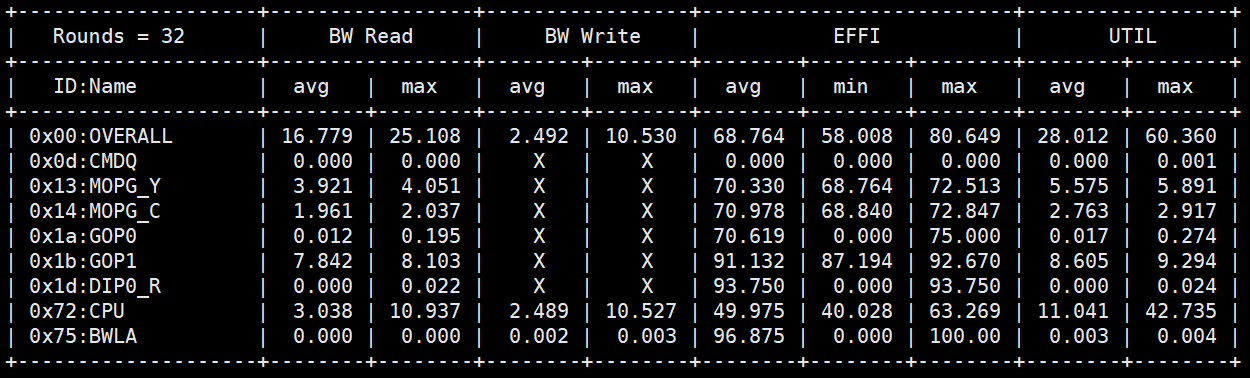
Use flowctrl for flow limiting
echo flowctrl [r/w] [IP_NAME/IP_ID] [1] [intensity] [1] > /sys/devices/system/miu/miu0/clientThe intensity value range is [0x0-0xff]. A larger value indicates stronger flow ctrl limitation.
Example: Limiting tasks of other IPs in the same Group
cat /sys/devices/system/miu/miu0/client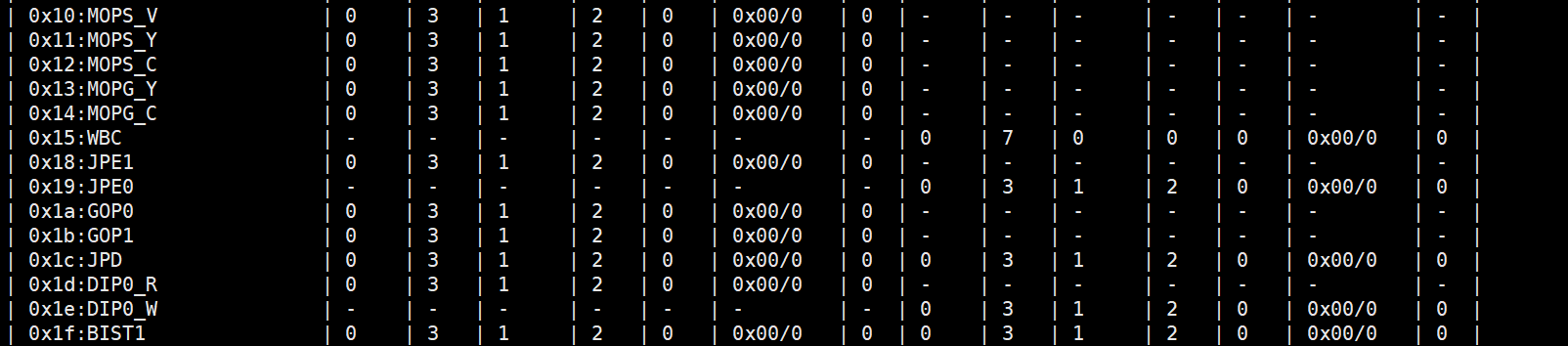
When FB uses single buffer, the CPU and GOP may operate on the same buffer. In this case, the GOP may be unable to compete with the CPU, resulting in screen flickering. The CPU can be appropriately limited. If effective, it indicates a bandwidth issue. To avoid this situation, double buffer is recommended.
It can also be combined with the operation of increasing GOP priority in (2). If both operations are used together without effect, bandwidth issues can be ruled out.
-
Modify GOP DMA Threshold
(1). Check Current "Waterline Value"
cat /proc/mi_modules/mi_rgn/debug_hal/gop_waterline
(2). Field Explanation:
TARGET: Target module. Ibopper supports DISP_UI & DISP_CUR_1, with values of 3 & 5 respectively
ID: GOP id. Both DISP_UI / DISP_CUR_1 have only 1 GOP, value: 0
ENABLE: Whether to display configuration information, value: [0/1]
URGENT: Whether to pull the GOP urgent signal high. Not used by Ibopper, value: [0/1]
DMA_THRESHOLD_VALUE: Waterline value, value: [0-0x3f]
(3). Modify "Waterline Value"
The default waterline values for both current UI and Cursor are 0x30. The waterline value can be appropriately increased. If multiple larger "waterline values" are attempted without effect, DMA FIFO issues can be ruled out.
UI modification example:
echo 3 0 1 0 0x38 > /proc/mi_modules/mi_rgn/debug_hal/gop_waterlineCursor modification example:
echo 5 0 1 0 0x38 > /proc/mi_modules/mi_rgn/debug_hal/gop_waterline
-