SGS SATA Debug SOP Manual
REVISION HISTORY
| Revision No. | Description |
Date |
|---|---|---|
| 1.0 | 05/15/2026 |
1. SATA Device Not Detected
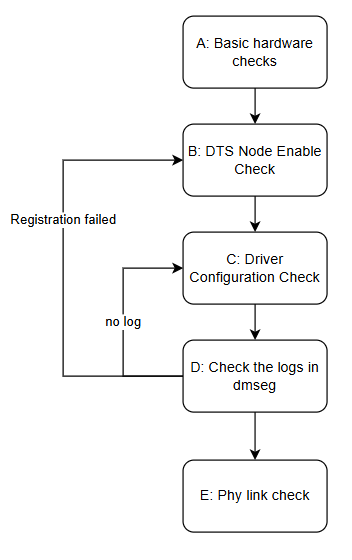
| Step | Method | Exit Condition | Next Step | Data to Provide to FAE | Related FAQ |
|---|---|---|---|---|---|
| A | 1.Verify the SATA HDD/SSD is functional by testing on a PC 2.Check SATA data cable connection, swap with a known-good cable for cross-testing 3.Use a multimeter to verify SATA power voltage is within normal range (SATA Power 3.3V/5V/12V) |
Exit 1: 1.Drive cannot be detected on PC either > Drive issue Exit 2: 1.Device is detected after replacing SATA cable > Cable issue Exit 3: 1.SATA power voltage is abnormal > Power issue Exit 4: Drive, cable, and power are all normal>No issue |
Exit 1: >Replace drive Exit 2: >Replace cable Exit 3: >End, seek HW support Exit 4: >B |
Exit 3: ==>Seek HW support |
|
| B | 1.Verify SATA-related nodes are enabled in DTS: cd \<kernel_path> vim mhera.dtsi Search for "sata" keyword, check PHY nodes (sgs-sata-phy/sgs-sata1-phy) and AHCI nodes (sata/sata1) status property Kernel: status = "ok" U-Boot: status = "okay" 2.If nodes are commented out or status is "disabled", SATA function is not enabled |
Exit 1: 1.PHY or AHCI node status is not "ok"/"okay", or commented out > Node not enabled Exit 2: 1.Nodes are enabled>No issue |
Exit 1: >Change status to "ok" or "okay" Exit 2: >C |
Exit 1: ==>Provide DTS config file |
|
| C | 1.Check Kernel menuconfig for SATA-related configs: Device Drivers → SCSI device support → [] SCSI device support / [] SCSI disk support Serial ATA and Parallel ATA drivers (libata) → [] Platform AHCI SATA support SGS SoC platform drivers → [] Sgs ACP Bridge driver SGS SoC platform drivers → [] Sgs SATA HOST / [] Sgs sata apply hd link / [*] Sgs sata apply hd link vote 2.Check driver build method (Built-in or Module): If Module, verify load order: insmod drv-sata-phy.ko first, then insmod drv-sata-host.ko 3.Check if sata_disable_port kernel parameter is mistakenly set (0x1=disable port0, 0x2=disable port1) |
Exit 1: 1.Not all SATA-related menuconfig options are enabled > Driver not compiled Exit 2: 1.Driver compiled as Module but not loaded or wrong load order > Module load issue Exit 3: 1.sata_disable_port is set causing port disabled > Boot parameter issue Exit 4: Driver config is normal>No issue |
Exit 1: >Enable all related options and rebuild Exit 2: >Load modules in correct order Exit 3: >Fix boot parameter Exit 4: >D |
||
| D | 1.Check dmesg for SATA initialization log, focus on these keywords: 1.1 "sata phy registered." indicates PHY driver loaded successfully 1.2 "sata host X success registered." indicates AHCI Host loaded successfully 1.3 "sgs SATA link up" indicates PHY link established, prints speed (GenX) and SStatus/SControl 1.4 "sgs SATA link down" indicates PHY link not established 1.5 "COMRESET failed" indicates link reset failed 1.6 "get phyd/phya/ahci_misc resource fail" indicates register mapping failed 2.If no SATA-related log in dmesg, go back to C |
Exit 1: 1.No SATA/AHCI related log in dmesg > Driver not loaded, go back to C Exit 2: 1.dmesg shows PHY or Host registration failed > DTS config error or driver issue Exit 3: 1.PHY and Host both registered, but "link down" > PHY link not established Exit 4: 1."link up" but device still not detected > System-level issue |
Exit 1: >C Exit 2: >B Exit 3: >E Exit 4: >End |
Exit 2: >1.Provide complete dmesg log >2.Provide DTS config file Exit 3: >1.Provide complete dmesg log Exit 4: >1.Provide complete dmesg log |
|
| E | 1.Check SATA link status via sysfs: cat /sys/devices/virtual/sgs/sata0/sata_dump Output description: link err cnt: link error count link gen1/gen2/gen3 cnt: link success count at each speed 2.If link err cnt is high and all gen cnt are 0, PHY cannot establish link 3.Perform PHY parameter tuning via sysfs, refer to "SATA Host User Guide" Section 6 HW CTS Setting: cd /sys/devices/virtual/sgs/sata0/ 3.1 Set transfer speed first: echo [0/½] > test_gen 3.2 Set test pattern: echo [0~4] > cts_pattern 3.3 Adjust TX parameters: echo [enable] [db] [level] > de_emphasis 4.Verify signal quality with oscilloscope by measuring SATA TX eye diagram 5.Dump AHCI and PHY registers for SWRD (see Appendix for bank/offset) |
Exit 1: 1.Link restored after PHY tuning > PHY tuning resolved, update parameters to DTS Exit 2: 1.Link still cannot be established after PHY tuning > HW signal issue Exit 3: 1.Register dump info obtained ==> Provide to SWRD for analysis |
Exit 1: >End Exit 2: >End Exit 3: ==>End |
Exit 1: >1.Record CTS tuning process and final parameters >2.Update DTS per user guide Exit 2: >1.Provide complete dmesg log >2.Provide oscilloscope eye diagram >3.Dump all SATA registers (AHCI: riux32_r 0x1A34/0x1A35 all offsets; PHY: riu_r 0x1438/0x1439/0x143A/0x143B all offsets (Port0) or 0x1441/0x143C/0x143D/0x143E all offsets (Port1)) Exit 3: >1.Dump all SATA registers (AHCI: riux32_r 0x1A34/0x1A35 all offsets; PHY: riu_r 0x1438/0x1439/0x143A/0x143B all offsets (Port0) or 0x1441/0x143C/0x143D/0x143E all offsets (Port1)) ==>2.Complete dmesg log |
2. SATA Read/Write Performance Below Expectation
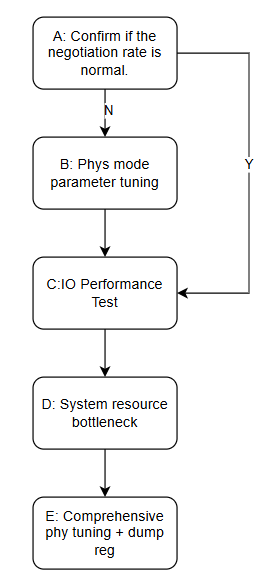
| Step | Method | Exit Condition | Next Step | Data to Provide to FAE | Related FAQ |
|---|---|---|---|---|---|
| A | 1.Check SATA link negotiated speed via dmesg, search for "sgs SATA link up": Format: "sgs SATA link up 6.0 Gbps (SStatus XXX SControl XXX)" 2.Check link status via sysfs: cat /sys/devices/virtual/sgs/sata0/sata_dump Check link gen1/gen2/gen3 cnt for actual negotiated speed distribution 3.Check current speed via AHCI PxSSTS register: riux32_r 0x1A34 0x4A (Port0) bit[7:4]: 1=GEN1(1.5G), 2=GEN2(3G), 3=GEN3(6G) 4.Verify DTS phy_mode matches expected speed: phy_mode=0 → GEN1, phy_mode=1 → GEN2, phy_mode=2 → GEN3 5.Check drive max supported speed via hdparm: hdparm -I /dev/sda check "Supported SATA speeds" |
Exit 1: 1.Actual negotiated speed is lower than max supported by both sides > Link speed negotiation insufficient Exit 2: 1.DTS phy_mode is set lower than expected > DTS config issue Exit 3: 1.Negotiated speed reached expected but performance still below target ==> Other issue |
Exit 1: >B Exit 2: >End, modify phy_mode and retest Exit 3: ==>C |
||
| B | 1.Refer to "SATA Host User Guide" Section 6 HW CTS Setting, adjust PHY parameters via sysfs: cd /sys/devices/virtual/sgs/sata0/ 1.1 Set transfer speed first: echo 2 > test_gen (GEN3=2) 1.2 Set test pattern: echo 1 > cts_pattern (MFTP=1) 1.3 Adjust TX parameters: echo [enable] [db] [level] > de_emphasis enable=0: Vpp only (applies to GEN1/GEN2/GEN3) enable=1: Enable de-emphasis (GEN3 only) db: 0=(-1.5dB), 1=(-2.5dB), 2=(-3.5dB), 3=(-6.0dB) level: 0=(0.4Vpp) ~ 8=(1.2Vpp) 2.Try increasing Vpp (level value) first, from 3(0.7Vpp) to 6(1.0Vpp) 3.If Vpp alone is insufficient, enable de-emphasis (enable=1) with appropriate db value for GEN3 4.Verify signal quality improvement with oscilloscope by measuring SATA TX eye diagram 5.Confirm tuned parameters are stable, repeat test multiple times |
Exit 1: 1.Performance restored after PHY tuning > PHY tuning resolved Exit 2: 1.Speed still cannot reach target after tuning > HW signal quality limitation Exit 3: 1.Oscilloscope eye diagram does not meet spec ==> PCB trace or SATA cable issue |
Exit 1: >End, update tuned parameters to DTS Exit 2: >End Exit 3: ==>End |
Exit 1: >1.Record CTS tuning process and final parameters >2.Update DTS tx_gen3_de_emphasis and tx_gen1_gen2_Vpp per user guide Exit 2: >1.Provide dmesg speed negotiation log >2.Provide oscilloscope eye diagram Exit 3: ==>1.Provide oscilloscope eye diagram |
|
| C | 1.Test drive baseline read/write performance with hdparm: hdparm -t /dev/sda (buffered disk read) hdparm -T /dev/sda (cache read) 2.Use fio tool for more accurate performance testing: Sequential read: fio --name=read --rw=read --bs=4M --size=1G --numjobs=1 --direct=1 --iodepth=24 Sequential write: fio --name=write --rw=write --bs=4M --size=1G --numjobs=1 --direct=1 --iodepth=24 Random read: fio --name=randread --rw=randread --bs=4K --size=1G --numjobs=1 --direct=1 --iodepth=24 Random write: fio --name=randwrite --rw=randwrite --bs=4K --size=1G --numjobs=1 --direct=1 --iodepth=24 3.Verify test commands are correct, common issues: 3.1 fio without --direct=1 tests page cache instead 3.2 Without --iodepth parameter, NCQ performance is not utilized |
Exit 1: 1.hdparm buffered read is normal, but fio direct IO performance is low > DMA or IO scheduler issue Exit 2: 1.Both hdparm and fio performance are low > HW or controller-level issue Exit 3: 1.Test command was incorrect, performance normal after correction ==> Test method issue |
Exit 1: >D Exit 2: >D Exit 3: ==>End |
Exit 3: ==>Confirm correct fio parameters |
|
| D | 1.Use top/vmstat to monitor system resources during SATA read/write: 1.1 CPU Loading: top command, focus on idle % (cpu loading = 100% - idle) 1.2 Memory usage: free command, focus on available memory 1.3 Interrupt distribution: cat /proc/interrupts, focus on SATA MAC interrupt count 2.If CPU Loading is high, check for high-priority tasks consuming resources 3.Check if SATA interrupts are concentrated on a single core 4.Check if system memory bandwidth is the bottleneck: use mbw tool to test |
Exit 1: 1.CPU Loading too high causing SATA processing delay (idle near 0%) > CPU bottleneck Exit 2: 1.Memory insufficient causing frequent swapping > Memory bottleneck Exit 3: 1.Interrupts concentrated on single core > Try IRQ affinity optimization Exit 4: 1.System resources sufficient, performance still below target > PHY signal quality or controller issue |
Exit 1: >End Exit 2: >End Exit 3: >Try IRQ affinity and retest Exit 4: >E |
Exit 4: >1.Provide top/vmstat output >2.Provide /proc/interrupts content |
|
| E | 1.Comprehensively adjust PHY parameters to optimize signal quality: 1.1 Adjust TX Vpp: increase level value via de_emphasis node 1.2 Enable de-emphasis for GEN3: enable=1, adjust db value 1.3 Adjust RX equalization parameters: modify rx_eq_rs1/rx_eq_rs2/rx_eq_ctle in DTS (usually TX parameters are sufficient; only adjust RX if TX tuning is insufficient) 2.Check SSC (Spread Spectrum Clock) config impact on performance: cat /sys/devices/virtual/sgs/sata0/test_ssc DTS tx_ssc_mode=0 means SSC disabled 3.Measure SATA signal eye diagram with oscilloscope 4.If performance improves but still below target, dump complete register info for SWRD |
Exit 1: 1.Performance restored to expected level after PHY tuning > PHY tuning resolved Exit 2: 1.Performance improved but still below target > Signal integrity limitation Exit 3: 1.Performance still below target after all adjustments ==> SWRD further analysis required |
Exit 1: >End, update parameters to DTS Exit 2: >End Exit 3: ==>End |
Exit 1: >1.Record PHY parameter comparison before/after tuning Exit 2: >1.Provide oscilloscope eye diagram Exit 3: >1.Dump all SATA registers (AHCI: riux32_r 0x1A34/0x1A35 all offsets; PHY: riu_r 0x1438/0x1439/0x143A/0x143B all offsets (Port0) or 0x1441/0x143C/0x143D/0x143E all offsets (Port1)) >2.Complete dmesg log and fio test log ==>3.Oscilloscope signal waveform |
3. Appendix
3.1 SATA sysfs Debug Nodes
SATA PHY driver creates the following debug nodes in sysfs:
Node Path:
- Port0:
/sys/devices/virtual/sgs/sata0/ -
Port1:
/sys/devices/virtual/sgs/sata1/Node Name Operation Description sata_dump cat View link error count and link success count at each speed test_gen cat / echo View/set PHY test speed: 0=GEN1(1.5G), 1=GEN2(3G), 2=GEN3(6G) cts_pattern cat / echo View/set CTS test pattern: 0=HFTP, 1=MFTP, 2=LFTP, 3=LBP, 4=SSOP de_emphasis cat / echo View/set TX parameters: echo [enable] [db] [level] > de_emphasis test_ssc cat / echo View/set SSC: 0=disable, 1=enable
Note: When setting CTS, set transfer speed (test_gen) first, then set test pattern (cts_pattern).
de_emphasis Parameter Description:
| Parameter | Description | Options |
|---|---|---|
| enable | GEN3 de-emphasis enable | 0=Vpp only, 1=use de-emphasis |
| db | De-emphasis level (valid when enable=1) | 0=(-1.5dB), 1=(-2.5dB), 2=(-3.5dB), 3=(-6.0dB) |
| level | Voltage swing level | 0=(0.4Vpp) ~ 8=(1.2Vpp) |
3.2 AHCI Key Registers
Read/Write Method: riux32_r / riux32_w (bank 0x1A34, 0x1A35 are x32 registers)
| Register | Bank | Offset | Description |
|---|---|---|---|
| CAP | 0x1A34 (Port0) / 0x1A35 (Port1) | 0x00 | Controller Capabilities |
| GHC | Same as above | 0x01 | Global Control, bit31=AE (AHCI Enable) |
| PI | Same as above | 0x03 | Port Implemented |
| PxCLB | Same as above | 0x10 | Command List Base |
| PxFB | Same as above | 0x14 | FIS Base |
| PxIS | Same as above | 0x40 | Port Interrupt Status |
| PxIE | Same as above | 0x44 | Port Interrupt Enable |
| PxCMD | Same as above | 0x48 | Port Command |
| PxTFD | Same as above | 0x50 | Port Task File Data |
| PxSIG | Same as above | 0x54 | Port Signature |
| PxSSTS | Same as above | 0x4A | Port Serial Status bit[3:0]: Device detection (1h=connected) bit[7:4]: Negotiated speed (1h=GEN1, 2h=GEN2, 3h=GEN3) |
| PxSCTL | Same as above | 0x4B | Port Serial Control |
| PxSERR | Same as above | 0x4C | Port Serial Error |
| PxSACT | Same as above | 0x50 | Port Serial Active |
Read Example:
3.3 SATA PHY Registers
Read/Write Method: riu_r / riu_w
| Region | Port0 Bank | Port1 Bank | Size |
|---|---|---|---|
| phyd | 0x1439 | 0x143C | 0x200 |
| phya | 0x143A | 0x143D | 0x200 |
| phya2 | 0x143B | 0x143E | 0x200 |
| ahci_misc | 0x1438 | 0x1441 | 0x200 |
Read Example:
Dump All SATA Registers Example (Port0):
# AHCI registers (x32)
riux32_r 0x1A34
# PHY registers (all banks)
riu_r 0x1438    # ahci_misc
riu_r 0x1439    # phyd
riu_r 0x143A    # phya
riu_r 0x143B    # phya2
Dump All SATA Registers Example (Port1):
# AHCI registers (x32)
riux32_r 0x1A35
# PHY registers (all banks)
riu_r 0x1441    # ahci_misc
riu_r 0x143C    # phyd
riu_r 0x143D    # phya
riu_r 0x143E    # phya2
3.4 DTS Key Parameters Quick Reference
| Property | Description | Configurable Values |
|---|---|---|
| phy_mode | PHY speed mode | 0=GEN1(1.5G), 1=GEN2(3G), 2=GEN3(6G) |
| tx_ssc_mode | Spread spectrum clock | 0=disable, 1=enable |
| tx_gen1_gen2_Vpp | GEN1/GEN2 TX voltage swing | 0xFF=default, 0~5=manual levels |
| tx_gen3_de_emphasis | GEN3 de-emphasis parameter | 0xFF=default, format: \<enable> \<db> \<level> |
| rx_eq_rs1 | RX equalization parameter RS1 | 0xFF=default |
| rx_eq_rs2 | RX equalization parameter RS2 | 0xFF=default |
| rx_eq_ctle | RX equalization parameter CTLE | 0xFF=default |
PHY parameters with 0xFF use default configuration. For signal quality optimization, refer to "SATA Host User Guide" Section 6 HW CTS Setting.