MI JPD DEBUG SOP
REVISION HISTORY
| Revision No. | Description |
Date |
|---|---|---|
| 1.00 | 02/28/2024 |
Preface
This document aims to describe how to perform preliminary troubleshooting when encountering MI JPD-related issues, how to quickly locate problems, and what information needs to be provided to the JPD owner for analysis after confirming it is an Sgs SDK issue.
The following command can be used to obtain MI JPD proc information:
cat /proc/mi_modules/mi_jpd/mi_jpd0
-
Device common info
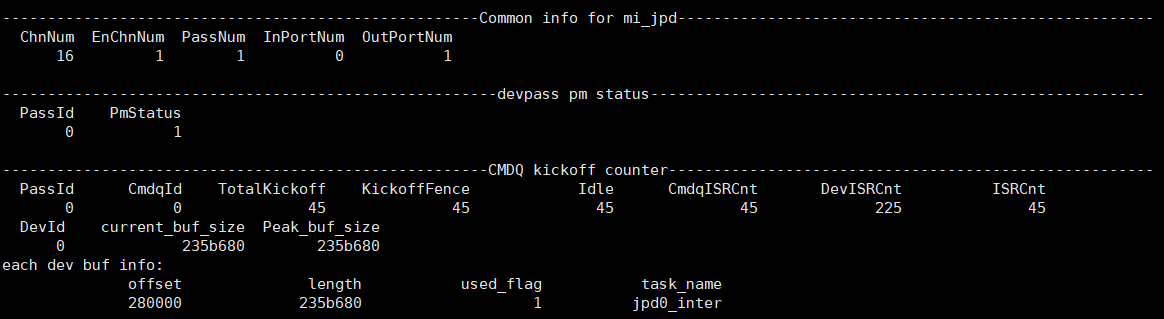
-
Chn common info
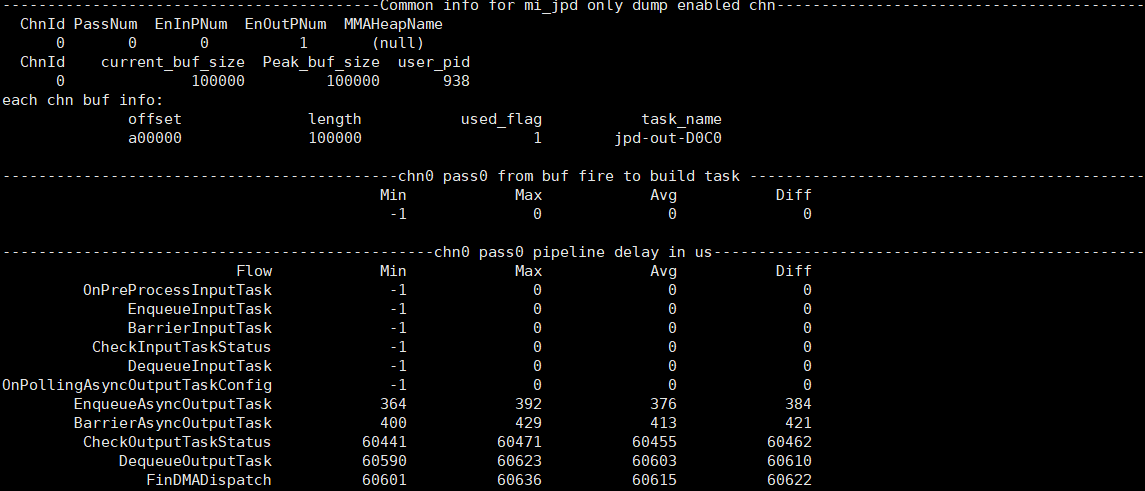
-
Output port common info
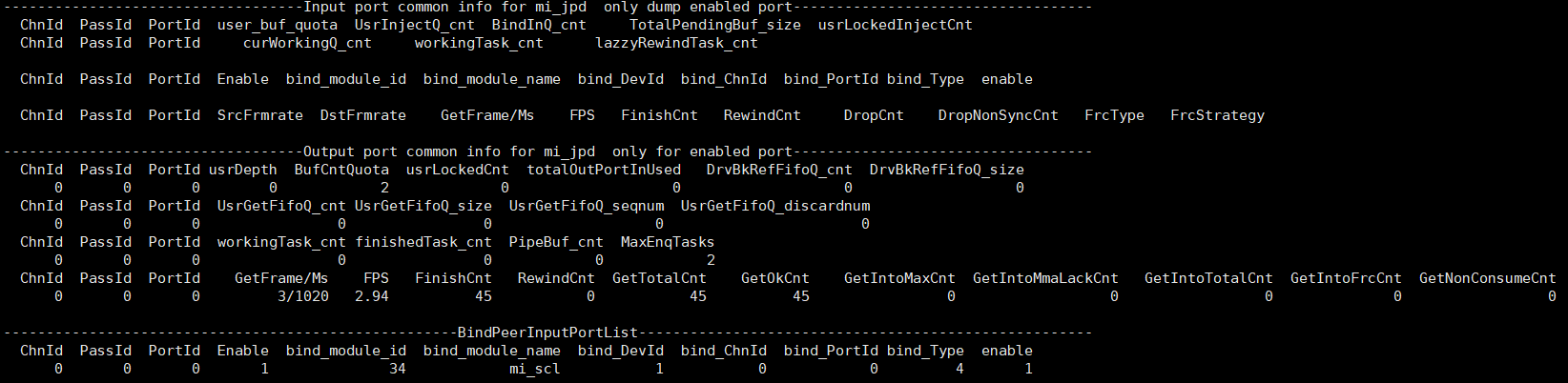
-
Private info
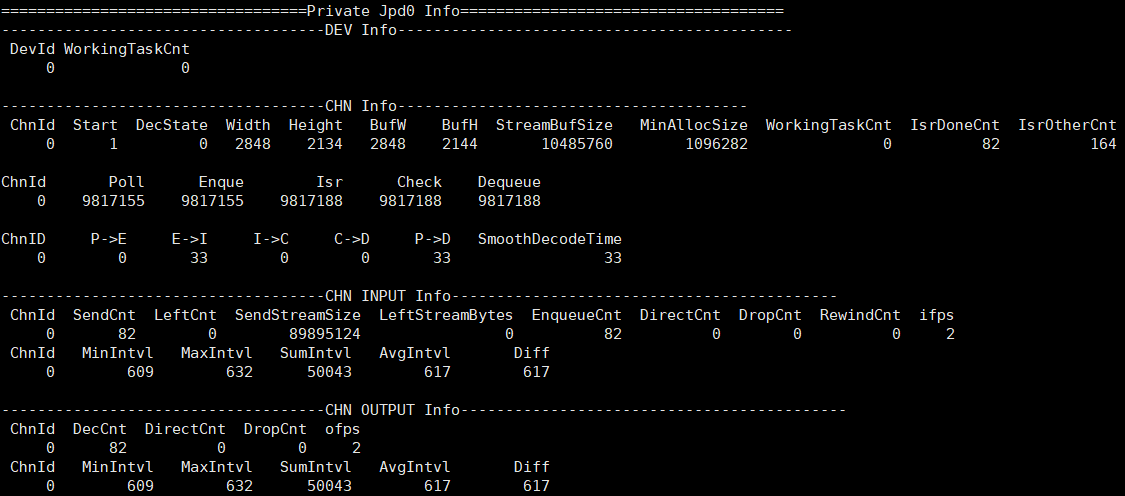
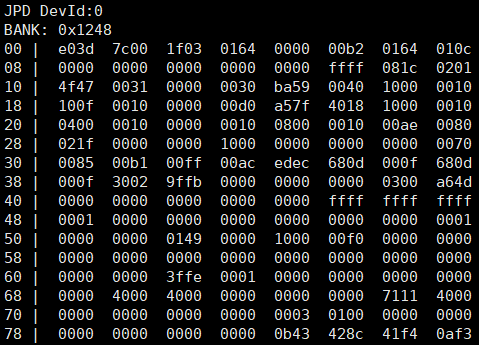
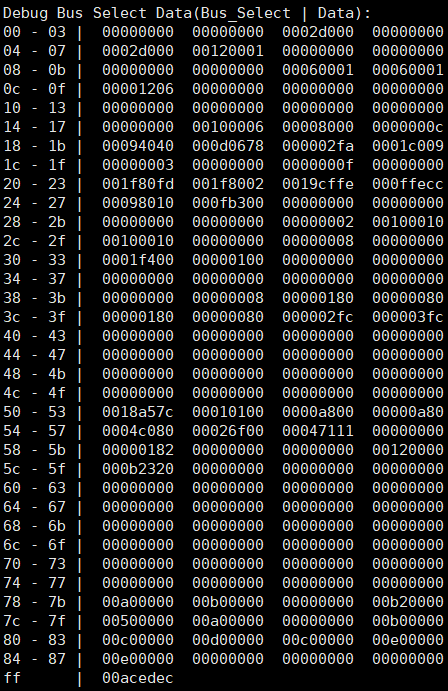
The following command can be used to dump register settings:
cat /proc/mi_modules/mi_jpd/debug_hal/debug_reg
-
Bank Info
-
Debug Info
The following command can be used to dump input/output data:
// dump input es data

echo dumpsb [chn] [bEnable] [path] > /proc/mi_modules/mi_jpd/mi_jpd0

// dump output yuv data

echo dumpfb [chn] [bEnable] [path] > /proc/mi_modules/mi_jpd/mi_jpd0
The following command can be used to obtain the clk rate used by JPD:
cat /proc/mi_modules/mi_jpd/debug_hal/clk
1. JPD Common Issues
1.1 Insufficient Frame Rate
Debug flow reference diagram:

Debug flow:
| Flow | Confirmation Method | Exit Condition | Next Step | Information Required | Related FAQ References |
|---|---|---|---|---|---|
| A | Obtain Private info, confirm whether SendCnt stream count & ifps stream frame rate in CHN INPUT Info are normal; MinIntvl/MaxIntvl/AvgIntvl can confirm minimum/maximum/average stream interval | Exit condition 1: Stream abnormality -> Adjust stream speed Exit condition 2: Stream normal | Exit condition 1: Flow ends Exit condition 2: B | ||
| B | Obtain Private info, confirm whether Width/Height decoded resolution in CHN Info meets JPD specification requirements | Exit condition 1: Does not meet requirements -> Adjust resolution or increase clk Exit condition 2: Meets requirements | Exit condition 1: Flow ends Exit condition 2: C | Refer to the JPD API documentation to confirm the decoding specifications | |
| C | cat /proc/mi_modules/mi_jpd/debug_hal/clk to obtain clk information, confirm whether clk usage meets expectations | Exit condition 1: Does not meet expectations -> Adjust clk settings Exit condition 2: Meets expectations | Exit condition 1: Flow ends Exit condition 2: D | ||
| D | Obtain Private info, confirm whether DropCnt in CHN INPUT Info / CHN OUTPUT Info has abnormal increase | Exit condition 1: Yes Exit condition 2: No | Exit condition 1: E Exit condition 2: F | ||
| E | Use dumpsb to dump input es data, use stream analysis tool to confirm whether es is normal | Exit condition 1: Abnormal -> Adjust stream data Exit condition 2: Normal | Flow ends | Exit condition 2: Provide existing log information / proc information | Open-source tools such as jpegsnoop can be used to analyze bitstreams |
| F | Use top and other methods to confirm whether cpu loading is too high | Exit condition 1: Too high -> Adjust thread priority Exit condition 2: Normal | Flow ends | Exit condition 2: Provide existing log information / proc information |
1.2 No Output
Debug flow reference diagram:

Debug flow:
| Flow | Confirmation Method | Exit Condition | Next Step | Information Required | Related FAQ References |
|---|---|---|---|---|---|
| A | Obtain Private info, confirm whether Start in CHN INPUT Info is 1 | Exit condition 1: Is 0 -> Modify App to call MI_JPD_StartChn and reconfirm Exit condition 2: Is 1 | Exit condition 1: Flow ends Exit condition 2: B | ||
| B | Obtain Private info, confirm whether SendCnt stream count & ifps stream frame rate in CHN INPUT Info have values | Exit condition 1: No stream sent -> Modify App to send stream Exit condition 2: Stream normal | Exit condition 1: Flow ends Exit condition 2: C | ||
| C | Obtain Output port common info, confirm whether usrDepth is greater than 0 | Exit condition 1: No consumer, App cannot obtain output buf -> Set Output Depth Exit condition 2: Has consumer | Flow ends | Exit condition 2: Provide existing log information / proc information / input es data |
1.3 Output Corrupted
Debug flow:
| Flow | Confirmation Method | Exit Condition | Next Step | Information Required | Related FAQ References |
|---|---|---|---|---|---|
| A | Use dumpsb to dump input es data, use stream analysis tool to confirm whether es is normal | Exit condition 1: Abnormal -> Adjust stream data Exit condition 2: Normal | Flow ends | Exit condition 2: Provide existing log information / proc information / input es data / output yuv data | Open-source tools such as jpegsnoop can be used to analyze bitstreams |
1.4 Memory Corruption Issue
JPD memory corruption example: log with Name=JPD0 indicates memory corruption occurred on JPD device0; among them, IsWrite=0 indicates read memory corruption, IsWrite=1 indicates write memory corruption.
[MI WRN] MI_SYS_Mma_MmuCallback [mi_sys][369]: [MI_SYS_Mma_MmuCallback] Status=0x4, PhyAddr=0x403f40000, ClientId=0x19,Name=JPD0 IsWrite=0

[MI WRN] MI_SYS_Mma_MmuCallback [mi_sys][369]: [MI_SYS_Mma_MmuCallback] Status=0x4, PhyAddr=0x401f60000, ClientId=0x19,Name=JPD0 IsWrite=1
Debug flow:
Follow the steps below to capture debug information and provide it to the JPD owner for confirmation.
- Step 1. Configure and capture information according to the following steps:
vi /config/modparam.json # In the E_MI_MODULE_ID_SYS node, add or update the setting "debugMmu": true
reboot

echo debug_mmu debug_log 1 1 1 32 > /proc/mi_modules/mi_sys/mi_sys0 # Output JPD internal allocate/free memory information log & memory usage when memory corruption occurs
// echo debug_mmu debug_log 0 0 0 32 > /proc/mi_modules/mi_sys/mi_sys0 # Close
cat /proc/kmsg

// Run app for testing in another console, provide kmsg with memory corruption log
1.5 Timeout Issue
Debug flow reference diagram:

Debug flow:
| Flow | Confirmation Method | Exit Condition | Next Step | Information Required | Related FAQ References |
|---|---|---|---|---|---|
| A | Obtain Output port common info, confirm whether BindPeerInputPortList has bound downstream SCL | Exit condition 1: Bound Exit condition 2: Not bound | Exit condition 1: B Exit condition 2: Flow ends | ||
| B | Obtain Output port common info, confirm whether bind_Type in BindPeerInputPortList is Realtime mode 4 | Exit condition 1: Is 4 Exit condition 2: Not 4 | Exit condition 1: C Exit condition 2: Flow ends | Exit condition 2: Provide existing log information / dumpreg information / proc information / input es data | |
| C | Dump register settings, confirm whether 0x7d[15:0] in Debug Info is greater than 0x7f[15:0] | Exit condition 1: Greater -> Downstream SCL did not read data, please ask SCL owner to analyze Exit condition 2: Equal | Flow ends |
1.6 Other Issues
For other issues, during JPD usage, after capturing information multiple times according to the following steps, confirm with the JPD owner.
cat /proc/mi_modules/mi_jpd/mi_jpd0

cat /proc/mi_modules/mi_jpd/debug_hal/debug_reg