Sgs Spinor Debug SOP Manual
REVISION HISTORY
| Revision No. | Description |
Date |
|---|---|---|
| 1.0 | 03/05/2024 |
Issue 1. SPI NOR Flash ESTAR Upgrade Failure
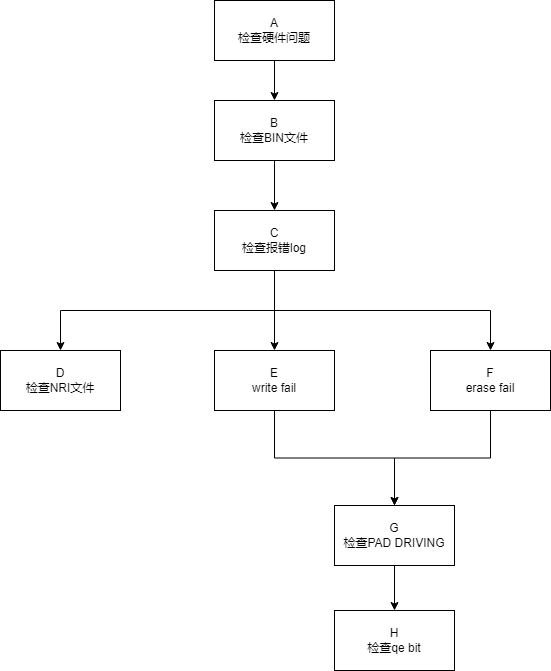
| Step | Method | Exit Condition | Next Step | Materials Required for SWRD | Related FAQ Reference |
|---|---|---|---|---|---|
| A | 1. Check if SOC chip has cold solder joints 2. Check if Flash chip has cold solder joints 3. Check if Flash voltage matches datasheet specifications 4. Check if SOC pin and Flash pin waveforms are synchronized |
Exit Condition 1: Hardware circuit re-soldered but ESTAR still fails Exit Condition 2: ESTAR succeeds |
Exit Condition 1: >B Exit Condition 2: >End process |
||
| B | 1. Check if bin file corresponds to NOR Flash 2. Check upgrade script |
Exit Condition 1: Bin file is not compiled for NOR Flash Exit Condition 2: Upgrade script matches reference script |
Exit Condition 1: >Recompile bin file Exit Condition 2: >C |
||
| C | Check error log | Exit Condition 1: no nri Exit Condition 2: Log shows write fail Exit Condition 3: Log shows erase fail |
Exit Condition 1: >D Exit Condition 2: >E Exit Condition 3: ==>F |
||
| D | Check if cis.bin file contains current Flash information | Exit Condition 1: cis.bin file does not contain current Flash information Exit Condition 2: cis.bin file contains current Flash information |
Exit Condition 1: >Add Flash NRI information Exit Condition 2: >End process, escalate to RD |
1. Branch information 2. Build config 3. Branch information 4. Reference reproduction procedure 5. Flash datasheet |
|
| E | Check if Flash register write protection bits are set | Exit Condition 1: Flash register write protection bits are set Exit Condition 2: Flash register write protection bits are all 0 |
Exit Condition 1: >End process, escalate to RD Exit Condition 2: >G |
1. Branch information 2. Build config 3. Branch information 4. Reference reproduction procedure 5. Flash datasheet |
|
| F | Check if Flash register write protection bits are set | Exit Condition 1: Flash register write protection bits are set Exit Condition 2: Flash register erase fail bit and write protection bits are all 0 |
Exit Condition 1: >End process, escalate to RD Exit Condition 2: >G |
1. Branch information 2. Build config 3. Branch information 4. Reference reproduction procedure 5. Flash datasheet |
|
| G | Check PAD DRIVING | Exit Condition 1: Upgrade succeeds after adjusting pad driving Exit Condition 2: Upgrade fails after adjusting pad driving |
Exit Condition 1: >End process Exit Condition 2: >End process, escalate to RD |
1. Branch information 2. Build config 3. Branch information 4. Reference reproduction procedure 5. BDMA register information 6. Flash datasheet |
|
| H | Check Flash register QE bit | Exit Condition 1: QE bit is 0 Exit Condition 2: QE bit is 1 |
Exit Condition 1: >End process, escalate to RD Exit Condition 2: >End process, escalate to RD |
1. Branch information 2. Build config 3. Branch information 4. Reference reproduction procedure 5. BDMA register information 6. Flash datasheet |
Issue 2. SPI NOR ISP Tool Programming Boot Failure
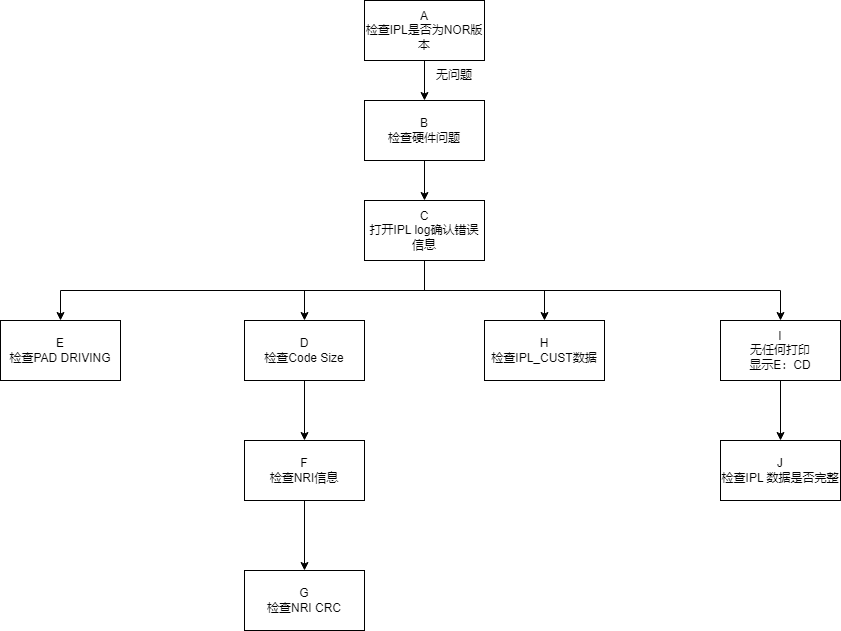
| Step | Method | Exit Condition | Next Step | Materials Required for SWRD | Related FAQ Reference |
|---|---|---|---|---|---|
| A | Check IPL compilation | Exit Condition 1: Compiled IPL is for NAND option Exit Condition 2: Compiled IPL option is incorrect |
Exit Condition 1: >B Exit Condition 2: >Recompile IPL |
||
| B | 1. Check if SOC chip has cold solder joints 2. Check if Flash chip has cold solder joints 3. Check if Flash voltage matches datasheet specifications 4. Check if SOC pin and Flash pin waveforms are synchronized |
Exit Condition 1: Hardware confirmed no issues Exit Condition 2: Hardware issues exist |
Exit Condition 1: >C Exit Condition 2: >Request CAE rework based on specific hardware issue |
1. Branch information 2. Build config 3. Branch information 4. Reference reproduction procedure 5. Flash datasheet |
|
| C | Confirm IPL error message type | Exit Condition 1: SNI initialization succeeds, load IPL_CUST Header directly halts or behavior is inconsistent Exit Condition 2: Reports no nri Exit Condition 3: load IPL_CUST check sum fail Exit Condition 4: Prints E:CD |
Exit Condition 1: >E Exit Condition 2: >D Exit Condition 3: >H Exit Condition 4: >I |
||
| D | Check if IPL code size exceeds maximum specification | Exit Condition 1: IPL size does not exceed maximum limit Exit Condition 2: IPL size exceeds maximum limit |
Exit Condition 1: >F Exit Condition 2: >Contact PM to arrange code size reduction |
||
| E | Request CAE to capture waveforms using oscilloscope, adjust pad driving based on waveform information | Exit Condition 1: Boot succeeds after adjusting pad driving Exit Condition 2: Waveform still marginal after adjusting pad driving |
Exit Condition 1: >End process Exit Condition 2: >Request CAE rework, add capacitor at Flash pins |
||
| F | Check if NRI information includes current Flash | Exit Condition 1: Includes current Flash Exit Condition 2: Does not include current Flash |
Exit Condition 1: >G Exit Condition 2: >Add Flash NRI information per NRI documentation |
||
| G | Check if related NRI information in packaged cis file has CRC calculated, send cis.bin file to RD to confirm if CRC exists | Exit Condition 1: CRC data is empty Exit Condition 2: CRC data is calculated |
Exit Condition 1: >Check if packaging script uses nrigenerator to calculate SNI CRC Exit Condition 2: >End process, escalate to RD |
1. Branch information 2. Build config 3. Branch information 4. Reference reproduction procedure 5. Flash datasheet |
|
| H | Use ISP tool to dump data and check if IPL_CUST data is normal | Exit Condition 1: Dumped data comparison inconsistent Exit Condition 2: Dumped data comparison consistent |
Exit Condition 1: >Check if bin file packaging script is correct Exit Condition 2: >End process, escalate to RD |
1. Branch information 2. Build config 3. Branch information 4. Reference reproduction procedure 5. Flash datasheet |
|
| I | Check print output | Exit Condition 1: Log prints "E:CD" |
Exit Condition 1: ==>J |
||
| J | Use ISP tool to connect Flash, then dump IPL partition data and compare with original bin file | Exit Condition 1: Data consistent Exit Condition 2: Data inconsistent |
Exit Condition 1: >Escalate to RD Exit Condition 2: >Re-program IPL |
1. Branch information 2. Build config 3. Branch information 4. Reference reproduction procedure 5. Flash datasheet |
Issue 3. SPI NOR ISP Tool Connection Failure
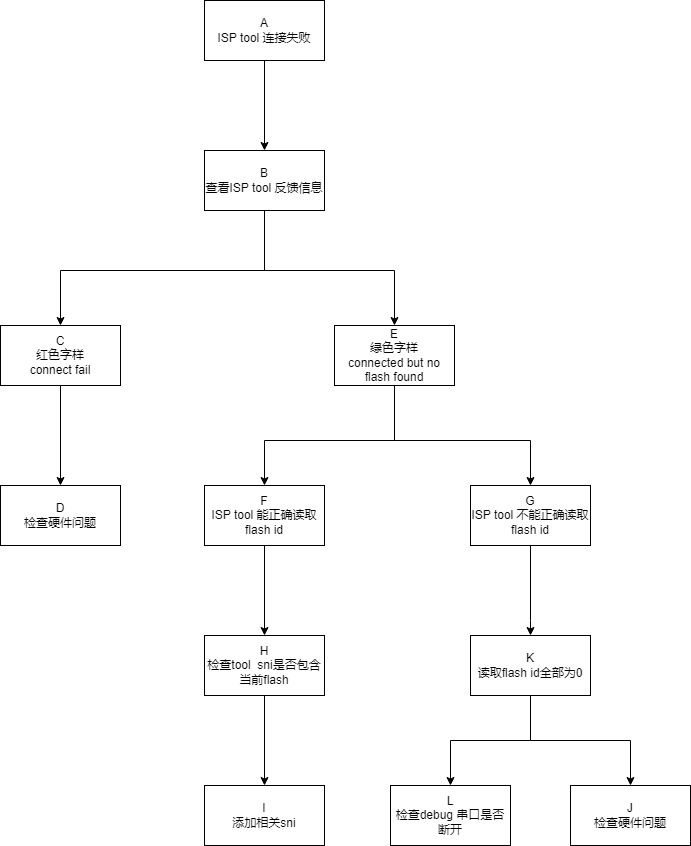
| Step | Method | Exit Condition | Next Step | Materials Required for SWRD | Related FAQ Reference |
|---|---|---|---|---|---|
| A | NA | Exit Condition 1: ISP tool fails to connect Flash |
Exit Condition 1: ==>B |
||
| B | Check feedback information from ISP tool during connection | Exit Condition 1: Red text |
NA | ||
| C | NA | Exit Condition 1: Connection feedback shows red text |
Exit Condition 1: ==>D |
||
| D | Request CAE assistance: 1. Check if SOC chip has cold solder joints 2. Check if Flash chip has cold solder joints 3. Check if Flash voltage matches datasheet specifications 4. Check if SOC pin and Flash pin waveforms are synchronized 5. Check if jumper settings match |
Exit Condition 1: Connection still fails Exit Condition 2: Connection succeeds |
Exit Condition 1: >Escalate to RD for assistance Exit Condition 2: >End process |
1. Provide remote environment with LA available, RD will guide waveform capture | |
| E | NA | Exit Condition 1: ISP tool white window correctly reports Flash ID Exit Condition 2: ISP tool white window reports incorrect ID |
Exit Condition 1: >F Exit Condition 2: >G |
||
| F | NA | Exit Condition 1: ISP tool white window correctly reports Flash ID |
Exit Condition 1: ==>H |
||
| G | NA | Exit Condition 1: ISP tool white window reports ID as 0x00 |
Exit Condition 1: ==>L & J (check simultaneously) |
||
| H | Use SNI editor (available from RD) to open SNI file in tool directory, check if corresponding Flash model exists and verify ID information matches | Exit Condition 1: No Flash related information Exit Condition 2: Flash related information exists |
Exit Condition 1: >I Exit Condition 2: >End process, escalate to RD |
||
| L | Close software used for viewing UART log | NA | NA | ||
| I | Add SNI according to SNI manual | NA | NA | ||
| J | Same method as D | NA | NA |