MI DISP DEBUG SOP
REVISION HISTORY
| Revision No. | Description |
Date |
|---|---|---|
| 1.00 | 06/17/2024 | |
| 1.01 | 12/04/2024 | |
| 2.00 | 06/09/2025 |
Preface
This document is intended to introduce how to perform preliminary troubleshooting when encountering MI DISP-related issues, quickly locate the problem, and determine what information needs to be provided to RD for analysis after confirming that it is an Sgs SDK issue.
1. Panel-Related Issues
1.1 No Display (Black Screen)
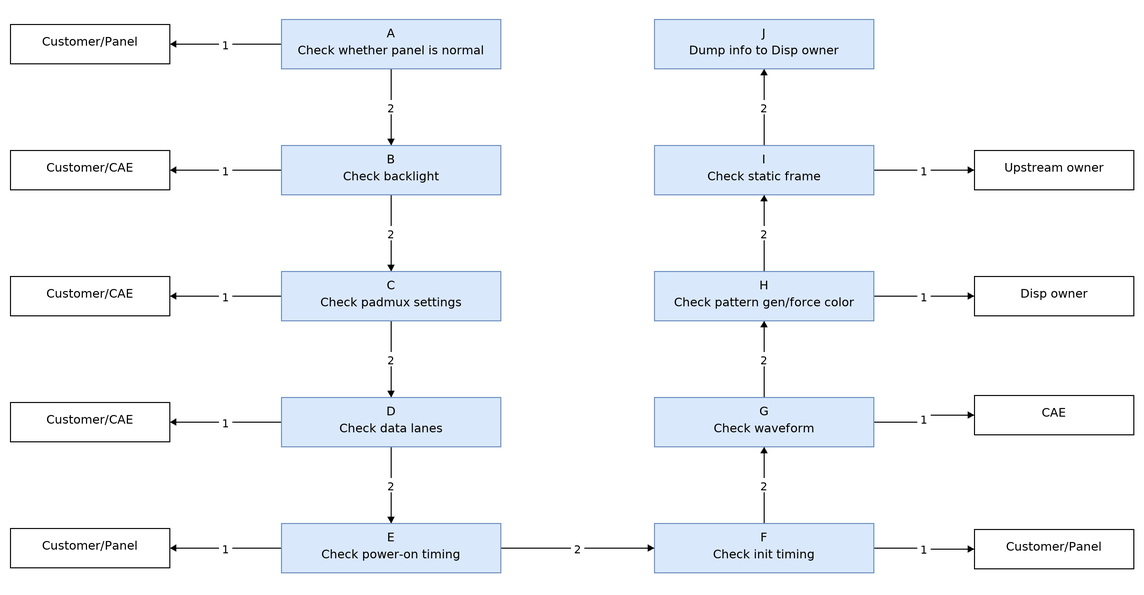
Debug Flow:
| Flow | Verification Method | Exit Condition | Next Step | Required Information | Related FAQ Reference |
|---|---|---|---|---|---|
| A | Confirm if the screen is normal through cross-validation testing | Exit condition 1: Screen abnormal; Exit condition 2: Screen normal | Exit condition 1: Please seek assistance from customer/panel manufacturer; Exit condition 2: B | ||
| B | Confirm backlight is enabled | Exit condition 1: Backlight not enabled; Exit condition 2: Backlight normally enabled | Exit condition 1: Please seek assistance from customer/CAE; Exit condition 2: C | ||
| C | 1. Confirm padmux is configured via padmux.dtsi: Refer to GPIO Usage Reference 2. Confirm configuration is correct by referring to tmux table | Exit condition 1: padmux setting incorrect; Exit condition 2: padmux setting correct | Exit condition 1: Please seek assistance from customer/CAE; Exit condition 2: D | ||
| D | Confirm if M/L swap is configured correctly. For mipidsi/lvds panels, additionally confirm whether each data lane swap and P/N swap are configured correctly | Exit condition 1: data lane configuration incorrect; Exit condition 2: data lane configuration correct | Exit condition 1: Please seek assistance from customer/CAE; Exit condition 2: E | ||
| E | Refer to the datasheet to confirm if there is a power on sequence. If present, measure the waveform to confirm compliance with specifications | Exit condition 1: Power-on sequence does not comply with specifications; Exit condition 2: Power-on sequence complies with specifications | Exit condition 1: Please seek assistance from customer/panel manufacturer; Exit condition 2: F | ||
| F | Refer to the datasheet to confirm if there is an initial sequence. If present, confirm whether the application flow includes it, and capture the waveform to confirm correct execution | Exit condition 1: Initialization sequence not executed correctly; Exit condition 2: Initialization sequence executed correctly | Exit condition 1: Please seek assistance from customer/panel manufacturer; Exit condition 2: G | ||
| G | Measure signals using oscilloscope or logic analyzer, and confirm clock frequency. CAE assistance may be requested | Exit condition 1: Waveform abnormal; Exit condition 2: Waveform correct | Exit condition 1: Please seek assistance from CAE; Exit condition 2: H | ||
| H | Confirm with patterngen and force color. Refer to FAQ link | Exit condition 1: No display or abnormal display; Exit condition 2: Color bars or pure red displayed | Exit condition 1: Please execute step J and inform disp owner; Exit condition 2: I | patterngen/force_color setting | |
| I | Static display confirmation: echo stopgetbuff 0 0 ON > /proc/mi_modules/mi_disp/mi_disp0(mi_disp1) | Exit condition 1: Display appears; Exit condition 2: No display | Exit condition 1: Please seek assistance from disp upstream owner; Exit condition 2: J | ||
| J | Dump information for Disp owner analysis: 1, dump disp reg 2, cat /proc/mi_modules/mi_disp/mi_disp0(mi_disp1) 3, Capture reproduction log: echo 8 > /proc/mi_modules/mi_disp/debug_level; echo 0x800020ff > /proc/mi_modules/mi_disp/debug_hal/dbgmg; cat kmsg; | NA | NA |
1.2 Screen Display Artifacts or Flickering
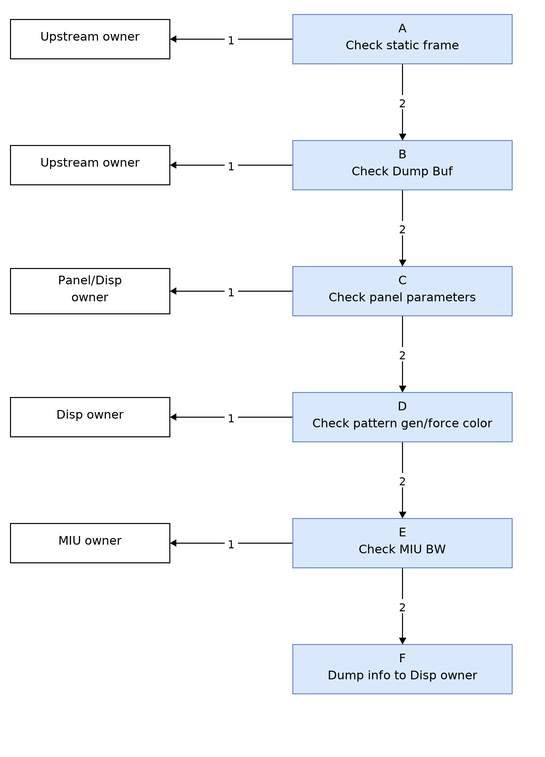
Debug Flow:
| Flow | Verification Method | Exit Condition | Next Step | Required Information | Related FAQ Reference |
|---|---|---|---|---|---|
| A | Static display confirmation: echo stopgetbuff 0 0 ON > /proc/mi_modules/mi_disp/mi_disp0(mi_disp1) | Exit condition 1: Display normal without flickering or artifacts; Exit condition 2: Display flickering or artifacts present | Exit condition 1: Please seek assistance from disp upstream owner; Exit condition 2: B | ||
| B | Dump Buf confirmation: echo dumpframe 0 0 [path] > /proc/mi_modules/mi_disp/mi_disp0(mi_disp1) | Exit condition 1: Image abnormal; Exit condition 2: Image normal | Exit condition 1: Please seek assistance from disp upstream owner; Exit condition 2: C | ||
| C | Refer to the datasheet to confirm panel parameter information, including pad driving, data format mode, H/V total/bp/fp, etc. | Exit condition 1: Panel parameter configuration incorrect; Exit condition 2: Panel parameter configuration normal | Exit condition 1: Please seek assistance from panel manufacturer/disp owner; Exit condition 2: D | ||
| D | Confirm with patterngen and force color. Refer to FAQ link | Exit condition 1: Display abnormal; Exit condition 2: Display normal | Exit condition 1: Please seek assistance from disp owner; Exit condition 2: E | patterngen/force_color setting | |
| E | Dump MIU BW information for confirmation: cat /sys/devices/system/miu/miu0/bw | Exit condition 1: BW insufficient; Exit condition 2: BW sufficient | Exit condition 1: Please seek assistance from MIU owner; Exit condition 2: F | ||
| F | Dump information for Disp owner analysis: 1, dump disp reg 2, cat /proc/mi_modules/mi_disp/mi_disp0(mi_disp1) 3, Capture reproduction log: echo 8 > /proc/mi_modules/mi_disp/debug_level; echo 0x800020ff > /proc/mi_modules/mi_disp/debug_hal/dbgmg; cat kmsg; | NA | NA |
1.3 Screen Color Display Abnormalities
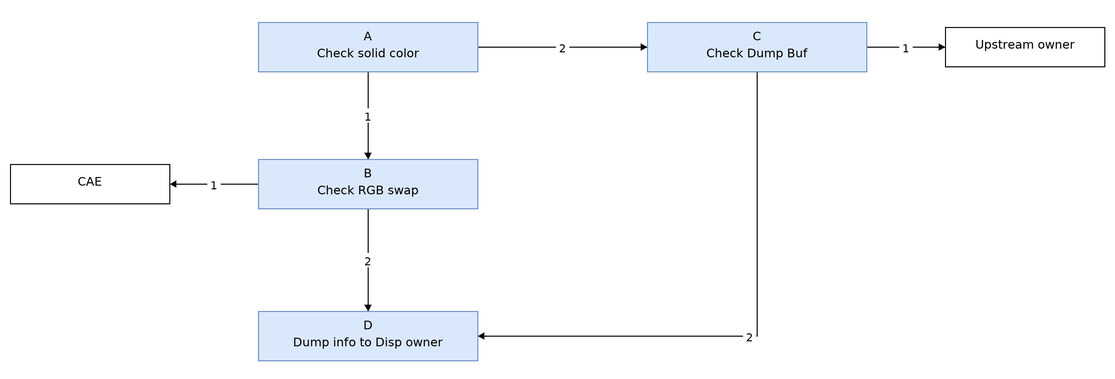
Debug Flow:
| Flow | Verification Method | Exit Condition | Next Step | Required Information | Related FAQ Reference |
|---|---|---|---|---|---|
| A | Single color confirmation with force color, separately test red, blue, and green. Refer to FAQ link | Exit condition 1: Color display abnormal; Exit condition 2: Color display normal for all colors | Exit condition 1: B; Exit condition 2: C | patterngen/force_color setting | |
| B | RGB swap confirmation: Confirm whether m_ucPanelSwapChnR, m_ucPanelSwapChnG, m_ucPanelSwapChnB, m_ucPanelSwapRgbML, etc. in the panel parameters are configured correctly with HW information. CAE assistance may be requested. | Exit condition 1: Configuration incorrect; Exit condition 2: Configuration correct | Exit condition 1: Please seek assistance from CAE; Exit condition 2: D | ||
| C | Dump Buf confirmation: echo dumpframe 0 0 [path] > /proc/mi_modules/mi_disp/mi_disp0(mi_disp1) | Exit condition 1: Image abnormal; Exit condition 2: Image normal | Exit condition 1: Please seek assistance from disp upstream owner; Exit condition 2: D | ||
| D | Dump information for Disp owner analysis: 1, dump disp reg 2, cat /proc/mi_modules/mi_disp/mi_disp0(mi_disp1) 3, Capture reproduction log: echo 8 > /proc/mi_modules/mi_disp/debug_level; echo 0x800020ff > /proc/mi_modules/mi_disp/debug_hal/dbgmg; cat kmsg; | NA | NA |
2. Disp-Related Issues
2.1 Disp Frame Rate Insufficient
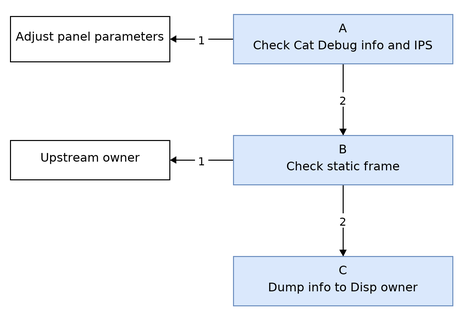
Debug Flow:
| Flow | Verification Method | Exit Condition | Next Step | Required Information | Related FAQ Reference |
|---|---|---|---|---|---|
| A | Cat debug information: cat /proc/mi_modules/mi_disp/mi_disp0(mi_disp1); Confirm whether IPS (HW frame rate) is normal. If IPS does not meet expectations, confirm whether H_total/V_total/DCLK/FPS and other information in the panel parameters are configured correctly. Generally, DCLK=H_total*V_total*fps | Exit condition 1: Panel parameter error; Exit condition 2: IPS meets expectations, but FPS does not meet expectations | Exit condition 1: Correct panel parameters; Exit condition 2: B | ||
| B | Static display confirmation: Execute echo stopgetbuff 0 0 ON > /proc/mi_modules/mi_disp/mi_disp0(mi_disp1) to fix the display Confirm whether "SrcFrmrate" "DstFrmrate" in the debug information meet expectations | Exit condition 1: SrcFrmrate does not meet expectations; Exit condition 2: SrcFrmrate meets expectations, only DstFrmrate does not meet expectations | Exit condition 1: Please seek assistance from upstream owner; Exit condition 2: C | ||
| C | Dump information for Disp owner analysis: 1, dump disp reg 2, cat /proc/mi_modules/mi_disp/mi_disp0(mi_disp1) 3, Capture reproduction log: echo 8 > /proc/mi_modules/mi_disp/debug_level; echo 0x800020ff > /proc/mi_modules/mi_disp/debug_hal/dbgmg; cat kmsg; | NA | NA |
2.2 MOP Memory Corruption
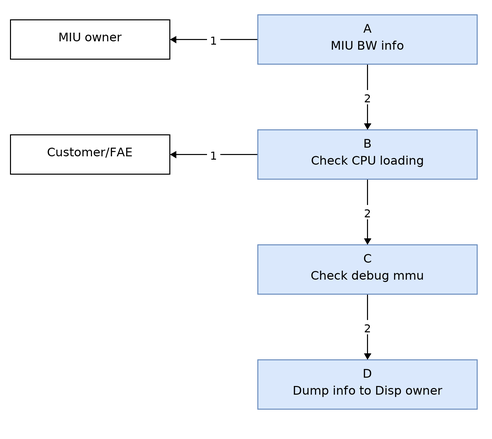
Debug Flow:
| Flow | Verification Method | Exit Condition | Next Step | Required Information | Related FAQ Reference |
|---|---|---|---|---|---|
| A | MIU BW confirmation: cat /sys/devices/system/miu/miu0/bw | Exit condition 1: BW insufficient; Exit condition 2: BW sufficient | Exit condition 1: Please seek assistance from MIU owner; Exit condition 2: B | ||
| B | CPU loading investigation: Use the top command to check current CPU loading | Exit condition 1: CPU loading too high; Exit condition 2: CPU loading normal | Exit condition 1: Please request customer assistance to reduce CPU loading and try again; Exit condition 2: C | ||
| C | Debug mmu confirmation: Consult MIU owner to confirm memory corruption type | NA | Record this test result and execute step: D | ||
| D | Dump information for Disp owner analysis: 1, dump disp reg 2, cat /proc/mi_modules/mi_disp/mi_disp0(mi_disp1) 3, Capture reproduction log: echo 8 > /proc/mi_modules/mi_disp/debug_level; echo 0x800020ff > /proc/mi_modules/mi_disp/debug_hal/dbgmg; echo trace 0 1 > /proc/mi_modules/mi_disp/mi_disp0(mi_disp1); cat kmsg; | NA | NA |
3. WBC-Related Issues
3.1 WBC Frame Rate Insufficient
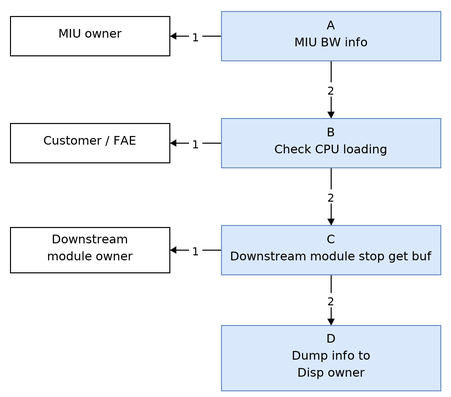
Debug Flow:
| Flow | Verification Method | Exit Condition | Next Step | Required Information | Related FAQ Reference |
|---|---|---|---|---|---|
| A | MIU BW confirmation: cat /sys/devices/system/miu/miu0/bw | Exit condition 1: BW insufficient; Exit condition 2: BW sufficient | Exit condition 1: Please seek assistance from MIU owner; Exit condition 2: B | ||
| B | CPU loading investigation: Use the top command to check current CPU loading | Exit condition 1: CPU loading too high; Exit condition 2: CPU loading normal | Exit condition 1: Please request customer assistance to reduce CPU loading or increase WBC thread priority and try again; Exit condition 2: C | ||
| C | Downstream module stop get buf confirmation: If there are bound downstream modules, please configure the downstream module to stop inputting buf and try | Exit condition 1: Frame rate normal after downstream stops input; Exit condition 2: Frame rate abnormal after downstream stops input | Exit condition 1: Please seek assistance from downstream owner; Exit condition 2: D | ||
| D | Dump information for Disp owner analysis: 1, cat /proc/mi_modules/mi_disp/mi_disp0;cat /proc/mi_modules/mi_disp/mi_wbc0; cat downstream module proc information 2, Capture reproduction log: echo 8 > /proc/mi_modules/mi_disp/debug_level; echo trace > /proc/mi_modules/mi_disp/mi_wbc0; cat kmsg; | NA | NA |
3.2 WBC Memory Corruption
Debug Flow:
| Flow | Verification Method | Exit Condition | Next Step | Required Information | Related FAQ Reference |
|---|---|---|---|---|---|
| A | MIU BW confirmation: cat /sys/devices/system/miu/miu0/bw | Exit condition 1: BW insufficient; Exit condition 2: BW sufficient | Exit condition 1: Please seek assistance from MIU owner; Exit condition 2: B | ||
| B | CPU loading investigation: Use the top command to check current CPU loading | Exit condition 1: CPU loading too high; Exit condition 2: CPU loading normal | Exit condition 1: Please request customer assistance to reduce CPU loading and try again; Exit condition 2: C | ||
| C | Debug mmu confirmation: Consult MIU owner to confirm memory corruption type | NA | Record this test result and execute step: D | ||
| D | Dump information for Disp owner analysis: 1, cat /proc/mi_modules/mi_disp/mi_disp0;cat /proc/mi_modules/mi_disp/mi_wbc0; cat downstream module proc information 2, Capture reproduction log: echo 8 > /proc/mi_modules/mi_disp/debug_level; echo trace > /proc/mi_modules/mi_disp/mi_wbc0; cat kmsg; | NA | NA |
3.3. WBC Output Display Abnormalities
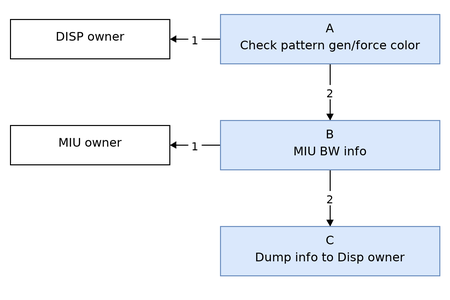
Debug Flow:
| Flow | Verification Method | Exit Condition | Next Step | Required Information | Related FAQ Reference |
|---|---|---|---|---|---|
| A | Confirm with patterngen and force color. Refer to FAQ link | Exit condition 1: Output normal; Exit condition 2: Output abnormal | Exit condition 1: Please refer to Section 2.2 or seek assistance from disp owner; Exit condition 2: B | patterngen/force_color setting | |
| B | MIU BW confirmation: cat /sys/devices/system/miu/miu0/bw | Exit condition 1: BW insufficient; Exit condition 2: BW sufficient | Exit condition 1: Please seek assistance from MIU owner; Exit condition 2: C | ||
| C | Dump information for Disp owner analysis: 1, dump disp reg 2, cat /proc/mi_modules/mi_disp/mi_disp0;cat /proc/mi_modules/mi_disp/mi_wbc0; cat downstream module proc information | NA | NA |
4. Dump disp reg
Dump script usage: ./xxx_disp_reg.sh [log_file] [dump_cnt]
| ChipName | Script |
|---|---|
| Souffle | souffle_disp_reg.sh |
| Iford | iford_disp_reg.sh |
| Pcupid | pcupid_disp_reg.sh |
| iBopper | ibopper_disp_reg.sh |
| ifackel | ifackel_disp_reg.sh |
| Jaguar1 | jaguar1_disp_reg.sh |
| iFliegen | ifliegen_disp_reg.sh |
| Mhera | Mhera_disp_reg.sh |