USB Device Debug SOP
REVISION HISTORY
| Revision No. | Description |
Date |
|---|---|---|
| 1.0 | 05/20/2026 |
1. USB Device Issue Handling Process
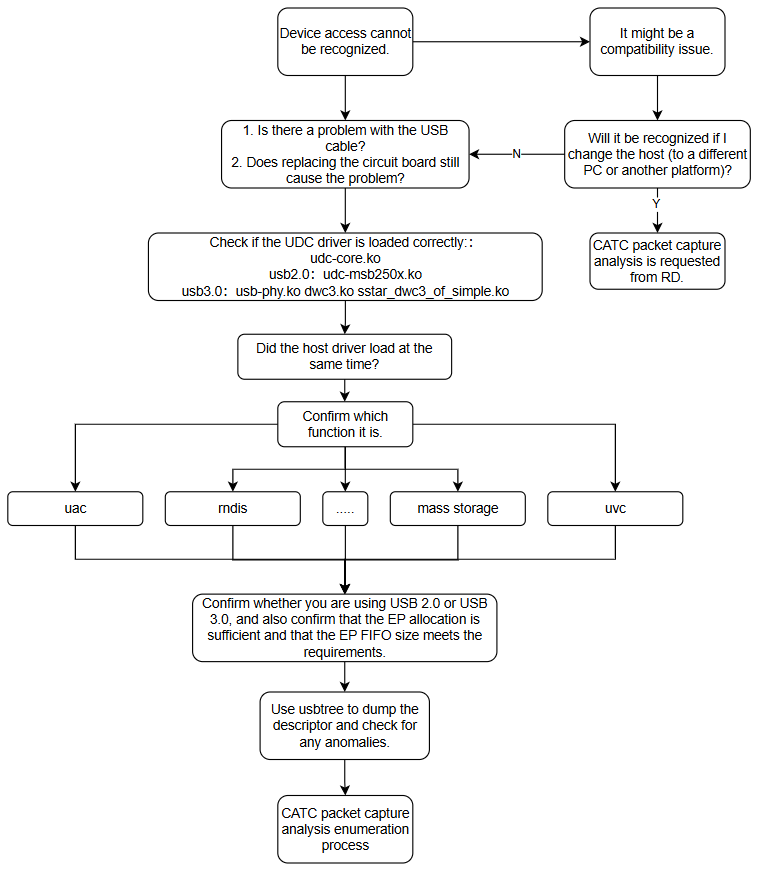
2. Device Driver Configuration and Loading
| Phenomenon Category | Issue Description | Debug Methods and Analysis |
|---|---|---|
| device driver configuration | device driver configuration methods | 1. USB device function has two configuration methods: one is through configfs + functionfs, the other is through Linux gadget composite driver |
3. UVC Issues
For UVC issues, first determine whether it is an MI pipeline anomaly or a USB transmission problem. If it is a USB transmission problem, use the following methods for troubleshooting. If it is an MI issue, this SOP is not applicable.
| Phenomenon Category | Issue Description | Debug Methods and Analysis |
|---|---|---|
| uvc image output abnormal | Unable to output images | 1. Use prog_uvc -f to feed images for testing whether normal image output is possible 2. Confirm whether the pipeline has issues |
| uvc resolution switching abnormal | Unable to output images after repeatedly switching resolution | 1. Use prog_uvc -f to feed images for testing whether normal switching is possible 2. Inability to output images after resolution switching is generally a problem only in bulk mode; confirm whether this patch has been added: 325482 3. If still unresolved, use CATC for packet capture, especially in USB30 cases. Use CATC packet capture to analyze LTSSM status and check whether entering U1/U2 low-power state causes issues |
| corrupted image/screen flicker | Corrupted image, screen flicker | 1. Generally due to frame loss. In USB30 cases, check whether isoc miss occurs on that endpoint (taking ep1in as an example): cat /sys/kernel/debug/usb/1f100400.dwc3/ep1in/trb_statistics 2. Use prog_uvc -f to feed images for testing whether the same problem occurs, to confirm it is unrelated to MIU bandwidth 3. CATC packet capture analysis, especially for USB30. Focus on checking LTSSM status to determine whether entering low-power state affects image output 4. Capture complete logs and CATC packets for RD or FAE analysis |
4. RNDIS Issues
| Phenomenon Category | Issue Description | Debug Methods and Analysis |
|---|---|---|
| rndis network adapter unusable | RNDIS yellow exclamation mark appears in Windows Device Manager | Need to manually update the driver according to the following method: Device Manager -> Update Driver -> Browse my computer for driver software -> Let me pick from a list of available drivers on my computer -> Network Adapters -> Manufacturer: Microsoft Model: Remote NDIS based Internet Sharing Device |
| rndis streaming panic | log shows skbuff: skb_over_panic | 1. Add via make menuconfig: CONFIG_USB_AVOID_SHORT_PACKET_IN_BULK_OUT_WITH_DMA_FOR_ETHERNET 2. Test with iperf to check for problems 3. If issues persist, use CATC packet capture and request RD or FAE assistance for analysis |
5. Empty Chip Upgrade Issues
| Phenomenon Category | Issue Description | Debug Methods and Analysis |
|---|---|---|
| usb empty chip upgrade failed | usb empty chip upgrade failed | 1. Confirm whether PC recognizes the device normally in all three stages: ROM->IPL->uboot. If IPL cannot recognize it, update usb_updater.bin; if uboot cannot recognize it, update uboot.bin 2. If it is not a recognition issue, then there is a problem with IPL or uboot. Capture upgrade logs from both device side and PC tool side, and request RD or FAE analysis 3. CATC packet capture analysis |
| usb upgrade boot failure | System boots but stops at uboot, unable to enter kernel | 1. Confirm whether the compiled images are normal 2. Check whether the boot uboot distinguishes between dual env or single env; it must match the actual image 3. Capture logs and request RD or FAE analysis |