HdmiTx Debug Guide
REVISION HISTORY
| Revision No. | Description |
Date |
|---|---|---|
| 1.00 | 12/26/2023 | |
| 1.01 | 12/02/2024 | |
| 1.02 | 06/09/2025 | |
| 1.03 | 10/30/2025 |
Preface
The current HDMI specification is based on HDMI 1.4. The internal specifications of the company are as follows:
-
The HDMI input source originates from DISP, with internal hardware direct connection
-
Hot-plug detection is supported, and callback registration can be configured to return information to user mode
-
Only HDMI version 1.4 is supported. Therefore, the maximum resolution is limited to 4K@30fps
-
HDCP is not supported
-
I mode output (interlaced output) is not supported
-
CEC is not supported
Regarding Video Output:
-
Only 8-bit video output is supported; 10-bit/12-bit is not supported
-
Output color domain supports YUV444/RGB444; YUV422 is not supported. If in DVI mode, only RGB444 is supported
-
Timing must be aligned with DISP settings
-
HDMI output is transmitted directly to the SINK via hardware. It cannot be dumped to memory
Regarding Audio Output:
-
HDMI is hardware-directly connected to AO. HDMI can only output audio when the specific AO device is operating normally
-
HDMI audio attribute configuration must be aligned with AO settings, such as sample rate, bit depth, and other parameters
-
HDMI audio cannot be output independently; it must be output together with video
-
HDMI audio can only be output in HDMI mode; DVI mode does not support it
1. Common Issues
1.1 Black Screen with No Signal
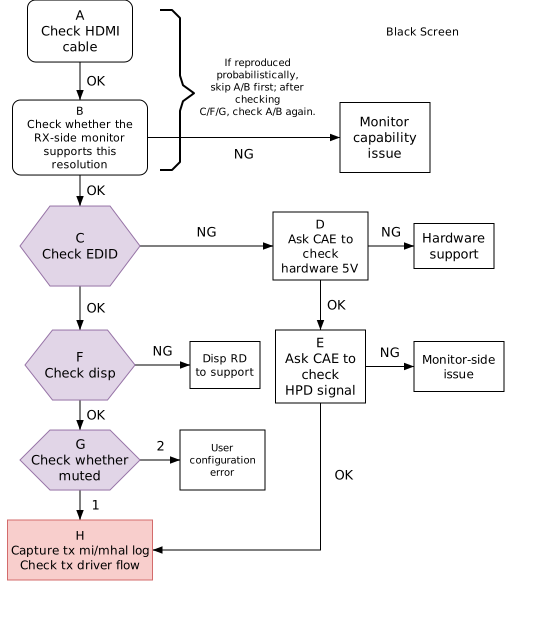
| Flow | Method | Exit Condition | Next Step | RD Required Information | Reference FAQ |
|---|---|---|---|---|---|
| A | Find an HDMI cable that works normally for display and perform cross-test | XX | XX | ||
| B | Connect to a reference device and switch to this resolution to verify if display works | XX | XX | ||
| C | echo getEdid 0 > /proc/mi_modules/mi_hdmi/mi_hdmi0 | Exit Condition 1 (NG): => Read value is all zeros, or error log appears in serial port during reading Exit Condition 2 (OK): => Parse the correctness of the EDID data, refer to HDMI EDID Parsing |
Exit Condition 1: => D Exit Condition 2: => F |
Read fail:  Normal read: 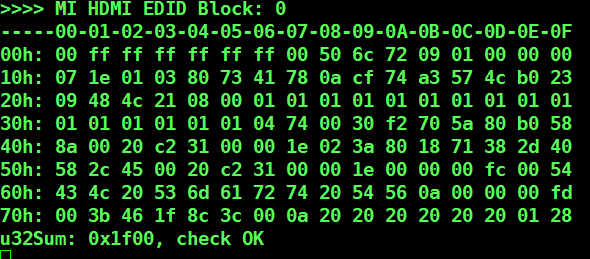 |
|
| D | Measure 5V signal | Exit Condition 1 (NG): => 5V voltage cannot be measured at the board HDMI port Exit Condition 2 (Ok): => 5V voltage can be measured normally |
Exit Condition 1: => Hardware investigation Exit Condition 2: => E |
HDMI port pinout 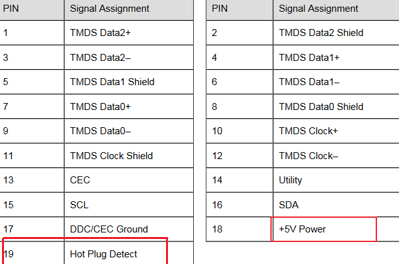 |
|
| E | Measure HPD signal | Exit Condition 1 (NG): => HPD voltage signal cannot be measured at the port Exit Condition 2 (OK): => HPD signal can be measured at the port |
Exit Condition 1: => Need to clarify display-side issues (e.g., test with reference device) Exit Condition 2: => H |
Same as above | |
| F | cat /proc/mi_modules/mi_disp/mi_disp0(mi_disp1) | Exit Condition 1 (NG): => Error log appears in serial port during reading or status is abnormal (see FAQ Exit Condition 2 (OK): => Disp end parameters are normal |
Exit Condition 1: => Disp RD investigation Exit Condition 2: => G |
Please preserve the scene and ask disp RD for assistance | a. Whether frames are constantly being dropped, i.e., whether dropCnt is continuously accumulating b. Whether Interface is HDMI, whether timingInfo is correct, whether IrqCnt is accumulating   |
| G | echo setMute Off > /proc/mi_modules/mi_hdmi/mi_hdmi0 | Exit Condition 1: => Black screen persists Exit Condition 2: => Black screen disappears and picture appears |
Exit Condition 1: => H Exit Condition 2: => Muted, please ask customer to check configuration |
Here mute refers to the screen content being covered by pattern, typically pure black. Configuration refers to a mute switch in the MI interface; check if it was mistakenly enabled | |
| H | cat /proc/mi_modules/mi_hdmi/mi_hdmi0 cat /proc/mi_modules/mi_hdmi/debug_hal/cfg cat /proc/mi_modules/mi_disp/mi_disp0(mi_disp1) Enable log: echo 7 > /proc/mi_modules/mi_hdmi/debug_level echo 0x9b0040 > /proc/mi_modules/mi_hdmi/debug_hal/dbgmg |
Provide serial port logs to RD for driver flow analysis; preserve the scene as much as possible to cooperate with RD experiments (if easily reproducible, enable logs before starting reproduction) |
1.2 Abnormal Display
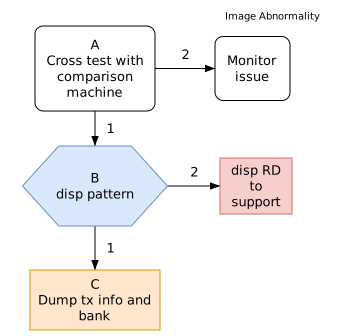
| Flow | Method | Exit Condition | Next Step | RD Required Information | Reference FAQ |
|---|---|---|---|---|---|
| A | Test with other displays and test this display with other Tx devices | Exit Condition 1: => Other displays also show abnormal picture Exit Condition 2: => Other displays show ok picture, this display shows abnormal picture |
Exit Condition 1: => B Exit Condition 2: => Display issue |
||
| B | Tiramisu/Muffin/Mochi/Mhera platforms: Enable pattern: riu_w 1150 7 e or 1160 7 e Disable pattern: riu_w 1150 7 1 or riu_w 1160 7 1 Takoyaki/ibopper platforms: Enable pattern: riu_w 1128 7 e Disable pattern: riu_w 1128 7 1 |
Exit Condition 1: => Picture remains abnormal Exit Condition 2: => Color vertical stripes are displayed |
Exit Condition 1: => C Exit Condition 2: => Disp RD investigation |
Please preserve the scene and ask disp Sw RD for assistance to check if disp timing settings have issues | |
| C | cat /proc/mi_modules/mi_hdmi/mi_hdmi0 cat /proc/mi_modules/mi_hdmi/debug_hal/cfg cat /proc/mi_modules/mi_disp/debug_hal/cfg ibopper: /customer/riu_r 1125;/customer/riu_r 1126 mhera: /customer/riu_r 1458;/customer/riu_r 1459;/customer/riu_r 145a |
Provide serial port logs to Sw RD for analysis |
1.3 No Audio
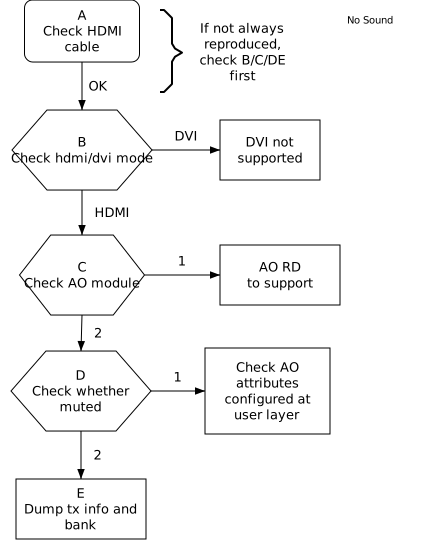
| Flow | Method | Exit Condition | Next Step | RD Required Information | Reference FAQ |
|---|---|---|---|---|---|
| A | Replace with an HDMI cable that normally outputs sound | XX | XX | ||
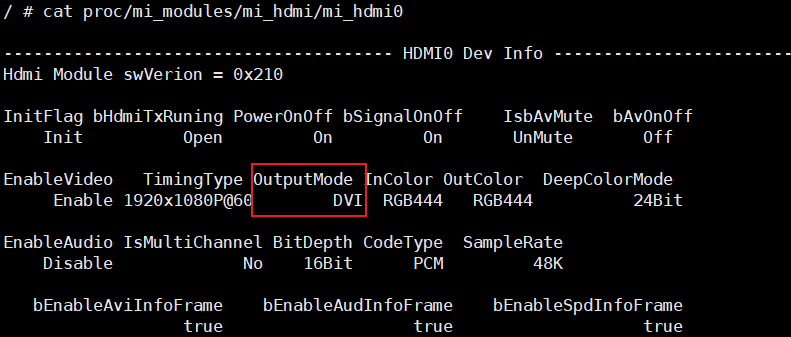
| B | cat /proc/mi_modules/mi_hdmi/mi_hdmi0 | Exit Condition 1 (DVI): => OutputMode in cat info is DVI Exit Condition 2 (HDMI): => OutputMode in cat info is HDMI |
Exit Condition 1: => DVI not supported Exit Condition 2: => C |
 |
|
| C | cat /proc/mi_modules/mi_ao/mi_ao0 | Exit Condition 1: => Error log appears in serial port during reading or status is abnormal (see FAQ Exit Condition 2: => Status is normal (see FAQ screenshot on the right for 32K single audio hdmi output) |
Exit Condition 1: => Ao RD investigation Exit Condition 2: => D |
Enable AO log echo 7 > /proc/mi_modules/mi_ao/debug_level and provide serial port logs to Audio sw RD for analysis | a. Whether MI If is HDMI b. Whether sample rate is set as expected and whether FrmCnt is accumulating 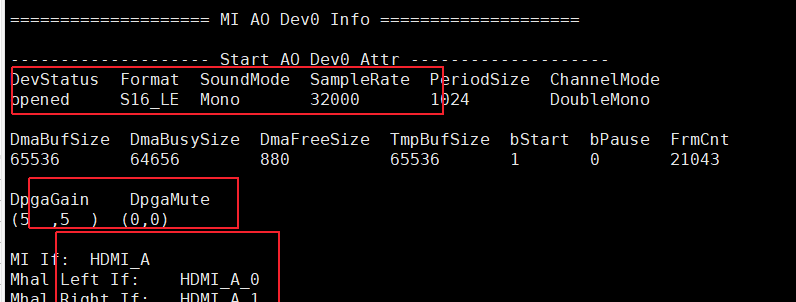 |
| D | echo setMute Off > /proc/mi_modules/mi_hdmi/mi_hdmi0 | Exit Condition 1: => Audio output is present Exit Condition 2: => Audio still has no output |
Exit Condition 1: => Muted, please ask customer to configure according to API documentation Exit Condition 2: => E |
hdmi doc | |
| E | cat /proc/mi_modules/mi_hdmi/mi_hdmi0 cat /proc/mi_modules/mi_hdmi/debug_hal/cfg ibopper: /customer/riu_r 1125;/customer/riu_r 1126 mhera: /customer/riu_r 1458;/customer/riu_r 1459;/customer/riu_r 145a |
Provide serial port logs to RD for analysis |
2. VGA
-
The maximum VGA timing is 1080p@60Hz, with RGB888 format. The input source originates from DISP, with internal hardware direct connection, equivalent to one screen of DISP. There is no audio, CEC, etc., and EDID is not supported.
-
The debug method is consistent with the HDMI display abnormality described above. Specific details are not repeated here. Only the VGA log enabling part is supplemented below.
cat /proc/mi_modules/mi_disp/debug_hal/cfg
cat /proc/mi_modules/mi_disp/mi_disp0(mi_disp1)

Takoyaki/iBopper: /customer/riu_r 1127;/customer/riu_r 1128;/customer/riu_r 1129
Tiramisu/Muffin/Mochi: /customer/riu_r 145b;/customer/riu_r 1150;/customer/riu_r 1151(/customer/riu_r 1160;/customer/riu_r 1161)
Mhera: /customer/riu_r 1157;/customer/riu_r 1150;/customer/riu_r 1151(/customer/riu_r 1160;/customer/riu_r 1161)

echo 0x800020f7 > /proc/mi_modules/mi_disp/debug_hal/dbgmg  //Enable HAL layer log; please input before enabling the application when reproducing the issue
3. Summary of Commonly Used Commands
-
Check hdmitx mi/mhal configuration information
cat /proc/mi_modules/mi_hdmi/mi_hdmi0 cat /proc/mi_modules/mi_hdmi/debug_hal/cfg -
Check disp configuration information
cat /proc/mi_modules/mi_disp/debug_hal/cfg cat /proc/mi_modules/mi_disp/mi_disp0(mi_disp1) -
Dump hdmitx bank
ibopper: /customer/riu_r 1125;/customer/riu_r 1126 mhera: /customer/riu_r 1458;/customer/riu_r 1459;/customer/riu_r 145a bk1125: timing info: width(0x17 - 0x16) height(0x19-0x18) bit0 of 0x01=<0 dvi,1 hdmi> bit13 of 0x01=<1 mute,0 unmute> -
Mute and unmute
echo setMute On > /proc/mi_modules/mi_hdmi/mi_hdmi0 echo setMute Off > /proc/mi_modules/mi_hdmi/mi_hdmi0 -
Check Audio configuration information
cat /proc/mi_modules/mi_ao/mi_ao0 -
Force set hdmi/dvi mode
echo setHdmiMode hdmi > /proc/mi_modules/mi_hdmi/mi_hdmi0 echo setHdmiMode dvi > /proc/mi_modules/mi_hdmi/mi_hdmi0 -
Get Edid
//block0 echo getEdid 0 > /proc/mi_modules/mi_hdmi/mi_hdmi0 //block1 echo getEdid 1 > /proc/mi_modules/mi_hdmi/mi_hdmi0 -
Parse Edid
echo parseEdid > /proc/mi_modules/mi_hdmi/mi_hdmi0