Memory Layout
1. PureLinux
This document mainly introduces how to generate visualized DRAM layout under alkaid and explains bootargs memory parameters (including size adjustment methods for MMA, etc.).
1.1 Implementation Description of Visualized DRAM Layout
Currently, alkaid project/build_pre_process_config.sh is responsible for reading the size settings from Kconfig, calculating the dram_layout, and generating the required environment variables, compilation options, load addresses, etc.
1.1.1 Core Functions and Parameter Description
function add_region_to_layout() {
    local module="$1"
    local start_hex="$2"
    local end_hex="$3"
    local size_hex="$4"
    local parent="$5"

    local start_print=$(addr_to_offset "$start_hex")
    local end_print=$(addr_to_offset "$end_hex")
    local size_print="${size_hex:-"-"}"
    local parent_print="${parent:-"-"}"

    printf "%-12s %-18s %-18s %-12s %-12s\n" "$module" "$start_print" "$end_print" "$size_print" "$parent_print" >> "$DRAM_LAYOUT"
}
$1: Module name
$2: Start address (CPU base address, can be 0x100000000 base or 0x20000000 base)
$3: End address (CPU base address, can be 0x100000000 base or 0x20000000 base)
$4: Module size
$5: Parent module name (for modules like CMA/MMA that are reserved within LX, supports not passing address)
1.1.2 Call Timing
In alkaid project/build_pre_process_config.sh, ensure all runtime modules call the add_region_to_layout function for recording. Currently, the modules included in statistics are:
add_region_to_layout "CMA" "" "" "$cma_size" "LX"
add_region_to_layout "FB" "" "" "$fb_size" "LX"
add_region_to_layout "LOGO" "$((logo_start_addr + dram_base_addr))" "$((logo_end_addr + dram_base_addr))" "$logo_size" "LX"
add_region_to_layout "FIRMWARES" "" "" "$component_size" "LX"
add_region_to_layout "LX" $lx_addr $lx_end_addr $lx_size
add_region_to_layout "MMA" "" "" "$mma_size" "LX"
add_region_to_layout "MMA" $mma_addr $mma_end_addr $mma_size
add_region_to_layout "IPU"                    $ipu_addr            $ipu_end_addr              $ipu_size
add_region_to_layout "RTOS" $rtos_addr $rtos_end_addr $rtos_size
add_region_to_layout "VMM" $vmm_addr $vmm_end_addr $vmm_size
add_region_to_layout "OPTEE" $optee_addr $optee_end_addr $optee_size
add_region_to_layout "RISCV" $riscv_addr $riscv_end_addr $riscv_size
add_region_to_layout "TFA" $tfa_addr $tfa_end_addr $tfa_size
1.1.3 Visualization Script
project/scripts/dram_layout_graph.py reads the dram_layout.txt generated by build_pre_process_config.sh and generates a visualized HTML.
# Depends on plotly library, needs to run in python3 environment
python3 scripts/dram_layout_graph.py --input configs/dram_layout.txt --output configs/dram_layout.html
Example: cat project/configs/dram_layout.txt content:
===========================================================================
DRAM: 0x0-0x40000000
Generation time: 2025-12-18 12:03:03
===========================================================================
MODULE       Start              End                Size         Parent
---------------------------------------------------------------------------
CMA          -                  -                  0x400000     LX
FB           -                  -                  0x1CF0000    LX
LOGO         0x3f500000         0x3fd00000         0x800000     LX
LX           0x0                0x3fd00000         0x3FD00000   -
MMA          -                  -                  0x10000000   LX
RISCV        0x3fd00000         0x3ff00000         0x200000     -
TFA          0x3ff00000         0x40000000         0x100000     -
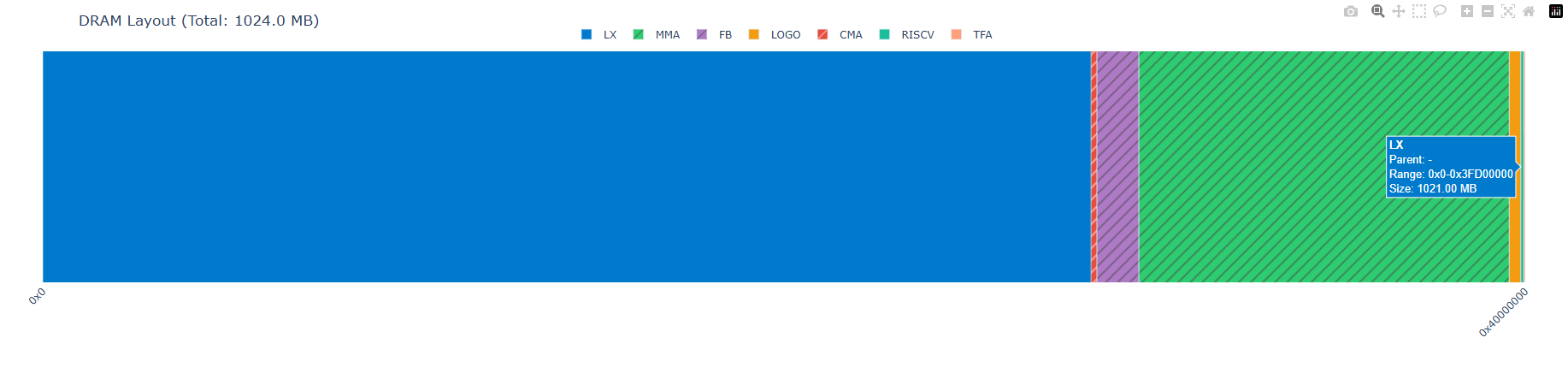
The above example includes both modules with determined addresses and modules with undetermined addresses but determined parent modules. The processing result of dram_layout_graph.py is shown below (open the visualized HTML with a browser).
-
For modules with determined addresses, solid color blocks are used. Hovering the mouse displays specific address information.
Figure 1-1
-
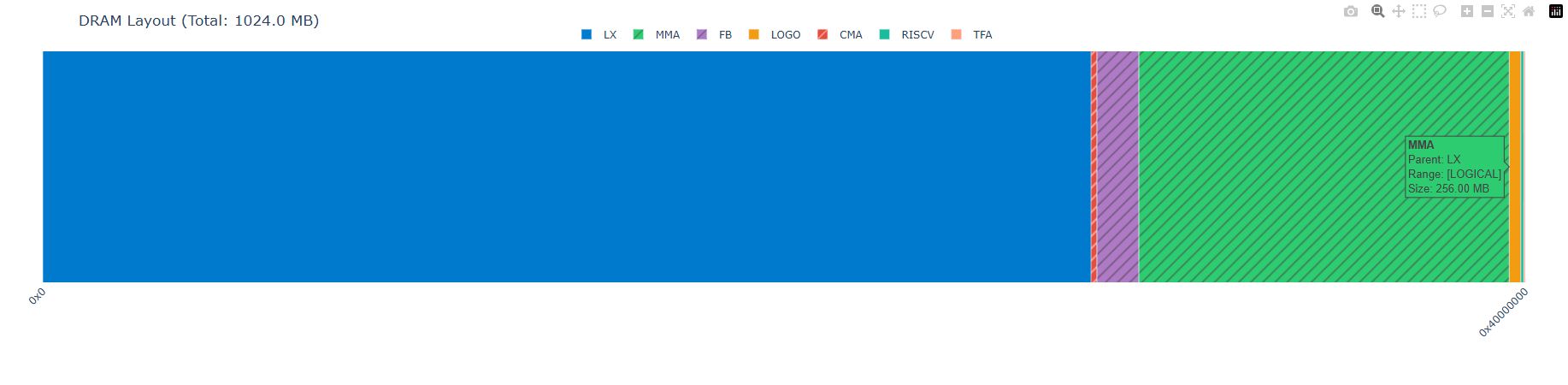
For modules with undetermined addresses but determined parent modules, only a block of memory is simulated from the parent module, but the position has no actual meaning. Shaded color blocks are used, and hovering the mouse does not display specific address information.
Figure 1-2
-
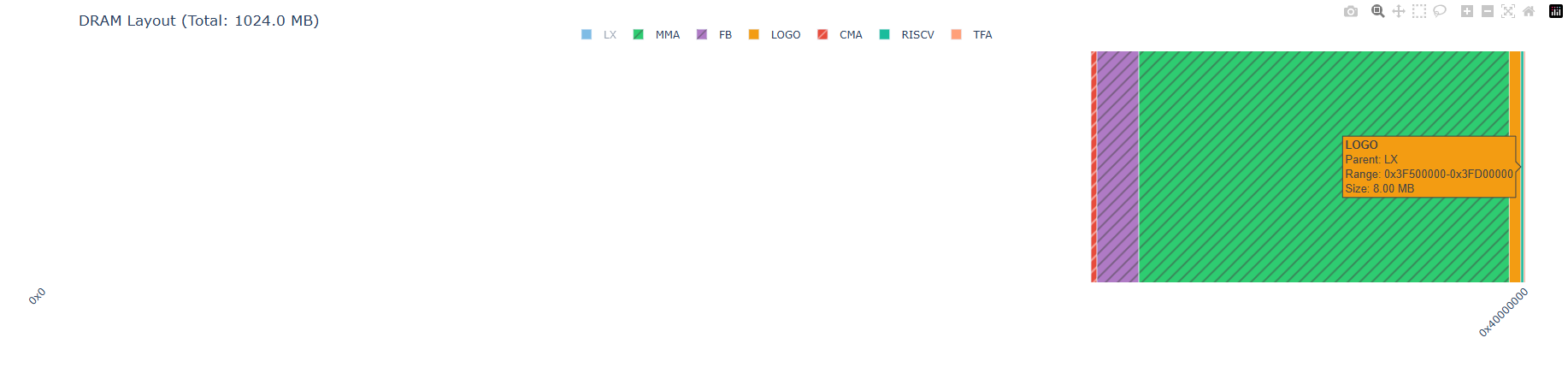
You can click the color blocks above to show or hide specific modules.
Figure 1-3
Runtime Memory Viewing Methods
1.The blue part in Figure 1-1 is allocated to Linux and managed by Linux. You can view the usage using common Linux commands, such as:
2.The green striped part in Figure 1-1 is allocated to MMA and managed by sys. Usage viewing:
1.2 Detailed Explanation of bootargs Memory Parameters
bootargs are the startup parameters passed by U-Boot to the Linux kernel, which contain key memory configuration information. The following is a typical bootargs example:
bootargs=ubi.mtd=ubia,2048 root=/dev/mtdblock6 rootfstype=squashfs ro init=/linuxrc LX_MEM=0x1000000000,0x80000000 cma=2M mma_heap=mma_heap_name0,miu=0,sz=0x22000000 mma_memblock_remove=1 mma_heap=mma_heap_fb,miu=0,sz=0x4048000 mmap_reserved=fb,miu=0,sz=0x800000,max_start_off=0x7f800000,max_end_off=0x80000000 mtdparts=nand0:1920k@1280k(BOOT),1920k(BOOT_BAK),256k(ENV),256k(ENV1),5m(KERNEL),5m(KERNEL_BACKUP),4m(rootfs),1152k(MISC),109952k(ubia)
1.2.1 Memory-related Parameter Description
| Parameter | Meaning and Function | Corresponding defconfig Configuration | How to Modify |
|---|---|---|---|
LX_MEM= |
Linux memory configuration (system memory space available to the kernel) Format: LX_MEM=<base_address>,<size> (arm64) or LX_MEM=<size> (arm32)Example: LX_MEM=0x1000000000,0x80000000 (base address 0x1000000000, size 2GB) |
CONFIG_LX_MEM_SIZE |
Modify CONFIG_LX_MEM_SIZE in defconfig |
cma= |
CMA (Contiguous Memory Allocator) contiguous memory area size Used for devices that require physically contiguous memory, such as DMA, Framebuffer, Camera, etc. Format: cma=<decimal_size>M (project scripts only generate format with M unit)Example: cma=2M, cma=16M (automatically converted from hex configuration by script) |
CONFIG_CMA_MEM_SIZE |
Modify CONFIG_CMA_MEM_SIZE in defconfig (hexadecimal)Script automatically converts to decimal + M unit format |
mma_heap= |
MMA (Memory Management Allocator) memory heap configuration Format: mma_heap=<name>,miu=<MIU_number>,sz=<size>Parameter Description: - Name: heap identifier (e.g., mma_heap_name0 main heap, mma_heap_fb frame buffer heap)- miu: MIU interface number (usually 0, indicating MIU0) - sz: heap size (hexadecimal, e.g., 0x22000000 approximately 544MB)Example: mma_heap=mma_heap_name0,miu=0,sz=0x22000000 |
CONFIG_MMA_MEM_SIZECONFIG_FB_MEM_SIZE |
Modify corresponding configuration items in defconfig miu and name are automatically specified by the system |
mma_memblock_remove= |
MMA removes allocated memory from system memblock Prevents the Linux kernel from allocating MMA-reserved memory to other modules Format: mma_memblock_remove=<0|1>Parameter Description: 0=do not remove, 1=remove (enabled by default) |
Automatically generated | No manual modification required |
mmap_reserved= |
Reserved memory mapping area (used for fixed-position reserved memory such as LOGO) Format: mmap_reserved=<name>,miu=<MIU_number>,sz=<size>,max_start_off=<start_offset>,max_end_off=<end_offset>Parameter Description: - Name: reserved area identifier (e.g., fb)- miu: MIU interface number (usually 0) - sz: reserved size (hexadecimal) - max_start_off: maximum start offset relative to DRAM base address (hexadecimal) - max_end_off: maximum end offset relative to DRAM base address (hexadecimal) Offset Calculation: Only the offset for LOGO ( CONFIG_LOGO_MEM_SIZE) is automatically calculated by build_pre_process_config.sh, allocated downward from lx_size; other areas need manual offset specificationExample: mmap_reserved=fb,miu=0,sz=0x800000,max_start_off=0x3f500000,max_end_off=0x3fd00000 |
CONFIG_LOGO_MEM_SIZE, etc. |
Modify corresponding configuration in defconfig LOGO offset is automatically calculated, others need manual specification |
Unified format conventions in bootargs:
- Address format: hexadecimal, prefixed with
0x(e.g.,0x80000000)- Size format:
cma=: decimal + M unit (automatically converted from hexadecimal by script, e.g.,2M)szformma_heap=: hexadecimal (e.g.,0x22000000)szformmap_reserved=: hexadecimal (e.g.,0x800000)- MIU number: numeric identifier, usually 0 (indicating MIU0)
1.2.2 Memory Layout Example
Based on the above bootargs, the memory layout is as follows (from high address to low address):
  ┌─────────────────────────────────────┐
  │ mmap_reserved FB (8MB)              │ ← 0x80000000 (high address)
  ├─────────────────────────────────────┤
  │ MMA Heap (544MB)                    │
  ├─────────────────────────────────────┤
  │ MMA Heap FB (64MB)                  │
  ├─────────────────────────────────────┤
  │ CMA (2MB)                           │
  ├─────────────────────────────────────┤
  │ Linux System Memory (~1.36GB)       │ ← 0x0 (low address)
  │ kernel + user space                 │
  └─────────────────────────────────────┘
1.2.3 Relationship between LX_MEM and DRAM Size
In defconfig configuration, pure Linux defconfig defaults to CONFIG_LX_MEM_SIZE=CONFIG_DRAM_SIZE
However, in some defconfig, CONFIG_LX_MEM_SIZE may be less than CONFIG_DRAM_SIZE, such as defconfig that needs to enable OPTEE, which reserves part of the range for ARM TrustZone secure firmware, which is invisible to Linux.
1.2.4 Methods to Modify bootargs
Modify defconfig
By modifying related configuration items in the project configuration file:
CONFIG_LX_MEM_SIZE="0x80000000"
CONFIG_CMA_MEM_SIZE="0x200000"
CONFIG_MMA_MEM_SIZE="0x22000000"
CONFIG_FB_MEM_SIZE="0x4048000"
U-Boot Environment Variables