CIPHER USER GUIDE
REVISION HISTORY
| Revision No. | Description |
Date |
|---|---|---|
| 1.0 | 04/18/2024 | |
| 1.1 | 04/11/2025 |
1. Overview
cipher module, which can be used for AES encryption and decryption, SHA calculation, RSA encryption and decryption, and digital signature verification.
2. Keyword description
-
AESDMA
Hardware module for encryption and decryption calculations.
3. Function description
-
aes
Supports AES128/AES192/AES256 encryption and decryption algorithms; modes include ECB/CBC/CTR modes; supports hardware key and software key usage.
-
hash
Supports SHA1/SHA256 algorithms, input data length is unlimited.
-
rsa
Supports RSA2048/RSA4096 encryption and decryption, signing and verification; supports the use of hardware keys and software keys.
-
sm2/sm3/sm4
Support SM2/SM3/SM4 algorithm
-
ECC160/192/256/384/512/521
Support ECC160/192/256/384/512/521 algorithm
4. UBOOT
4.1 Code Framework and Config
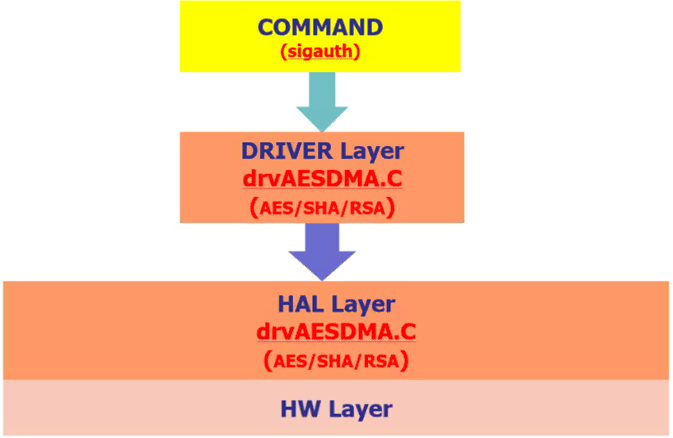
4.1.1 Code Framework
4.1.2 Uboot Config
Open the following configuration under uboot:

[*] Sgs SoC platform drivers  --->

    [*]   Sgs Crypto driver
4.2. Cipher API Interface Analysis
The usage of the Cipher API in U-Boot is the same as that in the kernel. Please refer to section 5.3 for API descriptions.
Please refer to the test cases for the do_verifyaes interface in the cmd/sgs/aes.c file for the demo.
5. KERNEL
5.1. Code Framework and Kernel Config
5.1.1 Code Framework
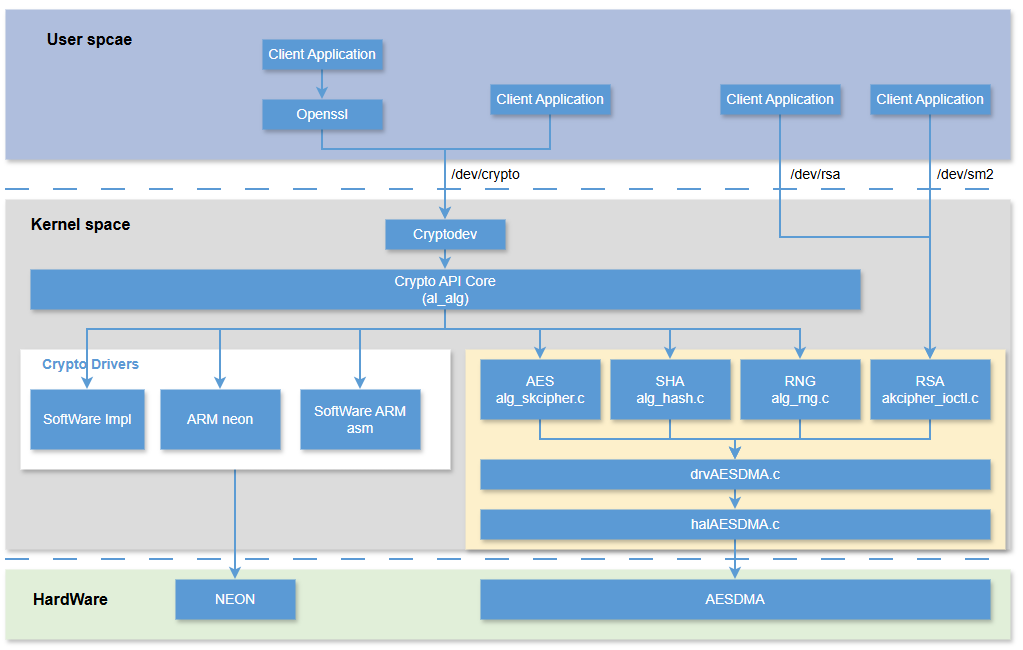
Figure 2-1: Cipher_02
5.1.2 Kernel Config
Open the following configuration under kernel to use aesdma normally.

Device Drivers  --->

    [*] Sgs SoC platform drivers  --->
        <*>   Sgs Crypto driver
            [*]     HW_RANDOM Random Number Generator support
            [*]     Enable aesdma debug node
            [ ]     crypto in optee
        <*>   Support cryptodev
5.2. Access Interface in Userspace
Access the kernel through user-level ioctl.
- aes, sha, sm3, sm4: With the help of the module cryptodev, it provides a general encryption API that enables applications to take advantage of hardware-accelerated encryption functions. Encryption functions can be accessed by opening the
/dev/cryptodevice file. Applications can use common encryption algorithms (such as AES, DES, etc.) and modes (such as CBC, ECB, CTR, etc.) to perform encryption and decryption operations.
rsa, sm2, ecc
- rsa, sm2, ecc: RSA/SM2/ECC algorithms are not supported in the kernel native interface, so RSA/SM2 uses the Linux standard interface to register misc class devices, generating
/dev/rsaand/dev/sm2nodes, and User Space can use Hardware RSA/SM2/ECC algorithms through nodes.
5.2.1 aes/sm4 Encryption and Decryption Interface
Demo path: drivers/sgs_common/cryptodev/examples/aes.c drivers/sgs_common/cryptodev/examples/sm4.c.
use otpkey demo path:drivers/sgs_common/cryptodev/examples/aes-sgs-unique.c.
-
Open notes
int cfd = -1; /* Open the crypto device */ cfd = open("/dev/crypto", O_RDWR, 0); if (cfd < 0) { perror("open(/dev/crypto)"); return 1; } /* Set close-on-exec (not really needed here) */ if (fcntl(cfd, F_SETFD, 1) == -1) { perror("fcntl(F_SETFD)"); return 1; } -
Create session
int aes_ctx_init(struct cryptodev_ctx* ctx, int cfd, const uint8_t* key, unsigned int key_size)
{
#ifdef CIOCGSESSINFO
    struct session_info_op siop;
#endif

    memset(ctx, 0, sizeof(*ctx));
    ctx->cfd = cfd;

    ctx->sess.cipher = CRYPTO_AES_CBC;  // use CRYPTO_SM4_CBC for SM4 CBC mode
    ctx->sess.keylen = key_size;
    ctx->sess.key    = (void*)key;
    if (ioctl(ctx->cfd, CIOCGSESSION, &ctx->sess))
    {
        perror("ioctl(CIOCGSESSION)");
        return -1;
    }

#ifdef CIOCGSESSINFO
    memset(&siop, 0, sizeof(siop));

    siop.ses = ctx->sess.ses;
    if (ioctl(ctx->cfd, CIOCGSESSINFO, &siop))
    {
        perror("ioctl(CIOCGSESSINFO)");
        return -1;
    }
    printf("Got %s with driver %s\n", siop.cipher_info.cra_name, siop.cipher_info.cra_driver_name);
    if (!(siop.flags & SIOP_FLAG_KERNEL_DRIVER_ONLY))
    {
        printf("Note: This is not an accelerated cipher\n");
    }
    /*printf("Alignmask is %x\n", (unsigned int)siop.alignmask); */
    ctx->alignmask = siop.alignmask;
#endif
    return 0;
}
Parameter key description:
1) If using a software key, you can directly pass in the key data
2) If hardware keys are used, refer to the following rules
If you need to use otpkey as a key, you need to burn OTP_AES128_KEY in advance. For the specific generation and burning methods of otpkey, please refer to Chapter 2 of the Secureboot User Manual: Security_Boot Use reference, for inquiries about the Security_Boot Use reference document, please consult the FAE window.
AESKEY256 in OTP is actually composed of two AES128 keys in OTP. The combination and setting method are as follows.
Want to set:
KEY256_1:000102030405060708090A0B0C0D0E0F101112131415161718191A1B1C1D1E1FNeed to set:
key128_1:000102030405060708090A0B0C0D0E0Fkey128_2:101112131415161718191A1B1C1D1E1FThe configuration methods and corresponding relationships are shown in the following table:
eKeyType keylen corresponding otpkey DRV_SKCIPHER_KEY_SEL_HW_1 16 key128_1 DRV_SKCIPHER_KEY_SEL_HW_2 16 key128_2 DRV_SKCIPHER_KEY_SEL_HW_3 16 key128_3 DRV_SKCIPHER_KEY_SEL_HW_4 16 key128_4 DRV_SKCIPHER_KEY_SEL_HW_1 32 key256_1(key128_1+key128_2) DRV_SKCIPHER_KEY_SEL_HW_2 32 key256_2(key128_3+key128_4) Since the kernel native interface does not select whether to use otpkey, the program will determine whether to use otpkey based on whether the key header is a special character sequence "SGSU*".
The configuration methods and corresponding relationships are shown in the following table:
key keylen otpkey "SGSKEYN\x01" 16 key128_1 "SGSKEYN\x02" 16 key128_2 "SGSKEYN\x03" 16 key128_3 "SGSKEYN\x04" 16 key128_4 "SGSKEYN\x01" 32 key256_1(key128_1+key128_2) "SGSKEYN\x02" 32 key256_2(key128_3+key128_4) For example, if using the OTP key 128_1, then the key is set:
unsigned char key[16] = {'S', 'G', 'S', 'K', 'E', 'Y', 'N', 0x01, 0x00, 0x00, 0x00, 0x00, 0x00, 0x00, 0x00, 0x00};Note: The key length needs to meet 16 bytes/32 bytes, the first 8 bytes of data need to be set according to the above format, and the data in the remaining positions are not required.
-
Perform encryption and decryption
Structure description
struct crypt_op
{
    __u32        ses;   /* session identifier */
    __u16        op;    /* COP_ENCRYPT or COP_DECRYPT */
    __u16        flags; /* see COP_FLAG_* */
    __u32        len;   /* length of source data */
    __u8 __user *src;   /* source data */
    __u8 __user *dst;   /* pointer to output data */
    /* pointer to output data for hash/MAC operations */
    __u8 __user *mac;
    /* initialization vector for encryption operations */
    __u8 __user *iv;
};
Encryption and decryption examples
int aes_encrypt(struct cryptodev_ctx* ctx, const void* iv, const void* plaintext, void* ciphertext, size_t size) { struct crypt_op cryp; void* p; /* check plaintext and ciphertext alignment */ if (ctx->alignmask) { p = (void*)(((unsigned long)plaintext + ctx->alignmask) & ~ctx->alignmask); if (plaintext != p) { fprintf(stderr, "plaintext is not aligned\n"); return -1; } p = (void*)(((unsigned long)ciphertext + ctx->alignmask) & ~ctx->alignmask); if (ciphertext != p) { fprintf(stderr, "ciphertext is not aligned\n"); return -1; } } memset(&cryp, 0, sizeof(cryp)); /* Encrypt data.in to data.encrypted */ cryp.ses = ctx->sess.ses; cryp.len = size; cryp.src = (void*)plaintext; cryp.dst = ciphertext; cryp.iv = (void*)iv; cryp.op = COP_ENCRYPT; if (ioctl(ctx->cfd, CIOCCRYPT, &cryp)) { perror("ioctl(CIOCCRYPT)"); return -1; } return 0; } -
Close session
void aes_ctx_deinit(struct cryptodev_ctx* ctx) { if (ioctl(ctx->cfd, CIOCFSESSION, &ctx->sess.ses)) { perror("ioctl(CIOCFSESSION)"); } } -
Close nodes
/* Close the original descriptor */
if (close(cfd))
{
    perror("close(cfd)");
    return 1;
}
Note that currently hardware acceleration only supports aes (ecb/cbc/ctr) and sm4 (ecb/cbc/ctr). If other algorithms are required, software decryption will be used. The aes/sm4 of hardware accelerated has the following alignment requirements for the input data size:
mode size alignment ecb 16 bytes cbc 1 bytes ctr 1 bytes There is no alignment requirement for the memory address of the input data, but it is recommended to align to 16 bytes when using aes, which can enable the zero copy function of cryptodev to reduce the memory copy between the user layer and the kernel layer.
Hardware accelerated AES supports key sizes of 128/256 bits, and hardware accelerated SM4 supports key sizes of 128 bits.
5.2.2 Hash Operation Interface
Demo path: drivers/sgs_common/cryptodev/examples/sha.c drivers/sgs_common/cryptodev/examples/sm3.c
-
Open nodes
int cfd = -1, i; /* Open the crypto device */ cfd = open("/dev/crypto", O_RDWR, 0); if (cfd < 0) { perror("open(/dev/crypto)"); return 1; } /* Set close-on-exec (not really needed here) */ if (fcntl(cfd, F_SETFD, 1) == -1) { perror("fcntl(F_SETFD)"); return 1; } -
Create session
int sha_ctx_init(struct cryptodev_ctx* ctx, int cfd, const uint8_t* key, unsigned int key_size) { #ifdef CIOCGSESSINFO struct session_info_op siop; #endif memset(ctx, 0, sizeof(*ctx)); ctx->cfd = cfd; if (key == NULL) ctx->sess.mac = CRYPTO_SHA2_256; // use CRYPTO_SM3 for sm3 else { ctx->sess.mac = CRYPTO_SHA2_256_HMAC; ctx->sess.mackeylen = key_size; ctx->sess.mackey = (void*)key; } if (ioctl(ctx->cfd, CIOCGSESSION, &ctx->sess)) { perror("ioctl(CIOCGSESSION)"); return -1; } #ifdef CIOCGSESSINFO siop.ses = ctx->sess.ses; if (ioctl(ctx->cfd, CIOCGSESSINFO, &siop)) { perror("ioctl(CIOCGSESSINFO)"); return -1; } printf("Got %s with driver %s\n", siop.hash_info.cra_name, siop.hash_info.cra_driver_name); if (!(siop.flags & SIOP_FLAG_KERNEL_DRIVER_ONLY)) { printf("Note: This is not an accelerated cipher\n"); } /*printf("Alignmask is %x\n", (unsigned int)siop.alignmask);*/ ctx->alignmask = siop.alignmask; #endif return 0; } -
Perform operation
Structure description
struct crypt_op
{
    __u32        ses;   /* session identifier */
    __u16        op;    /* COP_ENCRYPT or COP_DECRYPT */
    __u16        flags; /* see COP_FLAG_* */
    __u32        len;   /* length of source data */
    __u8 __user *src;   /* source data */
    __u8 __user *dst;   /* pointer to output data */
    /* pointer to output data for hash/MAC operations */
    __u8 __user *mac;
    /* initialization vector for encryption operations */
    __u8 __user *iv;
};
Encryption and decryption examples
int sha_hash(struct cryptodev_ctx* ctx, const void* text, size_t size, void* digest) { struct crypt_op cryp; void* p; /* check text and ciphertext alignment */ if (ctx->alignmask) { p = (void*)(((unsigned long)text + ctx->alignmask) & ~ctx->alignmask); if (text != p) { fprintf(stderr, "text is not aligned\n"); return -1; } } memset(&cryp, 0, sizeof(cryp)); /* Encrypt data.in to data.encrypted */ cryp.ses = ctx->sess.ses; cryp.len = size; cryp.src = (void*)text; cryp.mac = digest; if (ioctl(ctx->cfd, CIOCCRYPT, &cryp)) { perror("ioctl(CIOCCRYPT)"); return -1; } return 0; } -
Close session
void sha_ctx_deinit(struct cryptodev_ctx* ctx) { if (ioctl(ctx->cfd, CIOCFSESSION, &ctx->sess.ses)) { perror("ioctl(CIOCFSESSION)"); } } -
Close nodes
/* Close the original descriptor */
if (close(cfd))
{
    perror("close(cfd)");
    return 1;
}
Note that currently hardware acceleration only supports sha256/sm3 algorithms. If other algorithms (such as sha1, md5) are used, the software algorithm will be called.
5.2.3 RSA Encryption and Decryption Interface
RSA encryption and decryption interface supports RSA512/1024/2048/4096 (due to the low security of RSA512/1024, it is recommended to use RSA2048/4096).
demo path: drivers/sgs_common/cryptodev/examples/cipher/cipher_rsa_sync.c.
-
Open nodes
int fd = -1; /* Open the crypto device */ fd = open("/dev/rsa", O_RDWR, 0); if (fd < 0) { perror("open(/dev/rsa)"); return 1; } -
Perform operation
Structure description
struct rsa_config
{
    unsigned int *pu32RSA_Sig;            //the address of source data
    unsigned int *pu32RSA_KeyN;            //the address of KeyN
    unsigned int *pu32RSA_KeyE;            //the address of KeyE
    unsigned int *pu32RSA_Output;        //the address of destination data
    unsigned int  u32RSA_KeyNLen;        //64->512, 128->1024, 256->2048, 512->4096
    unsigned int  u32RSA_KeyELen;        //64->512, 128->1024, 256->2048, 512->4096
    unsigned int  u32RSA_SigLen;        //64->512, 128->1024, 256->2048, 512->4096
    unsigned char u8RSA_pub_ekey;        //0:pvivate key,1:public key
};
Encryption and decryption examples
static int test_rsa(int fd, struct rsa_config *prsa_config) { int i = 0; #if 1 // RSA calculate if (ioctl(fd, MDrv_RSA_Calculate, prsa_config)) { perror("ioctl(MDrv_RSA_Calculate)"); return 1; } #endif return 0; } -
Close nodes
/* Close the original descriptor */
if (close(fd))
{
    perror("close(fd)");
    return 1;
}
Among them, RSA has the following requirements for the size of input data (pu32RSA_Sig), KeyN (pu32RSA_KeyN), and KeyE (pu32RSA_KeyE):
RSA input size KeyN size KeyE size 512 64 bytes 64 bytes 64 bytes 1024 128 bytes 128 bytes 128 bytes 2048 256 bytes 256 bytes 256 bytes 4096 512 bytes 512 bytes 512 bytes
5.2.4 SM2/ECC Encryption and Decryption Interface
SM2/ECC encryption and decryption demo path: drivers/sgs_common/cryptodev/examples/cipher/cipher_sm2_sync.c.
-
Open nodes
int fd = -1; /* Open the crypto device */ fd = open("/dev/sm2", O_RDWR, 0); if (fd < 0) { perror("open(/dev/sm2)"); return 1; } -
Perform operation
Structure description
typedef struct drv_sm2_config_s
{
    unsigned char * pu8PrivKey;  // private key
    unsigned char * pu8PubKeyX;  // public key in X coordinate
    unsigned char * pu8PubKeyY;  // public key in Y coordinate
    unsigned int    u32KeyLen;   // key length (unit: byte)
    unsigned char   u8Mode;      // decryption flag (set 1 for decryption, 0 for encryption)
    unsigned char * pu8Input;    // input data
    unsigned int    u32InputLen; // input data length (unit: byte)
    unsigned char * pu8Output;   // output data
    unsigned char * pu8Sign;
    drv_sm2_curve_e ecurve;
} drv_sm2_config_t;
Encryption and decryption examples
int UtSm2Encrypt(int s32Fd, void* pInput, void* pOutput, unsigned int u32Len) { drv_sm2_config_t stCfg; stCfg.u8Mode = 0; stCfg.ecurve = E_DRV_SM2_CURVE_DEFAULT; stCfg.pu8PubKeyX = g_u8PubKeyX; stCfg.pu8PubKeyY = g_u8PubKeyY; stCfg.u32KeyLen = UT_SM2_PRECISION * 4; stCfg.pu8Input = pInput; stCfg.u32InputLen = u32Len; stCfg.pu8Output = pOutput; if (ioctl(s32Fd, SM2_IOCTL_CRYPT, &stCfg)) { fprintf(stderr, "ioctl(SM2_IOCTL_CRYPT) failed\n"); return -1; } return 0; } -
Close nodes
/* Close the original descriptor */
if (close(fd))
{
    perror("close(fd)");
    return 1;
}
Among them, SM2 encryption and decryption requires a key length of 32 bytes and supports a maximum input data length of 1MB.
5.3. kernel space uses the API provided by the Crypto module
| API name | Description |
|---|---|
| drv_skcipher_run | aes/sm4 encryption and decryption interface |
| drv_hash_run | hash computing interface |
| drv_akcipher_run | rsa/sm2 encryption and decryption interface |
| drv_rng_read | Hardware random number reading interface |
| run_decrypt | data decryption interface |
| run_authenticate2 | data check interface |
| run_authenticate | data check interface |
5.3.1. drv_skcipher_run
-
Purpose
Encrypt or decrypt data with aes/sm4
-
Function
u32 drv_skcipher_run(drv_skcipher_config *config)
-
Parameter
Parameter name Description config Configuration information used in the AES encryption and decryption process, including data address information, encryption and decryption information, etc. typedef struct { drv_skcipher_key_sel key_sel; // select key u8 swkey[DRV_SKCIPHER_KEY_LEN_256]; // software key,max 256 drv_skcipher_key_len key_len; // skcipher key len drv_skcipher_alg_type alg_type; // skcipher algtype drv_skcipher_op_mode op_mode; // skcipher alg mode drv_skcipher_op_dir op_dir; // decrypt or encrypt drv_skcipher_mround_num mround_num; // aesdma multiround num u64 src_phys; // src phys addr u64 dst_phys; // dst phys addr u8 * src_virt; // src virt addr u8 * dst_virt; // dst virt addr u32 len; // plaintext len u8 * iv; // (CBC/CTR need)iv value u8 async; // 0:sync,1:async } __attribute__((aligned(16))) drv_skcipher_config; -
Returned value
Returned value Description config->len Length of data after encryption or decryption 0 Encryption and decryption failure 1 Parameter error -
Note
-
To use this interface, see the drivers/sgs_common/crypto/ut/lnx/ut_aes.c.
Before you can test aesdma, you need to start the aesdma clock by doing the following:
open CONFIG_SGS_AESDMA_DEBUG echo aesdma_clk_state=1 > /sys/bus/platform/devices/soc:aesdma/debug echo rng_clk_state=1 > /sys/bus/platform/devices/soc:aesdma/debug -
skcipher Key type:
key macro support SW KEY DRV_SKCIPHER_KEY_SEL_SW YES HW KEY 1 DRV_SKCIPHER_KEY_SEL_HW_1 YES HW KEY 2 DRV_SKCIPHER_KEY_SEL_HW_2 YES HW KEY 3 DRV_SKCIPHER_KEY_SEL_HW_3 YES HW KEY 4 DRV_SKCIPHER_KEY_SEL_HW_4 YES HW KEY 5 DRV_SKCIPHER_KEY_SEL_HW_5 YES HW KEY 6 DRV_SKCIPHER_KEY_SEL_HW_6 YES HW KEY 7 DRV_SKCIPHER_KEY_SEL_HW_7 YES HW KEY 8 DRV_SKCIPHER_KEY_SEL_HW_8 YES key sel key 0 SW KEY 1 key1:1st HW key for aes128;{key1+key2 for aes256} 2 key2:2nd HW key for aes128;{key2+key3 for aes256} 3 key3:3rd HW key for aes128;{key3+key4 for aes256} 4 key4:4th HW key for aes128;{key4+key5 for aes256} 5 key5:5th HW key for aes128;{key5+key6 for aes256} 6 key6:6th HW key for aes128;{key6+key7 for aes256} 7 key7:7th HW key for aes128;{key7+key8 for aes256} 8 key8:8th HW key for aes128;{key8+key1 for aes256} -
skcipher algorithm type:
alg type macro support AES DRV_SKCIPHER_ALG_TYPE_AES YES DES DRV_SKCIPHER_ALG_TYPE_DES YES TDES DRV_SKCIPHER_ALG_TYPE_TDES YES SM4 DRV_SKCIPHER_ALG_TYPE_SM4 YES -
skcipher key length:
key len macro support 64bit DRV_SKCIPHER_KEY_LEN_64 YES 128bit DRV_SKCIPHER_KEY_LEN_128 YES 192bit DRV_SKCIPHER_KEY_LEN_192 YES 256bit DRV_SKCIPHER_KEY_LEN_256 YES The AES algorithm length can be 128bit, 192bit, or 256bit.
The length of the DES algorithm is a fixed 64bit.
The TDES algorithm has a fixed length of 192 bits and can only use ABA mode, that is, the last 64bit key must be the same as the previous 64bit.
The length of the SM4 algorithm is 128 bits
-
skcipher operation mode:
operate mode macro support ECB DRV_SKCIPHER_OP_MODE_ECB YES CBC DRV_SKCIPHER_OP_MODE_CBC YES CTR DRV_SKCIPHER_OP_MODE_CTR YES -
skcipher ENCRYPT or DECRYPT:
operate dir macro support COPY DRV_SKCIPHER_OP_DIR_COPY NO ENCRYPT DRV_SKCIPHER_OP_DIR_ENCRYPT YES DECRYPT DRV_SKCIPHER_OP_DIR_DECRYPT YES -
skcipher Multi Round:
operate dir macro support Multi Round 1 DRV_SKCIPHER_MROUND_NUM_1 YES Multi Round 2 DRV_SKCIPHER_MROUND_NUM_2 YES Multi Round 3 DRV_SKCIPHER_MROUND_NUM_3 YES Multi Round 4 DRV_SKCIPHER_MROUND_NUM_4 YES
-
5.3.2. drv_hash_run
-
Purpose
Hash the data
-
Function
u32 drv_hash_run(drv_hash_config *config)
-
Parameter
Parameter name Description config Configuration information for hash calculation of data typedef struct { drv_hash_alg_type alg_type; // hash alg type drv_hash_work_mode work_mode; // auto or manual mode drv_hash_state * ctx; // hash state u64 src_phys; // src phys addr u8 * src_virt; // src virt addr u8 * digest; // hash result addr u32 len; // plaintext len u8 async; // 0:sync,1:async } __attribute__((aligned(16))) drv_hash_config; -
Returned value
Returned value Description 0 success 1 fail -
Note
-
See the drivers/sgs_common/crypto/ut/lnx/ut_aes.c to use this interface.
Before you can test aesdma, you need to start the aesdma clock by doing the following:
open CONFIG_SGS_AESDMA_DEBUG echo aesdma_clk_state=1 > /sys/bus/platform/devices/soc:aesdma/debug echo rng_clk_state=1 > /sys/bus/platform/devices/soc:aesdma/debug -
hash alg type:
alg type macro support SHA1 DRV_HASH_ALG_TYPE_SHA1 YES SHA256 DRV_HASH_ALG_TYPE_SHA256 YES SM3 DRV_HASH_ALG_TYPE_SM3 YES -
hash cal mode:
mode macro support AUTO DRV_HASH_WORK_MODE_AUTO YES MANUAL DRV_HASH_WORK_MODE_MANUAL YES
-
5.3.3. drv_akcipher_run
-
Purpose
rsa/sm2 encryption and decryption interface
-
Function
u32 drv_akcipher_run(drv_akcipher_config *config)
-
Parameter
Parameter name Description config Configuration information for RSA encryption and decryption of data typedef struct { drv_akcipher_key_sel key_sel; // select key drv_akcipher_alg_type alg_type; // akcipher alg type drv_akcipher_key_len key_n_len; // key_n_len or ecc precision u8 async; // 0:sync,1:async union { struct { DRV_AKCIPHER_KEY_TYPE key_type; // public key or private key u8 * key_n; // RSA N key addr u8 * dst_virt; // dst virt addr u8 * key_e; // RSA E key addr u32 key_e_len;// RSA E key len u8 * src_virt; // src virt addr u32 data_len; // plaintext len } rsa; struct { /* For the specific parameters of ECC, please refer to the formula below. */ drv_sm2_curve *curve; // ecc curve addr drv_sm2_point *point_out; // output poinit drv_sm2_point *point_g; // g point drv_sm2_point *point_p; // p point u32 * K; // K u32 * S; // S u32 * T; // T u32 * in_curve; // 0:not in curve,1:in curve } ecc; }; } __attribute__((aligned(16))) drv_akcipher_config; -
Returned value
Returned value Description 0 success 1 fail -
Note
-
To use this interface, see the drivers/sgs_common/crypto/ut/lnx/ut_aes.c.
Before you can test aesdma, you need to start the aesdma clock by doing the following:
open CONFIG_SGS_AESDMA_DEBUG echo aesdma_clk_state=1 > /sys/bus/platform/devices/soc:aesdma/debug echo rng_clk_state=1 > /sys/bus/platform/devices/soc:aesdma/debug -
akcipher key type(software key or hardware key):
key macro support SW KEY DRV_AKCIPHER_KEY_SEL_SW YES HW KEY DRV_AKCIPHER_KEY_SEL_HW NO -
akcipher key type(public key or private key):
key macro support PRIVATE KEY DRV_AKCIPHER_KEY_TYPE_PRI YES PUBLIC KEY DRV_AKCIPHER_KEY_TYPE_PUB YES -
akcipher alg type:
alg type macro support RSA DRV_AKCIPHER_ALG_TYPE_RSA YES ECC MULT DRV_AKCIPHER_ALG_TYPE_ECC_POINT_MULT YES ECC MULT AND ADD DRV_AKCIPHER_ALG_TYPE_ECC_POINT_MULT_AND_ADD YES ECC VERIFY DRV_AKCIPHER_ALG_TYPE_ECC_POINT_VERIFY YES -
akcipher N KEY length:
N key len macro support 256byte DRV_AKCIPHER_KEY_LEN_RSA2048 YES 256byte DRV_AKCIPHER_KEY_LEN_RSA4096 YES 20byte DRV_AKCIPHER_KEY_LEN_ECC160 YES 24byte DRV_AKCIPHER_KEY_LEN_ECC192 YES 28byte DRV_AKCIPHER_KEY_LEN_ECC224 YES 32byte DRV_AKCIPHER_KEY_LEN_ECC255 YES 32byte DRV_AKCIPHER_KEY_LEN_ECC256 YES 40byte DRV_AKCIPHER_KEY_LEN_ECC320 YES 48byte DRV_AKCIPHER_KEY_LEN_ECC384 YES 64byte DRV_AKCIPHER_KEY_LEN_ECC512 YES 68byte DRV_AKCIPHER_KEY_LEN_ECC521 YES
-
5.3.4. drv_rng_read
-
Purpose
Read hardware random numbers
-
Function
u16 drv_rng_read(void);
-
Parameter
Parameter name Description none -
Returned value
Returned value Description Not 0 16-bit hardware random number 0 fail -
Note
-
To use this interface, see the drivers/sgs_common/crypto/ut/lnx/ut_aes.c.
Before you can test aesdma, you need to start the aesdma clock by doing the following:
open CONFIG_SGS_AESDMA_DEBUG
echo aesdma_clk_state=1 > /sys/bus/platform/devices/soc:aesdma/debug
echo rng_clk_state=1 > /sys/bus/platform/devices/soc:aesdma/debug
-
5.3.5. run_decrypt
-
Purpose
Decrypt the specified data and save the result in the data source address
-
Function
void run_decrypt(u64 u64ImageAddr, u32 u32ImageSize, u32 u32KeySel, u16 *pu16Key, u32 keylen)
-
Parameter
Parameter name Description u64ImageAddr input data start address u32ImageSize input data size u32KeySel aes(ecb) key number pu16Key aes(ecb) sw key keylen key len -
Returned value
Returned value Description none -
Note
-
See run_auth_test in drivers/sgs_common/crypto/os/rtk/drv_aesdma_test.c to test the interface.
Before you can test aesdma, you need to start aesdma's clock by doing the following:
open CONFIG_SGS_AESDMA_DEBUG echo aesdma_clk_state=1 > /sys/bus/platform/devices/soc:aesdma/debug echo rng_clk_state=1 > /sys/bus/platform/devices/soc:aesdma/debug -
In run_decrypt, the decryption mode fixed to AES(ECB) can be used with sw key and hw key
-
5.3.6. run_authenticate2
-
Purpose
Data verification signature interface
-
Function
u8 run_authenticate2(u64 u64ImageAddr, u32 u32ImageSize, u64 u32Key, u32 u32KeySize, u32 u32Sig, u32 u32SigSize)
-
Parameter
Parameter name Description u64ImageAddr input data start address u32ImageSize input data size(no include signature data size) u32Key rsa2048 public n key u32KeySize n key size u32Sig sig data start addr u32SigSize sig data size -
Returned value
Returned value Description 1 success 0 fail -
Note
rsa2048 is used to verify the data. In run_authenticate2, the sha256 result of the input data is calculated first, and then the signature data is verified. Then, the verification results are consistent with the sha256 calculation results to determine whether the verification is successful.
5.3.7. run_authenticate
-
Purpose
Data verification signature interface
-
Function
u8 run_authenticate(u64 u64ImageAddr, u32 u32ImageSize, u32 *pu32Key)
-
Parameter
Parameter name Description u64ImageAddr input data start address u32ImageSize input data size(no include signature data size) pu32Key rsa2048 public n key -
Returned value
Returned value Description 1 success 0 fail -
Note
- run_authenticate encapsulates run_authenticate2. The entered data should be plaintext+signature, and the entered u32ImageSize should not contain the size of the signature data..
-
You can refer to run_auth_test in drivers/sgs/crypto/ut/rtk/drv_aesdma_test.c to test the interface.
Before you can test aesdma, you need to start the aesdma clock by doing the following:
open CONFIG_SGS_AESDMA_DEBUG
echo aesdma_clk_state=1 > /sys/bus/platform/devices/soc:aesdma/debug
echo rng_clk_state=1 > /sys/bus/platform/devices/soc:aesdma/debug
5.4 Debug Node
Node address: /sys/bus/platform/devices/soc:aesdma/debug
5.4.1 debug node Description
| Name | Description |
|---|---|
| rng_init | Random number initialization status |
| sca | Hardware anti-bypass attack enable status |
| mcg | Hardware gated clock enable status |
| pa | Enhanced power saving, note: After this function is turned on, the module only retains the most basic power supply and loses computing power |
| wadr_irq | skcipher interrupt enable status |
| ps_irq | hash/akcipher interrupt enable status |
| aesdma_clk_state | aesdma clock status |
| aesdma_clk_freq | aesdma clock frequency |
| rng_clk_state | rng clock state |
| rng_clk_freq | rng clock frequency |
| log_level | You can adjust the driver print level. EMERG:0,ERROR:1,INFO:2,DEBUG:3 |
5.4.2 Usage examples
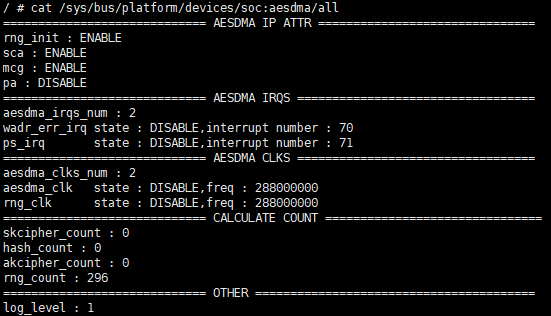
View all information:
cat /sys/bus/platform/devices/soc:aesdma/debug
The debug node will summarize the information of other child nodes. Read this node and print the information as shown:
Enable/disable random number initialization:
echo rng_init=1 > /sys/bus/platform/devices/soc:aesdma/debug

echo rng_init=0 > /sys/bus/platform/devices/soc:aesdma/debug
Enable/disable mcg:
echo mcg=1 > /sys/bus/platform/devices/soc:aesdma/debug

echo mcg=0 > /sys/bus/platform/devices/soc:aesdma/debug
Enable/disable pa:
echo pa=1 > /sys/bus/platform/devices/soc:aesdma/debug

echo pa=0 > /sys/bus/platform/devices/soc:aesdma/debug
Enable/disable skcipher interrupt:
echo wadr_irq=1 > /sys/bus/platform/devices/soc:aesdma/debug

echo wadr_irq=0 > /sys/bus/platform/devices/soc:aesdma/debug
Enable/disable hash/akcipher interrupt:
echo ps_irq=1 > /sys/bus/platform/devices/soc:aesdma/

echo ps_irq=0 > /sys/bus/platform/devices/soc:aesdma/debug
Enable/disable aesdma clock:
echo aesdma_clk_state=1 > /sys/bus/platform/devices/soc:aesdma/debug

echo aesdma_clk_state=0 > /sys/bus/platform/devices/soc:aesdma/debug
Adjust aesdma clock frequency:
Optional values (172000000, 216000000)
echo aesdma_clk_freq=216000000 > /sys/bus/platform/devices/soc:aesdma/debugreq
Turn on/off rng clock:
echo rng_clk_state=1 > /sys/bus/platform/devices/soc:aesdma/debug

echo rng_clk_state=0 > /sys/bus/platform/devices/soc:aesdma/debug
Adjust rng clock frequency:
Optional value (12000000, 288000000)
echo rng_clk_freq=288000000 > /sys/bus/platform/devices/soc:aesdma/debug
Adjust print level:
DRV_AESDMA_LOG_LEVEL_EMERG = 0,
DRV_AESDMA_LOG_LEVEL_ERROR = 1,
DRV_AESDMA_LOG_LEVEL_INFO = 2,
DRV_AESDMA_LOG_LEVEL_DEBUG = 3
Optional value (0, 1, 2, 3)
e.g. Enable all logs
echo log_level=3 > /sys/bus/platform/devices/soc:aesdma/debug
Note: Sensitive information will not be printed by default (such as SKCIPHER, AKCIPHER keys), and the macro SECRET_MSG_PRINT in drivers/sgs/crypto/drv/drv_aesdma_internal.h needs to be set to 1 in advance.
5.5 sysfs debug information
To use this function, you need to enable kernel configuration in advance:
- CONFIG_HWIP_DEBUG=y
aesdma is a typical unique system resource. A beautiful list is used under sysfs to display the debug information of aesdma. The debug node has the following features:
- All debug information is output at once
- The output information can be controlled by writing nodes
Example:
echo 'help' > /sys/class/sgs/aesdma/debug # show this help

echo '[-]state' > /sys/class/sgs/aesdma/debug # disable|enable show all aesdma state
echo '[-]statistic' > /sys/class/sgs/aesdma/debug # disable|enable show all aesdma statistic
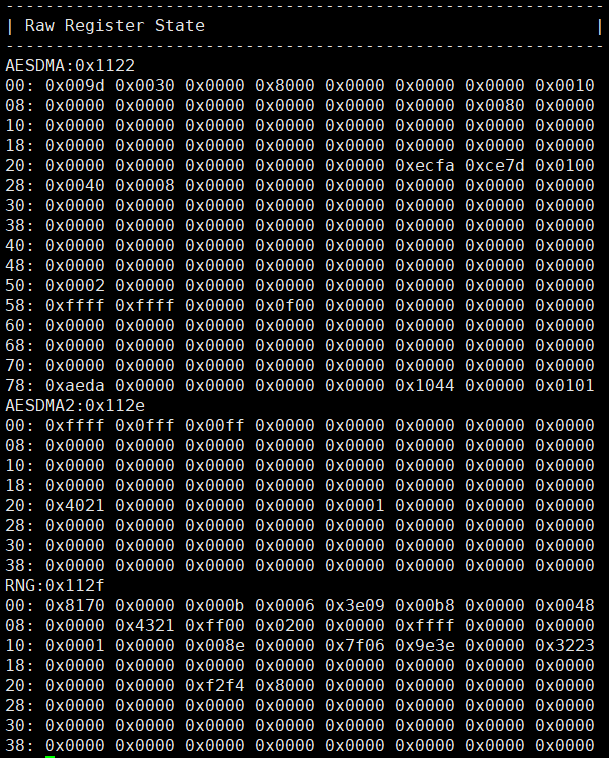
echo '[-]reg' > /sys/class/sgs/aesdma/debug # disable|enable show all aesdma raw register value
cat /sys/class/sgs/aesdma/debug # show aesdma state | statistic | raw register value
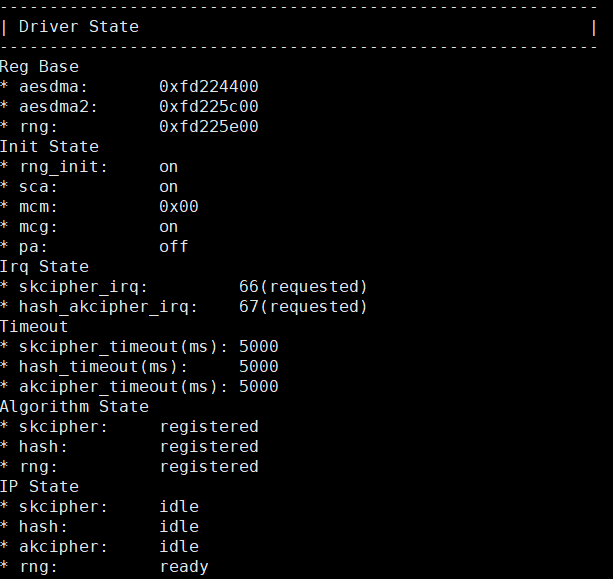
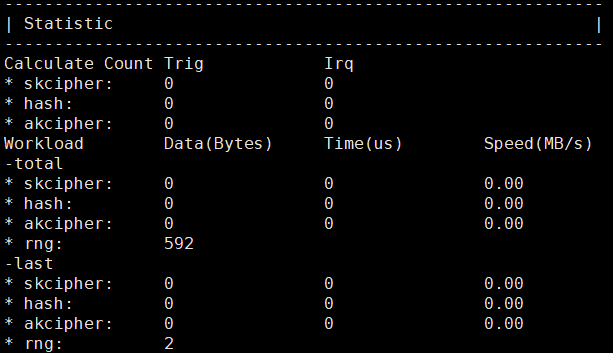
Read the node and print the information as shown below:
-
Driver status
-
Statistics
-
Register information