Audio Capture/Playback Demo User Guide
1. Feature Overview
1.1 Program Overview
sgs_demo_audio_alsa_ai_ao_demo is a sample program that demonstrates ALSA audio capture and playback functionality. It supports recording, playback, DMIC testing, and ECHO echo testing, and provides recording gain and playback volume settings.
1.2 Key Features
- Audio Capture: Supports input sources such as AMIC, DMIC, and ECHO
- Audio Playback: Supports DAC/speaker output
- Echo Capture (pass_echo): Captures speaker echo while playing audio
- AI-to-AO Passthrough: Hardware direct connection from AI to AO
- Hardware Mixing (pass_mix): Play music and AI-to-AO passthrough simultaneously
- Recording Gain Adjustment (0~100%)
- Playback Volume Adjustment (0~100%)
1.3 Use Case and Interface Mapping
| usecase | interface |
|---|---|
| capture | adc_a / adc_b / dmic / echo_rx / i2s_a_rx / i2s_b_rx / i2s_c_rx |
| playback | dac / echo_tx / i2s_a_tx / i2s_b_tx / i2s_c_tx |
| passthrough | adc_a-dac / adc_b-dac |
| pass_mix | adc_a/adc_b-dac hardware mixing (playback + AI-to-AO passthrough) |
| pass_echo | echo_tx-echo_rx echo capture |
2. Build Environment
2.1 Build Environment Setup
Set up the arm64 build environment in the project root directory:
export PATH=/tools/toolchain/aarch64-unknown-linux-gcc-12.4.0-glibc-2.37-gnu/bin:$PATH
export CROSS_COMPILE=aarch64-unknown-linux-gnu-12.4.0-
export ARCH=arm64
cd project
make linux-comake_mhera.emmc.glibc-12.4.0-arm64-ext4.d3.4096.fccsp16_lpddr4x_defconfig
If using 2GB DDR, the defconfig can use linux-comake_mhera.emmc.glibc-12.4.0-arm64-ext4.d3.2048.fccsp16_lpddr4x_defconfig
2.2 Build Commands
# Build the entire project
cd project
make clean;make image -j16

# Build the audio demo
cd sdk/verify/sample_code
make demo/audio/alsa_ai_ao_demo
2.3 Build Output
The generated executable is located at: sdk/verify/sample_code/out/arm64/app/sgs_demo_audio_alsa_ai_ao_demo
3. Runtime Environment
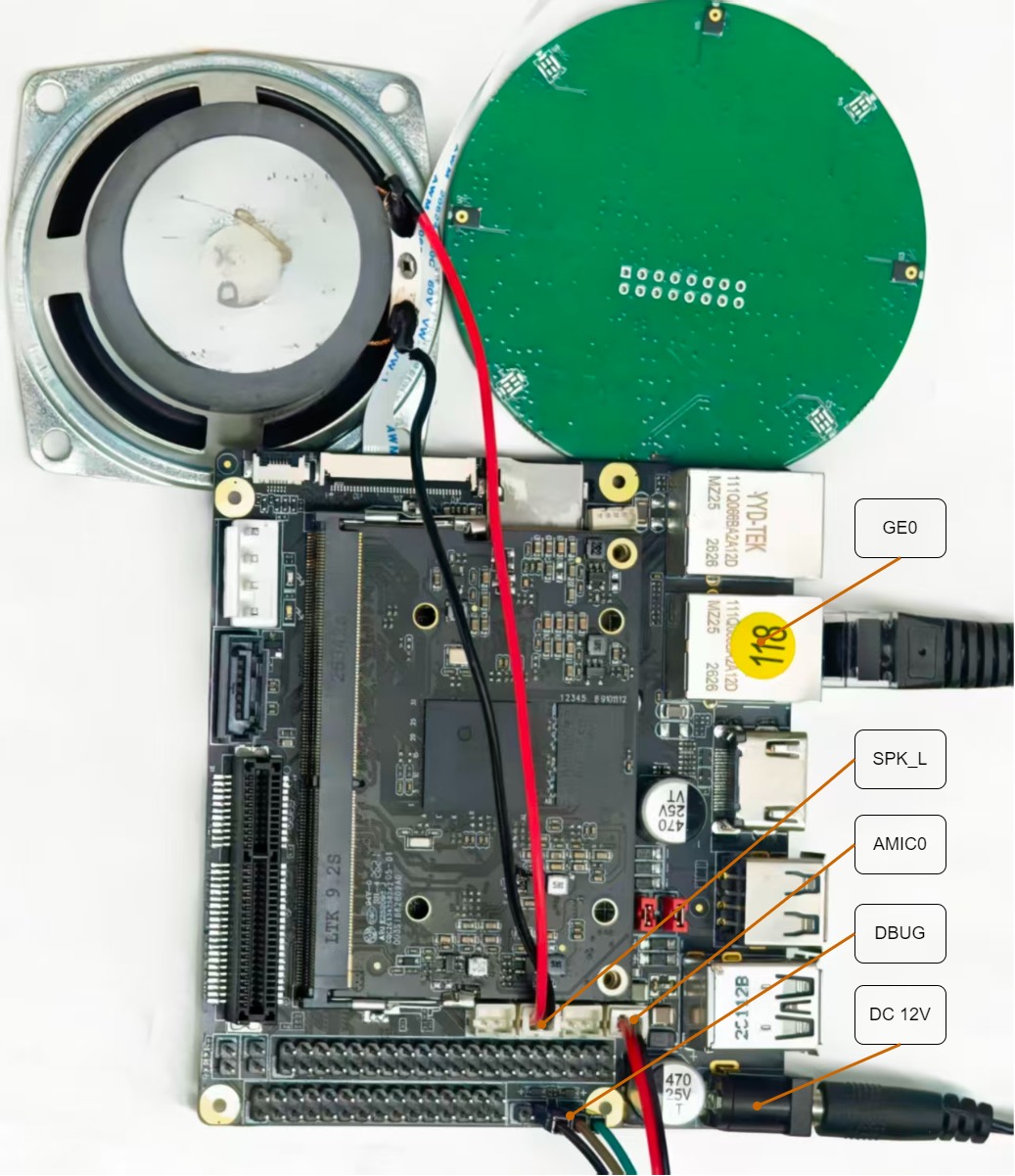
3.1 Hardware Environment
- Comake PI D3 development board
- Power supply and Ethernet cable
- AMIC and DMIC
- Speaker
Hardware connections as shown below:
| Front | Back |
|---|---|
 |
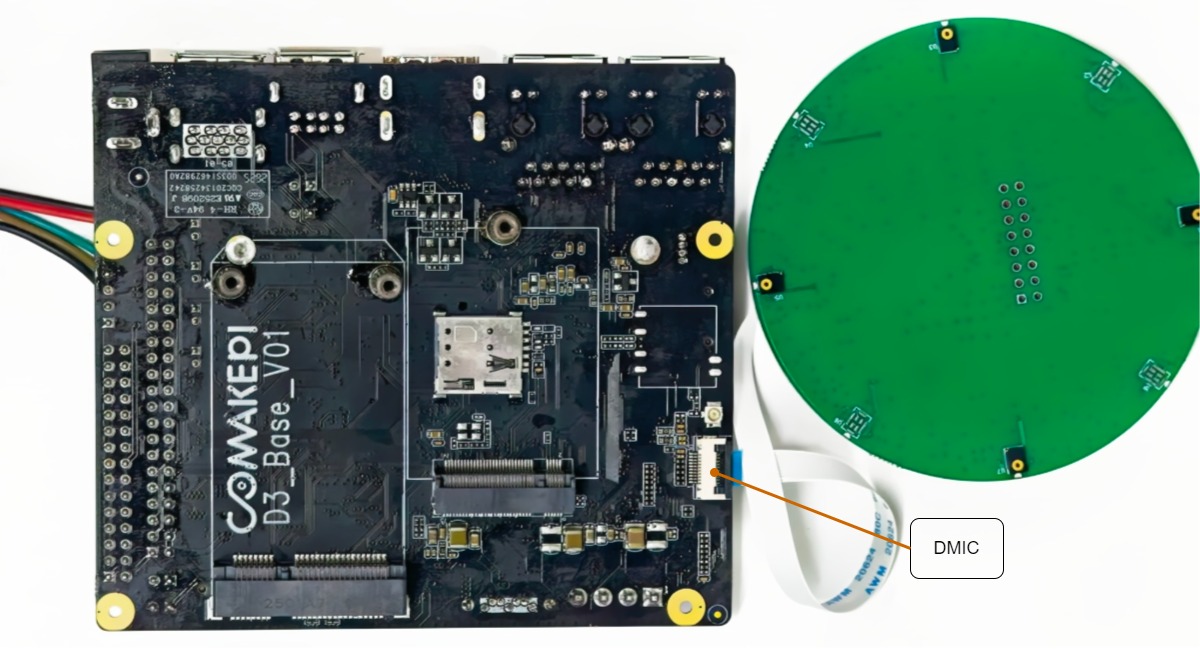 |
Note: When connecting the DMIC to the DMIC port on the board, the metal surface faces downward and the blue side faces upward, as shown in the backside wiring diagram above.
3.2 DTS Configuration
No special requirements.
3.3 Command-line Parameter Reference
3.3.1 General Parameters
| Option | Description | Option | Description |
|---|---|---|---|
| -A | Audio card number for capture | -F | File path for captured audio (WAV) |
| -a | Audio card number for playback | -f | Audio file path for playback (WAV) |
| -D | Device number for capture | -T | Capture duration (seconds) |
| -d | Playback device number | -t | Playback duration (seconds) |
| -C | Number of capture channels | -V | Capture gain (0~100) |
| -c | Number of playback channels | -v | Playback volume (0~100) |
| -R | Capture sample rate | -r | Playback sample rate |
| -i | Capture input source |
4. Running Instructions
4.1 Prerequisites
- Hardware: Comake PI D3 development board, power supply, Ethernet cable, AMIC, DMIC, speaker
- Software: Flashing tool, image already flashed
- Dependencies: ALSA environment variables correctly configured
4.2 Installation and Deployment
- Copy the compiled executable
sgs_demo_audio_alsa_ai_ao_demoto/customer/sample_code/on the board and set permissions to 777:
- Log in to the board and set the ALSA environment variables:
export ALSA_CONFIG_DIR=/customer/alsalib/res/alsa
export ALSA_PLUGIN_DIR=/customer/alsalib/
export LD_LIBRARY_PATH=/customer/alsalib/:$LD_LIBRARY_PATH
- Navigate to the program directory:
4.3 Test Cases
Command-line usage format: ./sgs_demo_audio_alsa_ai_ao_demo [usecase] -i [interface] [options]
D3 board supported use cases: capture, playback, pass_echo
D3 board supported interfaces: capture supports dmic and echo_rx only; playback supports dac and echo_tx only
| Test Objective | Steps | Command | Expected Result |
|---|---|---|---|
| AMIC Recording Test | Record 10 seconds of audio using AMIC with gain set to 60% | ./sgs_demo_audio_alsa_ai_ao_demo capture -i adc_a -F test.wav -A 0 -D 0 -R 8000 -C 1 -T 10 -V 60 |
1. App does not crash 2. Recording completes successfully 3. test.wav file is generated 4. Recording audio is clear and audible |
| DMIC Recording Test | Record 10 seconds of audio using DMIC with gain set to 60% | ./sgs_demo_audio_alsa_ai_ao_demo capture -i dmic -F test.wav -A 0 -D 0 -R 8000 -C 1 -T 10 -V 60 |
1. App runs without issues 2. Recording completes successfully 3. test.wav file is generated 4. Recording audio is clear and audible |
| DAC Playback Test | Play 10 seconds of audio through DAC/speaker with volume at 40% | ./sgs_demo_audio_alsa_ai_ao_demo playback -i dac -f ./test.wav -a 0 -d 0 -c 2 -t 10 -v 40 |
1. App runs without issues 2. Playback starts successfully 3. Sound is clear and normal 4. Playback completes without interruption |
| ECHO Capture Test | Play audio and capture speaker echo simultaneously, recording gain 50%, playback volume 40%, duration 10s | ./sgs_demo_audio_alsa_ai_ao_demo pass_echo -i echo_tx-echo_rx -f ./resource/input/48K_16bit_STERO_30s.wav -F echorx.wav -a 0 -d 0 -r 48000 -t 10 -v 40 -A 0 -D 0 -R 48000 -T 10 -C 2 -V 50 |
1. App runs without issues 2. Playback and echo capture run simultaneously 3. echorx.wav file is generated 4. Echo audio matches the playback content |
5. Results
5.1 Functional Results
5.1.1 AMIC Recording
- Program starts and records audio normally
- Audio data is captured via AMIC and saved as a WAV file
- Recording duration and gain are adjustable via parameters
5.1.2 DMIC Recording
- Program starts and records audio normally
- Audio data is captured via DMIC and saved as a WAV file
- Recording duration and gain are adjustable via parameters
5.1.3 DAC Playback
- Reads WAV audio file and outputs to speaker via DAC
- Playback volume and duration are adjustable via parameters
- Program exits automatically upon completion
5.1.4 ECHO Capture
- Captures speaker echo while playing audio
- Generates an echo recording file (echorx.wav)
- Can be used for echo cancellation algorithm debugging
5.2 FAQ
- If the app behaves abnormally, check hardware connections and driver status
- ALSA environment variables (
ALSA_CONFIG_DIR) must be correctly set before running - The
48K_16bit_STERO_30s.wavtest file can be obtained fromdemo/resource/input/ - If the board lacks required libraries, verify that libs have been copied to
/config/lib