YOLOv8
1 Overview
1.1 Background Introduction
YOLOv8 is an advanced real-time object detection algorithm that improves detection accuracy and robustness while maintaining a fast detection speed. The official YOLOv8 provides various detection model sizes: n, s, m, l, x, and the accuracies of these open-source models are as follows:
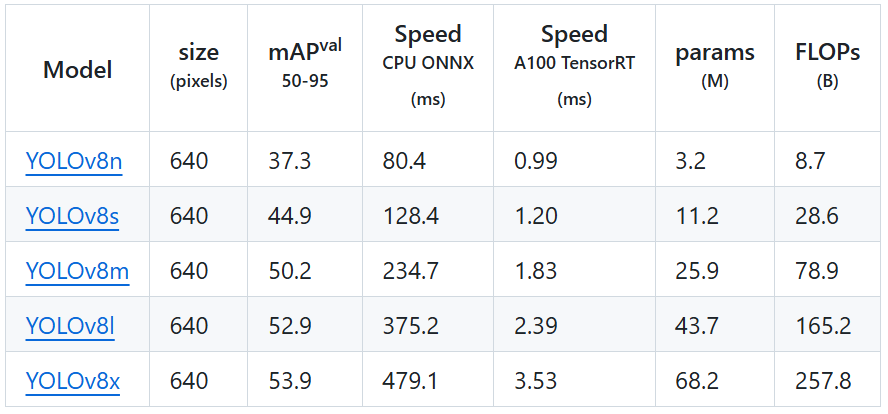
For more details, please refer to the official YOLOv8 documentation:
https://github.com/ultralytics/ultralytics/tree/v8.2.103
The download link for the YOLOv8 open-source models is as follows:
1.2 Usage Instructions
The Linux SDK-alkaid comes with pre-converted offline models and board-side examples by default. The relevant file paths are as follows:
-
Board-side example program path Linux_SDK/sdk/verify/opendla/source/detection/yolov8
-
Board-side offline model path Linux_SDK/project/board/${chip}/dla_file/ipu_open_models/detection/yolov8n_640x640.img
-
Board-side test image path Linux_SDK/sdk/verify/opendla/source/resource/bus.jpg
If the user does not need to convert the model, they can jump directly to section 3.
2 Model Conversion
2.1 ONNX Model Conversion
-
Setting up the Python environment $conda create -n yolov8 python==3.10 $conda activate yolov8 $git clone https://github.com/ultralytics/ultralytics $cd ultralytics $pip install -e . -i https://pypi.tuna.tsinghua.edu.cn/simple Note: The provided Python environment setup is only a reference example; for the specific setup process, please refer to the official source running tutorial:
https://docs.ultralytics.com/quickstart/ -
Model Testing
-
Write the model testing script
predict.pyfrom ultralytics import YOLO # Load a pretrained YOLO8n model model = YOLO("yolov8n.pt") # Run inference on 'bus.jpg' with arguments model.predict("./ultralytics/assets/bus.jpg", save=True, imgsz=640, conf=0.5) -
Run the model testing script to ensure the YOLOv8 environment is configured correctly. $python predict.py
For specific details, please refer to the official YOLOv8 testing documentation
https://docs.ultralytics.com/zh/usage/python/#predict -
-
Model Export
- Write the model conversion script
export.py: import os import sys from ultralytics import YOLO model = YOLO("yolov8n.pt") model.export(format="onnx", imgsz=[640,640], simplify=True, opset=13) - Run the model conversion script to generate the yolov8n.onnx model in the current directory $python export.py
- Write the model conversion script
2.2 Offline Model Conversion
2.2.1 Preprocessing & Postprocessing Instructions
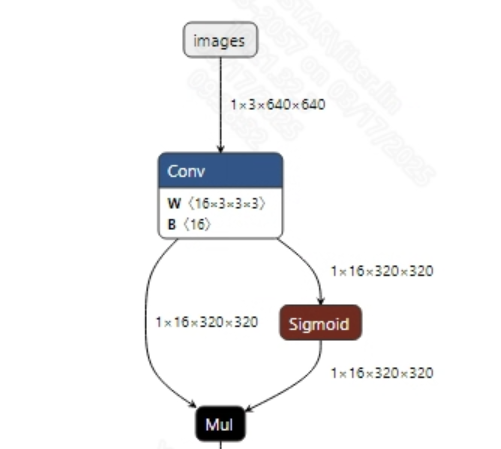
- Preprocessing The input information for the successfully converted yolov8n.onnx model is shown in the figure below, requiring the input image size to be (1, 3, 640, 640), and the pixel values must be normalized to the range [0, 1].
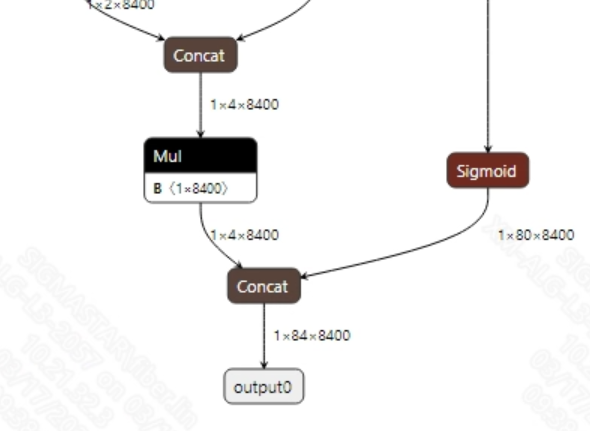
- Postprocessing The output information for the successfully converted yolov8n.onnx model is shown in the figure below. The output dimensions of the yolov8 model are typically (1, 84, 8400), where 8400 is the number of candidate boxes and 84 includes 4 bounding box coordinates and 80 class probabilities. After obtaining the candidate boxes from the model output, all candidate box classes need to be judged, and NMS (Non-Maximum Suppression) must be performed to output the correct bounding boxes.
2.2.2 Offline Model Conversion Process
Note: 1) OpenDLAModel corresponds to the smodel file extracted from the compressed package image-dev_model_convert.tar. 2) The conversion command must be run in a Docker environment; please load the SGS Docker environment according to the Docker development environment tutorial.
- Copy the ONNX model to the conversion code directory $cp ultralytics/yolov8n.onnx OpenDLAModel/detection/yolov8/onnx
- Conversion command $cd IPU_SDK_Release/docker $bash run_docker.sh # Enter the OpenDLAModel directory in the Docker environment $cd /work/SGS_XXX/OpenDLAModel $bash convert.sh -a detection/yolov8 -c config/detection_yolov8.cfg -p SGS_IPU_Toolchain (absolute path) -s false
- Final generated model locations output/{chip}_/yolov8n_640x640.img output/{chip}_/yolov8n_640x640_fixed.sim output/{chip}_/yolov8n_640x640_float.sim
2.2.3 Key Script Parameter Analysis
-   input_config.ini
        [INPUT_CONFIG]
        inputs = images;                # ONNX input node names, separated by commas if there are multiple;
        training_input_formats = RGB;   # Input format during model training, usually RGB;
        input_formats = YUV_NV12;       # Board-side input format, can choose BGRA or YUV_NV12 based on the situation;
        quantizations = TRUE;           # Enable input quantization, do not modify;
        mean_red = 0;                   # Mean, related to model preprocessing, configure according to actual conditions;
        mean_green = 0;                 # Mean, related to model preprocessing, configure according to actual conditions;
        mean_blue = 0;                  # Mean, related to model preprocessing, configure according to actual conditions;
        std_value = 255;                # Variance, related to model preprocessing, configure according to actual conditions;
        [OUTPUT_CONFIG]
        outputs = output0;              # ONNX output node names, separated by commas if there are multiple;
        dequantizations = TRUE;         # Whether to enable dequantization, fill according to actual needs, recommended to be TRUE. If set to False, output will be int16; if set to True, output will be float32.
-   detection.cfg
        [YOLOV8]
        CHIP_LIST=pcupid                    # Platform name, must match the board platform; otherwise, the model cannot run
        Model_LIST=yolov8n                  # Input ONNX model name
        INPUT_SIZE_LIST=640x640             # Model input resolution
        INPUT_INI_LIST=input_config.ini     # Configuration file
        CLASS_NUM_LIST=0                    # Just fill in 0
        SAVE_NAME_LIST=yolov8n_640x640.img  # Output model name
        QUANT_DATA_PATH=quant_data          # Path for quantization images
2.3 Model Simulation
- Obtain float/fixed/offline model outputs
$bash convert.sh -a detection/yolov8 -c config/detection_yolov8.cfg -p SGS_IPU_Toolchain (absolute path) -s true
After executing the above command, the output tensor of the
floatmodel will be saved by default in a txt file under the pathdetection/yolov8/log/output. Additionally, thedetection/yolov8/convert.shscript also provides simulation examples forfixedandoffline, allowing users to obtain outputs for thefixedandofflinemodels by uncommenting code blocks during execution. - Model Accuracy Comparison
With the input being the same as the aforementioned models, enter the environment built in section 2.1, and add the following print statement at line 143 in the
ultralytics/ultralytics/nn/modules/head.pyfile: print(torch.cat((dbox, cls.sigmoid()), 1)) This will obtain the output tensor of the corresponding node in the PyTorch model, allowing for comparison with the float, fixed, and offline models. It should also be noted that the original model's output format isNCHW, while the output formats of the float/fixed/offline models areNHWC.
3 Board-side Deployment
3.1 Program Compilation
Before compiling the example program, it is necessary to select the appropriate deconfig based on the board (nand/nor/emmc, ddr model, etc.) for the complete SDK compilation. For details, refer to the alkaid SDK sigdoc document "Development Environment Setup."
- Compile the board-side YOLOv8 example. $cd sdk/verify/opendla $make clean && make source/detection/yolov8 -j8
- Final generated executable file location sdk/verify/opendla/out/${AARCH}/app/prog_detection_yolov8
3.2 Running Files
When running the program, you need to copy the following files to the board: - prog_detection_yolov8 - bus.jpg - yolov8n_640x640.img
3.3 Running Instructions
- Usage:
./prog_detection_yolov8 -i image -m model [-t threshold](command to run the executable) - Required Input:
- image: path to the image folder/single image
- model: path to the offline model to be tested
-
Optional Input:
- threshold: detection threshold (0.0~1.0, default is 0.5)
-
Typical output:
>./prog_detection_yolov8 -m ./yolov8n.img -i ./images/yolov8_bus.jpg

    demo_args: inImages=./; modelPath=./yolov8n.img; threshold=0.5
    found 1 images!
    [0] processing ./images/yolov8_bus.jpg...
    model invoke time: 14.361000 ms
    post process time: 0.436000 ms
    outImagePath: ./output/2108/bus.png

4 Algorithm Optimization
4.1 Postprocessing Optimization
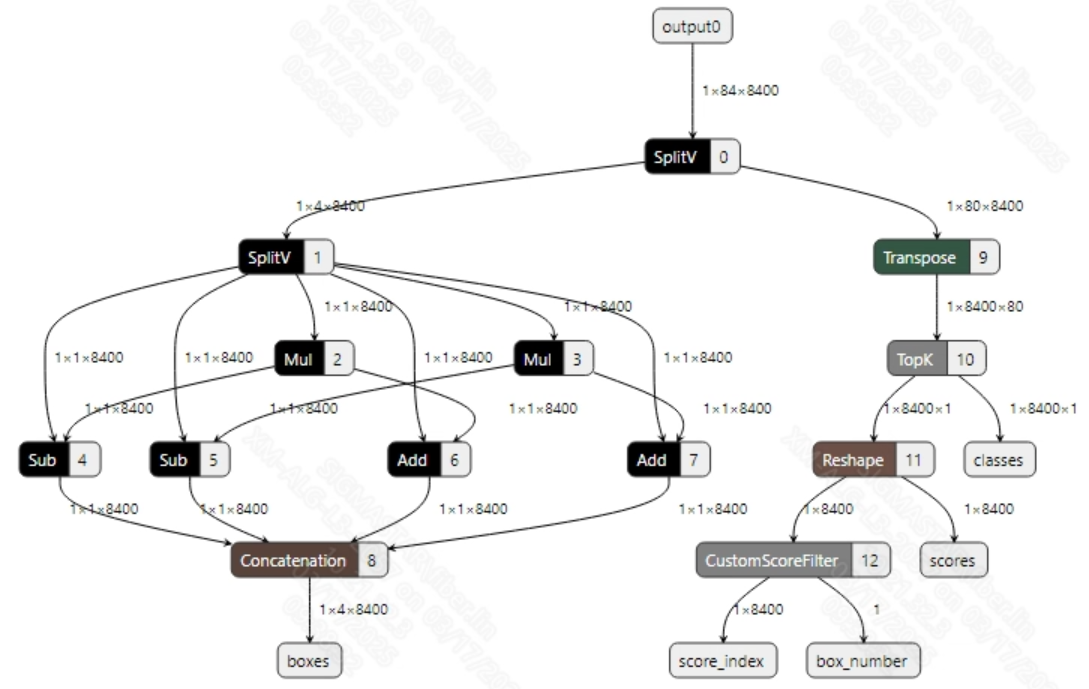
- Existing Issues The CPU usage of the official YOLOv8 converted offline model is relatively high. The root cause is that the YOLOv8 model outputs 8400 candidate detection boxes (Bounding Boxes) by default, and in the COCO dataset with 80 categories, each candidate box requires 80 computations for class confidence, resulting in a total computation of 672,000 times per frame (8400×80), which keeps the CPU loading at a high state.
- Solution
Construct a post-processing model using the SGS_IPU_Toolchain (as shown in the figures below) and concatenate it with the official YOLOv8 model. This allows the computation of all candidate boxes to be performed on the IPU without changing the structure of the official YOLOv8 model. Therefore, while converting the model and running the board-side example:
- The ONNX model remains unchanged; refer to 2.1
- Offline model conversion command
$bash convert.sh -a detection/yolov8 -c config/detection_yolov8.cfg -p SGS_IPU_Toolchain (absolute path) -s false -d ipu
Relevant optimizations can be found in
OpenDLAModel/detection/yolov8/yolov8_post.py - Board-side deployment; refer to 3
- Note The method of building IPU operators through the SGS_IPU_Toolchain requires the user to be familiar with the IPU Toolchain. For specifics, refer to the documentation for using the IPU Toolchain.