Vad
1 Overview
1.1 Background Introduction
VAD (Voice Activity Detection) is an algorithm that can detect human speech segments from audio, serving as a precursor module for speech recognition and speaker identification tasks. We will deploy the NVIDIA open-source NeMo-VAD model. For detailed information about the model, please visit:
https://github.com/NVIDIA/NeMo/tree/v1.20.0
The model download address is:
https://catalog.ngc.nvidia.com/orgs/nvidia/teams/nemo/models/vad_multilingual_marblenet/files
1.2 Usage Instructions
The Linux SDK-alkaid comes with pre-converted offline models and board-side examples by default. The relevant file paths are as follows:
- Board-side example program path Linux_SDK/sdk/verify/opendla/source/vad/nemo
- Board-side offline model path Linux_SDK/project/board/${chip}/dla_file/ipu_open_models/vad/vad_sim.img
- Board-side test audio path Linux_SDK/sdk/verify/opendla/source/resource/BAC009S0764W0121.wav
If the user does not need to convert the model, they can directly skip to section 3.
2 Model Conversion
2.1 onnx Model Conversion
-
Setting up the Python environment $conda create --name nemo python==3.10.12 $conda activate nemo $conda install pytorch torchvision torchaudio cudatoolkit=11.3 -c pytorch $pip install nemo_toolkit['all'] Note: We are developing based on the nemo-v1.20.0 version. The Python environment setup provided here is only for reference; please refer to the official source code running tutorial for specific setup processes:
https://github.com/NVIDIA/NeMo/tree/v1.20.0 -
Model testing
Run the inference script to ensure the nemo environment is configured correctly. $cd NeMo $python ./examples/asr/speech_classification/frame_vad_infer.py \ --config-path="./examples/asr/conf/vad" \ --config-name="frame_vad_infer_postprocess.yaml" \
-
Model export
- Write the model conversion script
frame_vad_infer.py- In line 104 of
examples/asr/speech_classification/frame_vad_infer.py, add: vad_model.export( './vad.onnx', dynamic_axes={}, input_example=[torch.rand((1, 400, 80)).cuda(), {"length":400}]) - In line 189 of
collections/asr/models/asr_model.py, add: if instance(input, list): tmp = input input = tmp[0] length = tmp[1] if input.hap[2] == 80 and input.shape[1] == length: input = torch.transpose(input, 1, 2) - In line 204 of
collections/asr/models/asr_model.py, modify:- Original: ret = dec_fun(encoder_states=encoder_output)
- Modified: ret = dec_fun(hidden_states=encoder_output)
- In line 104 of
- Run the model conversion script
frame_vad_infer.py. $python ./examples/asr/speech_classification/frame_vad_infer.py \ --config-path="./examples/asr/conf/vad" \ --config-name="frame_vad_infer_postprocess.yaml" \
- Write the model conversion script
2.2 Offline Model Conversion
2.2.1 Pre & Post Processing Instructions
- Preprocessing
Before inputting speech into the model, the audio WAV needs to be converted into fbank. The input information for the successfully converted
vad_sim.onnxmodel is shown in the image below, with the required fbank length of (1, 400, 80). Here, 400 is the time series length, and 80 is the number of channels.
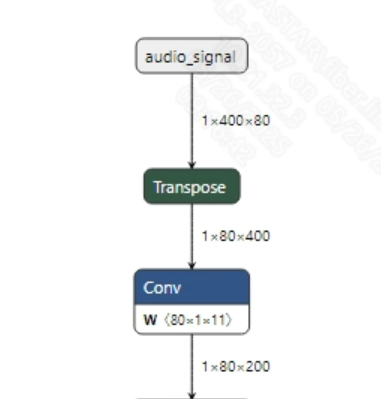
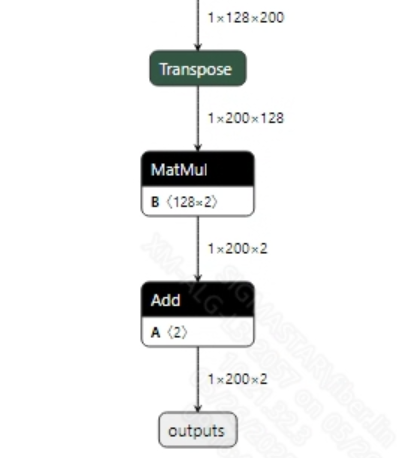
- Postprocessing This model has no postprocessing operations. After acquiring the output features, you can obtain the prediction value of whether the current input token is valid audio by applying softmax. The output information is shown below:
2.2.2 Offline Model Conversion Process
Note: 1) OpenDLAModel corresponds to the smodel files extracted from the compressed package image-dev_model_convert.tar. 2) The conversion command needs to be run in the Docker environment; please load the SGS Docker environment according to the Docker development environment tutorial first.
-
Copy the ONNX model to the conversion code directory $cp vad_sim.onnx OpenDLAModel/vad/nemo/onnx
-
Conversion command $cd IPU_SDK_Release/docker $bash run_docker.sh # Enter the OpenDLAModel directory in the Docker environment $cd /work/SGS_XXX/OpenDLAModel $bash convert.sh -a vad/nemo -c config/vad_nemo.cfg -p SGS_IPU_Toolchain (absolute path) -s false
-
Final generated model addresses output/{chip}_/vad_sim.img output/{chip}_/vad_sim_fixed.sim output/{chip}_/vad_sim_float.sim
2.2.3 Key Script Parameter Analysis
-   input_config.ini
        [INPUT_CONFIG]
        inputs=audio_signal;                # ONNX input node name, separate with commas if there are multiple;
        input_formats=RAWDATA_FP32_NHWC;    # Board input format, can choose based on the ONNX input format, e.g., float: RAWDATA_F32_NHWC, int32: RAWDATA_S16_NHWC;
        quantizations=TRUE;                 # Enable input quantization, no need to change;
        [OUTPUT_CONFIG]
        outputs=outputs;                    # ONNX output node name, separate with commas if there are multiple;
        dequantizations=TRUE;               # Whether to enable dequantization, fill according to actual needs, recommended to be TRUE. Set to False, output will be int16; set to True, output will be float32
-   vad_nemo.cfg
        [COMFORMER]
        CHIP_LIST=pcupid                    # Platform name, must match board platform, otherwise model will not run
        Model_LIST=vad_sim                  # Input ONNX model name
        INPUT_SIZE_LIST=0                   # Model input resolution
        INPUT_INI_LIST=input_config.ini     # Configuration file
        CLASS_NUM_LIST=0                    # Just fill in 0
        SAVE_NAME_LIST=vad_sim.img          # Output model name
        QUANT_DATA_PATH=image_lists.txt     # Quantization data path
2.3 Model Simulation
- Obtain float/fixed/offline model outputs
$bash convert.sh -a vad/nemo -c config/vad_nemo.cfg -p SGS_IPU_Toolchain (absolute path) -s true
After executing the above command, the
floatmodel's output tensor will be saved by default in a txt file under the pathvad/nemo/log/output. In addition, thevad/nemo/convert.shscript also provides simulation examples forfixedandoffline, allowing users to obtain outputs of thefixedandofflinemodels by uncommenting code blocks during runtime. - Model Accuracy Comparison
With the input being the same as the aforementioned models, enter the environment built in 2.1 chapter, and add the following print statement at line 447 in the
examples/asr/asr_vad/speech_to_text_with_vad.pyfile: print(log_probs) This will obtain the output tensor of the corresponding node in the pytorch model, allowing for comparison with the float, fixed, and offline models. It should be particularly noted that the original model's output format isNCHW, while the output format of the float/fixed/offline models isNHWC.
3 Board-side Deployment
3.1 Program Compilation
Before compiling the example program, you need to select the appropriate deconfig based on the board (nand/nor/emmc, ddr model, etc.) for the complete sdk compilation. For details, you can refer to the alkaid sdk sigdoc document "Development Environment Setup."
- Compile the board-side nemo example. $cd sdk/verify/opendla $make clean && make source/vad/nemo -j8
- Final generated executable file location sdk/verify/opendla/out/${AARCH}/app/prog_vad_nemo
3.2 Running Files
When running the program, you need to first copy the following files to the board: - prog_vad_nemo - BAC009S0764W0121 - vad_sim.img
3.3 Running Instructions
-
Usage:
./prog_vad_nemo wav model(command to run the executable)- wav: audio file
- model: offline model
-
Typical Output:
./prog_vad_nemo resource/BAC009S0764W0121.wav models/vad_sim.img

    client [922] connected, module:ipu
    is_speech score: 0.001206
    is_speech score: 0.002193
    is_speech score: 0.001267
    is_speech score: 0.001172
    is_speech score: 0.001315
    is_speech score: 0.001187
    is_speech score: 0.001588
    is_speech score: 0.001541
    is_speech score: 0.002397
    is_speech score: 0.001925
    is_speech score: 0.004228
    is_speech score: 0.003051
    is_speech score: 0.005933
    is_speech score: 0.004191
    is_speech score: 0.005690
    is_speech score: 0.004748
    is_speech score: 0.009524
    is_speech score: 0.005953
    is_speech score: 0.009928
    is_speech score: 0.017336
    is_speech score: 0.207253
    is_speech score: 0.390963
    is_speech score: 0.838701
    is_speech score: 0.880120
    is_speech score: 0.978352
    is_speech score: 0.991667
    is_speech score: 0.997704
    is_speech score: 0.996953
    is_speech score: 0.999195
    is_speech score: 0.998785
    is_speech score: 0.999110
    is_speech score: 0.999063
    is_speech score: 0.999097
    is_speech score: 0.999155
    is_speech score: 0.999170
    is_speech score: 0.999101
    is_speech score: 0.999304
    is_speech score: 0.999292
    is_speech score: 0.999446
    is_speech score: 0.999426
    is_speech score: 0.999559
    is_speech score: 0.999268
    is_speech score: 0.999304
    is_speech score: 0.998892
    is_speech score: 0.999053
    is_speech score: 0.998227
    is_speech score: 0.998460
    is_speech score: 0.998189
    is_speech score: 0.998425
    is_speech score: 0.998025
    is_speech score: 0.998069
    is_speech score: 0.998468
    is_speech score: 0.999088
    is_speech score: 0.999029
    is_speech score: 0.999137
    is_speech score: 0.999095
    is_speech score: 0.999192
    is_speech score: 0.999230
    is_speech score: 0.999287
    is_speech score: 0.999368
    is_speech score: 0.999313
    is_speech score: 0.999182
    is_speech score: 0.999272
    is_speech score: 0.999301
    is_speech score: 0.999371
    is_speech score: 0.999323
    is_speech score: 0.999371
    is_speech score: 0.999400
    is_speech score: 0.999420
    is_speech score: 0.999357
    is_speech score: 0.999335
    is_speech score: 0.999302
    is_speech score: 0.999152
    is_speech score: 0.998994
    is_speech score: 0.999222
    is_speech score: 0.999228
    is_speech score: 0.999421
    is_speech score: 0.999515
    is_speech score: 0.999520
    is_speech score: 0.999449
    is_speech score: 0.999450
    is_speech score: 0.999400
    is_speech score: 0.999372
    is_speech score: 0.999289
    is_speech score: 0.999198
    is_speech score: 0.999097
    is_speech score: 0.999022
    is_speech score: 0.999040
    is_speech score: 0.998885
    is_speech score: 0.998684
    is_speech score: 0.998773
    is_speech score: 0.998566
    is_speech score: 0.998348
    is_speech score: 0.998506
    is_speech score: 0.998509
    is_speech score: 0.998559
    is_speech score: 0.998362
    is_speech score: 0.998425
    is_speech score: 0.998132
    is_speech score: 0.998449
    is_speech score: 0.997921
    is_speech score: 0.998176
    is_speech score: 0.998372
    is_speech score: 0.998765
    is_speech score: 0.998756
    is_speech score: 0.998616
    is_speech score: 0.998536
    is_speech score: 0.998450
    is_speech score: 0.998342
    is_speech score: 0.998394
    is_speech score: 0.998035
    is_speech score: 0.998153
    is_speech score: 0.998049
    is_speech score: 0.997196
    is_speech score: 0.996593
    is_speech score: 0.996181
    is_speech score: 0.996602
    is_speech score: 0.996609
    is_speech score: 0.996776
    is_speech score: 0.996258
    is_speech score: 0.997197
    is_speech score: 0.996720
    is_speech score: 0.997739
    is_speech score: 0.996624
    is_speech score: 0.997697
    is_speech score: 0.997436
    is_speech score: 0.997792
    is_speech score: 0.997465
    is_speech score: 0.997800
    is_speech score: 0.997511
    is_speech score: 0.998078
    is_speech score: 0.997501
    is_speech score: 0.997395
    is_speech score: 0.996318
    is_speech score: 0.997522
    is_speech score: 0.997541
    is_speech score: 0.998257
    is_speech score: 0.998209
    is_speech score: 0.998666
    is_speech score: 0.998414
    is_speech score: 0.998512
    is_speech score: 0.998298
    is_speech score: 0.998064
    is_speech score: 0.998181
    is_speech score: 0.998808
    is_speech score: 0.998935
    is_speech score: 0.998969
    is_speech score: 0.999039
    is_speech score: 0.999035
    is_speech score: 0.999177
    is_speech score: 0.999238
    is_speech score: 0.999272
    is_speech score: 0.999245
    is_speech score: 0.999046
    is_speech score: 0.998965
    is_speech score: 0.998740
    is_speech score: 0.998614
    is_speech score: 0.998825
    is_speech score: 0.998696
    is_speech score: 0.998248
    is_speech score: 0.996915
    is_speech score: 0.995238
    is_speech score: 0.991321
    is_speech score: 0.992952
    is_speech score: 0.989907
    is_speech score: 0.990689
    is_speech score: 0.987685
    is_speech score: 0.988767
    is_speech score: 0.987314
    is_speech score: 0.982662
    is_speech score: 0.969382
    is_speech score: 0.934737
    is_speech score: 0.890915
    is_speech score: 0.838379
    is_speech score: 0.761765
    is_speech score: 0.678670
    is_speech score: 0.611241
    is_speech score: 0.554069
    is_speech score: 0.497151
    is_speech score: 0.406663
    is_speech score: 0.329079
    is_speech score: 0.229154
    is_speech score: 0.143231
    is_speech score: 0.102593
    is_speech score: 0.054421
    is_speech score: 0.035556
    is_speech score: 0.016550
    is_speech score: 0.010145
    is_speech score: 0.006585
    is_speech score: 0.004256
    is_speech score: 0.003941
    is_speech score: 0.002855
    is_speech score: 0.002925
    is_speech score: 0.002234
    is_speech score: 0.002314
    is_speech score: 0.001892
    is_speech score: 0.002127
    is_speech score: 0.001897
    is_speech score: 0.003490
    is_speech score: 0.002991
    output size: 200 2
    ------shutdown IPU1------
    client [922] disconnected, module:ipu