1. Quick Start
1 AI Model Quick Conversion
It is recommended that the conversion instructions for the IPU_Toolchain be executed in a Docker environment. For more details, please refer to Environment Setup.
The onnx_yolov8s model can be obtained in the Quick_Start_Demo/onnx_yolov8s directory at the same level as IPU_Toolchain.
1.1 Model Conversion
Initialize SGS_IPU_Toolchain
cd SGS_IPU_Toolchain
source cfg_env.sh
To view the specific supported CHIP and version information for the IPU Toolchain, please execute
python3 SGS_IPU_Toolchain/DumpDebug/show_sdk_info.py
Enter the onnx_yolov8s directory
cd Quick_Start_Demo/onnx_yolov8s
Run the following command to convert
python3 SGS_IPU_Toolchain/Scripts/ConvertTool/SGS_converter.py onnx \
-i coco2017_calibration_set32 \
--model_file onnx_yolov8s.onnx \
--input_shape 1,3,640,640 \
--input_config input_config.ini \
-n onnx_yolov8s_preprocess.py
--output_file onnx_yolov8s_CHIP.img \
--export_models \
--soc_version CHIP
For details on how to convert models from different frameworks to IPU models, please refer to Original Model to Edge Model Conversion Guide.
1.2 Model Simulation Running
1.2.1 PC End Simulation Running yolov8s Floating Point Model
The yolov8_simulator.py script can be found in the Quick_Start_Demo/onnx_yolov8s directory at the same level as IPU_Toolchain.
Enter the onnx_yolov8s directory
cd Quick_Start_Demo/onnx_yolov8s
Run the following command
python3 yolov8_simulator.py \
--image 000000562557.jpg \
--model onnx_yolov8s_float.sim \
-n onnx_yolov8s_preprocess.py \
--draw_result output \
--soc_version CHIP
For the usage of the calibrator_custom simulator Python API, please refer to the Custom Simulator Introduction
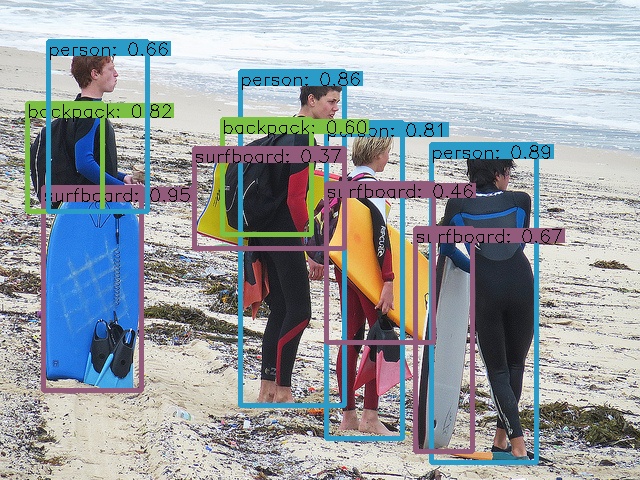
The images drawn are saved in the output directory, and the output results of the float model simulation inference (first 2 shown):
{"image_id": 562557, "category_id": 42, "bbox": [43.684708,187.861725,99.633865,204.318481], "score": 0.947503},
{"image_id": 562557, "category_id": 1, "bbox": [431.325500,144.585709,106.798584,319.920639], "score": 0.890941},
1.2.2 Running the yolov8s Fixed Point Model on PC
python3 yolov8_simulator.py \
--image 000000562557.jpg \
--model onnx_yolov8s_fixed.sim \
-n onnx_yolov8s_preprocess.py \
--draw_result output \
--soc_version CHIP
The images drawn are saved in the output directory, and the output results of the fixed model simulation inference (first 2 shown):
{"image_id": 562557, "category_id": 42, "bbox": [44.104973,189.841034,96.748329,201.353577], "score": 0.942028},
{"image_id": 562557, "category_id": 1, "bbox": [431.829865,145.265045,105.226593,319.568085], "score": 0.881899},
1.2.3 Running the yolov8s Offline Model on PC
python3 yolov8_simulator.py \
--image 000000562557.jpg \
--model onnx_yolov8s_CHIP.img \
-n onnx_yolov8s_preprocess.py \
--draw_result output \
--soc_version CHIP
The images drawn are saved in the output directory, and the output results of the offline model simulation inference (first 2 shown):
{"image_id": 562557, "category_id": 42, "bbox": [44.104973,189.841034,96.748329,201.353577], "score": 0.942028},
{"image_id": 562557, "category_id": 1, "bbox": [431.829865,145.265045,105.226593,319.568085], "score": 0.881899},
1.2.4 Running the yolov8s Offline Model on Development Board
The Linux SDK-alkaid has provided the app located at sdk/verify/release_feature/source/dla/ipu_server.
Compile the board-side ipu_server example.
cd sdk/verify/release_feature
make clean && make source/dla/ipu_server -j8
Final generated executable file location
sdk/verify/release_feature/out/${AARCH}/app/prog_dla_ipu_server
Run the ipu_server on the board to start the RPC service (PORT is the designated port number).
./prog_dla_ipu_server -p PORT
The prog_dla_ipu_server app has been run on the board to enable the RPC service, and the PC uses yolov8_simulator.py to run the AI offline model.
python3 yolov8_simulator.py \
--image 000000562557.jpg \
--model onnx_yolov8s_CHIP.img \
-n onnx_yolov8s_preprocess.py \
--draw_result output \
--soc_version CHIP \
--host board_ip_address \
--port PORT
The images drawn are saved in the output directory, and the output results of the offline model inference on the board (first 2 shown):
{"image_id": 562557, "category_id": 42, "bbox": [44.104973,189.841034,96.748329,201.353577], "score": 0.942028},
{"image_id": 562557, "category_id": 1, "bbox": [431.829865,145.265045,105.226593,319.568085], "score": 0.881899},
Parameter explanations are as follows:
--image: Inference image
--model: AI offline model (offline.img)
-n: Preprocessing .py file
--draw_result: Folder to save inference box results
--port: Board IP address
--host: Designated port number
If it is not possible to run ipu_server due to network environment issues, you can directly use the board-end running mode. Please refer to YOLOv8 Board-side Deployment.