PP-OCR
1 Overview
1.1 Background Introduction
PP-OCR is an open-source Chinese and English OCR system developed by Baidu, characterized by its ultra-lightweight design, high precision, and ease of use. It is currently one of the mainstream open-source OCR systems in the industry. As shown in the figure below, PP-OCR mainly consists of text detection, orientation classification, and text recognition:
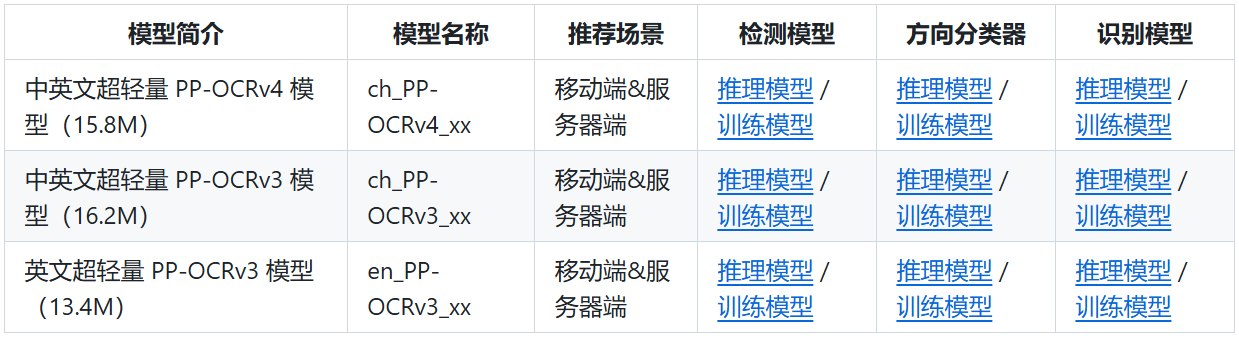
The PP-OCR community is continuously being updated, and we are using the PP-OCRv4 version. For more details, please refer to the official PP-OCR documentation:
https://github.com/PaddlePaddle/PaddleOCR/blob/v2.8.1/doc/doc_ch/PP-OCRv4_introduction.md
Since orientation classification does not affect the final text recognition results, we only select the text detection and text recognition models from the PP-OCR system for deployment. The model download addresses are as follows:
[ppocrv4_det](https://paddleocr.bj.bcebos.com/PP-OCRv4/chinese/ch_PP-OCRv4_det_infer.tar)

[ppocrv4_rec](https://paddleocr.bj.bcebos.com/PP-OCRv4/chinese/ch_PP-OCRv4_rec_infer.tar)
1.2 Usage Instructions
The Linux SDK-alkaid comes with pre-converted offline models and board-side examples by default. The relevant file paths are as follows:
-
Board-side example program path
Linux_SDK/sdk/verify/opendla/source/ocr/ppocr -
Board-side offline model paths
Linux_SDK/project/board/${chip}/dla_file/ipu_open_models/ocr/ppocr_det_640x640.img Linux_SDK/project/board/${chip}/dla_file/ipu_open_models/ocr/ppocr_rec_320x48.img -
Board-side test image path
Linux_SDK/sdk/verify/opendla/source/resource/lite_demo.png
If the user does not need to convert the model, they can directly skip to section 3.
2 Model Conversion
2.1 onnx Model Conversion
-
Setting up the Python environment
$conda create --name paddle_env python=3.8 --channel https://mirrors.tuna.tsinghua.edu.cn/anaconda/pkgs/free/
$conda activate paddle_env
$pip install --upgrade pip
# If your machine has CUDA9 or CUDA10 installed, run the following command for installation
$python -m pip install paddlepaddle-gpu==2.0.0 -i https://mirror.baidu.com/pypi/simple
$git clone https://github.com/PaddlePaddle/PaddleOCR
$cd PaddleOCR
$pip install -r requirements.txt -i https://pypi.tuna.tsinghua.edu.cn/simple
Note: The Python environment setup provided here is only for reference; please refer to the official source code running tutorial for specific setup processes:
https://github.com/PaddlePaddle/PaddleOCR/blob/v2.8.1/doc/doc_ch/environment.md https://github.com/PaddlePaddle/PaddleOCR/blob/v2.8.1/doc/doc_ch/installation.md -
Model testing
-
Run the model testing script to ensure the paddle_env environment is configured correctly.
$python3 tools/infer/predict_system.py --image_dir="./doc/imgs/00018069.jpg" --det_model_dir="./ch_PP-OCRv4_det_infer/" --rec_model_dir="./ch_PP-OCRv4_rec_infer/" --use_angle_cls=false --use_gpu="1"
For specific information, please refer to the PP-OCR official testing documentation
https://github.com/PaddlePaddle/PaddleOCR/blob/v2.8.1/doc/doc_ch/inference_ppocr.md
-
-
Model export
-
Run the model conversion script
$paddle2onnx --model_dir ./ch_PP-OCRv4_det_infer \ --model_filename inference.pdmodel \ --params_filename inference.pdiparams \ --save_file ./opendla/det_onnx/model.onnx \ --opset_version 11 \ --enable_onnx_checker True $paddle2onnx --model_dir ./ch_PP-OCRv4_rec_infer \ --model_filename inference.pdmodel \ --params_filename inference.pdiparams \ --save_file ./opendla/rec_onnx/model.onnx \ --opset_version 11 \ --enable_onnx_checker True -
Optimize the graph structure
$python3 -m paddle2onnx.optimize ./opendla/det_onnx/model.onnx ./opendla/det_onnx/ppocr_det_fix.onnx
$python3 -m onnxsim ./opendla/rec_onnx/model.onnx ./opendla/rec_onnx/model_sim.onnx
$python3 -m paddle2onnx.optimize ./opendla/rec_onnx/model_sim.onnx ./opendla/rec_onnx/ppocr_rec_fix.onnx
-
2.2 Offline Model Conversion
2.2.1 Pre & Post Processing Instructions
-
Preprocessing
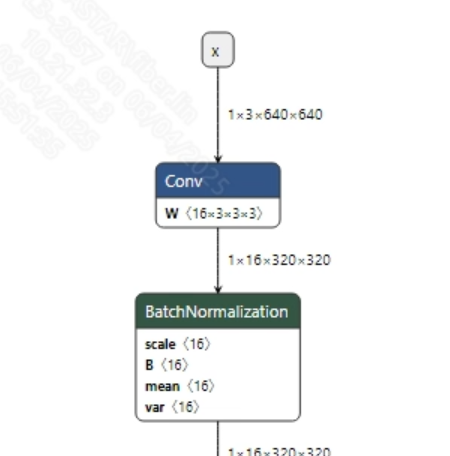
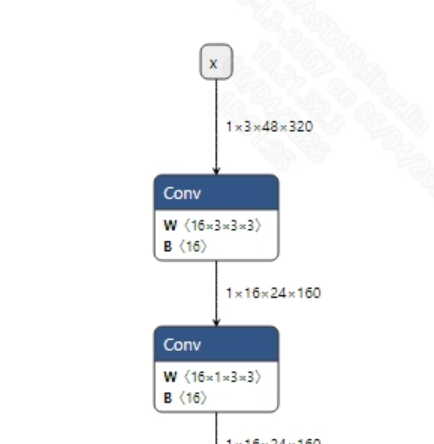
The input information for the successfully converted ppocr_det_fix.onnx and ppocr_rec_fix.onnx models is shown in the images below, with input image sizes of (1, 3, 640, 640) and (1, 3, 48, 320), respectively. Additionally, the input pixel values need to be normalized: the detection model requires normalization to [0, 1], while the text recognition model requires normalization to [-1, 1].
-
Postprocessing
The output information of the ppocr_det_fix.onnx model is shown in the image below, which indicates the probability of each pixel point being text in the image. It requires threshold filtering, binary conversion, and bounding box operations to ultimately output the coordinates of the detected text. For details, please refer to db_postprocess. The model's output dimensions are shown in the image below.
The output information of the ppocr_rec_fix.onnx model is shown in the image below; after obtaining the model's output data, you can call CTC decoding to get the final results.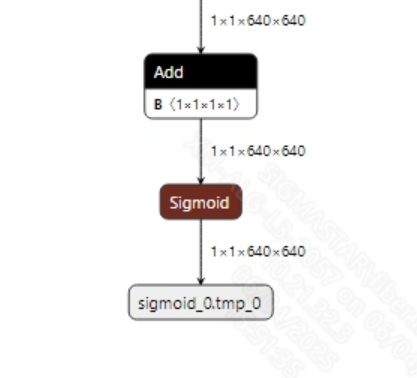
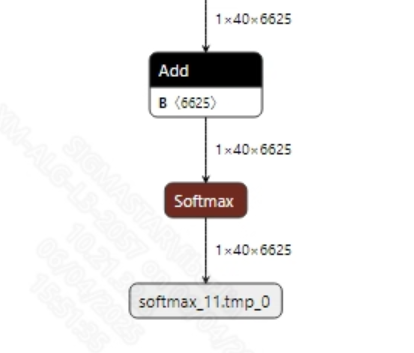
2.2.2 Offline Model Conversion Process
Note: 1) OpenDLAModel corresponds to the smodel files extracted from the compressed package image-dev_model_convert.tar. 2) The conversion command needs to be run in the Docker environment; please load the SGS Docker environment according to the Docker development environment tutorial first.
-
Copy the ONNX models to the conversion code directory
$cp opendla/det_onnx/ppocr_det_fix.onnx OpenDLAModel/ocr/ppocr/onnx $cp opendla/rec_onnx/ppocr_rec_fix.onnx OpenDLAModel/ocr/ppocr/onnx -
Conversion command
$cd IPU_SDK_Release/docker $bash run_docker.sh # Enter the OpenDLAModel directory in the docker environment $cd /work/SGS_XXX/OpenDLAModel $bash convert.sh -a ocr/ppocr -c config/ocr_ppocr.cfg -p SGS_IPU_Toolchain (absolute path) -s false -
Final generated model addresses
output/${chip}_${time}/ppocr_det_640x640.img
output/${chip}_${time}/ppocr_det_640x640_fixed.sim
output/${chip}_${time}/ppocr_det_640x640_float.sim
output/${chip}_${time}/ppocr_rec_320x48.img
output/${chip}_${time}/ppocr_rec_320x48_fixed.sim
output/${chip}_${time}/ppocr_rec_320x48_float.sim
2.2.3 Key Script Parameter Analysis
-   det_input_config.ini

        [INPUT_CONFIG]
        inputs = x;                         # ONNX input node name, separate with commas if there are multiple;
        training_input_formats = RGB;       # Input format during model training, usually RGB;
        input_formats = BGRA;               # Board input format, can choose BGRA or YUV_NV12 as appropriate;
        quantizations = TRUE;               # Enable input quantization, no need to change;
        mean_red = 123.48;                  # Mean value, related to model preprocessing, configure according to actual situation;
        mean_green = 116.28;                # Mean value, related to model preprocessing, configure according to actual situation;
        mean_blue = 103.53;                 # Mean value, related to model preprocessing, configure according to actual situation;
        std_value = 58.395:57.12:57.375;    # Standard deviation, related to model preprocessing, configure according to actual situation;
        [OUTPUT_CONFIG]
        outputs = sigmoid_0.tmp_0;          # ONNX output node name, separate with commas if there are multiple;
        dequantizations = FALSE;            # Whether to enable dequantization, fill in according to actual needs, recommended to be TRUE. Set to False, output will be int16; set to True, output will be float32;

-   rec_input_config.ini

        [INPUT_CONFIG]
        inputs = x;                         # ONNX input node name, separate with commas if there are multiple;
        training_input_formats = RGB;       # Input format during model training, usually RGB;
        input_formats = BGRA;               # Board input format, can choose BGRA or YUV_NV12 as appropriate;
        quantizations = TRUE;               # Enable input quantization, no need to change;
        mean_red = 127.5;                   # Mean value, related to model preprocessing, configure according to actual situation;
        mean_green = 127.5;                 # Mean value, related to model preprocessing, configure according to actual situation;
        mean_blue = 127.5;                  # Mean value, related to model preprocessing, configure according to actual situation;
        std_value = 127.5;                  # Standard deviation, related to model preprocessing, configure according to actual situation;
        [OUTPUT_CONFIG]
        outputs = softmax_11.tmp_0;         # ONNX output node name, separate with commas if there are multiple;
        dequantizations = FALSE;            # Whether to enable dequantization, fill in according to actual needs, recommended to be TRUE. Set to False, output will be int16; set to True, output will be float32;

-   ocr_ppocr.cfg

        [PPOCR]
        CHIP_LIST=pcupid                                            # Platform name, must match board platform, otherwise model will not run
        Model_LIST=ppocr_det_fix,ppocr_rec_fix                      # Input ONNX model names
        INPUT_SIZE_LIST=0,0                                         # Model input resolution, can be left unspecified here
        INPUT_INI_LIST=det_input_config.ini,rec_input_config.ini     # Configuration files
        CLASS_NUM_LIST=0 ,0                                         # Just fill in 0
        SAVE_NAME_LIST=ppocr_det_640x640.img,ppocr_rec_320x48.img   # Output model names
        QUANT_DATA_PATH=quant_data_det,quant_data_rec               # Quantization image paths
2.3 Model Simulation
-
Get float/fixed/offline model output
$bash convert.sh -a ocr/ppocr -c config/ocr_ppocr.cfg -p SGS_IPU_Toolchain (absolute path) -s trueAfter executing the above command, the tensor output of the
floatmodel will be saved by default to a txt file in theocr/ppocr/log/outputpath. Additionally, theocr/ppocr/convert.shscript also provides simulation examples forfixedandoffline; users can uncomment the code blocks to obtainfixedandofflinemodel outputs during runtime. -
Model Accuracy Comparison
Under the condition that the input is the same as the above model, enter the environment built in section 2.1. For the detection model, you can add a print statement at line 273 of the
PaddleOCR/tools/infer/predict_det.pyfile: print(outputs) For the text recognition model, you can add a print statement at line 825 of thePaddleOCR/tools/infer/predict_rec.pyfile: print(preds) Obtain the output tensor corresponding to the Pytorch model node, and compare it with the float, fixed, and offline models. Additionally, it is important to note that the output format of the original model isNCHW, while the output formats of the float/fixed/offline models areNHWC.
3 Board-Side Deployment
3.1 Program Compilation
Before compiling the example program, you need to first select the deconfig for SDK full-package compilation based on the board (nand/nor/emmc, DDR model, etc.), which can be referenced in the alkaid SDK sigdoc document titled "Development Environment Setup."
- Compile the board-side ppocr example. $cd sdk/verify/opendla $make clean && make source/ocr/ppocr -j8
- Final generated executable file address sdk/verify/opendla/out/${AARCH}/app/prog_ocr_ppocr
3.2 Running Files
When running the program, the following files need to be copied to the board: - prog_ocr_ppocr - lite_demo.png - ppocr_keys_v1.txt - ppocr_det_640x640.img, ppocr_rec_320x48.img
3.3 Running Instructions
- Usage:
./prog_ocr_ppocr det_model rec_model image dict(execution file usage command) - Required Input:
- det_model: text detection model
- rec_model: text recognition model
- image: image folder/path of a single image
- dict: dictionary
- Typical output: ./prog_ocr_ppocr models/ppocr_det_640x640.img models/ppocr_rec_320x48.img resource/lite_demo.png resource/ppocr_keys_v1.txt client [758] connected, module:ipu found 1 images! [0] processing resource/lite_demo.png... fillbuffer processing... net input width: 640, net input height: 640 花费了0.457335秒, 0.999969, 0.997668, 0.999969, 发足够的滋养, 0.999969, 14, 0.999969, 即时持久改善头发光泽的效果, 给干燥的头, 0.999969, 0.990198, 0.999969, 13, 0.999969, 【主要功能】:可紧致头发磷层, 从而达到, 0.999969, 0.994448, 0.999969, 12, 0.999969, 0.972573, 0.999969, (成品包材), 0.999969, 11, 0.999969, 0.925898, 0.999969, 糖、椰油酰胺丙基甜菜碱、泛醒, 0.999969, 10, 0.999969, 【主要成分】:鲸蜡硬脂醇、燕麦B-葡聚, 0.940574, 0.961928, 0.999969, 9, 0.799982, 【适用人群】:适合所有肤质, 0.999969, 0.995842, 0.999969, 8, 0.999969, 0.996577, 0.999969, 【净含量】:220ml, 0.969673, 7, 0.444441, 【产品编号】:YM-X-30110.96899, 0.999969, 6, 0.999969, 【品名】:纯臻营养护发素, 0.999969, 0.995007, 0.999969, 5, 0.999969, 0.985133, 0.999969, 【品牌】:代加工方式/OEMODM, 0.988205, 4, 0.999969, 每瓶22元, 1000瓶起订), 0.985685, 0.993976, 0.999969, 3, 0.999969, (45元/每公斤, 100公斤起订), 0.988205, 0.97417, 0.999969, 2, 0.999969, 0.992728, 0.999969, 产品信息/参数, 0.999969, 1, 0.999969, 纯臻营养护发素0.993604, 0.986637, Thede, 0.746648, invoke time: 54.502000 ms postprocess time: 58.893000 ms text recognition time: 2718.544000 ms ------shutdown IPU0------ client [758] disconnected, module:ipu