TrustZone部署
REVISION HISTORY
| Revision No. | Description |
Date |
|---|---|---|
| 1.0 | 05/22/2023 |
1. SGS TRUSTZONE编译和部署
1.1. 刻录OTP_TZ启动TrustZone
TrustZone是否启动是由OTP里TZ bit决定。OTP_TZ默认为0,将OTP_TZ=1刻录成1可以启动芯片TrustZone功能。
提供uboot cmd用来刻录OTP_TZ,在设置完该command后,须于下次启动才会生效。
WRITE COMMAND:
otpctrl -w 0x40 0x0 0xffffffff
Sgs# otpctrl -w 0x40 0x0 0xffffffff
[OTP OPTEE] operation = 1, command = 40000000, data = ffffffff
READ COMMAND:
otpctrl -r 0x40
Sgs# otpctrl -r 0x40
[OTP OPTEE] operation = 2, command = 40000000, data = 0
Results:
0x000:: 0xff 0xff 0xff 0xff
1.2. 编译带TrustZone功能的系统镜像
编译:
-
cd ${Alkaid}/project/
-
export ARCH=arm
-
export CROSS_COMPILE=arm-linux-gnueabihf-
-
export PATH=/tools/toolchain/gcc-11.1.0-20210608-sigmastar-glibc-x86_64_arm-linux-gnueabihf/bin:$PATH
-
make ipc_iford.spinand.glibc-11.1.0-squashfs.ssc029a.512.bga12_ddr4_optee_defconfig
-
make image -j32
产生档案:
- cd ${Alkaid}/project/image/output/images
烧录系统镜像后,在Linux开机时可以看到driver初始化及与OP-TEE交握的讯息:
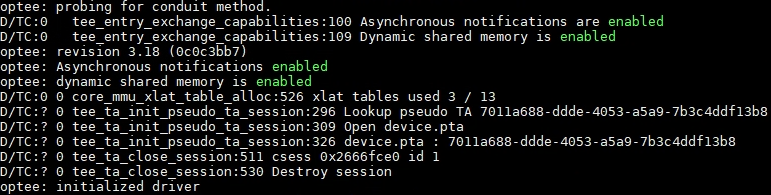
图1 开机log
1.3. 编译和运行OP-TEE client、OP-TEE example
1.3.1 OP-TEE client
optee_client包含了2个主要的部分:
-
User-space library: libteec.so.1 (用来提供GlobalPlatform的TEE client APIs)
-
User-space daemon: tee-supplicant (用来提供 OP-TEE service 的 daemon)
编译:
-
cd optee_client/
-
vim config.mk修改:CFG_TEE_FS_PARENT_PATH、CFG_TEE_CLIENT_LOAD_PATH和CFG_TEE_PLUGIN_LOAD_PATH,改成符合使用者指定的路径。
CFG_TEE_FS_PARENT_PATH: 在Linux中TEE的file system路径,默认值是/customer/tee/fs
CFG_TEE_CLIENT_LOAD_PATH: 在Linux中load library的路径,默认值是/customer/tee/lib。 此路径下必须包含一个optee_armtz目录,在optee_armtz目录中会放置TA
CFG_TEE_PLUGIN_LOAD_PATH: 在Linux中放置tee-supplicant user plugin的路径。 默认值是/customer/tee/lib/tee-supplicant/plugins
-
export ARCH=arm
-
export CROSS_COMPILE=arm-linux-gnueabihf-
-
export PATH=/tools/toolchain/gcc-11.1.0-20210608-sigmastar-glibc-x86_64_arm-linux-gnueabihf/bin:$PATH
-
make
产生档案:
-
out/libteec/libteec.so.1 (需将其放到开发板上的LD_LIBRARY_PATH的路径中)
-
out/tee-supplicant/tee-supplicant (需将其放到开发板上任意路径,比如/customer/tee路径中)
1.3.2 OP-TEE example
optee_example包含了多组CA+TA example,如hello_world、acipher、aes、rsa、resure_storage、self_hash等,为帮助开发者提供参考例程。以下介绍编译hello_world TA和CA并运行。
编译Hello World CA:
-
cd optee_examples
-
cd hello_world/host
-
make TEEC_EXPORT=
<optee_client>/out/export/usr --no-builtin-variables<optee_client>为optee_client源码所在路径,编译optee_example需要依赖optee_client源码
编译Hello World TA:
-
cd optee_examples
-
cd hello_world/ta
-
make PLATFORM=iford TA_DEV_KIT_DIR=
<optee_os>/out/iford/export-ta_arm32<optee_os >为optee_os源码所在路径,编译optee_example需要依赖optee_os源码
产生的档案:
-
CA: hello_world/host/optee_examples_hello_world
-
TA: hollo_world/ta/8aaaf200-2450-11e4-abe2-0002a5d5c51b.ta (需将其放到开发板上的$(CFG_TEE_CLIENT_LOAD_PATH)/optee_armtz目录中)
8aaaf200-2450-11e4-abe2-0002a5d5c51b为hello_world使用的UUID,ta文件不可随意更改文件名,否则会导致CA运行时,tee-supplicant无法加载TA到TEE运行。
以背景任务执行 tee_supplicant:
-
cd /customer/tee
-
export LD_LIBRARY_PATH=/customer/tee/lib:$LD_LIBRARY_PATH (假设CFG_TEE_CLIENT_LOAD_PATH指定libteec.so.1存放linux路径为/customer/tee/lib)
-
./tee-supplicant &
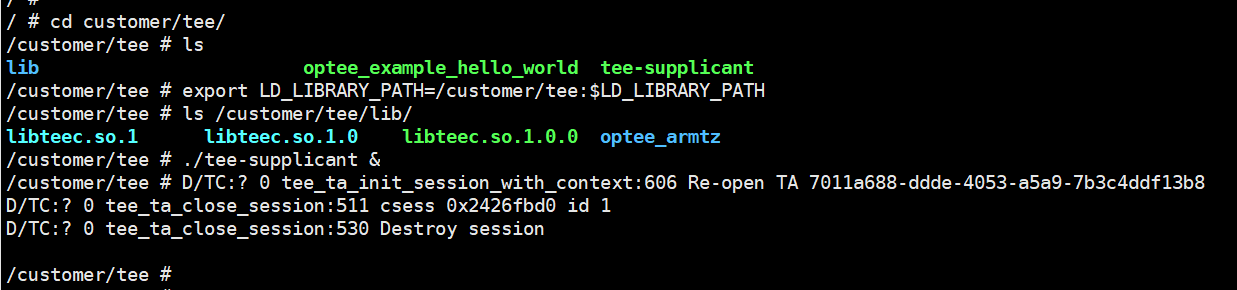
图2 执行tee_supplicant
Hello World执行的结果如下:
- ./optee_example_hello_world

图3 执行CA
linux通过tee_supplicant从文件系统中获取TA image(8aaaf200-2450-11e4-abe2-0002a5d5c51b.ta),传递给op-tee再将TA运行到op-tee中。
hello_world example实现的效果:CA送出一个hello command给TA,TA收到整数加1再回传给CA。
2. 开发指南
2.1. UUID
CA会用UUID来识别一个trusted application(TA)。
可靠的128位数字组成的UUID可以通过访问 https://www.uuidgenerator.net/version4 网站获取。
2.2. optee_examples范例程序
一次完整的功能(比如数据加解密、安全内存访问等)调用一般都是起源于CA,TA做具体功能实现并返回数据到CA。在GP(global platform)中规定的CA端接口主要的是五个接口,分别如下:
-
TEEC_InitializeContext(): 初始化TEE context,完成open tee driver,建立与TEE之间的context
-
TEEC_OpenSession(): 建立CA与TA之间的会话窗口
-
TEEC_InvokeCommand(): 想TA发送执行请求来执行具体的操作
-
TEEC_CloseSession(): 关闭CA与TA之间的会话窗口
-
TEEC_FinalizeContext():清空建立的contex
一次完整的CA调用过程需要做一次调用执行initContext, Opensession, InvokeCommand, close session, FinalizeContext操作。
官方文档《TEE_Client_API_Specification.pdf》提供更详细的TEEC API接口介绍:https://globalplatform.org/specs-library/tee-client-api-specification/
针对CA所呼叫的5个TEE client API,TA端也有对应的TA interface,TA就是由相对应的TA interface所组成。
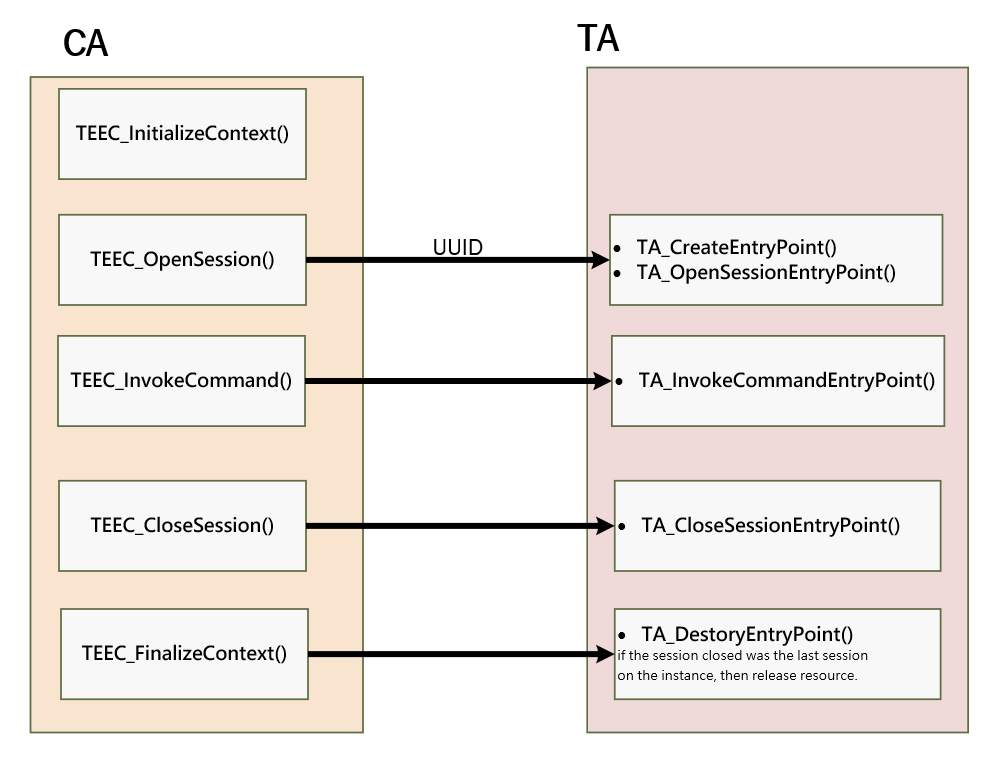
图4 TEEC api和TA interface对应呼叫关系
官方文档《GPT_TEE_Internal_Core_API_Specification_PublicReview.pdf》提供更详细的AT interface 以及 GlobalPlatform TEE internal API介绍:https://globalplatform.org/specs-library/tee-client-api-specification/

图5 CA/TA concept
optee_examples提供了OP-TEE的范例程序,包含了CA及TA。比如Hello World example实现功能:CA带入一个42的值,TA执行TA_HELLO_WORLD_CMD_INC_VALUE的功能,将带入值加1,之后再回传执行的结果给CA。
透过optee_examples可以了解到如何建构CA及TA。
2.3. optee_os编译说明
SGS提供的project源码包里包含optee os二进制镜像,如果使用者有需要开发optee_os,自行编译的过程如下:
编译:
-
cd optee_os/
-
export ARCH=arm
-
export CROSS_COMPILE=arm-linux-gnueabihf-
-
export PATH=/tools/toolchain/gcc-11.1.0-20210608-sigmastar-glibc-x86_64_arm-linux-gnueabihf/bin:$PATH
-
make PLATFORM=iford clean
-
make PLATFORM=iford -j8
产生档案:
-
cp optee_os/out/iford/core/tee.bin ${alkaid}/project/board/iford/boot/optee/tee.bin
-
重新编译alkaid
optee_os的关键目录说明如下:

图6 optee-os目录结构
更详细的optee_os开发说明需要阅读官方网站:https://optee.readthedocs.io/en/latest/building/gits/optee_os.html
2.4. boot和kernel编译说明
SGS提供的boot和kernel源码包包含默认打开OP-TEE配置的defconfig。
开发者自己编译boot和Kernel时,需要留意打开OP-TEE相关config选项,才能正常运行TEE系统和trustzone功能。
2.4.1 boot menuconfig配置
Device Drivers > Trusted Execution Environment Support:
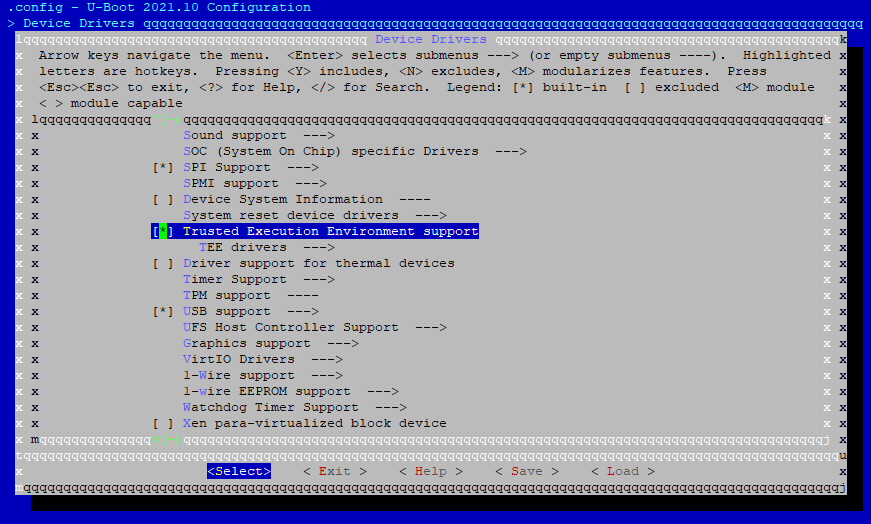
图7 Config UBoot OPTEE 1
Device Drivers > TEE drivers > OP-TEE:
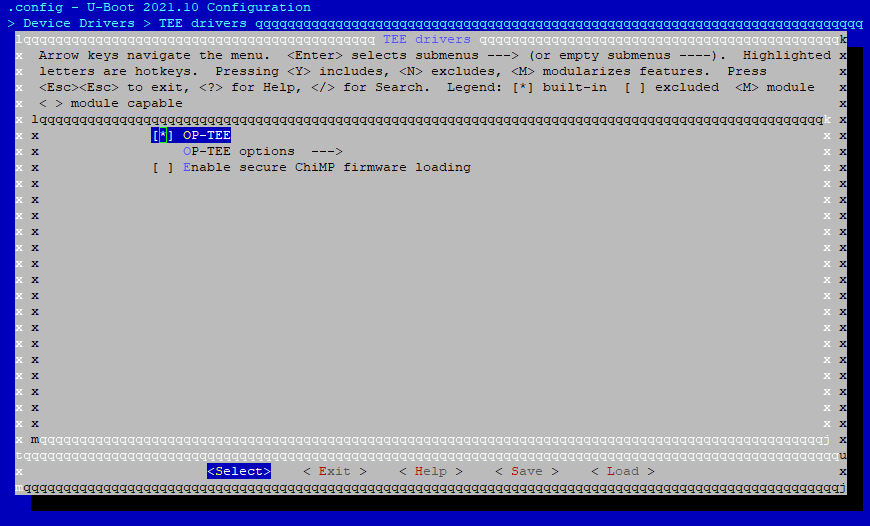
图8 Config UBoot OPTEE 2
2.4.2 kernel menugconfig配置
Device Drivers > Trusted Execution Environment Support:
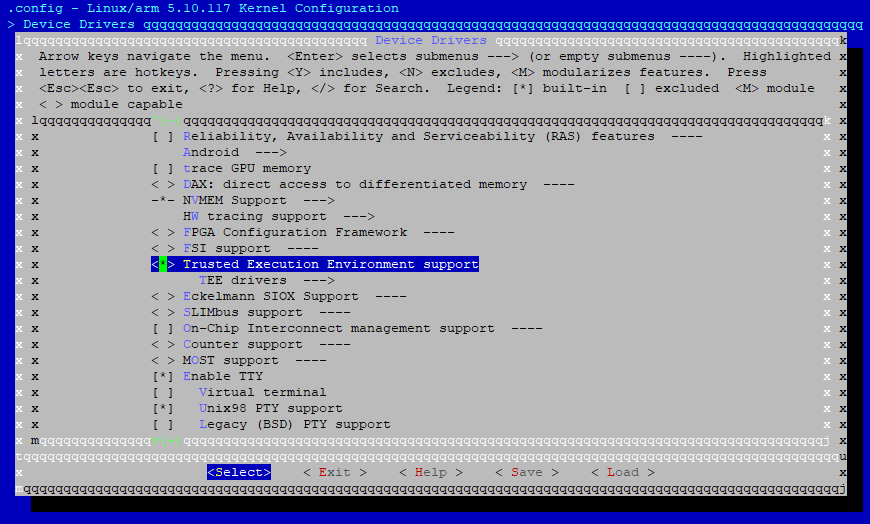
图9 Config Kernel OPTEE 1
Device Drivers > TEE drivers > OP-TEE:
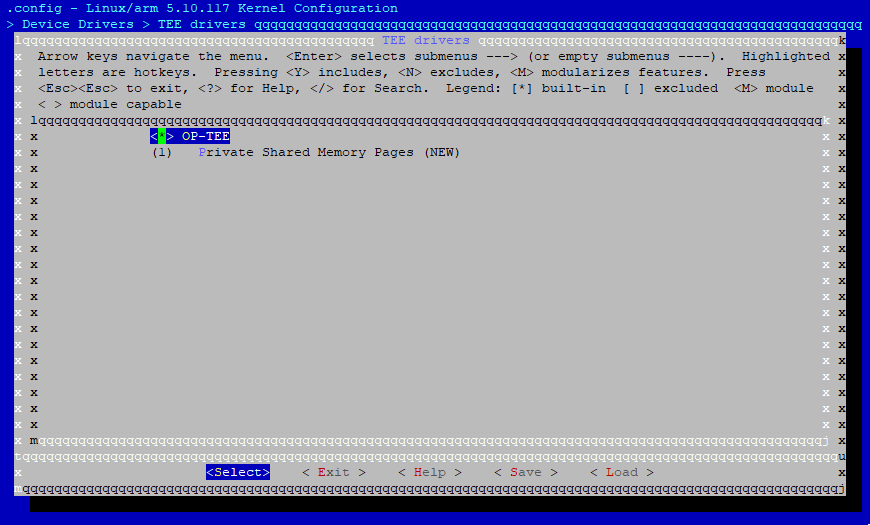
图10 Config Kernel OPTEE 2