3. Model Inference
LLM Converter provides two inference tools: run_llm and run_serve, designed for two key stages: functional verification and production deployment. Below is a detailed comparison of both:
| Tool | run_llm.py | run_serve.py |
|---|---|---|
| Purpose | Functional verification and single inference test after model conversion | Production environment deployment |
| Interface | Command Line (CLI) invocation | HTTP API (OpenAI compatible) |
| Concurrency Support | Single sequential execution | Support for multiple concurrent client requests |
| Running Mode | Single-threaded sequential execution | Support for multiple concurrent client requests and queue management |
| Task Management | Manual execution, no built-in scheduling | Built-in request queue and automatic scheduling |
| Applicable Scenarios | Model functional verification, conversion testing, debugging analysis | Online inference service, multimodal integration, cloud service deployment |
The following will introduce the usage of the above two tools respectively.
1. run_llm Inference Model
In the LLM Converter framework, run_llm serves as the direct inference interface for large language models, used to execute a complete inference task and output model running results. This module is mainly used to verify the functional completeness after model conversion, detect the correctness of model loading, tokenizer configuration, and inference process, helping developers discover and locate problems before deployment.
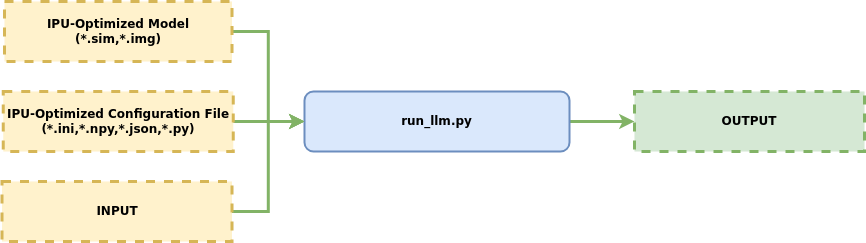
Supports multiple input types including text, image, video, audio, etc.
1.1 Usage
Simple usage example:
python3 Tool/Scripts/LLM_Converter/run_llm.py \
-d=SGS_LLM_Models/Qwen/Qwen1.5-0.5B/output_models \
--prompt "Give me a short introduction to large language model."
Description of configurable parameters:
1.1.1 Basic Parameters
💡 (1) -d, --model_dir: (Required Parameter)
-- Purpose: Specify the directory containing SGS LLM model and configuration files.

-- Usage:

```
python3 run_llm.py -d /path/to/output_model
```
Usage
The folder path specified by -o / --output when executing convert_hf_to_sim.py.
💡 (2) -t, --tokenize_dir: (Optional Parameter)
-- Purpose: Specify the directory containing tokenizer files and configurations.

-- Usage:

```
python3 run_llm.py -t /path/to/tokenizer
```
Usage
Only need to manually specify when no tokenizer-related files are generated in the output_models directory
When executing convert_hf_sim.py, if no tokenizer-related files are generated, the following prompt will appear:
Please use the -t parameter when running run_llm to specify the tokenizer directory.
In such cases, it is necessary to configure the -t parameter when running the command.
1.1.2 Data Processing Parameters
The following parameters mainly serve the question-answering template tokenize_template.py:
💡 (1) --prompt:
-- Purpose: Specify text input, supports various texts including Chinese, English, etc. Default is Hello

-- Usage:
```
python3 run_llm.py --prompt "Hello"
```
💡 (2) --image:
-- Purpose: Specify image input, common image formats such as JPG, PNG, etc.

-- Usage:
```
python3 run_llm.py  --image /path/to/image.jpg
```
💡 (3) --video:
-- Purpose: Specify video input

-- Usage:
```
python3 run_llm.py --video /path/to/video.mp4
```
💡 (4) --wav_file:
-- Purpose: Specify audio input

-- Usage:
```
python3 run_llm.py  --wav_file audio1.wav audio2.wav
```
💡 (5) --use_audio_in_video:
-- Purpose: Video input companion parameter, specifies whether to process audio information in the video. Default is False

-- Usage:
```
python3 run_llm.py  --use_audio_in_video
```
💡 (6) --max_num:
-- Purpose: Maximum quantity limit during image preprocessing. Default is 1

-- Usage:
```
python3 run_llm.py  --max_num 1
```
1.1.3 Model Configuration Parameters
💡 (1) --no_streamer:
-- Purpose: Whether to disable streaming output. Default is False

-- Usage:
```
python3 run_llm.py  --no_streamer
```
💡 (2) --processor_decode:
-- Purpose: Whether to use processor decoding. Default is False

-- Usage:
```
python3 run_llm.py  --processor_decode
```
1.1.4 System Parameters
💡 (1) --soc_version:
-- Purpose: Set the IPU SoC version

-- Usage:
```
python3 run_llm.py  --soc_version CHIP
```
💡 (2) --show_log:
-- Purpose: Output detailed conversion process log information in real-time, facilitating real-time debugging, status monitoring, and troubleshooting for developers during the conversion process

-- Usage:
```
python3 run_llm.py  --show_log
```
1.1.5 RPC Configuration Parameters
💡 (1) --host:
-- Purpose: Set the IPU server host address

-- Usage:
```
python3 run_llm.py  --host 192.168.1.100
```
💡 (2) --port:
-- Purpose: Set the IPU server port

-- Usage:
```
python3 run_llm.py  --port 8080
```
💡 (3) --model_onboard_dir:
-- Purpose: Specify the loading directory of the model on IPU

-- Usage:
```
python3 run_llm.py  --model_onboard_dir /path/to/model
```
💡 (4) --timeout:
-- Purpose: Set the IPU server timeout (seconds). Default is 60

-- Usage:
```
python3 run_llm.py  --timeout 120
```
📋 Parameter Dependency Description:
-
Basic Required: -d is a required parameter
-
- --image for image understanding
- --video + --use_audio_in_video for video understanding
- --wav_file for audio processing
-
Output Control: --no_streamer for non-streaming output, --processor_decode for special decoding (e.g., Florence-2-base secondary decoding)
2. run_serve Inference Model
In the LLM Converter framework, run_serve is the core tool for deploying large language models as production-grade HTTP API services. This server encapsulates the converted model as a high-performance, scalable API endpoint and provides the following capabilities:
- Unified Inference Service: Support integrated processing of text and multimodal models, achieving compatibility of a single server with multiple input types.

- Standardized Interface: Adopt OpenAI-compatible API design, facilitating integration with existing tools and client applications.

- Production-grade Deployment: Built-in concurrent processing, resource management, and service monitoring capabilities, meeting high availability and high-performance production environment requirements.
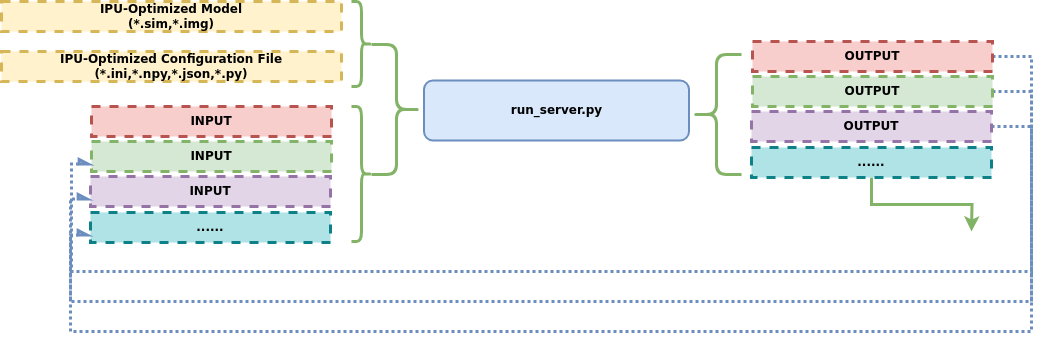
Through run_serve, developers can quickly deploy optimized models as stable, scalable cloud services.
2.1 Usage
-
Terminal running example:
python3 Tool/Scripts/LLM_Converter/run_serve.py \ -d=SGS_LLM_Models/Qwen/Qwen1.5-0.5B/output_models \ --port 8013 -
Remote to development board inference:
The Linux SDK-alkaid has provided the app located at sdk/verify/release_feature/source/dla/ipu_server.
Usage process is as follows:
(1) First, run ipu_server on the board to start the RPC service (PORT is the designated port number)
./prog_dla_ipu_server -p PORT
(2) Second, run run_serve.py on the PC
python3 Tool/Scripts/LLM_Converter/run_serve.py \
-d=SGS_LLM_Models/Qwen/Qwen1.5-0.5B/output_models \
--port 8013
--ipu_host 10.44.16.3
--ipu_port 3333
--model_onboard_dir /path/to/model/on/borad/
Description of configurable parameters:
2.1.1 Basic Parameters
💡 (1) -d, --dir: (Required Parameter)
-- Purpose: Specify the directory containing SGS LLM model and configuration files.

-- Usage:

```
python3 run_llm.py -d /path/to/output_model
```
Usage
The folder path specified by -o / --output when executing convert_hf_to_sim.py.
💡 (2) -t, --tokenize: (Optional Parameter)
-- Purpose: Specify the directory containing tokenizer files and configurations.

-- Usage:

```
python3 run_llm.py -t /path/to/tokenizer
```
Usage
Only need to manually specify when no tokenizer-related files are generated in the output_models directory
When executing convert_hf_sim.py, if no tokenizer-related files are generated, the following prompt will appear:
Please use the -t parameter when running run_llm to specify the tokenizer directory.
In such cases, it is necessary to configure the -t parameter when running the command.
2.1.2 Hardware Parameters
💡 (1) --host:
-- Purpose: Set the IPU server host address

-- Usage:
```
--host 192.168.1.100
```
💡 (2) --port:
-- Purpose: Set the IPU server port

-- Usage:
```
--port 8080
```
💡 (3) --model_onboard_dir:
-- Purpose: Specify the loading directory of the model on IPU

-- Usage:
```
--model_onboard_dir /path/to/model
```
💡 (4) --timeout:
-- Purpose: Set the IPU server timeout (seconds). Default is 60

-- Usage:
```
--timeout 60
```
💡 (5) --ipu_host:
-- Purpose: Set the IPU hardware server host address

-- Usage:
```
--ipu_host 192.168.1.100
```
💡 (6) --ipu_port:
-- Purpose: Set the IPU hardware server port

-- Usage:
```
--ipu_port 8080
```
2.1.3 System Parameters
💡 (1) --soc_version:
-- Purpose: Set the IPU SoC version

-- Usage:
```
--soc_version CHIP
```
💡 (2) --show_log:
-- Purpose: Output detailed conversion process log information in real-time, facilitating real-time debugging, status monitoring, and troubleshooting for developers during the conversion process

-- Usage:
```
--show_log
```
💡 (3) --log_level:
-- Purpose: Set the type of detailed conversion process log information output

-- Usage:
```
--log_level 'info'
```
Usage
Optional Values
-
debug: Debug information (most detailed)
-
info: General information (default)
-
warning: Warning information
-
error: Error information (least detailed)
💡 (4) --verbose_logs:
-- Purpose: Whether to enable verbose logs. Default is False

-- Usage:
```
--verbose_logs
```
💡 (5) --max_history_tokens:
-- Purpose: Set the maximum number of history tokens. Default value is 2048

-- Usage:
```
--max_history_tokens 2048
```
2.1.4 Performance Parameters
💡 (1) --smart_processing_mode:
-- Purpose: Set smart processing mode

-- Usage:
```
--smart_processing_mode balanced
```
Usage
Optional Values
-
conservative: Conservative mode - Prioritize stability, suitable for critical tasks
-
balanced: Balanced mode (default) - Balance between performance and stability
-
aggressive: Aggressive mode - Prioritize performance, suitable for high-concurrency scenarios
💡 (2) --max_queue_size:
-- Purpose: Set the maximum length of the request queue. Default is 50

-- Usage:
```
--max_queue_size 50
```
💡 (3) --max_concurrent:
-- Purpose: Set the maximum concurrent processing number. Default is 1
-- Usage:
```
--max_concurrent 1
```
2.2 Multi-turn Dialogue Running Method Reference
Running method example:
step1: Open terminal to run:
python3 run_serve.py
-d Qwen2.5/output_models/
--port 8013
step2: Open another terminal to run:
curl -X POST http://localhost:8013/v1/chat/completions
 -d '{
      "messages": [
        {"role": "user", "content": "Hello, please introduce yourself"}
      ],
      "stream": true
    }'
3. Development Board Environment Setup & Direct Inference
This section only applies to IPU development boards with Ubuntu installed. Development board memory is limited, and the Python runtime environment plus dependency libraries consume significant memory, making it only suitable for running smaller LLM models. For large models, please refer to the previous two sections for PC-side inference.
On an Ubuntu development board, after setting up the Python runtime environment directly, you can perform model inference independently on the board without relying on a PC.
The underlying call chain for on-board inference is as follows: when run_llm.py / run_serve.py imports calibrator_custom, it detects the current aarch64 architecture via platform.machine() and automatically loads py_ipu_adapter to replace the native libraries (such as py_wrapper) used on the x86_64 platform. The core components of py_ipu_adapter include:
py_ipu: An inference engine compiled as an aarch64 native shared library. ItsIPUModelclass directly calls the board-side IPU driver, providing low-level interfaces such asalloc_buffer,set_input,invoke, andget_outputfor model loading and operator execution.stubs: Provides no-op stubs for modules only available on x86_64 (such assgs_chalkfor computation graph construction,compile_offlinefor offline compilation, andcalibratorfor quantization calibration), ensuring the inference code can import normally without triggering link errors.
The upper-level inference scripts are platform-agnostic — the same run_llm.py / run_serve.py code runs directly on both PC and board.
3.1 Environment Setup
1. Install System Dependencies
sudo apt install python3-pip libgl1
2. Install IPU Python Package
The py_ipu offline wheel package is typically located in the /usr/local/share directory. Please select the corresponding .whl file based on your Python version:
python3 -m pip install py_ipu-1.0.0-py3-none-linux_aarch64.whl
3. Install Python Dependencies
# PyTorch (CPU version)
python3 -m pip install torch torchvision --index-url https://download.pytorch.org/whl/cpu

# Other dependencies
python3 -m pip install \
    opencv_python==4.11.0.86 \
    transformers==4.57.3 \
    Pillow==11.2.1 \
    onnx==1.17.0 \
    joblib==1.4.2 \
    accelerate==1.3.0 \
    flatbuffers==25.2.10 \
    attrdict \
    einops==0.8.1 \
    timm==1.0.15 \
    draccus==0.11.5 \
    imageio==2.37.0 \
    uvicorn==0.38.0 \
    fastapi==0.124.4 \
    aiohttp==3.13.2 \
    -i https://mirrors.aliyun.com/pypi/simple
4. Configure bootargs
Ensure the kernel boot parameters include the following key item. It is recommended to reserve 1.5GB for MMA:
mma_heap=mma_heap_name0,miu=0,sz=0x60000000
3.2 Model Inference
After environment setup, copy the converted model directory (output_models/) to the board and you can run inference directly.
run_llm single inference:
python3 run_llm.py -d=./Qwen3-0.6B/ --prompt "Hello"
run_serve service mode:
python3 run_serve.py -d=./Qwen3-0.6B/ --port 8888
Once the service is started, use Cherry Studio or other OpenAI-compatible frontend tools to connect via http://<board_IP>:8888 for multi-turn dialogue.