2. Model Conversion
LLM_Converter supports converting Hugging Face format large language models into inference models executable on the IPU platform.
Workflow Description:
Use converter_hf_to_sim.py to convert Hugging Face models to IPU format. During the conversion process, converter_hf_to_sim.py performs model construction and conversion by calling the model construction scripts supported by the current tool.
This chapter will detail how to use the converter_hf_to_sim tool to convert Hugging Face format pre-trained models to inference formats supported by the IPU platform.
1. Model Conversion Preparation
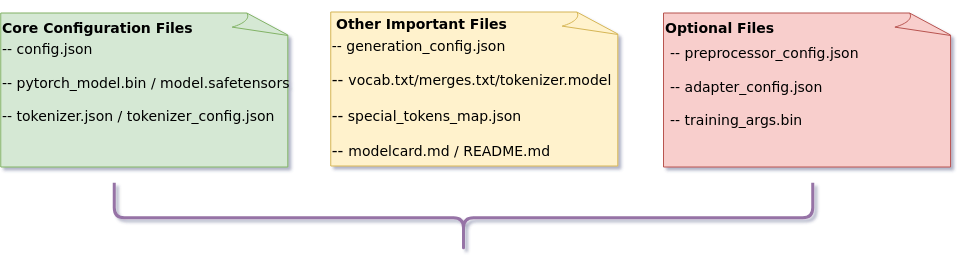
Before performing model conversion, please prepare the following files:
Main configuration files after downloading Hugging Face pre-trained model:

- 📋 Core Configuration Files:
   config.json (Complete definition configuration file for model architecture and parameters)

   pytorch_model.bin / model.safetensors (Model weight files)

   tokenizer.json / tokenizer_config.json (Tokenizer configuration files)

- 📋 Other Important Files
    generation_config.json (Text generation parameter configuration file)

    vocab.txt / merges.txt / tokenizer.model (Tokenizer vocabulary files)

    special_tokens_map.json (Special token mapping file)

    modelcard.md / README.md (Model card documentation)

- 📋 Optional Files
   preprocessor_config.json (Multimodal model configuration)

   adapter_config.json (Adapter model configuration)
| Conversion Tool Version Requirements |
|---|
| Core Dependency: transformers 4.57.3 |
Verification Method:
import transformers
print(transformers.__version__)
Notice
❌ Prohibit using models of other transformer versions
❌ Prohibit mixing different versions of transformers library
2. Model Conversion Tool Usage Guide
convert_hf_to_sim.py is the core script of the LLM Converter tool, used to convert Hugging Face format pre-trained models to inference formats supported by the IPU platform. This chapter will detail the complete usage process of this script, guiding users through each step of model conversion. Diagram of using convert_hf_to_sim.py to convert models:
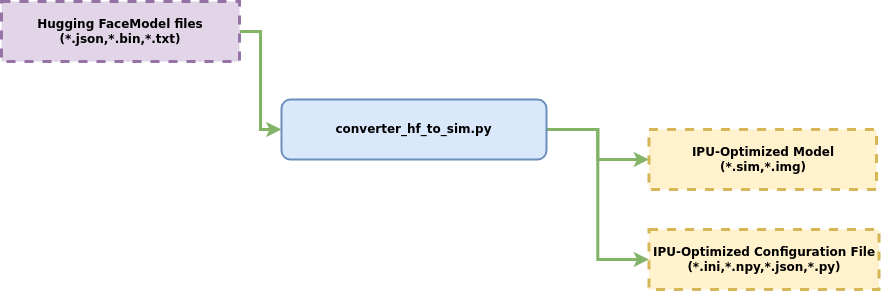
Model conversion process description:
① Hugging Face model files
② Hugging Face model configuration files
Feed into the model conversion tool LLM_converter,
to obtain models in the format supported by the IPU platform and configuration files adapted for IPU platform inference.
The following will detail how to use the convert_hf_to_sim.py script to convert Hugging Face format models.
Model Conversion Flow Overview
The conversion tool internally executes the following three phases in sequence:
| Phase | Description | Output |
|---|---|---|
| Phase 1: Model Conversion | PyTorch → ONNX → Chalk → Float SIM | decoder_model_float.sim, etc. |
| Phase 2: Quantization Calibration | Only executed when --inputs is specified. Collects statistics through calibration data inference, then performs quantization |
decoder_model_fixed.sim, etc. |
| Phase 3: Offline Compilation | Fixed → Offline, generating the final deployable model (default) | *.sim_sgsimg.img |
If only basic conversion is performed (without
--inputs), only Phase 1 will be completed, outputting a floating-point model. If the model already contains weight quantization information (e.g., AWQ/GPTQ models), the tool can directly skip Phase 2 and generate an offline model in one step.
The conversion tool supports the following three conversion modes, with different required parameters:
| Mode | Applicable Models | Key Parameters |
|---|---|---|
| Native AWQ/GPTQ Models | Officially pre-trained weight-quantized models, preserving or removing existing quantization info for direct conversion | --keep_quantized_weights / --dequantize_weights |
| SGS Quantized Models | Floating-point models + SGS quantization library, quantized with calibration data before conversion | --inputs / -q / --quant_config / --quant_level |
| Full FP16 Conversion | No quantization performed, all tensors uniformly converted to FP16 format | --all_fp16 |
The following sections categorize and detail the usage of each parameter.
2.1. Basic Syntax
converter_hf_to_sim.py is the core tool for converting Hugging Face models to IPU format. This tool supports multiple conversion modes including floating-point, quantization, and multimodal, and provides rich configurable options to meet deployment needs in different scenarios. The following will detail the usage of this script.
Run the following command and specify the Hugging Face model directory path to complete the basic conversion:
python3 converter_hf_to_sim.py -d /path/to/hf_model
Executing this command will complete the following operations:
-
Read model: Load Hugging Face format model from the directory specified by the -d parameter
-
Execute conversion: Perform model conversion and optimization using tool default parameters
-
Output result: Automatically create an output_models subdirectory in the input directory to save the generated IPU-optimized model files
2.1.1 output_models Folder Content Description
After conversion, the output directory contains:
output_models/
├── *.sim                   # Optimized model files, including decoder and norm_head model files
├── *.ini,*.json,*.npy      # Model configuration files, including data files and conversion configuration files
└── tokenize_template.py    # Tokenizer template
💡 (1)decoder_model_float.sim / norm_head_float.sim
Description
IPU models adopt a decoupled architecture design, separating core computation (decoder) from output processing (norm_head). The decoder network performs multi-layer attention mechanisms and feedforward computation, while the norm_head network is responsible for final layer normalization and output projection.
💡 (2)input_config_decoder_model.ini / input_config_norm_head.ini
Description
To simplify the deployment process, the ini files required for inference configuration are automatically generated in the background without manual settings.
💡 (3)config.json
Description
config.json is a modified version of the original HuggingFace model configuration file adapted for IPU, with the added SGS_Model_Info key-value pair. This field is automatically populated by the system to specify the model files, ini configuration file paths, and data files required for IPU inference. No manual maintenance is required. To switch inference model stages, you can manually modify the model field in SGS_Model_Info.
SGS_Model_Info key-value pair content display:
"SGS_Model_Info": {
    "decoder_model": [
        "decoder_model_float.sim", # decoder model file, modify here to switch model inference stage
        "input_config_decoder_model.ini" # decoder configuration file
    ],
    "norm_head": [
        "norm_head_float.sim", # norm_head model file, modify here to switch model inference stage
        "input_config_norm_head.ini" # norm_head configuration file
    ],
    "token_embedding_weight": "token_embedding_weight.npy", # Vocabulary data file
    "sin_weight": "sin_weight.npy", # Rotation factor data file
    "cos_weight": "cos_weight.npy"  # Rotation factor data file
},
💡 (4)generation_config.json
Description
Generated based on the original HuggingFace model configuration file, usually no need to pay attention.
💡 (5)sin_weight.npy / cos_weight.npy
Description
Rotation factor data files.
💡 (6)token_embedding_weight.npy
Description
Vocabulary data file.
💡 (7)tokenize_template.py
Description
Question-answering template. The LLM_Converter framework provides a default question-answering template generation mechanism, implemented through the tokenize_template interface in the corresponding *_modeling.py for each model. Supports user customization:
Question-answering template generation process:
1. Framework calls the tokenize_template() function in *_modeling.py
2. Generated template is stored in tokenize_template.py
3. For customization: modify the tokenize_template interface of the corresponding model
4. Requirement: function must return a template in dictionary format
2.2 Advanced Syntax
Execute the following command to view all configurable parameters and their descriptions:
python3 converter_hf_to_sim.py -h
2.2.1 Basic Parameters
💡 (1) -d, --dir: (Required Parameter)
-- Purpose: Specify the directory path containing Hugging Face models and configuration files

-- Usage:

```
python3 convert_hf_to_sim.py -d /path/to/hf_model
```
Usage
This directory must contain:
-
config.json (Model configuration file)
-
pytorch_model.bin or .safetensors (Model weight file)
-
Other required model-related files
💡 (2) -o, --output: (Optional Parameter)
-- Purpose: Specify the directory path for output models

-- Usage:
```
-o output_dir
```
Usage
If this parameter is not specified, the tool will automatically create an output_models directory in the input model directory as the default output location.
2.2.2 Model Configuration Parameters
💡 (1) -t, --tokenize_dir: (Optional Parameter)
-- Purpose: Specify a custom directory containing tokenizer files and configurations

-- Usage:
```
-t /path/to/tokenizer
```
Usage
Default is None. Only set when custom tokenizer configuration is needed or using non-standard tokenizer paths.
💡 (2) --n_tokens: (Optional Parameter)
-- Purpose: Set the maximum number of tokens processed in a single pass by the LLM model during the pre-filling phase

-- Usage:
```
--n_tokens 128
```
Usage
Default is 128.
Used to precisely control the batch size during the pre-filling phase, directly affecting memory usage and computational efficiency
💡 (3) --encoder_tokens: (Optional Parameter)
-- Purpose: Set the maximum number of tokens for the Encoder input in Encoder-Decoder architecture models such as Marian and Florence2

-- Usage:
```
--encoder_tokens 256
```
Usage
Default is None, which uses the default values defined in each model modeling script (Marian: 128, Florence2: 786). Only set when you need to override the default encoder token count.
💡 (4) --max_length: (Optional Parameter)
-- Purpose: Set the maximum number of tokens the LLM model can process.

-- Usage:
```
--max_length 2048
```
Usage
Default is 2048.
2.2.3 Data Processing Parameters
💡 (1) --imgsz: (Optional Parameter)
-- Purpose: Set the dimensions (width, height) of input images. During multimodal model conversion, used to specify the target resolution for image preprocessing

-- Usage:
```
--imgsz 224 224
```
💡 (2) --videosz: (Optional Parameter)
-- Purpose: Set the dimension format (duration, channels, height, width) of input videos, used for conversion and processing of video-based multimodal models

-- Usage:
```
--videosz 10 3 224 224
```
💡 (3) --visual_input_formats: (Optional Parameter)
-- Purpose: Specify the input data format for multimodal visual models, used to adapt to different image preprocessing pipelines

-- Usage:
```
--visual_input_formats YUV_NV12
```
Usage
Available options: YUV_NV12 / RGBA / BGRA / BGR / RGB / GRAY. Please select the matching type based on model preprocessing requirements and input data format.
2.2.4 Quantization Parameters
💡 (1) --inputs: (Optional Parameter)
-- Purpose: This parameter is only used for SGS quantized model conversion. Specifies the path to the quantization calibration data JSON file for SGS quantization library model conversion.
        For pure text models like Qwen3-0.6B, the format is `[{"prompt": "text"}, ...]`
        For VLM models like Qwen2.5-VL, the format is `[{"image": "path/to/image", "prompt": "text"}, ...]`
        The JSON construction method for calibration data varies by model type. Please refer to [Supported Models](../4_Available_Models/Available_Models.md) for details.

-- Usage:
```
--inputs inputs_text.json
```
Usage
For pure text LLM models, each prompt should be as long as possible, recommended 100+ characters. Text that is too short leads to insufficient quantization statistics. For details, see the SGS Quantized Model Conversion section in Quick Start. For VLM multimodal models, since image tokens are relatively large in number, there is no strict requirement on prompt length.
💡 (2) -q, --q_mode: (Optional Parameter)
-- Purpose: This parameter is only used for SGS quantized model conversion. Sets the model quantization mode. This is an optional parameter that can be omitted by default.

For q_mode details, see [Model Conversion](../../2_Convert/Convert.md) 4.2.3 torch_calibrator Tool Details - torch_calibrator Quantization Parameter -q / --q_mode

By default, LLM decoder uses Q16 quantization, norm_head uses Q10 quantization, and other models use Q25 quantization.

-- Usage:
```
-q q_mode1 q_mode2 q_mode3 ...
```
Note: The order of q_mode settings must correspond one-to-one with the model order. The toolchain prints out the model and its corresponding q_mode setting for user adjustment.
💡 (3) --quant_config: (Optional Parameter)
-- Purpose: This parameter is only used for SGS quantized model conversion. Specifies the path to a quantization config YAML file for custom quantization parameters.

For quant_config details, see [Model Conversion](../../2_Convert/Convert.md) 4.2.3 torch_calibrator Tool Details - torch_calibrator Configuration File quant_config.yaml

By default, the toolchain configures the quant_config.yaml for the LLM decoder model and generates it in the current execution directory.

-- Usage:
```
--quant_config /path/to/quant_config1.yaml /path/to/quant_config2.yaml /path/to/quant_config3.yaml ...
```
Note: The order of quant_config settings must correspond one-to-one with the model order. The toolchain prints out the model and its corresponding quant_config for user adjustment.
💡 (4) --quant_level: (Optional Parameter)
-- Purpose: This parameter is only used for SGS quantized model conversion. Sets the quantization level, controlling the balance between quantization precision and performance.

-- Usage:
```
--quant_level L6
```
The toolchain uses torch_calibrator quantization by default, so quant_level defaults to None.
Usage
Different chips support different quantization levels. Please select the appropriate level for your target chip. If --quant_level and --q_mode are specified simultaneously, the tool will report an error.
For FP16-capable SoCs, quant_level only supports L6 and L6-1.
💡 (5) --quant_maxlength: (Optional Parameter)
-- Purpose: This parameter is only used for SGS quantized model conversion. Sets the maxlength of the decoder model used for quantization. Default is 1024.

-- Usage:
```
--quant_maxlength 2048
```
💡 (6) --save_quant_info: (Optional Parameter)
-- Purpose: This parameter is only used for SGS quantized model conversion. Saves model quantization information for subsequent debugging and analysis. Default is False.

-- Usage:
```
--save_quant_info
```
💡 (7) --gen_quant_data_only: (Optional Parameter)
-- Purpose: This parameter is only used for SGS quantized model conversion. Only generates quantization calibration data without performing complete conversion. Used for pre-generating quantization input data for subsequent reuse. Default is False.

-- Usage:
```
--gen_quant_data_only
```
💡 (8) --dequantize_weights: (Optional Parameter)
-- Purpose: Convert quantized LLM model weights back to floating-point format. Suitable for scenarios requiring restoring models to floating-point precision for debugging, analysis, or subsequent processing. Default is False

-- Usage:
```
--dequantize_weights
```
💡 (9) --keep_quantized_weights: (Optional Parameter)
-- Purpose: Preserve quantized LLM weights and quantization parameters during conversion. Suitable for scenarios requiring model format conversion or debugging while retaining quantization information. Default is True

-- Usage:
```
--keep_quantized_weights
```
Usage
⚠️ --dequantize_weights and --keep_quantized_weights are mutually exclusive switches. Neither requires specific value configuration; simply specifying the parameter itself in the command takes effect. They cannot be used simultaneously in the same command. Please choose one based on your needs when running
Incorrect Example 1:
python3 convert_hf_to_sim.py -d /path/to/hf_model --keep_quantized_weights --dequantize_weights

Incorrect Example 2:
python3 convert_hf_to_sim.py -d /path/to/hf_model --keep_quantized_weights False

Incorrect Example 3:
python3 convert_hf_to_sim.py -d /path/to/hf_model --dequantize_weights True

Correct Example:
python3 convert_hf_to_sim.py -d /path/to/hf_model --keep_quantized_weights
or
python3 convert_hf_to_sim.py -d /path/to/hf_model --dequantize_weights
2.2.5 Model State Parameters
💡 (1) -p: (Optional Parameter)
-- Purpose: Specify the specific stage model output when converting Hugging Face model to target platform framework.

-- Usage:
```
-p Float 或 -p Fixed
```
Usage
Optional Values
-
Float: Floating-point conversion
-
Fixed: Fixed-point conversion
-
Fixed_without_ipu_ctrl: Fixed-point conversion without IPU control
-
Offline: Offline conversion (default)
Note: If you need to export models including intermediate stages, you can configure environment variables in the terminal before executing conversion:

export LLM_DEBUG=1

After enabling, the models generated by the tool will retain model information for each intermediate stage, facilitating debugging and analysis.
2.2.6 Performance Optimization Parameters
💡 (1) --all_fp16: (Optional Parameter)
-- Purpose: Uniformly convert all convertible tensors in the model to FP16 floating-point format. Suitable for deployment scenarios with relatively loose precision requirements

-- Usage:
```
--all_fp16
```
Important
⚠️ Models converted with the --all_fp16 parameter have lower running speed, larger size, and poorer efficiency. Please use with caution if you have high performance requirements.
💡 (2) --num_process: (Optional Parameter)
-- Purpose: Set the number of parallel conversion processes, used to accelerate the conversion of large-scale models. Default is 1. Since LLMs have large parameter counts and consume significant memory during conversion, please enable multi-process with caution.

-- Usage:
```
--num_process 4
```
2.2.7 System Parameters
💡 (1) --soc_version: (Required Parameter)
-- Purpose: Set the IPU SoC version

-- Usage:
```
--soc_version CHIP
```
💡 (2) --show_log: (Optional Parameter)
-- Purpose: Output detailed conversion process log information in real-time, facilitating real-time debugging, status monitoring, and troubleshooting for developers during the conversion process

-- Usage:
```
--show_log
```
💡 (3) --num_soc: (Optional Parameter)
-- Purpose: Set the target number of SoC chips for cascaded deployment scenarios. Default is 1 (non-cascaded mode). Set to 2 for dual-SoC cascaded inference. Currently only supports 2 SoC chips in cascade.

-- Usage:
```
--num_soc 2
```
Usage
Currently only supports dual-SoC cascading. For cascaded mode conversion and running, please refer to the cascaded model section in Quick Start.
💡 (4) --work_mode: (Optional Parameter)
-- Purpose: Set the calibrator work mode, selected based on the modes supported by the target chip.

-- Usage:
```
--work_mode mode_name
```
Usage
Available options are auto-detected by the current SDK version. Execute python3 -c "import calibrator_custom; print(calibrator_custom.get_supported_work_mode())" to view supported options.
💡 (5) --tts: (Optional Parameter)
-- Purpose: Enable TTS (Text-to-Speech) conversion. Suitable for speech synthesis models. Default is False.

-- Usage:
```
--tts
```