Panel Q&A
Q1: How to dump disp input buf?
Command:
echo dumpframe 0 0 /mnt/ > /proc/mi_modules/mi_panel/mi_panel0
Q2: How to turn on the panel power supply backlight control sequence function?
In order to solve the problem of flashing garbage during panel initialization, we have added the panel power supply backlight control sequence function (first power supply, then send data, and then turn on the backlight), and add the following parameters:
m_ePanelPwBlCtrl = 1;                  //Turn on the panel power supply backlight timing control function:  1:  enable, 0:  disable
m_wPanelPwGpioNum = 88;        //The gpio index corresponding to the panel power supply, if not used, fill in 88 (GPIO_NR)
m_wPanelPwmNum = 0;              //Control the pwm corresponding to the backlight, note: it is the pwm group, not the gpio index
m_wPanelDutyVal = 200000;       //pwm duty
m_wPanelDlyTm2Data = 0;          //Delay from panel power supply to data sending, unit: ms
m_wPanelDlyTmData2Bl = 100;   //Delay from sending data to turning on the backlight,  unit: ms
m_wPanelPeriodVal = 200000;     //pwm Period
Q3: ST7701s 376*960, the bootlogo will jitter up and down
-
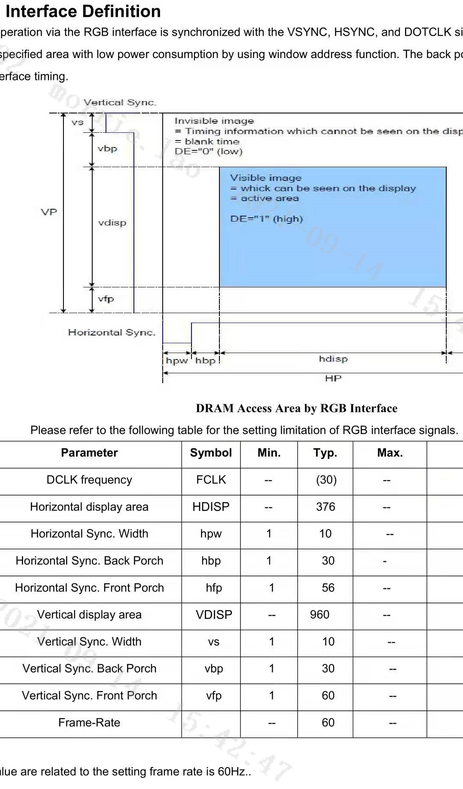
The screen parameters given by the screen factory are as follows:
-
Fill in the screen parameters according to this parameter, and found that the bootlogo display is abnormal, and the up and down jitter is quite severe (phenomenon such as 1.mp4). Changing Htotal to 562 can be repaired. The screen parameters are as follows:
Q4: How to configure TTL screen padmux under Uboot?
The bootlogo code under uboot will parse the configuration file under the board/misc/config.ini as follows:
m_eOutputFormatBitMode = 3; #0:10bit 1:6bit 2:8bit 3:565bit, choose 1 shows ttl18 is RGB666; choose 2 shows ttl24 is RGB888; choose 3 shows ttl16 is RGB565
m_wPadmux = 1; #ttl16 mode 1, choose padmux mode, current config shows choose PINMUX_FOR_TTL16_MODE_1