SSD_FBDEV
1. Overview
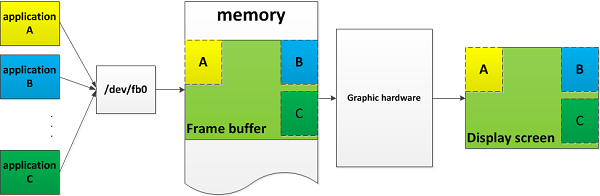
fbdev is used to provide a layer of software abstraction for the display graphics hardware. It agents the framebuffer of the graphics hardware, and provides some well-defined interfaces for application software to access the graphics hardware, regardless of the specific control details of the low-level graphics hardware.
Access fbdev through some specific device nodes, such as /dev/fb* located in the /dev directory.
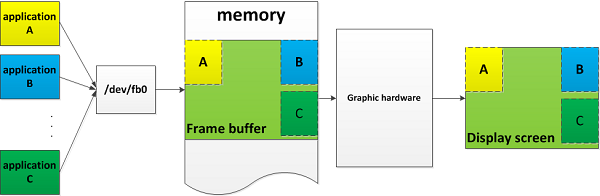
A simple framebuffer Usage scenarios:
3 applications modify the framebuffer through the fb device node fb0, and then the graphics hardware outputs the modified content to the display terminal.
2. User’s View of /dev/fb*
fbdev is currently a character device, the first device number is 29, the last device number marks the frame buffer number.
For convenience, the device node will be generated as follows (the number represents the device number):
0 = /dev/fb0 First frame buffer

1 = /dev/fb1 Second frame buffer

...

31 = /dev/fb31 32nd frame buffer
fbdev is also a normal memory device. It means that you can read and write its contents. For example:
-
Screenshot operation:
cp /dev/fb0 myfile
-
Draw a white pixel to the upper left corner of the screen:
echo -en '\xFF\xFF\xFF\x00' > /dev/fb0
-
mmap /dev/fb0 is used for more detailed drawing :
int fb = open("/dev/fb0", O_RDWR);
assert(fb > 0);
struct fb_var_screeninfo info;
assert(0 == ioctl(fb, FBIOGET_VSCREENINFO, &info));
size_t len = 4 * info.xres * info.yres;
uint32_t *buf = mmap(NULL, len, PROT_READ | PROT_WRITE, MAP_SHARED, fb, 0);
assert(buf != MAP_FAILED);
You can easily modify the pixels of (x,y) by assigning values to buf[y * info.xres + x].
3. Closer look to /dev/fb*
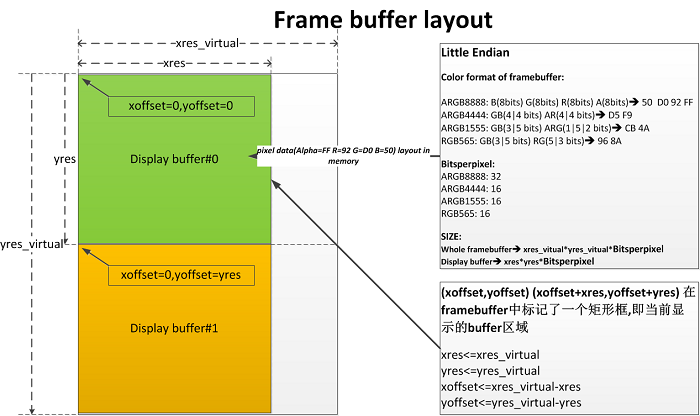
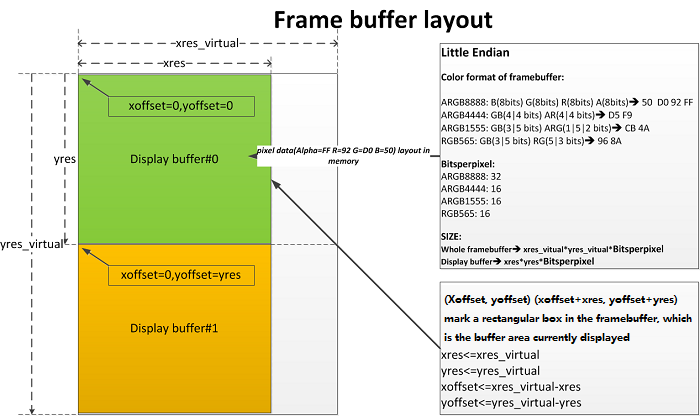
The overview mentioned that fbdev agents the display framebuffer of the graphics hardware, and provides some interfaces to control this part of the memory, compared with the simple application scenario of the framebuffer above, the following figure is the memory layout of framebuffer:
-
With different implementations of fbdev, the framebuffer of the graphics hardware that fbdev agents will have different initial attributes. Some are configurable properties (Get struct fb_var_screeninfo defined in "linux/fb.h" through ioctl(fb, FBIOGET_VSCREENINFO, &info)), Some are fixed properties(Get struct fb_fix_screeninfo defined in "linux/fb.h" through ioctl(fb, FBIOGET_FSCREENINFO, &info)).
-
Refer to section 4.1 for sstar initialization.
In the above picture, we need to pay attention to several main attributes:
-
colorformat
The color format of the framebuffer can be set by ioctl(fb, FBIOPUT_VSCREENINFO, &info), We decide it when we initialize fbdev. For fbdev users, once the color format is determined, they will know how to modify the content of the corresponding pixel.
-
bitsperpixel
Width of a pixel which is a variables coordinated with the color format. The color format determines the width of the pixel.
-
xres_virtual/yres_virtual
Get through ioctl FBIOGET_VSCREENINFO/FBIOPUT_VSCREENINFO. The total size of the framebuffer of the fbdev agent is:xres_virtual*yres_virtual*bitsperpixel。
-
xres/yres,xoffset/yoffset
(xoffset,yoffset) (xoffset+xres,yoffset+yres) marks a rectangular box in the framebuffer, which is the buffer area currently displayed. That is to say, the effective area of the display buffer for display can start from the start address of the framebuffer.
Why the display buffer is in the framebuffer?
-
Support different resolution contents.
Sometimes the memory size of the framebuffer is already applied when FBDEV is initialized. We may need to apply for a framebuffer that can accommodate the maximum resolution, such as 1080p. The display buffer we use now may be 720p.
-
double buffer.
Using a single buffer cann`t avoid the problem of screen tearing, because you may always modify the undisplayed content, which cause the part that has been displayed by the graphic hardware and the part that is modified to be displayed to be out of place.
Double buffer is used, buffer#1 is displayed when buffer#0 is modified, and buffer#0 is displayed when buffer#1 is modified
4. sstar FBDEV Introduction
4.1. sstar initialization
Load fbdev with the following command:
insmod fbdev.ko [default_config_path_file=
| parameter name | default value | function | example |
|---|---|---|---|
default_config_path_file |
"/config/fbdev.ini" |
Path used to set the fb configuration file fbdev.ini |
insmod fbdev.ko default_config_path_file=/customer/fbdev.ini |
default_reserved_mem_name |
"fb" |
Used to configure the name of the memory area used by bootlogo so that fb will release it at the right time |
insmod fbdev.ko default_reserved_mem_name=fb |
By default, insmod takes no arguments. The relevant parameters use the default values shown in the table above.
4.2. Configuration file - fbdev.ini
# FBDEV will generate fbdev device node according to the definition of [FB_DEVICE] project
# There can be multiple [FB_DEVICE], and generate multiple fbdev device nodes
[FB_DEVICE]
# The gop(graphic hardware) ID used by the fbdev
FB_HWLAYER_ID = 1
# The gop graphic window ID used by fbdev's framebuffer
FB_HWWIN_ID = 0
#deprecated
FB_HWLAYER_DST = 3
# The color format used by the framebuffer of the fbdev
# RGB565 = 1
# ARGB4444 = 2
# ARGB8888 = 5
# ARGB1555 = 6
# YUV422 = 9
# I8 = 4
# I4 = 13
# I2 = 14
FB_HWWIN_FORMAT = 5
# Modify Output color, 0 is RGB, 1 is YUV
FB_HWLAYER_OUTPUTCOLOR = 1
# Initialization xres of the framebuffer of the fbdev
FB_WIDTH = 1280
# The initialization yres of the framebuffer of the fbdev
FB_HEIGHT = 720
# Before getting the current display timing automatically, use the initialization gop output timing width
FB_TIMMING_WIDTH = 1920
# Before the current display timing is automatically obtained, use the initialization gop output timing high
FB_TIMMING_HEIGHT = 1080
# If the mmap of the system has a layout item of E_MMAP_ID_FB
# Then FBDEV's framebuffer will use the memory here
FB_MMAP_NAME = E_MMAP_ID_FB
# If the mmap of the system does not allocate a memory for FBDEV
# Then the framebuffer of FBDEV will apply for the following length of memory as framebuffer
# FB_BUFFER_LEN >= xres*yres*bytesperpixel*displayBufCnt
FB_BUFFER_LEN = 8192
#unit:Kbyte,4096=4M, fbdev.ko alloc size = FB_BUFFER_LEN*1024

# FBDEV supported hardware mouse configurations
[FB_CURSOR]
# gop ID used by the mouse layer
FB_HWLAYER_ID = 0
# The gop graphic window ID used by the mouse layer
FB_HWWIN_ID = 0
#deprecated
FB_HWLAYER_DST = 3
# The color format used by the mouse layer
# RGB565 = 1
# ARGB4444 = 2
# ARGB8888 = 5
# ARGB1555 = 6
# YUV422 = 9
# I8 = 4
# I4 = 13
# I2 = 14
FB_HWWIN_FORMAT = 6
# Modify Output color, 0 is RGB, 1 is YUV
FB_HWLAYER_OUTPUTCOLOR = 1
# If the mmap of the system has a layout item of E_MMAP_ID_FB
# Then the mouse layer of FBDEV will use the memory here
# If the mmap of the system does not allocate a memory for FBDEV
# Then the mouse layer of FBDEV will apply for 128K memory by itself
FB_MMAP_NAME = E_MMAP_ID_HW_CURSOR

# deprecated, z order between fbdev devices (who is displayed in the upper or lower layer)
[LAYER_ZORDER]
LAYER_ZORDER0 = 0
LAYER_ZORDER1 = 1
LAYER_ZORDER2 = 2
LAYER_ZORDER3 = 3
LAYER_ZORDER4 = 4
4.3. Graphic Hardware (GOP) in sstar
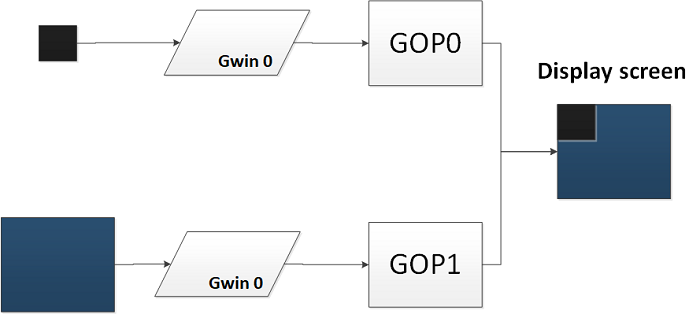
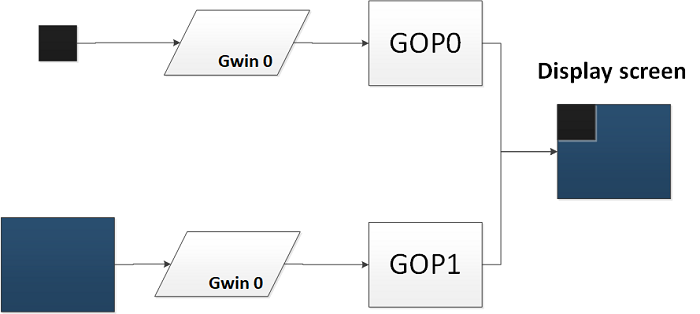
Observe the configuration file of fbdev.ini and see that each fbdev is bound to a GOP ID and a GWIN ID. In a certain hardware platform of sstar, there can be multiple GOPs, and a single GOP may control multiple graphics window (Gwin), each Gwin corresponds to a display in a framebuffer buffer. The number of specific GOP/Gwin varies from platform to platform.
-
GOP/Gwin stacking order
Take the Takoyaki platform as an example. It has 2 GOPs, and each one supports the management of 1 gwin, as shown in the figure below:
-
Difference between GOPs
There may be differences between GOPs, and the uses of different GOPs have tendencies. Take the Takoyaki platform as an example:
-
Support color format
-
Whether to support stretch
-
4.4. Takoyaki DISP_GOP attribute
| Properties | GOP0 | GOP1 | |--------------------------------|---------------- -------------------------------------------------- ------|--------------------------------------|| | Color Format | | YUV422 | | | | RGB565 | | | | ARGB8888 | | | ARGB4444 | ARGB4444 | | | ARGB1555 | ARGB1555 | | | I8 | I8 | | | I4 | I4 | | | I2 | I2 | | Zoom | Zoom is not supported. FB_WIDTH==FB_TIMING_WIDTH, FB_HEIGHT==FB_TIMING_HEIGHT | Support zoom, max(xres )=1280 | | Number of GWINs supported | 1 | 1 | | FB_WIDTH ALIGNMENT | 16/BytesPerPixel | 16/BytesPerPixel | | alpha0/alpha1 for ARGB1555 | Supports setting alpha0/alpha1 respectively | Only supports setting alpha1, alpha0=0x0 | | global alpha | Support | Support | | colorkey | Support | Support |
4.5. Ikayaki DISP_GOP attribute
| Properties | GOP0 |
|---|---|
| Color Format | YUV422 |
| Zoom | Support zoom in, in the zoomed-in scene max(xres)=1280 |
| Number of GWINs supported | 1 |
| global alpha | Support |
| FB_WIDTH alignment | 16/BytesPerPixel |
| colorkey | Support |
| alpha0/alpha1 for ARGB1555 | Only supports setting alpha1,alpha0=0x0 |
| RGB565 | |
| ARGB8888 | |
| ARGB4444 | |
| ARGB1555 | |
| I8 | |
| I4 | |
| I2 |
5. Interfaces
The introduction mentioned that fbdev defines some Interfaces for users to operate the framebuffer. It should be noted here that the implementation degree of these interfaces depends on the specific implementation degree of this part of the interface defined by linux by the implementer of FBDEV. Generally speaking, for some specific Platforms are not required to implement all interface definitions.
For example: color map/write&read function, etc. Because the index color display effect is not as good as ARGB32, it is more convenient to use mmap to operate framebuff than the wirte&read.
In addition to this, FBDEV providers can also provide proprietary control interfaces for specific platforms.
Interface support table
| User Space operation interface | Description | sstar supported platform |
|---|---|---|
| open/fopen/close/fclose | Open/close fbdev as a file | all |
| write/fwrite/read/fread | Read and write fbdev by reading and writing files | none |
| mmap | Make fbdev memory mapping | all |
| iocontrol | fbdev supports iocontrol to send control commands | all |
Linux standard iocontrol command table
| iocontrol command | Description | sstar supported platform |
|---|---|---|
| FBIOGET_VSCREENINFO | Get variable information of fbdev | all |
| FBIOPUT_VSCREENINFO | Set variable information of fbdev | all |
| FBIOGET_FSCREENINFO | Get fixed information of fbdev | all |
| FBIOPAN_DISPLAY | Pan display, after modifying the visible area of vinfo | all |
| FBIOPUTCMAP | Set colormap of fbdev | none |
| FBIOGETCMAP | Get colormap of fbdev | none |
| FBIOGET_CON2FBMAP | Get console corresponded framebuffer | all |
| FBIOPUT_CON2FBMAP | Map console corresponded framebuffer | all |
| FBIOBLANK | Clear framebuffer | none |
Sstar proprietary iocontrol command table
| iocontrol command | Description | sstar supported platform |
|---|---|---|
| FBIOGET_SHOW | Get the display status of fbdev | all |
| FBIOSET_SHOW | Set the display status of fbdev | all |
| FBIOGET_SCREEN_LOCATION | Get display area position information in framebuffer | all |
| FBIOSET_SCREEN_LOCATION | Set display area position information in framebuffer | all |
| FBIOGET_GLOBAL_ALPHA | Get global alpha of fbdev and index alpha information of ARGB1555 | all |
| FBIOSET_GLOBAL_ALPHA | Set global alpha of fbdev and index alpha information of ARGB1555 | all |
| FBIOGET_COLORKEY | Get the colorkey information of fbdev | all |
| FBIOSET_COLORKEY | Set the colorkey information of fbdev | all |
| FBIOGET_DISPLAYLAYER_ATTRIBUTES | Get fbdev display information | all |
| FBIOSET_DISPLAYLAYER_ATTRIBUTES | Set fbdev display information | all |
| FBIOGET_CURSOR_ATTRIBUTE | Set mouse information of fbdev | all |
| FBIOSET_CURSOR_ATTRIBUTE | Get mouse information of fbdev | all |