SSD_FLASH&DDR Reference
1. Flash partition view and configuration
1.1. How to view partition configuration
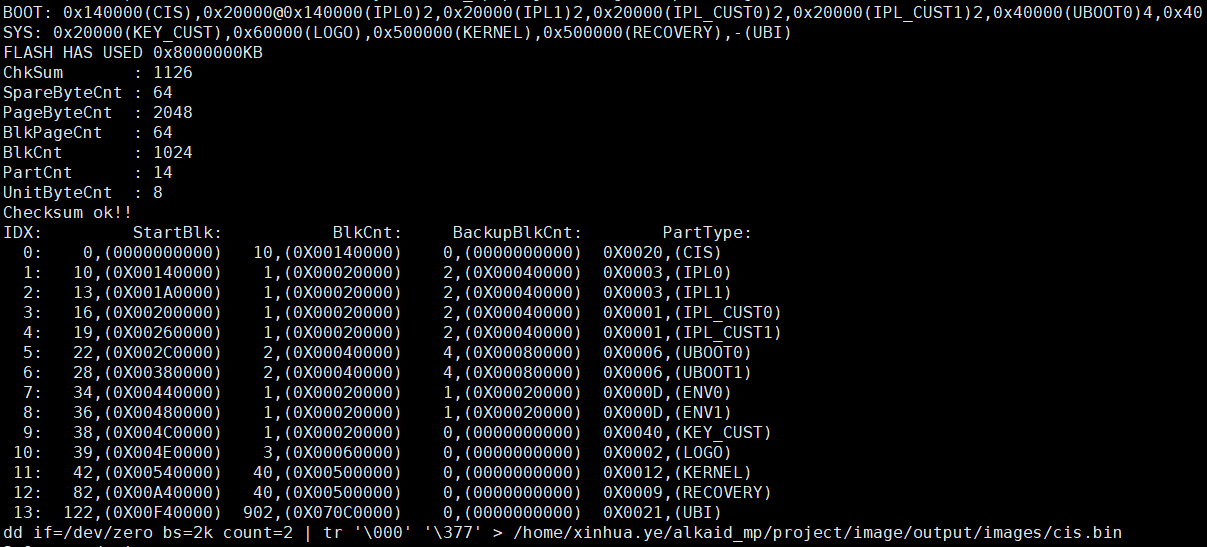
a. In the compilation stage, after compiling the project, the corresponding partition allocation log will be printed on the serial port:
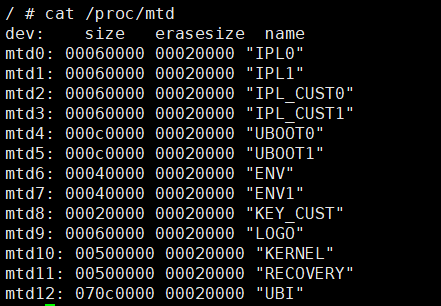
b. In the kernel stage, after the kernel is up, you can check it by typing the command: cat /proc/mtd
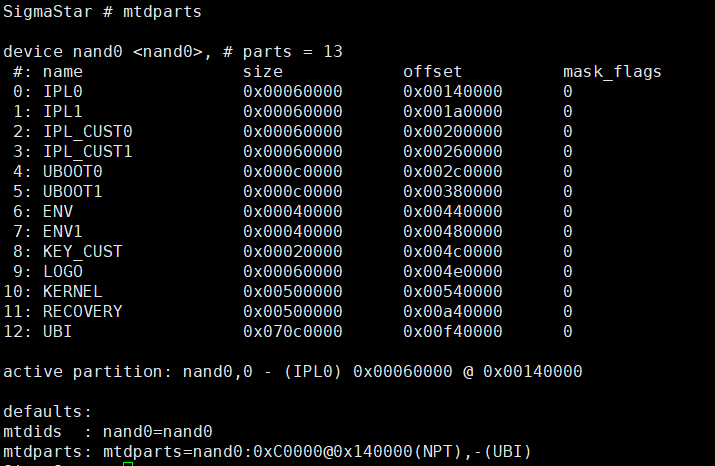
c. In the boot stage, you can type the command in the uboot console: mtdpart (Nor flash uses t.list)
1.2. Modify partition size
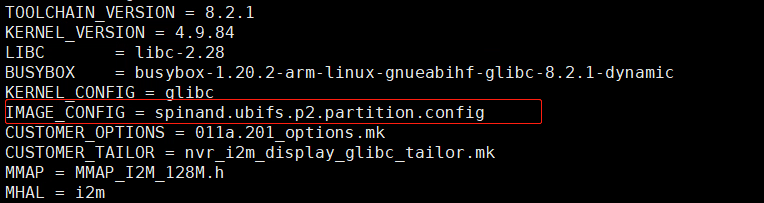
a. Find the corresponding partition config file used by your project. As shown in the figure below, find the partition configuration config specified by the IMAGE_CONFIG variable. Here is an example of spinand.ubifs.p2.partition.config (directory: project\image\configs\i2m\spinand.ubifs.p2.partition.config)
b. Open the partition configuration config, take the kernel partition as an example, as shown in the figure below, modify the size value specified by *$(PATSIZE)

Note: Due to the physical characteristics of flash, in general, erasing can only be done in units of one block, so the partition configuration should be aligned according to the block size (nand flash partition size needs to be aligned according to 128K, nor flash according to 64K)
1.3. Modify the total size of Nand Flash
a. Modify the file: alkaid\project\image\image.mk
b. Find the target field of cis_nofsimage and rewrite the value of the -k parameter, as shown in the figure below -k 1024, which represents 1024*128K = 128M
Note: If you are using 256M flash, then -k 1024 needs to be changed to -k 2048 (2048*128K = 256M)

2. DDR memory view and configuration
2.1. The composition of platform memory
DDR total memory = linux memory + kernel reserved part of the memory (including MMA)
2.2. How to view memory
a. View linux memory:
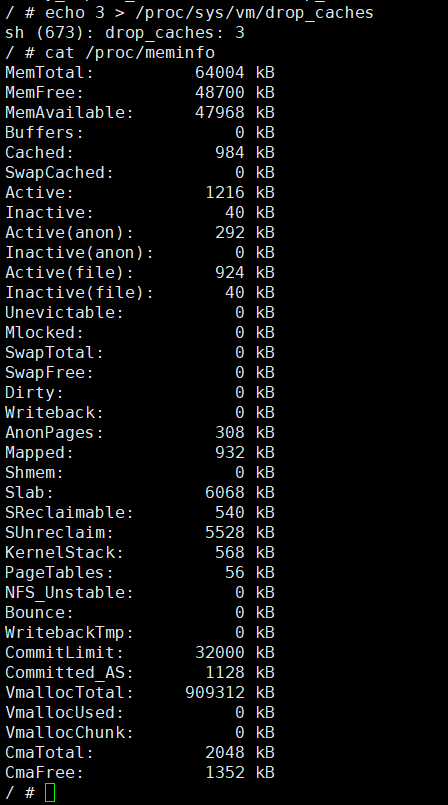
In order to accurately check the MemFree of memory, it is recommended to execute: echo 3 > /proc/sys/vm/drop_caches, and then cat /proc/meminfo, as shown in the figure below, MemTotal represents the total memory size of linux, and MemFree is idle RAM
b. View MMA memory:
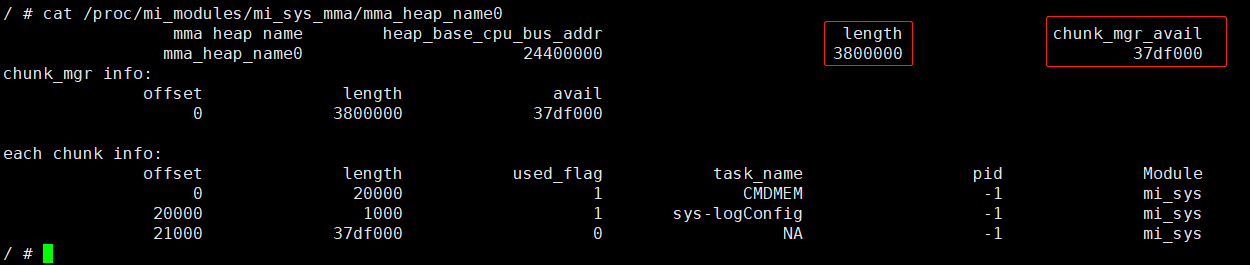
As shown in the figure below, length represents the total size of the allocated MMA is 0x2800000 Byte, and the remaining memory of the MMA is: chunk_mgr_avail = 0x37df000 Byte
2.3. How to configure MMA memory size
a. In the project project, open the config of your own project project (used here: configs/nvr/i2m/8.2.1/spinand.glibc.011a.128). As shown in the figure below, find CONFIG_KERNEL_BOOT_ENV in the file, and modify the sz corresponding to mma_heap_name0 (here sz=0x3800000 is 56M MMA)

b. During the debug process, you can directly modify the bootargs parameters on the board in the boot console. After saveenv, reset and restart will take effect, as shown in the following figure

2.4. How to judge that MMA/Linux is not enough
a . If the words MmaAlloc fail appear in the log, it means that the MMA memory may not be enough. To confirm the problem, before the problem occurs: echo 3 > /proc/mi_moudles/mi_sys/debug_level to increase the debug level of sys. MMA debug information when the serial port prints a problem

b. If the Linux memory is insufficient, OOM will generally appear, OOM will kill some applications, and the log will generate backtrace information

2.5. How to DEBUG memory problems
In the project, only by adjusting the memory size of MMA to reasonably balance the size between MMA and the available memory of linux, memory-related problems can be confirmed step by step in the order of the following steps.
a. Determine if there is a leak problem? If there is a constant decrease in available memory, fix the memory leak first
b. Is there an Out of Memory condition? If this happens, it means that the memory is insufficient. If there is remaining MMA, you can consider reducing the memory allocation of MMA, and the corresponding reduction will be added to the linux memory part.
c. Is there an MMA application error message related to MmaAlloc fail? If this happens, it means that the memory size of MMA is not enough to support the usage scenario. If there is remaining memory in the Linux part, you can increase the memory in the MMA part.
d. In the case that there is no memory leak, and the Linux memory and the MMA memory are balanced with each other, is the memory still not enough? If this happens, you can only consider cutting the function or replacing the DDR with a larger memory.